12 Best Purchase Order Automation Software for AV Companies
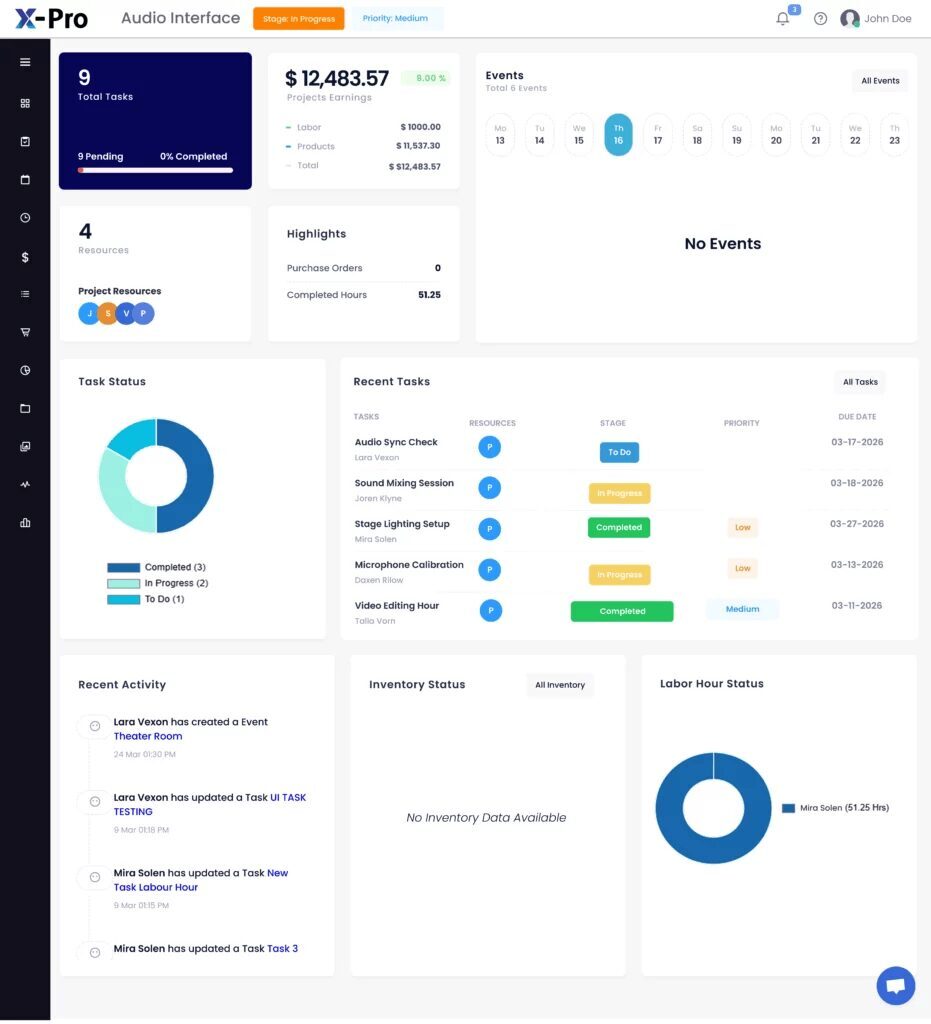
That is why choosing the Best Purchase Order Automation Software for AV Companies has become a strategic decision rather than an administrative one. Automation replaces scattered spreadsheets, email approvals, and copy-pasted product data with a connected workflow. Purchase requests, approvals, vendor communication, receiving, and cost tracking all live in one place. Automation also produces structured data, which makes procurement analytics possible: spend by vendor, price variance by SKU, on-time delivery rates, and cost-to-estimate comparisons per project. Without clean PO data, those metrics are guesswork.
This guide covers:
- What purchase order automation means in an AV context
- How to evaluate software with an AV-specific scorecard
- A detailed review of 12 platforms
- A deeper look at XTEN-AV X-PRO
- Illustrative case studies
- Answers to the questions AV buyers ask most
The 12 Best PO Automation Tools for AV Integrators at a Glance
If you want the short version, here is how the leading options map to AV business needs. Always verify current features and pricing with each vendor, because software evolves quickly.
| # | Software | Best for | AV-specific strength |
|---|---|---|---|
| 1 | XTEN-AV X-PRO | Small and mid-size AV integrators | PO, inventory, and project workflows linked to AV design (X-DRAW) |
| 2 | D-Tools System Integrator | Integrators standardized on a proposal-to-PO workflow | Product catalog, quoting, and PO generation built for systems integration |
| 3 | Procurify | Companies needing spend control and approvals | Approval workflows and budget visibility |
| 4 | Precoro | Teams wanting a clean procure-to-pay flow | Multi-step approvals and budget checks |
| 5 | Zoho Inventory / Zoho Books | Budget-conscious small firms | Affordable PO and inventory tools |
| 6 | QuickBooks (Online Advanced / Enterprise) | Businesses anchored in QuickBooks accounting | Familiar accounting-led POs |
| 7 | Oracle NetSuite | Larger, multi-entity AV groups | ERP-grade procurement and financial control |
| 8 | Microsoft Dynamics 365 Business Central | Mid-market firms in the Microsoft ecosystem | Purchasing, inventory, and finance in one suite |
| 9 | Coupa | Enterprise-scale procurement | Spend management and supplier governance |
| 10 | Odoo (Purchase + Inventory) | Customization-focused teams | Modular, configurable apps |
| 11 | Fishbowl | Inventory-heavy AV resellers | Warehouse and inventory depth |
| 12 | ConnectWise PSA | Managed-service-oriented AV and IT firms | Ticketing, projects, and purchasing in one PSA |
What Is Purchase Order Automation in an AV Context?
Purchase order automation uses software to generate, route, approve, send, track, and reconcile purchase orders with minimal manual data entry. In a generic business, that might mean a requisition becomes a PO after a manager clicks "approve." In an AV integration company, the workflow is more complicated because purchasing is driven by system design.A typical AV procurement chain looks like this:
- Design and bill of materials (BOM): The designer specifies equipment, often in a schematic or CAD tool.
- Proposal and quote: Sales prices the BOM with margin and labor.
- Contract award: The client signs, and equipment must now be sourced.
- Purchase order creation: Line items are grouped by vendor and tied to the project.
- Vendor confirmation: The distributor or manufacturer acknowledges stock, price, and ship date.
- Receiving and staging: Products arrive, often in partial shipments, and are checked against the PO.
- Deployment and closeout: Equipment goes to site, serial numbers are recorded, and costs are reconciled against the estimate.
Related concepts you will encounter:
- Requisition: An internal request to buy, often needing approval.
- Three-way match: Comparing the PO, the receiving record, and the vendor invoice before payment.
- Blanket PO: An umbrella order against a vendor for repeated purchases.
- Drop shipping: Vendor ships directly to the job site.
- Backorder management: Tracking undelivered line items.
- Landed cost: Product cost plus freight, duties, and handling.
- Procure-to-pay (P2P): The full cycle from request through payment.
Why AV Companies Need Purchase Order Automation (The Real Pain Points)
Generic procurement articles talk about "efficiency." AV buyers face more specific problems.
1. Fragmented product data. AV equipment has long, similar-looking model numbers. A mistyped suffix on a display or microphone can mean the wrong variant arrives. Manual re-entry between a design file, a quote, and a PO multiplies that risk.
2. Multiple suppliers per project. One room may involve a manufacturer-direct account, two broadline distributors, and an IT supplier. Tracking which vendor owes what is hard in email threads.
3. Partial shipments and backorders. Long-lead items such as DSPs, control processors, and specialty displays rarely arrive with everything else. Teams need to see exactly what is outstanding before scheduling technicians.
4. Margin sensitivity. Integrator margins on hardware can be thin, and a few unplanned purchases can erase profit. Purchasing needs to be visible against the project budget in real time.
5. Project-based, not stock-based, buying. Unlike retail, most AV purchasing is tied to a specific job. A generic inventory-driven system may not associate POs with projects well.
6. Field-office disconnect. Technicians need to know whether the gear on the truck matches what was ordered. Missing items on-site cost expensive return trips
.7. Weak reporting. Without structured PO data, leaders can't answer basic questions, such as which vendor is consistently late or which product category drives cost overruns.Selecting the
Best Purchase Order Automation Software for AV Companies means finding the platform that addresses these problems directly, not just one that sends a PDF to a vendor.
Benefits of Automating Purchase Orders for AV Integrators
Operational benefits
- Fewer data-entry errors through reuse of product records
- Faster PO creation from approved BOMs
- Consistent PO numbering and templates
- Clear status visibility from draft to delivered
- Stronger budget control through approval thresholds
- Easier comparison of actual versus estimated costs
- Reduced duplicate or unnecessary purchases
- Better cash flow forecasting through open-PO commitments
- Reliable procurement analytics for vendor negotiations
- Better supplier performance measurement
- Audit trails for compliance and client reporting
- Scalability as project volume grows
How to Evaluate PO Automation Software: The AV Procurement Scorecard
Most comparison articles list generic criteria. Here is a more practical approach: a weighted scorecard designed for AV integration. Score each candidate from 1 to 5 on every criterion, multiply by the weight, and compare totals.| Criterion | Suggested weight | What to look for |
|---|---|---|
| Project association | 20% | Can every PO line link to a specific project or room? |
| Design/quote connectivity | 15% | Does product data flow from design or proposals into POs? |
| Vendor management | 10% | Centralized supplier records, contacts, terms |
| Status and receiving tracking | 15% | Draft, ordered, partial, delivered; line-level receiving |
| Inventory visibility | 10% | Can you see on-hand stock before buying? |
| Cost and margin tracking | 10% | Budget versus actual by project |
| Accounting integration | 10% | Sync with QuickBooks, Xero, or ERP |
| Usability and adoption | 5% | Can purchasing staff and PMs learn it quickly? |
| Mobile/field access | 5% | Can technicians check project and equipment info? |
| Adjust the weights to your business. A reseller with a large warehouse should weight inventory higher. A design-build integrator should weight design connectivity higher. |
The 12 Best Purchase Order Automation Software for AV Companies
Each review below covers who the tool suits, standout capabilities, and limitations to weigh. Capabilities are summarized from publicly positioned functionality, and you should confirm current specifics in a live demo.
1. XTEN-AV X-PRO: Best for Small and Mid-Size AV Integrators
X-PRO is the project management, inventory, and purchasing platform within the XTEN-AV ecosystem, built specifically for AV businesses. It lets teams create purchase orders, add products, associate orders with projects, select vendors, and track status from draft to delivered. Its distinguishing feature is the link with X-DRAW, XTEN-AV's AV design and schematic tool, which connects design equipment data with inventory records.
Best for: AV integrators who want purchasing, inventory, project management, and invoicing in one AV-aware platform.
Watch for: Larger multi-entity enterprises may need deeper ERP-level financial consolidation than a purpose-built AV platform targets.A full breakdown appears in the dedicated section below.
2. D-Tools System Integrator: Best for Proposal-to-PO Workflows
D-Tools System Integrator (SI) is a long-established platform in the systems integration world, centered on product catalogs, proposals, and project documentation. Its strength is turning a priced, approved system into purchasing documents with product data already attached. Many integrators also use it alongside accounting software such as QuickBooks.
Best for: Integrators who already standardize their quote and proposal process around a catalog-driven tool.
Watch for: Evaluate how much of the post-sale procurement lifecycle (receiving, partial deliveries, field access) you will manage inside the platform versus elsewhere.
3. Procurify: Best for Spend Control and Approvals
Procurify is a spend management platform focused on purchase requests, approval workflows, and budget visibility. For AV companies with several project managers requesting equipment, it adds governance: who can buy what, up to what amount, and against which budget.Best for: Growing integrators that need strong approval routing and spend oversight.Watch for: It is a general procurement tool. AV-specific design linkage and project-based equipment workflows may require process design on your part.
4. Precoro: Best for Clean Procure-to-Pay Control
Precoro offers purchase requisitions, multi-level approvals, budget checks, and PO management in a relatively streamlined interface. It suits teams that want disciplined procurement without a heavy ERP rollout.
Best for: AV firms that want structured approvals and budget enforcement across departments or locations.
Watch for: As with other generic platforms, validate how product catalogs, project coding, and AV equipment data are handled.
5. Zoho Inventory and Zoho Books: Best Budget-Friendly Option
Zoho's inventory and accounting applications support purchase orders, vendor records, stock tracking, and bill matching at an accessible price point. They can work for small AV shops that need basic automation and already use other Zoho tools.
Best for: Small AV businesses beginning to move off spreadsheets.
Watch for: Limited AV-specific design and project depth. Expect to configure custom fields or workflows.
6. QuickBooks (Online Advanced or Enterprise): Best for Accounting-Led Teams
QuickBooks supports purchase orders connected to vendors, bills, and accounts, and its ecosystem integrates with many AV and project tools. For businesses that run everything from accounting, it offers familiarity and low training overhead.
Best for: Owner-operated AV companies where bookkeeping drives purchasing.
Watch for: Project-level receiving, partial-delivery tracking, and design-based purchasing are typically limited. Many integrators pair QuickBooks with a project or integration platform.
7. Oracle NetSuite: Best for Larger Multi-Entity AV Groups
NetSuite is a full ERP with procurement, inventory, financials, and reporting. It suits larger AV groups with multiple subsidiaries, complex intercompany transactions, or demanding audit requirements.
Best for: Established integrators or AV distribution businesses with significant scale.
Watch for: Implementation cost, time, and the need for specialist configuration. It may be more than a small integrator needs.
8. Microsoft Dynamics 365 Business Central: Best for the Microsoft Ecosystem
Business Central combines purchasing, inventory, finance, and project functions for small and mid-size organizations, with strong integration into Microsoft 365, Power BI, and Teams. That integration is attractive for firms that want procurement analytics through Power BI.
Best for: Mid-market AV businesses already invested in Microsoft tools.Watch for: Partner-led implementation and customization are common, and AV-specific workflows will need configuration.
9. Coupa: Best for Enterprise Spend Governance
Coupa is an enterprise spend management platform that covers sourcing, procurement, supplier management, and payments. It is typically relevant for very large AV organizations or those serving clients that require formal supplier governance.
Best for: Enterprise AV groups and managed-service providers with formal procurement policy.
Watch for: Scale and cost can exceed what most integrators require.
10. Odoo (Purchase and Inventory): Best for Customization
Odoo offers modular business apps, including purchasing, inventory, accounting, and project management, that can be assembled to match your process. Technical teams or implementation partners can tailor it to AV workflows.
Best for: AV firms with in-house technical capacity or an implementation partner who want flexibility.
Watch for: Flexibility means more setup decisions. Total effort depends on how much you customize.
11. Fishbowl: Best for Inventory-Heavy Operations
Fishbowl focuses on inventory and manufacturing-style operations, including purchasing, receiving, and warehouse management. It suits AV resellers and integrators that hold meaningful stock or run a staging warehouse.
Best for: AV businesses where stock accuracy, bin locations, and receiving are central.
Watch for: Project-centric AV design and field workflows are outside its core focus.
12. ConnectWise PSA: Best for Service-Oriented AV and IT Firms
ConnectWise PSA combines ticketing, project management, procurement, and billing for service-driven businesses. AV firms with a large managed-services or support component can benefit from having purchasing, service, and agreements in one system.
Best for: Integrators blending AV installation with ongoing managed support.
Watch for: It is built for the IT-services model, so AV design connectivity is typically not its focus.
Side-by-Side Comparison: Capabilities That Matter to AV Buyers
The ratings below are a qualitative guide based on each platform's general positioning. Confirm details with vendors.
| Capability | X-PRO | D-Tools SI | Procurify/Precoro | Zoho/QuickBooks | NetSuite/Dynamics | Fishbowl | ConnectWise PSA |
|---|---|---|---|---|---|---|---|
| AV-specific workflow | Strong | Strong | Limited | Limited | Configurable | Limited | Limited |
| PO-to-project linkage | Strong | Strong | Configurable | Basic | Configurable | Basic | Moderate |
| Approval workflows | Moderate | Moderate | Strong | Basic | Strong | Moderate | Moderate |
| Inventory depth | Moderate to strong | Moderate | Basic | Basic to moderate | Strong | Strong | Moderate |
| Design-to-purchase connectivity | Strong (X-DRAW) | Strong (catalog/proposal) | None | None | None | None | None |
| Implementation effort | Low to moderate | Moderate | Low | Low | High | Moderate | Moderate |
Why XTEN-AV X-PRO Is One of the Best Purchase Order Software for Small AV Businesses
Small AV businesses face a particular squeeze. They handle the same complexity as bigger integrators (multi-vendor purchasing, partial deliveries, tight margins) with fewer people and less time for software administration. They need a tool that is productive quickly, understands AV, and doesn't require an ERP-sized implementation. This is where XTEN-AV X-PRO stands out as one of the Best Purchase Order Software for Small AV Businesses.The strongest case for X-PRO isn't that it has more purchase order features than every competitor. It is that X-PRO connects purchase order management to the operational needs of AV integration businesses. Here is how that plays out, feature by feature.
1. Purchase Order Creation and Management
X-PRO lets AV businesses create, organize, and manage purchase orders within the platform. AV integrators regularly buy displays, speakers, amplifiers, processors, cameras, networking equipment, cables, and installation materials. Doing this manually leads to duplicated entries, incorrect product details, and disconnected purchasing records.X-PRO centralizes the process. Teams can create purchase orders, add the required products, enter relevant details, associate orders with projects, and send them to vendors.
Key capabilities:
- Create new purchase orders within the platform
- Add products and their relevant details
- Associate purchase orders with specific projects
- Select vendors for purchasing activities
- Maintain centralized purchase order records
- Manage purchase orders throughout their lifecycle
Business value: Less repetitive administrative work, better purchasing organization, and project manager visibility into project-related procurement.
2. Centralized Vendor Management
AV integrators source equipment from many manufacturers and distributors, so vendor management is central to purchasing. X-PRO lets businesses maintain supplier information in one place instead of searching emails, spreadsheets, and individual employee records.
Key capabilities:
- Add and maintain vendor records
- Store vendor contact information
- Organize supplier details centrally
- Associate vendors with purchase orders
- Access vendor information while managing procurement
Practical example: An integrator buys displays from a commercial display distributor, audio processors from an audio equipment supplier, cameras from a video conferencing distributor, and network switches from an IT supplier. With centralized vendor records, the purchasing team can reach the relevant supplier details while creating and managing each PO.
Business value: Better supplier coordination, less duplicated information, and easier vendor-related purchasing.
3. Purchase Order Status Tracking
Creating a PO is only the beginning. Businesses must also monitor whether products have been ordered, partially received, or delivered. X-PRO supports these stages:
| Status | Explanation |
|---|---|
| Draft | Purchase order created but not yet sent |
| Ordered | Purchase order sent to the vendor |
| Partially Received | Some ordered products have arrived, while others are pending |
| Delivered | Order has reached the delivered stage |
| Key capabilities: |
- Monitor purchase order progress
- View orders by current status
- Update purchase order stages
- Manage purchase orders through a visual workflow
- Identify partially received orders
- Maintain visibility into outstanding purchases
Practical example: An AV installation requires 15 products from three suppliers. One supplier delivers everything, another delivers half, and the third has not delivered anything. The purchasing team uses status tracking to see each order's progress and which equipment is still outstanding.
Business value: Better procurement visibility, quicker identification of pending deliveries, and better coordination between purchasing and installation schedules.
4. Inventory Management and Tracking
Equipment availability directly affects project execution, so AV integrators need to know what is in stock, what is assigned to projects, and what must be purchased. X-PRO's inventory capabilities help organize and monitor equipment records.
Key capabilities:
- Maintain centralized product inventory
- Organize equipment records
- Manage inventory associated with projects
- Improve visibility into available equipment
- Connect inventory information with AV design workflows
Practical example: A company manages five conference room installations at once. Before buying more displays, speakers, and processors, purchasing needs to know whether those products already sit in inventory. Having that information in X-PRO supports better purchasing decisions and prevents needless duplication.
Business value: Better equipment visibility, improved purchasing decisions, fewer unnecessary purchases, closer procurement-to-project coordination, and more organized records.
5. X-DRAW and X-PRO Inventory Synchronization
This is one of the most interesting capabilities in the XTEN-AV ecosystem and a genuine AV-specific differentiator. X-DRAW is XTEN-AV's AV system design and schematic drawing solution, while X-PRO handles project management, inventory, and purchasing. The integration connects equipment information from AV designs with X-PRO inventory records.
How it works:
- An AV designer creates a system design in X-DRAW.
- Products are added to the design.
- The corresponding product information can be synchronized with X-PRO inventory.
- Matching identifiers, such as SKUs or model numbers, align product records.
- Purchasing and project teams use the connected information when planning equipment requirements.
Practical example: A designer creates a conference room design containing a specific display, DSP, amplifier, and ceiling speakers. Purchasing needs to know which of these are already available and which need sourcing. By connecting X-DRAW and X-PRO inventory information, the business improves coordination between design and procurement.
Business value: Connects AV design with equipment management, reduces disconnected product records, improves equipment planning, supports procurement coordination, and creates a more connected project workflow.
6. Project Cost Management and Financial Tracking
Purchase orders directly influence project costs and profitability. Buying equipment without watching project expenses can cause surprise costs and shrinking margins. X-PRO provides financial visibility through project management and reporting.
Key capabilities:
- Monitor material costs
- Track labor expenses
- Review project budgets
- Monitor gross margins
- Compare project costs against estimates
- Access performance insights through dashboards
Business value: Better budget visibility, improved expense monitoring, more informed purchasing, clearer understanding of profitability, and stronger financial control across projects.
7. Integrated Invoicing Management
A purchase order goes to a supplier when you want to buy equipment or services. An invoice generally goes to a customer to request payment. They serve different purposes but sit close together in financial operations. X-PRO includes invoicing so AV businesses can manage customer billing alongside project workflows.
Key capabilities:
- Create project-related invoices
- Add billing information
- Maintain invoice records
- Generate customer-facing invoices
- Monitor payment status
Practical example: A company buys equipment for a corporate office installation. After project milestones are complete, it invoices the customer for the agreed equipment and services. Having invoicing and project management in the same platform keeps financial documentation organized.
Business value: Simpler project billing, centralized financial documentation, better project-finance coordination, and less dependence on disconnected tools.
8. Mobile Project Management for Field Teams
AV installations involve technicians at customer sites, warehouses, and multiple locations. They need project information, tasks, drawings, and schedules without relying on office systems. X-PRO's Field View mobile experience connects field technicians with project operations.
Key capabilities:
- Access assigned project tasks
- View project documentation
- Access drawings and site information
- Update task progress
- Record working hours through clock-in and clock-out
- Stay connected with project operations
Practical example: A technician installing a conference room system checks project details, reviews drawings, and updates task progress from the site, while the project manager keeps visibility into field activity.
Business value: Better office-to-field communication, improved coordination, easier access to project information, better labor tracking, and more efficient field operations.
9. Centralized Project Management and Workflow Coordination
One of X-PRO's biggest advantages is bringing several AV management activities together. Instead of handling tasks, purchasing, inventory, and documentation in separate tools, businesses manage them in a connected platform.
Key capabilities:
- Manage projects and tasks
- Connect tasks with project activities and events
- Manage project documentation
- Coordinate field operations
- Monitor project progress
- Maintain project-related purchasing and inventory information
Practical example: A large corporate office installation involves equipment procurement, vendor coordination, inventory, technician scheduling, installation, and cost monitoring. X-PRO brings these together, improving coordination among project managers, purchasing teams, and field technicians.
Business value: Less operational fragmentation and better visibility into project execution.
10. Cloud-Based Accessibility and Collaboration
X-PRO operates within XTEN-AV's cloud-based ecosystem, so teams can access project information without depending on locally stored documents. This matters for companies with employees in different locations.
Key capabilities:
- Access project information through the cloud
- Centralize project documentation
- Support collaboration between office and field teams
- Maintain access across locations
- Reduce reliance on disconnected spreadsheets and files
Business value: Better collaboration, accessible information, and stronger operational coordination.
X-PRO Key Features and Business Benefits Summary
| Key feature | Primary business benefit |
|---|---|
| Purchase Order Creation | Simplifies purchasing activities |
| Vendor Management | Centralizes supplier information |
| PO Status Tracking | Improves order visibility |
| Inventory Management | Improves equipment availability visibility |
| X-DRAW Integration | Connects AV designs with inventory |
| Project Cost Management | Improves financial visibility |
| Invoicing Management | Simplifies project billing |
| Mobile Field View | Connects field and office teams |
| Project Management | Coordinates project execution |
| Cloud Accessibility | Supports centralized collaboration |
What Makes X-PRO Different from Generic Purchase Order Software?
- AV-specific procurement workflows: Purchase orders are managed in the context of AV projects and equipment requirements.
- Design-to-inventory connectivity: X-DRAW and X-PRO connect system design information with inventory management.
- Project-level financial visibility: Businesses manage purchasing alongside project expenses, labor costs, invoicing, and profitability insights.
Non-Commodity Insight: The AV Procurement Maturity Model
Most articles stop at features. A more useful question is where your business sits today and what the next step looks like. This four-stage maturity model is a practical framework for AV integrators.
Stage 1: Reactive (email and spreadsheets). POs are created ad hoc in Excel or by emailing a distributor. Product data is retyped. Nobody has a reliable view of open orders. Next step: Centralize vendor records and use a standard PO template or tool.
Stage 2: Documented (basic PO tool or accounting-based POs). POs live in accounting software. Numbering is consistent, but POs aren't tied to projects, and receiving is informal. Next step: Link POs to projects and track partial receipts.
Stage 3: Connected (project-linked automation). POs are tied to projects, vendors are centralized, statuses are tracked, and inventory is visible. Product data flows from design or quote. Next step: Add cost-versus-estimate monitoring and approval thresholds.
Stage 4: Analytical (data-driven procurement). The business uses procurement analytics to guide decisions: vendor scorecards, price variance reporting, lead-time benchmarking, and margin forecasting.
Next step: Use insights in supplier negotiations and bid pricing.Most small AV businesses sit at Stage 1 or 2. Tools like X-PRO can move a team to Stage 3 quickly because the AV-specific workflow reduces the configuration burden. Enterprise ERPs can reach Stage 4 but take longer to implement.
Procurement Analytics for AV Companies: Metrics Worth Tracking
Once POs are structured, you can measure what matters. Consider these metrics:
- Spend by vendor: Shows concentration risk and negotiating leverage.
- Spend by category: Displays, audio, control, networking, cabling, and accessories.
- Price variance: Difference between quoted cost and PO cost per SKU.
- PO cycle time: Days from requisition to PO sent.
- On-time delivery rate: Percentage of lines delivered by the promised date.
- Partial-shipment frequency: Identifies vendors that routinely split orders.
- Backorder aging: How long lines stay undelivered.
- Budget-to-actual by project: Material cost versus estimate.
- Inventory turns and aged stock: Highlights capital tied up in unused equipment.
- Return and RMA rate by vendor or product: A hidden cost center.
Implementation Roadmap: Rolling Out PO Automation in 60 Days
Days 1 to 10: Define and clean up
- Document your current PO process, including who creates, approves, sends, and receives.
- Consolidate vendor records and remove duplicates.
- Standardize product naming and SKU conventions.
- Set up vendors, product records, and PO templates.
- Define PO statuses and approval thresholds.
- Decide how POs are numbered and associated with projects.
- Run two or three live projects through the new workflow.
- Compare PO accuracy and time spent against the old process.
- Collect feedback from purchasing, project managers, and technicians.
- Train all users and retire legacy spreadsheets.
- Establish baseline metrics: cycle time, error rate, on-time delivery.
- Schedule a monthly review of procurement analytics.
- Importing messy product data without cleanup
- Skipping the pilot
- Failing to define who owns receiving
- Choosing tools based on features you will never use
Case Studies: How AV Companies Benefit from PO Automation
The following are illustrative scenarios based on common AV integration situations. They are composites for educational purposes, not documented results from specific named customers.
Case Study 1: A Five-Person Integrator Escapes Spreadsheet Chaos
Situation: A small commercial AV integrator handled 8 to 10 active projects with POs built in spreadsheets and emailed as PDFs. Purchasing was split among the owner and one project manager, and no one could quickly say which orders were outstanding.
Problem: Two projects were delayed when a DSP was missing at install time. It had been ordered, but the backorder was buried in an email thread
Solution: The team moved to a project-linked platform with centralized vendors and status tracking (Draft, Ordered, Partially Received, Delivered).
Outcome: The project manager could filter partially received orders every morning and call vendors on overdue items before scheduling technicians. Missed-equipment delays dropped, and staging became more predictable.
Lesson: Visibility into partial receipts is often worth more than approval workflows for small teams.
Case Study 2: A Design-Led Integrator Reduces Order Error
Situation: An integrator producing detailed schematics noticed that wrong model suffixes on POs caused returns and restocking fees.
Problem: Designers specified equipment in drawings, sales re-entered items in quotes, and purchasing re-entered them in POs, creating three chances for error.
Solution: The company adopted a workflow that connected design equipment data to inventory and purchasing records, using SKU or model number matching to align records.
Outcome: Purchasing began with design-sourced product data instead of retyping it. Return incidents tied to mis-specified items declined, and the team had a clearer view of what was already in stock before ordering.
Lesson: Connecting design, inventory, and purchasing removes the most common source of AV order errors: manual re-entry.
Case Study 3: A Growing Integrator Protects Margins
Situation: A mid-size firm won several corporate office contracts. Revenue grew, but gross margin slipped.
Problem: Add-on equipment purchases and extra labor weren't compared against original estimates until projects closed, which was too late to correct.
Solution: The firm implemented project cost tracking and began reviewing material and labor spending against estimates weekly. Purchase orders were tied to project budgets.
Outcome: Managers caught cost drift mid-project, renegotiated change orders with clients earlier, and improved their understanding of true project profitability.
Lesson: PO automation pays off most when connected to budget-versus-actual reporting.
Common Mistakes AV Companies Make When Choosing PO Software
- Buying an ERP when a purpose-built tool would do. Complexity delays adoption.
- Ignoring project association. A PO that can't be tied to a project undermines margin tracking.
- Overlooking partial receipts. AV orders rarely arrive complete.
- Skipping field input. If technicians can't see equipment status, the benefit stops at the office door.
- Neglecting accounting integration. Double entry between systems erodes savings.
- Not planning data migration. Dirty product and vendor data follows you into the new system.
- Underestimating change management. Staff need training and a clear reason to switch.
How to Choose the Right Tool for Your AV Business Size
Solo operators and small shops (1 to 10 staff): Prioritize speed to value and AV-specific workflows. An AV-focused platform like X-PRO or an affordable accounting-based option can be enough.
Growing integrators (10 to 50 staff): Add approval workflows, inventory visibility, and cost tracking. Consider AV-focused platforms, or pair a proposal tool such as D-Tools with spend-control software.
Larger or multi-location firms (50+ staff): Evaluate ERP-grade systems like NetSuite or Dynamics 365 Business Central, or enterprise spend platforms where policy and audit requirements justify them.
Service-heavy AV and IT firms: Consider a PSA such as ConnectWise if ticketing and recurring services are central to your business.
Frequently Asked Questions About PO Automation for AV Companies
What is purchase order automation software?
Purchase order automation software digitizes and streamlines how a business creates, approves, sends, tracks, and reconciles purchase orders. For AV companies, it replaces manual spreadsheet and email processes with structured records tied to vendors, products, and projects, reducing errors and improving visibility into outstanding orders.What is the best purchase order software for small AV businesses?4
The right choice depends on workflow, but XTEN-AV X-PRO is a strong option for small AV businesses because it combines PO creation, vendor management, status tracking, inventory, project management, and invoicing in an AV-focused platform. Small teams that want minimal setup and AV-aware workflows often find this combination efficient.
Can purchase orders be linked to specific AV projects?
Yes, in project-aware platforms. Associating each PO with a project lets you track material costs against budget, see which equipment is outstanding for a given job, and report profitability accurately. Generic tools may require custom fields or configuration to achieve the same result.
How does PO automation reduce errors in AV equipment orders?
It reduces manual re-entry of model numbers, quantities, and vendor details by reusing product records, and it can connect design or inventory data to the purchasing process. Fewer touchpoints mean fewer chances for wrong SKUs, duplicated items, or missing products.
How do AV companies track partial shipments and backorders?
Software with status stages such as Draft, Ordered, Partially Received, and Delivered lets teams see which orders are incomplete. By reviewing partially received orders regularly, purchasing staff can follow up on missing items and adjust installation schedules before technicians arrive on-site.
What is the difference between a purchase order and an invoice?
A purchase order is issued by a buyer to a supplier to request goods or services. An invoice is issued by a seller to a customer to request payment. AV integrators use both: POs to buy equipment from vendors and invoices to bill clients.
Does PO software integrate with accounting systems like QuickBooks?
Many platforms offer accounting integrations or exports, but the depth varies. Confirm whether synchronization is one-way or two-way, which objects sync (vendors, POs, bills), and how often. Ask for a live demonstration using your own chart of accounts.
What features should AV companies look for in purchase order software?
Prioritize project association, centralized vendor management, status and receiving tracking, inventory visibility, cost-versus-estimate reporting, accounting integration, ease of use, and mobile access for field teams. Design-to-purchase connectivity is a major advantage for design-led integrators.
How much does purchase order automation software cost?
Pricing varies widely by vendor, number of users, modules, and implementation needs. Entry-level tools are generally affordable per user, while ERP and enterprise platforms involve higher licensing and implementation costs. Request current quotes and factor in training, data migration, and integration expenses.
What analytics can I get from automated purchase orders?
Structured PO data supports procurement analytics such as spend by vendor and category, price variance, on-time delivery rates, backorder aging, and budget-versus-actual by project. These insights help with supplier negotiations, bid pricing, and margin protection.
How long does it take to implement PO automation?
Small AV businesses using a purpose-built platform can often pilot within weeks if product and vendor data are clean. Larger ERP rollouts may take months. A phased approach with a pilot project reduces risk.
Conclusion:
Choosing the Best Purchase Order Automation Software for AV Companies
Purchasing is where AV project profitability is won or lost. Every wrong SKU, missed backorder, or unmonitored add-on purchase chips away at margin and reliability. Selecting the Best Purchase Order Automation Software for AV Companies means matching the tool to how your business actually works: project-based buying, multi-vendor sourcing, partial deliveries, tight margins, and a field team that depends on accurate equipment information.For small and growing integrators, an AV-specific platform such as XTEN-AV X-PRO offers a compelling mix of purchase order creation, vendor management, status tracking, inventory, cost visibility, invoicing, and mobile field access, linked to design through X-DRAW.
Larger or more complex organizations may find ERP and enterprise procurement platforms a better fit, while accounting-led and PSA-based options serve specific operating models.Whatever you choose, follow a disciplined process:
- Map your current workflow.
- Score candidates with the AV Procurement Scorecard.
- Pilot on live projects.
- Measure results using procurement analytics.
Start with a demo, bring a real project BOM, and judge each platform by how well it handles your actual equipment, vendors, and delivery realities.