7 Common Training Room AV Design Mistakes and How to Avoid Them
Every AV integrator knows the sinking feeling of walking into a completed training room AV installation only to discover critical design flaws that compromise performance, frustrate users, or demand expensive corrections. These mistakes—ranging from inadequate acoustic planning to poor infrastructure provisioning—transform what should be seamless learning environments into technical nightmares that undermine training effectiveness and damage integrator reputations.
The most common training room AV design mistakes share a troubling pattern: they're entirely preventable. Whether stemming from rushed planning, inadequate needs assessment, budget-driven compromises, or simple technical oversights, these errors cost organizations far more than the investment required to avoid them. Beyond immediate financial impact, poorly designed systems create ongoing operational burdens through excessive support calls, low utilization rates, and premature replacement cycles.
Choosing appropriate free training room AV design software or professional-grade design platforms significantly reduces error potential by incorporating industry best practices, automated validation, and comprehensive documentation workflows. However, software alone cannot compensate for fundamental design methodology flaws or inadequate stakeholder engagement during planning phases.
This comprehensive guide examines the seven most common training room AV design mistakes encountered in 2026, providing AV consultants and system integrators with practical strategies for avoiding these pitfalls while delivering exceptional learning environments that exceed client expectations and stand the test of time.
Key Takeaways
Inadequate acoustic design represents the most frequent and damaging mistake, undermining even expensive equipment investments
Failing to properly assess user technical proficiency leads to overly complex control systems that intimidate rather than empower instructors
Undersized network infrastructure creates reliability issues, quality degradation, and expensive retrofits in modern AV-over-IP systems
Neglecting remote participant experiences during hybrid learning designs creates second-class engagement undermining training effectiveness
Poor cable management and inadequate equipment rack design generate long-term maintenance headaches and reliability problems
Insufficient lighting integration compromises video conferencing quality and creates suboptimal learning environments
Lack of comprehensive documentation and user training prevents organizations from realizing system potential
AI-powered design software like X-Draw dramatically reduces error potential through automated validation and best-practice workflows
Proper needs assessment and stakeholder engagement during planning phases prevent most common design mistakes
Investing in professional AV design services delivers substantially better long-term value than cutting corners during planning
Comprehensive testing protocols before system handoff identify and resolve issues when corrections remain simple and inexpensive
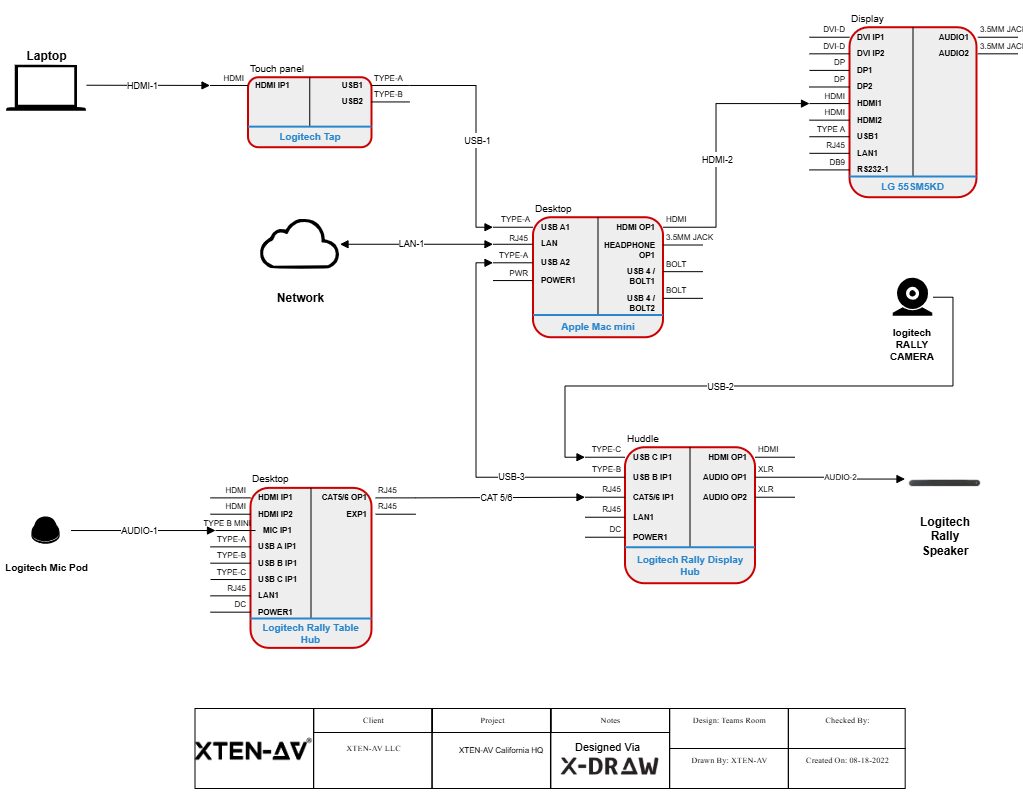
Why AV Design Matters in Modern Training Rooms
Training room AV design directly impacts learning effectiveness, instructor confidence, operational efficiency, and ultimately, organizational training ROI. Understanding these connections helps AV integrators communicate value and justify appropriate design rigor with budget-conscious clients.
Impact on Learning Outcomes
Research consistently demonstrates that audiovisual quality significantly affects information retention and training effectiveness. When participants struggle to see detailed content, strain to hear instructions, or experience frequent technical disruptions, cognitive resources shift from processing information to compensating for poor system performance. Professional training room AV systems eliminate these barriers, allowing learners to concentrate entirely on content rather than technology.
High-quality video with adequate resolution and brightness supports detailed content presentation—complex data visualizations, software demonstrations, and product imagery all require pristine visual delivery. Clear, intelligible audio throughout spaces prevents listener fatigue during extended sessions while ensuring every participant hears instructions accurately. Responsive interactive capabilities enable active learning methodologies proven more effective than passive consumption.
Supporting Hybrid Workforce Realities
The permanent shift toward distributed workforces makes hybrid learning capabilities essential infrastructure. Organizations with employees across multiple locations, remote workers, and field staff require training room AV systems delivering equivalent experiences regardless of physical presence.
Effective hybrid learning designs ensure remote participants see clearly, hear naturally, and engage equally with instructors and in-room attendees. This equity multiplies training investments by enabling single sessions to serve entire organizations rather than requiring repeated location-specific iterations.
Operational Efficiency and Cost Management
Well-designed training room AV infrastructure operates reliably with minimal technical support intervention. Systems start predictably, switch sources intuitively, and complete sessions without troubleshooting interruptions. This reliability reduces IT support burden, prevents training delays, and maintains instructor confidence.
Conversely, poorly designed systems generate constant support tickets, require dedicated technical operators, suffer frequent failures, and ultimately demand premature replacement—dramatically increasing total cost of ownership.
Future-Proofing Technology Investments
Organizations investing in training room AV infrastructure today need systems remaining relevant and effective for 5-10 years. Proper design with modular architecture, adequate infrastructure capacity, and standards-based components enables selective upgrades without complete system replacements.
Poor initial designs create inflexible systems requiring wholesale replacement when technology evolves or organizational needs change. The false economy of cutting design corners compounds exponentially over system lifecycles.
What Makes a Training Room AV System Effective?
Before examining common mistakes, understanding what constitutes effective training room AV design establishes the baseline against which errors are measured.
Core Effectiveness Criteria
Reliability and consistency: Systems operate predictably across all usage scenarios without requiring technical troubleshooting or workarounds. Equipment performs within specifications day after day with minimal failures or degradation.
Intuitive operation: Instructors with varying technical proficiency confidently manage all AV functionality without extensive training or reference documentation. Control interfaces align with user mental models using clear labeling and logical organization.
Appropriate performance: Audio quality delivers intelligible speech from all seating positions without fatigue-inducing volume levels. Display systems present content with adequate resolution, brightness, and viewing angles for room characteristics. Video conferencing enables natural remote interaction without quality compromises.
Flexible functionality: Systems support diverse training methodologies—lecture presentations, interactive workshops, collaborative breakout activities, and hybrid sessions—without requiring equipment reconfiguration or technical intervention.
Seamless integration: AV components work together cohesively rather than as disconnected standalone systems. Integration extends to organizational collaboration platforms, scheduling systems, content management tools, and building automation.
Technical Foundation Requirements
Effective systems build upon solid technical foundations:
Acoustic optimization creating environments supporting natural speech communication
Adequate network bandwidth and quality of service configuration supporting modern AV-over-IP architectures
Properly sized electrical circuits with power conditioning and surge protection
Professional cable management protecting infrastructure investments and simplifying maintenance
Comprehensive system documentation enabling troubleshooting, modifications, and long-term support
7 Common Training Room AV Design Mistakes and How to Avoid Them
Mistake #1: Neglecting Acoustic Design and Treatment
Inadequate acoustic planning represents the most frequent and damaging training room AV design error. Organizations routinely allocate substantial budgets to displays, speakers, microphones, and control systems while neglecting fundamental room acoustics—the invisible foundation determining whether expensive equipment delivers intended performance.
Why This Mistake Is So Common
Acoustic treatment lacks the visual appeal and marketing excitement of impressive displays or sophisticated cameras. It's technically complex, requiring specialized knowledge most AV integrators don't possess in-house. Acoustic materials consume budget without obvious equipment "value" visible in proposals. Many stakeholders simply don't understand acoustic fundamentals until experiencing problems post-installation.
The Real Impact
Poor room acoustics create multiple cascading problems:
Echo and reverberation make speech difficult to understand, especially for non-native speakers
Extended training sessions cause listener fatigue from constant audio processing effort
Video conferencing becomes frustrating as acoustic echo cancellation struggles with excessive reflections
Even expensive sound reinforcement systems cannot compensate for fundamental acoustic deficiencies
Recording quality suffers dramatically, limiting content reuse value
In untreated rooms, participants often report understanding only 60-70% of spoken content—a catastrophic failure for learning environments.
How to Avoid This Mistake
Conduct comprehensive acoustic analysis: Before finalizing designs, perform acoustic measurements or at minimum calculate expected reverberation time, background noise levels, and speech transmission index using room dimensions and surface materials.
Budget appropriately for treatments: Allocate 10-15% of total AV budgets specifically for acoustic panels, bass traps, diffusion elements, and other treatments. For average training rooms (500-1000 sq ft), acoustic treatment typically costs $5,000-$15,000.
Prioritize acoustic foundation: Install treatments before or during AV equipment installation. Never defer acoustic work to "phase two" after discovering audio problems—it rarely happens and compromises interim operation.
Engage acoustic consultants: For larger projects or acoustically challenging spaces, invest in specialized acoustic engineering expertise. The relatively modest consulting fees prevent far more expensive mistakes.
Specify proper materials: Use professional acoustic products with documented absorption coefficients and frequency response characteristics. Decorative foam or generic ceiling tiles rarely provide adequate performance.
Validate results: After treatment installation, verify acoustic performance through measurements confirming reverberation time, speech intelligibility, and background noise meet target specifications before equipment commissioning.
Mistake #2: Designing Overly Complex Control Systems
Control system complexity frequently overwhelms users, transforming powerful AV infrastructure into underutilized liabilities. Well-intentioned designers create feature-rich interfaces exposing every possible adjustment, assuming more options equal better solutions. The reality proves exactly opposite—complexity intimidates instructors, creates operational friction, and generates excessive support calls.
Root Causes of Complexity
Designers often project their own technical sophistication onto users, failing to recognize the gap between AV professional expertise and typical instructor technical proficiency. Stakeholder requirements gathering focuses on functional checklists rather than operational workflows. The desire to justify sophisticated control platforms drives feature proliferation. Insufficient usability testing during design phases allows complexity to compound unchecked.
Operational Consequences
Overly complex control interfaces create predictable problems:
Training sessions begin late while instructors struggle with startup procedures
Technical support personnel become required attendees for routine training events
Instructors revert to using minimal functionality, leaving expensive capabilities unused
User frustration erodes confidence in entire AV systems regardless of technical quality
Organizations develop workarounds or external solutions rather than using installed systems
Training room utilization decreases as instructors avoid technically intimidating spaces
Prevention Strategies
Match interface complexity to user proficiency: Design control interfaces around actual user technical sophistication, not theoretical capability. For instructor-operated systems, assume users possess basic presentation software familiarity but limited AV knowledge.
Prioritize common workflows: Identify the five most frequent operations and make them accessible through single-touch actions. Bury advanced features in submenus accessed only when specifically needed.
Implement progressive disclosure: Present simplified interfaces by default with advanced controls available to users who need them. Enable IT teams to access detailed controls while instructors see streamlined options.
Create scenario-based presets: Program one-touch buttons for common situations—"Presentation," "Video Conference," "Workshop," "All Off"—that configure entire systems appropriately without requiring users to understand individual component operation.
Conduct usability testing: Before finalizing control programming, test interfaces with representative actual users. Observe where they struggle, what labels confuse them, and which workflows feel unnatural. Iterate based on feedback.
Provide visual feedback: Ensure every control action generates clear confirmation showing what happened. Display current system state prominently. Show instructors what sources are active, which displays are enabled, and whether microphones are live.
Design for recovery: When users make mistakes, provide clear guidance for returning to known good states. Include "Reset to Default" options that restore functional configurations without requiring technical support.
Mistake #3: Undersizing Network Infrastructure
Modern training room AV systems increasingly rely on network infrastructure for AV-over-IP signal distribution, video conferencing, wireless collaboration, cloud-based control, and content streaming. Undersized or poorly configured networks create reliability nightmares, quality degradation, and expensive retrofit requirements that could be avoided with proper initial planning.
Why Networks Get Neglected
Network infrastructure often falls into responsibility gaps between AV integrators and IT departments. Assumptions about existing network adequacy prove incorrect during commissioning. Organizations underestimate bandwidth requirements or don't understand quality of service (QoS) necessity. Budget pressure drives compromises in "invisible" infrastructure favoring visible equipment.
Performance Impact
Inadequate network capacity manifests multiple ways:
Video conferencing stutters, freezes, or experiences audio-video sync issues
Multiple simultaneous training sessions interfere with each other
Wireless presentation systems suffer lag or disconnections
System responsiveness degrades during network congestion periods
Recording systems produce corrupted or incomplete captures
Remote monitoring and support become impossible or unreliable
These problems often appear intermittently, making troubleshooting difficult and creating user uncertainty about system reliability.
Proper Network Design Approach
Conduct comprehensive network assessment: Before finalizing AV designs, evaluate existing network infrastructure capacity, switch capabilities, cabling quality, and available bandwidth. Don't assume adequacy without verification.
Calculate actual bandwidth requirements: Determine bandwidth demands for all concurrent streams—presenter displays, audience cameras, content sharing, remote participants, recording, etc. Add 30-50% headroom for overhead and future growth.
Implement proper QoS configuration: Prioritize AV traffic through Quality of Service policies ensuring time-sensitive video and audio streams receive guaranteed bandwidth even during network congestion.
Utilize appropriate network switches: Select switches supporting required bandwidth with adequate port speeds and proper QoS capabilities. Budget switches often lack necessary features for professional AV-over-IP systems.
Establish dedicated VLANs: Isolate AV traffic on dedicated virtual networks preventing interference from general data traffic and improving security. Separate control systems, AV-over-IP streams, and internet-facing services.
Plan for redundancy: In critical training environments, implement redundant network paths providing failover protection against switch failures or cable damage.
Document network configuration: Create detailed documentation showing VLAN assignments, QoS policies, port configurations, and IP address schemes. Share documentation with both AV and IT support teams.
Test under load: Before declaring systems operational, test network performance under realistic load conditions with all expected concurrent streams active. Verify performance meets specifications without degradation.
Mistake #4: Ignoring Remote Participant Experiences
As hybrid learning becomes standard rather than exception, training room AV designs frequently prioritize in-room experiences while treating remote participation as afterthought. This creates second-class experiences for remote attendees, undermining training effectiveness and excluding distributed employees from equal learning opportunities.
The Equity Problem
Remote participants face multiple disadvantages in poorly designed systems:
Unable to see whiteboards, flip charts, or physical demonstrations clearly
Difficulty hearing audience questions or small group discussions
Lack of natural eye contact with instructors creating disconnection
Limited interaction opportunities compared to in-room attendees
Technical issues or poor audio quality forcing them to abandon sessions
Feeling invisible or forgotten during instructor-led activities
These disparities waste remote participants' time and organizational training investments while potentially violating workplace equity commitments.
Design Requirements for Hybrid Equity
Camera systems: Deploy multiple PTZ cameras capturing varied perspectives:
Instructor cameras providing close-up views with eye contact angles
Room cameras showing all in-room participants and ambient environment
Content cameras viewing whiteboards, flip charts, and demonstration areas
Audience cameras enabling remote participants to see question askers
Implement AI-powered auto-tracking that intelligently frames active speakers without manual operation.
Audio capture: Install comprehensive microphone coverage ensuring remote participants hear everything clearly:
Instructor microphones (wireless or lapel) capturing primary instruction
Ceiling microphone arrays with beamforming capturing audience questions naturally
Table microphones for workshop discussions
Proper acoustic echo cancellation preventing feedback
Display integration: Show remote participants prominently on in-room displays at appropriate scale creating presence and eye contact opportunities. Avoid relegating remote attendees to small sidebar windows.
Content visibility: Ensure remote participants see all visual content clearly without compression artifacts or quality degradation. Support dual-stream transmission sending presenter video and high-resolution content simultaneously.
Interaction capabilities: Provide remote participants with equivalent engagement tools:
Virtual hand raising visible to instructors
Polling and quiz participation
Chat functionality for questions
Digital whiteboard annotation
Breakout room support
Testing protocol: Always test hybrid learning systems from remote participant perspectives before deployment. Have team members join from remote locations evaluating audio quality, video clarity, content visibility, and interaction capabilities.
Mistake #5: Poor Cable Management and Infrastructure Planning
Inadequate cable management and infrastructure planning create immediate installation challenges and long-term operational problems. Hastily installed cabling becomes maintenance nightmares, reliability issues, and obstacles preventing future system modifications or upgrades.
Common Cable Management Failures
Insufficient cable pathways: Undersized conduits, cable trays, or raceways create installation difficulties and limit future expansion capacity. Installers force excessive cables through inadequate pathways damaging cables or creating service loops that violate bend radius specifications.
Lack of labeling: Unlabeled cables make troubleshooting nearly impossible. Support technicians waste hours tracing connections that proper labeling would identify instantly. Documentation gaps compound when personnel changes occur.
Inadequate service access: Critical connections hidden in inaccessible ceiling areas, behind permanently mounted equipment, or within sealed walls prevent routine maintenance and force expensive equipment removal for simple cable repairs.
Mixed signal types: Running low-voltage AV cables alongside power conductors without proper separation creates interference issues. Inadequate shielding on network cables introduces noise into signals.
No expansion capacity: Initial installations fill all available pathways, power circuits, and equipment rack space leaving zero capacity for additions or modifications.
Professional Infrastructure Approach
Plan generous pathway capacity: Size conduits, cable trays, and raceways at 150-200% of initial cable requirements. The modest incremental cost during construction provides invaluable flexibility for future modifications.
Implement comprehensive labeling: Label every cable at both ends using consistent naming conventions. Create labels identifying source, destination, signal type, and installation date. Use durable label materials surviving years of handling.
Design accessible termination points: Position patch panels, equipment racks, and connection boxes in easily accessed locations. Provide adequate service clearance around all equipment for maintenance activities.
Follow separation standards: Maintain proper separation between power and low-voltage cabling. Use shielded cables where electromagnetic interference concerns exist. Follow ANSI/TIA standards for structured cabling.
Create detailed documentation: Produce comprehensive as-built drawings showing all cable routes, connection points, equipment locations, and specifications. Maintain documentation in accessible locations for support teams.
Organize equipment racks: Design rack elevations with logical equipment arrangement, proper cooling airflow, organized cable routing, and adequate power distribution. Utilize vertical cable managers and horizontal patch panels maintaining neat, serviceable installations.
Test thoroughly: Verify all cable installations using appropriate test equipment. Certify network cabling meeting performance specifications. Test signal quality at maximum cable lengths under realistic load conditions.
Mistake #6: Insufficient Lighting Design Integration
Lighting control significantly impacts both video conferencing quality and learning environment effectiveness, yet frequently receives inadequate attention during training room AV design. Poor lighting creates washed-out video feeds, eye strain, inadequate visibility, or harsh conditions reducing training effectiveness.
Lighting Impact on AV Performance
Video conferencing requires balanced, soft lighting illuminating subjects' faces without shadows, harsh highlights, or background glare. Overhead fluorescent fixtures create unflattering shadows under eyes and noses. Windows behind subjects cause severe backlighting washing out faces. Insufficient illumination forces cameras to boost gain introducing noise and reducing quality.
In-room learning requires comfortable lighting levels supporting extended reading, note-taking, and screen viewing without glare or eye strain. Overly bright spaces cause display washout requiring excessive screen brightness. Dim environments strain eyes and reduce alertness.
Integrated Lighting Design Strategy
Conduct lighting analysis: Evaluate existing lighting or plan new installations specifically addressing AV requirements. Measure illumination levels at key positions—instructor areas, audience seating, and display locations—ensuring adequate balance.
Implement zoned control: Design lighting systems with independent zones controlling ambient room lighting, task lighting, and accent lighting separately. Enable scene presets matching different training activities.
Position sources appropriately: Install key lighting illuminating instructor faces from camera perspectives. Eliminate backlighting situations causing silhouetting. Provide soft, diffused lighting reducing harsh shadows.
Integrate with AV control: Connect lighting control to room control systems enabling coordinated scene management. Program lighting presets matching AV scenarios—"Presentation" dims ambient lights while maintaining instructor illumination, "Video Conference" optimizes lighting for cameras, "Workshop" provides full illumination.
Address natural light: Install motorized shades or blinds providing consistent light control regardless of sun position. Integrate window covering control with AV scene presets.
Select appropriate fixtures: Choose lighting fixtures with appropriate color temperature (typically 3500-4500K for professional environments), adequate color rendering index (CRI 85+), and dimming capability. Avoid fixtures creating screen flicker or electromagnetic interference.
Consider display technology: LED video walls require different ambient lighting than projection systems. Ensure lighting design matches display technology characteristics.
Mistake #7: Inadequate Documentation and Training
Even perfectly designed training room AV systems fail to deliver value when organizations lack proper documentation and user training. Comprehensive technical documentation enables effective troubleshooting and maintenance. User training empowers instructors to confidently utilize system capabilities. Both elements are frequently sacrificed under budget or schedule pressure.
Documentation Deficiencies
Common documentation failures include:
Missing or incomplete system diagrams showing signal flow and connections
Absent equipment lists with model numbers, serial numbers, and configuration details
Lack of network configuration documentation including IP addresses, VLANs, and QoS settings
No operational procedures for common tasks or troubleshooting scenarios
Absent maintenance schedules and procedures
Missing warranty information and support contacts
These gaps exponentially increase support costs, extend downtime during failures, and complicate future modifications or upgrades.
Training Insufficiency
User training often consists of brief "button tour" during system handoff—grossly inadequate for building instructor confidence. Comprehensive training should cover:
System capabilities and appropriate use cases
Step-by-step operation for common scenarios
Troubleshooting simple issues without support calls
Best practices for audio quality and camera framing
Content sharing procedures from various devices
Recording features and content retrieval
Professional Documentation Standards
Create comprehensive system documentation including:
Technical drawings: Complete schematic diagrams showing all connections, signal paths, and equipment interconnections. Include rack elevations with equipment mounting positions. Provide detailed cable schedules listing every connection.
Configuration documentation: Record all equipment settings, network configurations, control system programming logic, and customization details. Document IP addresses, subnet masks, gateway assignments, and VLAN memberships.
Operational procedures: Write clear instructions for common operations, startup/shutdown procedures, content source switching, recording activation, and basic troubleshooting. Include screenshots from control interfaces.
Maintenance documentation: Provide preventive maintenance schedules, firmware update procedures, cleaning requirements, and performance verification protocols. List recommended spare parts and consumables.
Support information: Compile contacts for technical support, warranty service, equipment manufacturers, and escalation procedures. Include system integrator contact information with response commitments.
Store accessibly: Maintain documentation in multiple formats—physical binders in equipment rooms, digital copies on shared drives, and cloud-hosted versions accessible during remote support.
Effective Training Programs
Conduct hands-on training sessions: Provide interactive training allowing instructors to practice actual system operation with guidance. Schedule training shortly before regular usage begins to maximize retention.
Create user-friendly quick references: Develop laminated quick reference cards showing common operations with simple step-by-step instructions and visual cues. Position near control interfaces.
Record video tutorials: Produce short video demonstrations showing system operation for reference. Make available through organizational learning platforms.
Establish support resources: Create easy access to AV support teams through clear contact methods. Implement help desk ticketing systems for issue tracking and resolution.
Schedule refresher sessions: Plan periodic training refreshers, especially when introducing new features or when instructor turnover occurs.
Gather feedback: Regularly solicit user feedback identifying operational challenges, confusing procedures, or desired capabilities. Use insights to improve systems and training.
Best Practices for Training Room AV Design
Following proven methodologies prevents common mistakes and ensures successful outcomes.
Conduct Comprehensive Needs Assessment
Begin projects with thorough stakeholder engagement understanding:
Training methodologies and instructional approaches employed
Typical class sizes and room occupancy patterns
Content types and presentation requirements
Hybrid learning needs and remote participant distribution
Instructor technical proficiency levels
Budget parameters and timeline constraints
Future growth plans and flexibility requirements
Document requirements comprehensively forming the foundation for technical design decisions.
Engage Appropriate Expertise
Complex training room AV projects benefit from specialized knowledge:
Acoustic consultants for challenging acoustic environments
Network engineers for AV-over-IP infrastructure design
Lighting designers for integrated lighting systems
AV consultants providing independent design validation
While adding expertise increases design costs, the investment prevents far more expensive implementation mistakes.
Design Iteratively with Stakeholder Review
Present design concepts at multiple development stages:
Initial concepts showing general approaches and technologies
Preliminary designs with specific equipment selections
Detailed designs including all specifications and documentation
Incorporate stakeholder feedback throughout development rather than surprising them with final designs.
Implement Rigorous Testing Protocols
Before declaring systems operational:
Test all functionality under realistic conditions
Verify performance meets specifications across all scenarios
Evaluate remote participant experiences thoroughly
Conduct extended operation testing simulating actual usage
Address all identified deficiencies completely
Never accept "mostly working" systems. Complete testing prevents post-occupancy problems.
Plan for Lifecycle Management
Include long-term operational considerations:
Preventive maintenance schedules and responsibilities
Technology refresh planning and budgeting
Support and training resource allocation
Performance monitoring and optimization processes
Systems require ongoing attention maintaining optimal operation over their lifecycles.
How X-Draw Simplifies Training Room Planning
Professional AV design software dramatically reduces error potential while accelerating project workflows. X-Draw has emerged as the premier platform for AV integrators designing complex training room AV systems.
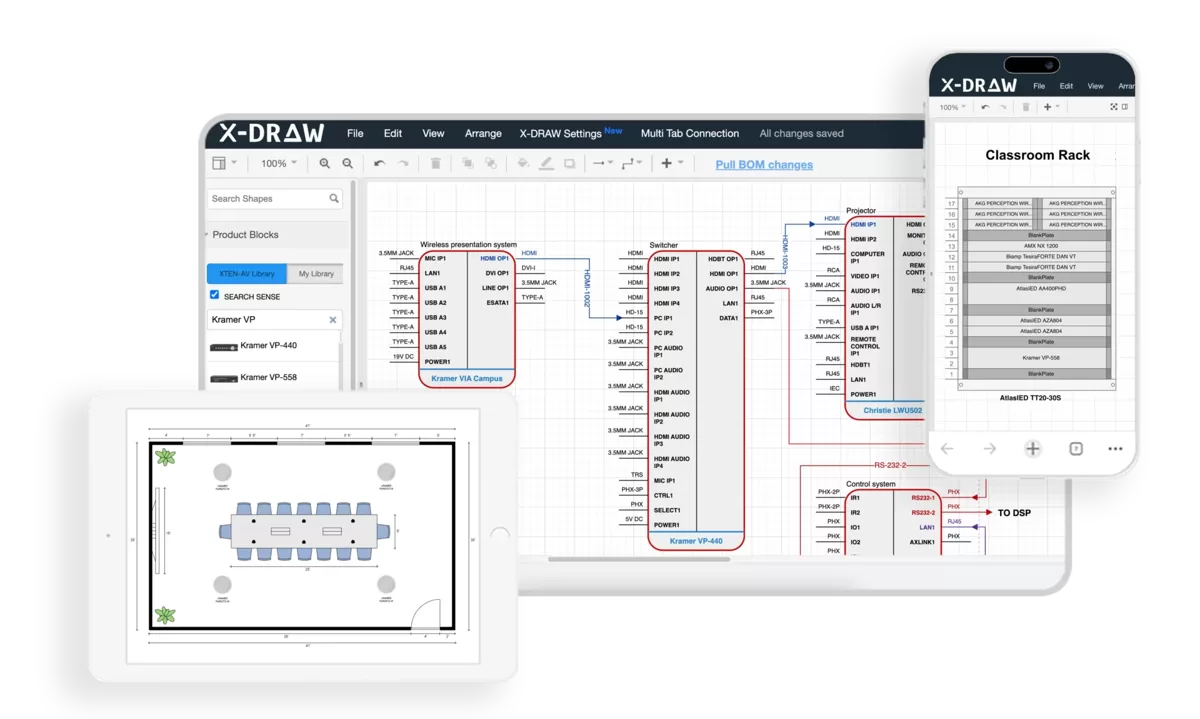
Design Automation Preventing Common Mistakes
X-Draw's AI-powered automation incorporates industry best practices directly into design workflows, automatically identifying potential problems before they become installation issues. The platform validates signal compatibility, flags undersized infrastructure, and ensures equipment specifications match application requirements.
This intelligent validation catches many common mistakes during design phases when corrections remain simple and inexpensive rather than discovering problems during commissioning when changes require expensive retrofits.
Streamlined Documentation Workflows
Comprehensive documentation—a frequent project shortcoming—happens automatically with X-Draw. The platform generates professional schematic drawings, equipment schedules, rack elevations, wiring diagrams, and installation documentation directly from design files. Changes propagate automatically throughout documentation maintaining consistency.
This automation eliminates the documentation gaps that plague manual processes while dramatically reducing engineering workload.
Collaborative Design Reducing Coordination Failures
X-Draw's cloud-based collaboration enables distributed teams to work simultaneously on projects without version conflicts. Designers, engineers, IT professionals, and stakeholders access current project information, provide feedback directly within designs, and maintain visibility into project status.
This transparency prevents miscommunication and coordination failures that create installation problems.
Professional Proposal Generation
Converting technical designs into compelling sales proposals traditionally consumes significant time. X-Draw automates proposal creation, generating branded documents with accurate equipment lists, professional diagrams, and customized descriptions in minutes rather than days.
This acceleration improves sales team responsiveness while ensuring proposal accuracy matches technical designs.

Key Features to Look for in Training Room AV Design Software
When evaluating AV design software options, prioritize capabilities specifically supporting training room projects.
Essential Design Capabilities
Comprehensive component libraries: Extensive databases of AV equipment from major manufacturers with accurate technical specifications, ensuring equipment selections match application requirements.
Intelligent schematic drawing: Tools enabling rapid creation of professional system diagrams with automated signal flow mapping and smart device connectivity suggestions.
Validation and error checking: Automated analysis identifying incompatible components, inadequate bandwidth, insufficient power capacity, or other technical issues during design phases.
Flexible output formats: Ability to generate various documentation types—system diagrams, rack elevations, wiring schedules, equipment lists, installation instructions—from single design files.
Workflow Integration Features
Proposal automation: Converting technical designs into professional sales proposals with minimal manual effort.
Project management integration: Connecting design activities with procurement, installation scheduling, and project tracking workflows.
Collaborative capabilities: Supporting team collaboration with real-time updates, commenting, and version control.
Cloud accessibility: Enabling project access from any location supporting remote work and field activities.
Professional Standards Support
Industry standards compliance: Following ANSI/TIA, AVIXA, and other relevant standards for professional installations.
Scalability: Supporting projects ranging from single rooms to enterprise-wide deployments with consistent quality.
Customization: Allowing customization of templates, libraries, and output formats matching organizational standards.
Why AV Integrators Use AI-Driven AV Design Platforms
Artificial intelligence increasingly transforms AV design workflows, and forward-thinking integrators embrace these capabilities.
Efficiency Improvements
AI-powered platforms automate repetitive tasks—component selection, signal routing, cable calculation, documentation generation—that traditionally consume substantial engineering time. This automation enables integrators to complete projects faster, handle more concurrent work, and improve profitability without proportional staff expansion.
Accuracy Enhancement
Manual design processes inevitably introduce errors—incorrect part numbers, incompatible signal types, insufficient cable specifications, missing connections. AI validation checks designs against technical constraints automatically, identifying potential issues when corrections remain simple rather than discovering problems during expensive field phases.
Knowledge Codification
AI platforms codify industry best practices and institutional knowledge into automated workflows. Junior designers benefit from embedded expertise accelerating skill development. Organizations maintain consistent quality regardless of individual designer experience levels.
Competitive Advantage
Integrators leveraging AI-driven platforms respond faster to opportunities, deliver higher quality documentation, and complete projects more efficiently than competitors using traditional manual methods. These advantages translate directly into improved win rates, profitability, and client satisfaction.
Common Challenges AV Integrators Face in Training Room Projects
Understanding typical project challenges helps anticipate and prevent problems.
Unclear or Changing Requirements
Stakeholders often struggle articulating precise requirements during planning phases. Training methodologies evolve during project execution. Technology preferences shift. These changes complicate design, create rework, and potentially compromise outcomes.
Prevention: Invest adequate time in structured needs assessment. Document requirements formally with stakeholder sign-off. Establish change management processes controlling scope modifications.
Budget Constraints vs. Quality Expectations
Organizations frequently expect premium performance from limited budgets. Pressure to meet arbitrary budget targets drives compromises undermining system effectiveness.
Approach: Educate stakeholders about performance implications of budget-driven compromises. Present multiple design tiers showing capability differences. Help organizations prioritize features matching budgets realistically.
Coordination with Other Trades
Training room projects involve multiple contractors—electrical, network, acoustical, furniture, construction—requiring careful coordination. Communication failures create schedule delays, installation conflicts, and quality problems.
Management: Establish clear coordination protocols. Conduct regular coordination meetings. Maintain detailed drawings showing interface requirements with other trades. Verify prerequisite work completion before AV installation begins.
Technology Complexity
Keeping current with rapidly evolving AV technologies, video conferencing platforms, collaboration tools, and control systems challenges even experienced integrators. Technology selections impact long-term system performance and client satisfaction.
Strategy: Invest in ongoing training and certification. Maintain relationships with manufacturer technical teams. Participate in industry organizations. Pilot emerging technologies before deploying to clients.
Post-Installation Support Expectations
Clients often expect extensive ongoing support without proper service agreements. Scope ambiguity regarding post-installation responsibilities creates conflict and uncompensated work.
Clarity: Define support scope, response times, and service terms explicitly during contracting. Offer structured support agreements as distinct services. Document support responsibilities in contracts preventing future disputes.
How to Improve Collaboration Between AV Designers and IT Teams
Effective collaboration between AV integrators and organizational IT departments prevents network infrastructure mistakes and ensures seamless system integration.
Establish Early Engagement
Involve IT teams during initial planning phases rather than presenting completed designs requiring network accommodation. Early collaboration enables realistic assessment of existing network infrastructure capabilities and appropriate planning for required upgrades.
Use Common Language
AV professionals and IT specialists often use different terminology for similar concepts creating communication barriers. Invest effort establishing shared understanding. Explain AV requirements in network terms IT teams understand. Learn IT constraints and operational practices informing AV design decisions.
Document Requirements Clearly
Provide IT teams with specific technical requirements—bandwidth needs, QoS configurations, VLAN requirements, multicast support, port specifications, security policies. Vague requests for "network support" create ambiguity. Detailed documentation enables proper planning and provisioning.
Respect IT Operational Standards
Organizations typically have established network management practices, security policies, and change control procedures. AV designs should align with these standards rather than demanding special exceptions. Understanding IT constraints during design prevents deployment conflicts.
Plan Joint Testing
Coordinate thorough testing protocols with IT teams verifying network performance under realistic AV load conditions. Joint testing identifies problems requiring network tuning or AV design adjustments before training rooms enter production use.
Establish Ongoing Communication
Maintain regular communication beyond initial installation. Notify IT teams about AV system changes affecting networks. Include IT in troubleshooting when problems potentially involve network infrastructure. Foster collaborative rather than adversarial relationships.
Future Trends in Training Room AV Design
Understanding emerging trends helps AV integrators design systems remaining relevant long-term.
AI-Powered Automation
Artificial intelligence increasingly permeates training room AV systems beyond design tools. Intelligent cameras automatically frame active speakers. Audio processing adapts to acoustic conditions and conversation patterns. Systems predict failures before they impact operations. Content analysis generates real-time summaries and suggests related materials.
Design implication: Build adequate processing power and network connectivity supporting AI feature evolution.
Extended Reality Integration
Virtual reality (VR), augmented reality (AR), and mixed reality (MR) technologies transition from experimental to practical training tools. Organizations increasingly deploy XR for immersive skill development, equipment familiarization, and scenario practice.
Infrastructure requirement: Provision high-bandwidth connectivity, adequate power for compute-intensive processing, and flexible spaces accommodating XR activities.
Advanced Spatial Audio
Sophisticated spatial audio technologies create three-dimensional soundscapes enhancing immersion and providing directional audio cues. Applications include language learning, safety training, and enhanced video conferencing with positional audio.
System consideration: Design audio systems supporting additional channels and specialized processing beyond traditional stereo or surround configurations.
Sustainability Focus
Corporate environmental commitments drive demand for energy-efficient AV systems, sustainable equipment manufacturing, and designs minimizing electronic waste.
Design approach: Prioritize energy-efficient components, implement intelligent power management, and plan for equipment longevity reducing replacement cycles.
Cloud-Based Processing
Traditional equipment racks increasingly give way to cloud-based processing and centralized infrastructure serving multiple spaces. This architectural shift reduces per-room equipment costs, simplifies management, and supports consistent experiences.
Infrastructure planning: Ensure robust network connectivity with adequate bandwidth and reliability supporting cloud-dependent architectures.
Frequently Asked Questions
What is the most common training room AV design mistake?
Inadequate acoustic design represents the most common and damaging training room AV mistake. Organizations routinely invest heavily in displays, speakers, and microphones while neglecting fundamental room acoustics that determine whether equipment delivers intended performance. Poor acoustics create echo, reverberation, and intelligibility problems that even expensive audio systems cannot overcome. Professional designs prioritize comprehensive acoustic treatment—including absorption panels, bass traps, and diffusion elements—before finalizing equipment specifications. Allocating 10-15% of total AV budgets to acoustic optimization prevents this mistake while ensuring expensive equipment investments achieve desired performance. Always conduct acoustic analysis and implement appropriate treatments before commissioning training room AV systems.
How much should organizations budget for professional training room AV design?
Professional training room AV budgets vary significantly based on space size, technology sophistication, and feature requirements. For dedicated training rooms supporting 20-40 participants, expect total project costs of $50,000-$100,000 including professional design, quality equipment, proper installation, and comprehensive documentation. Larger training venues with advanced capabilities (AI-powered cameras, LED video walls, sophisticated automation) may require $125,000-$250,000 or more. Design services typically represent 8-12% of total project budgets. While initially seeming expensive, professional design prevents costly mistakes, reduces installation problems, improves long-term reliability, and ensures systems meet actual needs effectively. Organizations cutting corners during design phases routinely spend far more addressing resulting problems than professional design would have cost.
Why is network infrastructure so critical for modern training room AV?
Modern training room AV systems increasingly depend on network infrastructure for AV-over-IP signal distribution, video conferencing, wireless collaboration, cloud-based control, and content streaming. Inadequate networks create multiple problems: video conferencing stutters or freezes, wireless presentation systems lag, multiple training sessions interfere, recordings corrupt, and system responsiveness degrades. Professional designs require comprehensive network assessment evaluating capacity, switch capabilities, cabling quality, and available bandwidth before finalizing AV specifications. Proper QoS configuration prioritizes time-sensitive AV traffic ensuring reliable performance during network congestion. Dedicated VLANs isolate AV traffic from general data preventing interference. Organizations should engage network expertise during planning phases rather than assuming existing infrastructure adequacy without verification.
How can AV integrators prevent complex control system problems?
Control system complexity frequently overwhelms users when designers expose excessive features rather than prioritizing intuitive operation. Prevention starts with understanding actual user technical proficiency—most instructors possess basic presentation software familiarity but limited AV knowledge. Design interfaces around common workflows making frequent operations accessible through single-touch actions. Implement scenario-based presets ("Presentation," "Video Conference," "Workshop") that configure entire systems appropriately. Use progressive disclosure hiding advanced features until specifically needed. Conduct usability testing with representative users before finalizing programming, iterating based on observed struggles and confusion. Provide clear visual feedback confirming action results and showing current system state. Design recovery options allowing users to return to known good configurations without technical support. Prioritize reliability and simplicity over feature proliferation.
What documentation should be included with training room AV installations?
Comprehensive system documentation proves essential for effective troubleshooting, maintenance, and future modifications yet frequently gets inadequate attention. Professional installations should include: complete schematic diagrams showing all connections and signal paths; detailed rack elevations with equipment mounting positions; comprehensive cable schedules listing every connection with proper labeling; equipment lists with model numbers, serial numbers, and configuration details; network documentation including IP addresses, VLANs, and QoS settings; operational procedures for common tasks and troubleshooting scenarios; preventive maintenance schedules and procedures; warranty information and support contacts; and control system programming logic documentation. Store documentation in multiple formats—physical binders in equipment rooms, digital copies on shared drives, and cloud-hosted versions for remote support access. Update documentation whenever system modifications occur maintaining accuracy throughout system lifecycles.
Should organizations invest in paid AV design software or use free alternatives?
While free AV design software provides basic drawing capabilities, professional platforms like X-Draw offer substantial advantages justifying investment for serious AV integrators. Professional tools include AI-powered automation dramatically reducing design time, specialized component libraries ensuring specification accuracy, automated proposal generation accelerating sales, comprehensive documentation tools reducing engineering workload, real-time collaboration supporting distributed teams, intelligent validation catching design errors early, and end-to-end workflow management consolidating disconnected processes. Free alternatives lack these capabilities requiring manual workarounds consuming valuable time while increasing error potential. For organizations regularly designing training room AV systems, productivity improvements and quality enhancements from professional platforms deliver rapid ROI through faster project completion, fewer installation problems, improved proposal win rates, and reduced post-installation support requirements. Calculate costs of design time, error correction, and lost opportunities when evaluating software decisions.
How can training room AV designs support future technology evolution?
Technology lifecycles accelerate continuously while organizational training needs evolve, demanding AV designs anticipating future requirements without overbuilding speculatively. Effective future-proofing starts with generous infrastructure capacity—deploy 10-gigabit Ethernet providing bandwidth headroom, install electrical capacity exceeding current requirements by 50-100%, and design cable pathways with excess capacity simplifying additions. Utilize modular equipment architectures enabling selective component upgrades without complete system replacements. Choose AV-over-IP platforms supporting component flexibility and standards-based protocols ensuring interoperability. Select vendors committed to backward compatibility and long-term platform support. Design flexible mounting infrastructure accommodating varied equipment types. Implement comprehensive documentation enabling future modifications. Budget for periodic technology refresh cycles maintaining competitive capabilities. Rather than predicting specific future technologies, create flexible foundations supporting reasonable evolution scenarios while avoiding obsolete proprietary systems limiting future options.
Conclusion
The seven common training room AV design mistakes examined throughout this guide—inadequate acoustic planning, overly complex control systems, undersized network infrastructure, neglecting remote participants, poor cable management, insufficient lighting integration, and inadequate documentation—share a troubling commonality: they're entirely preventable through proper design methodology, adequate planning investment, and appropriate expertise engagement.
These mistakes cost organizations far more than the investments required to avoid them. Beyond immediate financial impact from retrofits and corrections, poorly designed systems create ongoing operational burdens through excessive support requirements, low utilization rates, compromised training effectiveness, and premature replacement needs. The cumulative lifecycle costs of cutting design corners exponentially exceed professional design investment.
Success in training room AV design requires balancing technical performance, user experience, operational efficiency, and future adaptability while avoiding the pitfalls that undermine these objectives. AV integrators and consultants must prioritize comprehensive needs assessment, engage appropriate specialized expertise, design iteratively with stakeholder involvement, implement rigorous testing protocols, and deliver thorough documentation and training.
Professional AV design platforms like X-Draw dramatically reduce error potential through AI-powered validation, automated documentation, and best-practice workflows embedded directly into design processes. These tools transform complex projects into manageable workflows while accelerating timelines and improving quality consistency.
As we progress through 2026 and beyond, training room AV systems grow increasingly sophisticated incorporating AI automation, extended reality, spatial audio, and cloud-based architectures. However, fundamental design principles remain constant—clear audio, visible content, intuitive operation, and reliable performance form foundations upon which advanced capabilities build. Organizations avoiding common mistakes while following proven design methodologies create exceptional learning environments serving organizational needs effectively for years to come.
Whether tackling your first training room AV project or refining approaches after years of experience, understanding these common mistakes and implementing prevention strategies positions projects for success. Engage experienced professionals early in planning, invest appropriately in design rigor, utilize proper tools and technologies, and maintain unwavering focus on creating learning environments where technology empowers rather than obstructs educational objectives.