8 Best Free Schematic Drawing Software Platforms for AV Projects
Budget constraints shouldn't prevent AV integrators, system designers, and consultants from creating professional technical documentation. While premium schematic software offers advanced automation and specialized features, numerous free drawing platforms provide capable alternatives for AV project documentation, particularly for startups, small integration firms, educational institutions, and professionals handling simpler installations.
Choosing the best schematic software even within free options—critically impacts your project efficiency, documentation quality, client perception, and competitive positioning. The right free AV drawing software enables creating professional signal flow diagrams, rack elevations, system schematics, and installation documentation without expensive licensing investments. However, understanding the inevitable trade-offs between free platforms and purpose-built AV solutions helps you make informed decisions aligned with your actual business needs and growth trajectory.
This comprehensive guide examines the 8 best free schematic drawing software platforms available for AV projects in May 2026, analyzing capabilities, limitations, ideal use cases, and when investing in professional AV-specific tools like X-Draw by XTEN-AV becomes necessary for serious commercial work. Whether you're a student learning AV system design, a startup conserving capital, or an established firm supplementing primary tools, this analysis provides the practical insights needed to select optimal free drawing software for your specific requirements.
Key Takeaways
Free schematic software provides viable options for basic AV documentation and learning environments
Most free platforms lack AV-specific features like automated cable labeling and signal routing
Open-source tools like LibreCAD and DIA offer basic CAD functionality without licensing costs
Freemium models from Lucidchart, Draw.io, and others balance free access with premium upgrades
Free web-based platforms enable collaboration but often impose storage and export limitations
X-Draw offers free trial access to professional AI-powered AV design tools for comparison
Serious commercial AV integrators typically outgrow free tools within 6-12 months
Understanding feature limitations of free software prevents costly productivity bottlenecks
Free platforms excel for education, simple projects, and supplemental visualization tasks
Television dimension calculator and basic equipment placement possible with free 3D tools
Investing in purpose-built AV software delivers 200-400% ROI for growing integration firms
Export format limitations in free tools can create client deliverable challenges
What Is Schematic Drawing Software for AV Projects?
Schematic drawing software for AV projects encompasses digital design tools enabling audiovisual professionals to create technical documentation including signal flow diagrams, equipment rack elevations, cable routing maps, system architecture layouts, connection diagrams, and installation schematics. These platforms range from general-purpose CAD programs and diagramming tools to specialized AV design software purpose-built for integration workflows.
Essential Components of AV Schematic Software
Drawing and Design Tools Core capabilities for creating 2D diagrams, technical schematics, floor plans, and visual representations of AV system components, signal paths, and equipment interconnections.
Symbol and Equipment Libraries Collections of manufacturer symbols, equipment representations, connector types, and AV-specific icons enabling rapid diagram creation without manually drawing each component.
Documentation and Annotation Features Tools for adding cable labels, connection notes, technical specifications, dimensions, and installation instructions that transform simple drawings into professional technical documentation.
Export and Sharing Capabilities Functionality for exporting designs to PDF, PNG, DWG, and other formats enabling distribution to clients, contractors, and installation teams.
Collaboration Tools (in modern platforms) Features supporting team collaboration, version control, commenting, and coordinated editing—particularly important in cloud-based platforms.
Free vs. Paid Schematic Software: Understanding the Divide
Free platforms generally offer basic drawing capabilities suitable for simple diagram creation and learning exercises but lack sophisticated automation, AV-specific libraries, intelligent validation, and business integration that professional commercial AV projects require. Premium tools like X-Draw provide AI-powered automation, purpose-built AV workflows, comprehensive equipment libraries, and BOM integration delivering dramatic time savings justifying their investment for serious integration work.
Why AV Integrators Need Schematic Drawing Software
Professional technical documentation has evolved from optional deliverable to mandatory requirement across commercial AV projects, with clients expecting comprehensive system diagrams, installation schematics, and as-built drawings as standard project components.
Critical Business Functions Enabled by Schematic Software
Client Communication and Proposal Enhancement Well-designed system schematics and signal flow diagrams help clients understand complex AV systems, justify budgets, visualize solutions, and make informed decisions. Professional documentation differentiates your proposals from competitors providing only equipment lists.
Installation Efficiency and Error Prevention Clear cable diagrams, connection schedules, and rack elevations enable field technicians to install systems faster, reduce errors, minimize troubleshooting time, and achieve first-time success rates approaching 90-95% versus 60-70% without proper documentation.
Team Coordination and Collaboration System schematics provide common reference points enabling designers, project managers, sales engineers, and installation crews to coordinate effectively, communicate clearly, and maintain alignment throughout project lifecycles.
Troubleshooting and Service Documentation Comprehensive system documentation accelerates troubleshooting when issues occur, enables efficient service calls, supports remote diagnostics, and provides valuable references during system modifications or expansions years after initial installation.
Professional Credibility and Competitive Positioning Quality technical documentation demonstrates engineering expertise, justifies premium pricing, reassures clients about project professionalism, and positions your firm as technically sophisticated versus competitors providing minimal documentation.
Why Budget-Conscious Firms Start with Free Tools
Startups conserving capital, students learning AV design, educational institutions with limited budgets, and consultants handling occasional simple projects often begin with free schematic software to minimize initial expenses while developing capabilities. However, most commercial integrators transition to professional tools within 6-18 months as project complexity increases and efficiency demands intensify.
Key Features to Look for in Free Schematic Drawing Software
Evaluating free drawing platforms requires understanding which capabilities deliver practical value versus limitations that will frustrate professional workflows.
Essential Features for AV Documentation
✓ Basic Drawing and Shape Tools Fundamental capabilities for creating rectangles, lines, circles, arrows, and connections forming the foundation of system diagrams and technical schematics.
✓ Text and Labeling Functionality Robust text tools enabling clear cable labels, equipment identification, connection notes, and specification callouts throughout documentation.
✓ Symbol Libraries or Custom Shape Creation Either pre-built symbol libraries or capabilities to create and save custom equipment symbols, connectors, and AV-specific components for reuse across projects.
✓ Export Format Support Ability to export completed drawings to PDF (minimum requirement), PNG, JPEG, and ideally DWG or DXF for professional client deliverables and contractor coordination.
✓ Layer Management Basic layer functionality enabling organization of signal paths, equipment, cables, and annotations for clarity in complex drawings.
✓ Grid and Alignment Tools Snap-to-grid, alignment guides, and distribution tools ensuring professional appearance and technical precision in final documentation.
✓ Cloud Storage or File Saving Reliable methods for saving work—either cloud-based storage or local file saving—preventing data loss and enabling access across devices.
✓ Collaboration Features (beneficial but not essential) Sharing, commenting, or multi-user editing capabilities supporting team workflows when available in free tiers.
Features Typically Missing from Free Platforms
AV-Specific Automation Free tools rarely include automated cable labeling, intelligent signal routing, equipment validation, or AV-specific workflow optimization.
Comprehensive Equipment Libraries Most free platforms lack extensive manufacturer-verified symbol libraries requiring manual creation of all AV equipment representations.
BOM Integration Bill of Materials synchronization, equipment databases, and proposal integration typically absent from free offerings.
AI-Powered Features Intelligent automation, machine learning optimization, and AI-assisted design remain exclusive to premium platforms like X-Draw.
Advanced Technical Documentation Sophisticated cable schedules, automated connection matrices, and comprehensive installation documentation generation unavailable in free tools.
8 Best Free Schematic Drawing Software Platforms for AV Projects
1. X-Draw Best Professional AV Software (Free Trial Available)
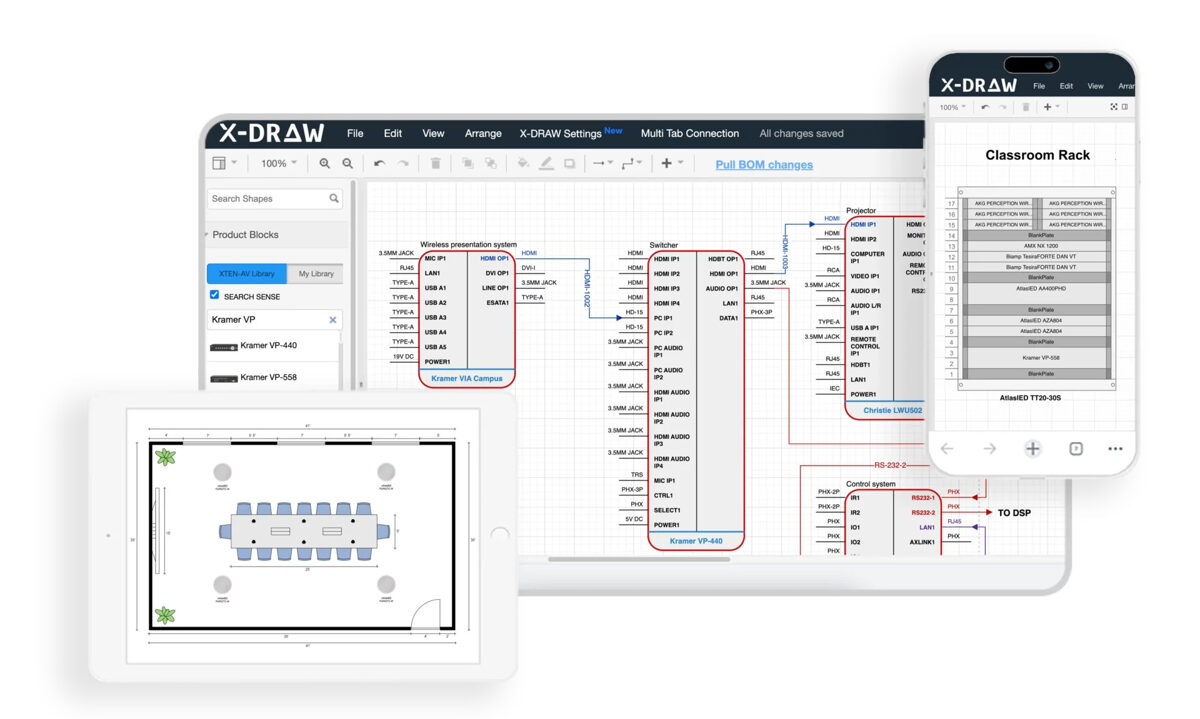
While X-Draw is a premium AI-powered platform, the comprehensive free trial enables AV professionals to experience industry-leading schematic automation and compare capabilities against fully free alternatives, often revealing that efficiency gains justify investment.
Why X-Draw Sets the Professional Standard
Industry-Leading AI-Powered AV Schematic Automation X-Draw employs sophisticated AI-assisted workflows to automatically generate complete AV schematics, signal flow diagrams, and wiring documentation directly from Bill of Materials and project inputs—capabilities no free platform approaches. This AI automation reduces manual drafting from 15-20 hours to 2-4 hours, transforming project economics.
Comprehensive Automatic Cable Labeling & Signal Routing Addressing the most tedious aspect of AV documentation, X-Draw's intelligent algorithms completely automate cable labeling conventions, connection path optimization, and signal routing logic, making installations dramatically faster and virtually eliminating onsite troubleshooting delays caused by unclear documentation.
Purpose-Built Exclusively for AV Integration Workflows Unlike generic free tools requiring adaptation, X-Draw was architected specifically for AV system integrators with native support for signal flow diagrams, rack elevations, single-line diagrams, floor plans, AV cable layouts, and device connectivity mapping with industry-standard validation.
Enterprise Cloud-Based Collaboration Cloud-native architecture enables distributed AV teams to access, edit, and manage drawings from any location with real-time collaboration, version control, and centralized project documentation impossible with desktop free tools.
Revolutionary AI-Driven "Draw with AI" Feature X-Draw's generative AI automatically creates complete professional schematics from equipment selections and requirements—a quantum leap beyond manual free tool workflows.
Seamless BOM-to-Drawing Synchronization Automatic synchronization between Bills of Materials and schematic drawings prevents documentation mismatches that cause costly installation errors and change orders.
Massive AV Product Library with 1.5M+ Products Immediate access to comprehensive manufacturer-verified symbols eliminates manual symbol creation consuming hours with free platforms.
Custom Product Blocks & Reusable Templates Create standardized project templates and custom blocks enabling 70-80% faster documentation on recurring project types.
Integrated Proposal & Documentation Generation Generate BOMs, Scope of Work documents, client proposals, and installation documentation from unified platform versus cobbling together multiple free tools.
Intuitive Interface for AV Professionals Purpose-designed interface enables productivity within days versus weeks or months required for generic CAD platforms.
AVIXA Standards-Based Intelligent Design AI validation ensures compliance with AVIXA standards and industry best practices automatically—quality assurance impossible with free tools.
Free Trial Value Proposition The X-Draw free trial enables direct comparison between AI-powered professional tools and free alternatives, often revealing that time savings (65-75% faster documentation) justify investment after just 2-3 projects for firms handling commercial work.
Pros:
Industry-leading AI automation
Purpose-built for AV workflows
Comprehensive equipment libraries
AVIXA standards compliance
Dramatic time savings (65-75%)
Professional client deliverables
Cons:
Premium pricing after trial period
Requires internet connectivity
Advanced features need orientation
Best For: Professional AV integrators handling commercial projects who need to evaluate whether AI automation justifies investment versus continuing with free tool limitations

2. Draw.io (diagrams.net) — Best Free Web-Based Diagramming Platform
Draw.io (now diagrams.net) provides capable free diagramming with no account required, operating entirely in web browsers with optional desktop versions.
Key Features:
Completely free with no premium tier pressure
No account registration required
Browser-based with offline desktop versions
Integration with Google Drive, OneDrive, Dropbox
Basic AV symbol libraries available
Export to PNG, JPEG, SVG, PDF, HTML
Custom shape creation and libraries
Layer support for organization
Grid and snap-to alignment
Collaboration through shared cloud storage
Detailed Analysis: Draw.io represents the strongest truly free option for basic AV documentation. The platform provides sufficient drawing tools for creating signal flow diagrams, simple rack layouts, and conceptual system schematics without financial barriers. Integration with cloud storage enables basic team collaboration when multiple people access shared files.
However, the tool provides zero AV-specific automation—all cable labels, connection paths, and equipment symbols require manual creation. No equipment libraries with manufacturer-verified components exist, demanding hours of custom symbol creation. Complex commercial AV projects quickly become cumbersome as diagram complexity increases.
Pros:
Genuinely free with no limitations
No account required
Good basic drawing tools
Multiple export formats
Cloud storage integration
Offline desktop versions available
Cons:
Zero AV-specific features
No equipment libraries
Manual cable labeling required
No BOM integration
No signal routing automation
Limited for complex commercial projects
Best For: Students, startups with zero budget, simple AV projects, conceptual diagrams, and educational learning environments
3. LibreCAD — Best Free Open-Source 2D CAD Software
LibreCAD provides free open-source 2D CAD functionality suitable for basic technical drawings without licensing restrictions.
Key Features:
Free and open-source software
2D CAD drafting tools
DXF and DWG file support (reading/writing)
Cross-platform (Windows, Mac, Linux)
Layer management system
Basic dimensioning tools
Snap and precision features
Command-line interface for efficiency
Customizable tool options
Active community support
Detailed Analysis: LibreCAD offers legitimate CAD functionality without costs, appealing to technically-minded users comfortable with traditional CAD interfaces. The platform supports DWG/DXF formats enabling file exchange with contractors and architects—a significant advantage over many free alternatives.
However, the dated interface, steep learning curve, absence of AV-specific symbols, limited symbol libraries, and purely manual workflows make LibreCAD challenging for AV documentation. Users must create all equipment symbols manually, document cables individually, and manage complex signal flow without assistance. The time investment often exceeds value gained versus more modern free alternatives.
Pros:
No licensing costs
DWG/DXF compatibility
Cross-platform support
True CAD precision
Open-source customization potential
Cons:
Dated interface and user experience
Steep learning curve
No AV-specific features or libraries
Manual symbol creation required
Limited modern conveniences
Challenging for non-CAD users
Best For: Budget-constrained technically-minded users, Linux environments, projects requiring DWG compatibility, and users with existing CAD experience
4. Lucidchart Free — Best Free Tier from Freemium Platform
Lucidchart offers a limited free tier providing basic cloud diagramming with upgrade paths when needs expand.
Key Features:
Free tier with 3 document limit
Cloud-based collaboration platform
Real-time multi-user editing
Basic template library
Integration with Google Workspace, Microsoft 365
Export to PDF, PNG, JPEG
Presentation mode
Basic equipment shape libraries
Commenting and feedback tools
Mobile apps for viewing
Detailed Analysis: Lucidchart's free tier provides taste of modern cloud collaboration with significant limitations: only 3 active documents, 60 objects per document, and restricted features. For very simple AV projects or students creating single diagrams, these constraints remain manageable. The intuitive interface and real-time collaboration demonstrate modern cloud platform advantages.
However, the free tier becomes unusable for professional AV integrators handling multiple projects. The 3-document limit means constantly deleting previous work to create new diagrams—impractical for business use. No AV-specific automation, limited equipment symbols, and manual documentation requirements persist. The free tier essentially functions as extended trial promoting paid subscriptions.
Pros:
Modern cloud-based interface
Real-time collaboration
Easy learning curve
Good for simple diagrams
Mobile accessibility
Cons:
Severe free tier limitations (3 documents)
Designed to push paid upgrades
No AV-specific features
Manual cable documentation
Impractical for business use
Best For: Students creating occasional single diagrams, evaluating cloud platforms, or very simple one-off AV documentation needs
5. DIA Diagram Editor — Best Free Open-Source Diagramming Tool
DIA provides open-source diagramming capabilities with technical diagram focus and no licensing costs.
Key Features:
Free open-source software
Technical diagram specialization
Network and circuit diagram support
Basic symbol libraries
Custom shape creation
Layer support
Export to PNG, EPS, SVG
Cross-platform compatibility
Scripting for automation
Lightweight software
Detailed Analysis: DIA targets technical diagramming with better symbol libraries than generic drawing tools, including network, electrical, and circuit components useful for AV documentation. The open-source nature provides customization potential for technically-savvy users.
However, DIA suffers from severely outdated interface design, limited active development, challenging user experience, no cloud features, and absence of modern conveniences. Creating professional AV documentation requires significant effort. Most users find more modern alternatives like Draw.io provide superior experiences with equivalent cost (free).
Pros:
Completely free
Technical diagram focus
Some relevant symbol libraries
Open-source flexibility
Cross-platform support
Cons:
Extremely outdated interface
Limited active development
Challenging user experience
No cloud collaboration
Better free alternatives exist
Best For: Linux users, open-source advocates, or users specifically needing DIA's particular technical libraries
6. Google Drawings — Best Free Tool for Google Workspace Users
Google Drawings provides basic diagramming integrated within the Google Workspace ecosystem.
Key Features:
Free with Google account
Cloud-based automatic saving
Integration with Google Drive, Docs, Slides
Real-time collaboration
Basic drawing and shape tools
Image insertion and manipulation
Comment and suggestion features
Revision history
Mobile accessibility
Export to PDF, PNG, JPEG, SVG
Detailed Analysis: Google Drawings offers simplicity and seamless Google Workspace integration appealing to organizations already invested in Google's ecosystem. The automatic cloud saving, real-time collaboration, and familiar interface lower barriers for casual users.
However, extremely limited functionality makes Google Drawings unsuitable for professional AV documentation. No symbol libraries, primitive drawing tools, absence of precision features, and complete lack of AV-specific capabilities restrict utility to very basic conceptual sketches. Even simple rack elevations or signal flow diagrams prove challenging.
Pros:
Free and accessible
Google Workspace integration
Automatic cloud saving
Simple collaboration
No learning curve
Cons:
Extremely limited functionality
No AV-specific features
Primitive drawing tools
No symbol libraries
Unsuitable for professional work
Best For: Very basic conceptual sketches, Google Workspace organizations needing simple internal diagrams, educational environments
7. SketchUp Free (Web) — Best Free 3D Visualization Tool
SketchUp Free provides browser-based 3D modeling useful for equipment placement and spatial visualization.
Key Features:
Free web-based version
Intuitive 3D modeling interface
3D Warehouse with equipment models
Basic architectural tools
Cloud storage (limited)
Export to PNG, STL
Mobile viewer apps
Floor plan import
Basic dimensioning
Equipment layout visualization
Detailed Analysis: SketchUp Free excels at 3D visualization of equipment placement, rack layouts, and spatial planning including television dimension calculator functionality for display positioning. The intuitive interface enables quick learning, and the 3D Warehouse provides some AV equipment models.
However, SketchUp is fundamentally a 3D modeling tool, not schematic software. No capabilities exist for signal flow diagrams, cable schedules, connection documentation, or technical schematics. The free web version imposes significant limitations including export restrictions and storage caps. Professional AV integrators use SketchUp supplementally for visualization alongside proper schematic software rather than as primary documentation tool.
Pros:
Excellent 3D visualization
Easy to learn
Good for equipment placement
3D Warehouse resources
Useful television dimension calculator functions
Cons:
Not schematic software
No signal flow capabilities
Limited free version features
Export restrictions
Requires supplemental documentation tools
Best For: Equipment placement visualization, rack layout modeling, spatial planning, client presentations as supplement to actual schematic software
8. Inkscape — Best Free Vector Graphics Software for Custom Diagrams
Inkscape provides professional vector graphics editing capabilities adaptable for custom technical diagrams.
Key Features:
Free open-source vector graphics
Professional-grade drawing tools
SVG native format
Export to PDF, PNG, EPS
Layer management
Precision drawing tools
Text and typography controls
Custom shape creation
Cross-platform support
Extensions for added functionality
Detailed Analysis: Inkscape delivers professional vector editing capabilities useful for creating custom equipment symbols, polished diagrams, and presentation-quality technical documentation. Advanced drawing tools enable precise control over appearance and professional output quality.
However, Inkscape is a graphics editor, not diagramming or schematic software. No AV-specific features, automation, templates, or technical documentation tools exist. Creating even simple system diagrams requires significant effort. The learning curve resembles Adobe Illustrator—substantial for users without graphics experience. Most AV professionals find purpose-built diagramming tools faster and more appropriate despite Inkscape's technical capabilities.
Pros:
Professional vector graphics tools
High-quality output
Custom symbol creation
Free and open-source
Powerful when mastered
Cons:
Not designed for AV schematics
Steep learning curve
No AV-specific features
Time-intensive for diagrams
Graphics editor, not documentation tool
Best For: Creating custom equipment symbols, polished presentation graphics, organizations with graphics expertise, or projects emphasizing visual design over technical documentation
Comparison Table: Best Free Schematic Drawing Software for AV Projects
Software | Platform | AV-Specific | Collaboration | Export Formats | Learning Curve | Best For |
X-Draw (Trial) | Cloud | ★★★★★ | ★★★★★ | All formats | Low | Professional comparison |
Draw.io | Web/Desktop | ★☆☆☆☆ | ★★★☆☆ | PDF, PNG, SVG | Very Low | Basic diagrams |
LibreCAD | Desktop | ★☆☆☆☆ | ★☆☆☆☆ | DWG, DXF, PDF | High | CAD users |
Lucidchart Free | Web | ★★☆☆☆ | ★★★★☆ | PDF, PNG | Low | 1-3 simple diagrams |
DIA | Desktop | ★★☆☆☆ | ★☆☆☆☆ | PNG, SVG | Medium | Technical diagrams |
Google Drawings | Web | ★☆☆☆☆ | ★★★★☆ | PDF, PNG, SVG | Very Low | Basic sketches |
SketchUp Free | Web | ★★☆☆☆ | ★★☆☆☆ | PNG, STL | Low | 3D visualization |
Inkscape | Desktop | ★☆☆☆☆ | ★☆☆☆☆ | PDF, PNG, SVG | High | Custom graphics |
How to Choose the Right Schematic Drawing Software for Your AV Projects
Selecting appropriate schematic software—even among free options—requires honest assessment of your requirements, constraints, and growth trajectory.
Step 1: Define Your Primary Use Case
Educational Learning Students and those learning AV system design benefit most from Draw.io or Google Drawings offering zero barriers to entry and sufficient capabilities for academic exercises.
Simple Occasional Projects Consultants or integrators handling infrequent simple residential installations can manage with Draw.io or Lucidchart free tier for basic documentation needs.
Professional Commercial Work Firms handling regular commercial AV projects should seriously evaluate X-Draw's free trial against free alternatives—time savings from AI automation typically justify investment after 2-3 projects.
3D Visualization Needs Projects emphasizing equipment placement and spatial planning benefit from SketchUp Free as a supplemental tool alongside 2D schematic software.
Step 2: Assess Realistic Time Investment
Calculate Manual Work Hours Free tools require manual creation of equipment symbols (1-2 hours), manual cable labeling (2-4 hours), manual signal routing (2-3 hours), and manual documentation (2-3 hours) per project = 7-12 hours overhead versus AI-automated platforms like X-Draw.
Value Your Time If your billable rate = $75-100/hour, the 7-12 hours of manual work with free tools = $525-1,200 in opportunity cost per project. Premium software costing $150/month delivers immediate ROI after handling just 1-2 projects monthly.
Step 3: Evaluate Client Expectations
Residential and Simple Projects Clients accepting basic documentation tolerate output from free platforms without quality concerns.
Commercial and Enterprise Clients Professional clients expect AVIXA-standard documentation, comprehensive cable schedules, detailed technical schematics—deliverables challenging or impossible with free tools.
Step 4: Consider Growth Trajectory
Temporary Budget Constraints Startups facing temporary capital constraints can bootstrap with free tools while planning transition to professional platforms as revenue grows.
Sustainable Business Model Firms establishing sustainable AV integration businesses should budget for proper tools from inception—attempting to scale professional operations on free software creates bottlenecks and quality issues.
Step 5: Test Multiple Options
Comparative Evaluation Try Draw.io, X-Draw free trial, and 1-2 other platforms with actual project requirements to experience practical differences between free and professional tools.
Team Input Involve designers, project managers, and field technicians in evaluation—their productivity directly impacts which tools deliver business value.
Step 6: Calculate Total Cost of Ownership
"Free" Hidden Costs Free tools impose costs through: time overhead (7-12 hours/project), lower documentation quality (affecting win rates), manual error rates (causing change orders), limited collaboration (delaying projects), and opportunity costs (inability to handle additional projects).
Professional Tool ROI Premium platforms like X-Draw delivering 65-75% time savings generate clear ROI: 15 hours saved per project × $100/hour = $1,500 value versus $150-200 monthly cost.
Common Challenges in AV Schematic Design
Understanding typical challenges helps evaluate whether free tools provide adequate capabilities or create frustrating limitations.
Manual Symbol Creation Overhead
The Problem: Free platforms lacking comprehensive equipment libraries require manually creating device symbols, connector representations, and AV-specific icons for every project—work consuming 2-4 hours that professional tools with 1.5M+ product libraries eliminate entirely.
Free Tool Reality: You'll spend significant time creating basic shapes attempting to represent DSP processors, video switchers, control systems, and specialized AV equipment without manufacturer-verified symbols.
Professional Solution: X-Draw's comprehensive product library provides instant access to manufacturer-accurate symbols eliminating this overhead completely.
Cable Documentation and Labeling
The Problem: Proper cable schedules, connection labels, and wire documentation require meticulous manual work with free tools—tracking every connection, assigning label numbers, documenting specifications, and maintaining consistency across dozens or hundreds of cables.
Free Tool Reality: Manual cable labeling consumes 3-5 hours per project with high error rates creating installation confusion and troubleshooting delays.
Professional Solution: Automated cable labeling in X-Draw generates perfect cable schedules and labels automatically in minutes with zero manual effort.
Signal Routing Complexity
The Problem: Complex AV systems with multiple signal paths, matrix routing, Dante networks, and video distribution require carefully documenting all connections—work prone to errors and inconsistencies when manual.
Free Tool Reality: Manually drawing every signal path, validating connections, and ensuring accuracy demands hours of tedious work with high error probability.
Professional Solution: Intelligent signal routing algorithms in AI-powered platforms optimize paths automatically, validate connections, and ensure accuracy without manual effort.
BOM and Documentation Synchronization
The Problem: Equipment changes during design iterations require manually updating all affected drawings, cable schedules, signal paths, and documentation—work often incomplete causing costly mismatches between proposals and installations.
Free Tool Reality: No free tool provides BOM synchronization, requiring manual changes across multiple documents with inevitable inconsistencies.
Professional Solution: X-Draw's BOM integration automatically propagates changes throughout all documentation maintaining perfect synchronization.
Version Control and Collaboration
The Problem: Teams working on projects using desktop free tools face version control nightmares—multiple file versions, conflicting edits, unclear latest revisions, and coordination challenges.
Free Tool Reality: Desktop tools like LibreCAD and DIA provide zero collaboration features requiring manual file sharing and version management.
Professional Solution: Cloud-based platforms with real-time collaboration and automatic version control eliminate these coordination challenges entirely.
Future of AV Schematic Drawing Software in 2026
The schematic software landscape continues evolving rapidly, with emerging trends affecting both free and professional platforms.
AI Integration Becomes Standard
Professional Platform Leadership Premium platforms like X-Draw already incorporate sophisticated AI automation, machine learning validation, and intelligent design assistance. This AI integration will expand dramatically through 2026-2027.
Free Platform Limitations Free tools will likely remain limited to basic functionality without AI capabilities due to computational costs and development investment required for machine learning features.
Cloud-Native Architecture Dominance
Industry Direction Desktop software continues declining as cloud-based platforms dominate through superior collaboration, accessibility, automatic updates, and distributed team support.
Free Tool Evolution Web-based free tools like Draw.io align with this trend while desktop options like LibreCAD become increasingly outdated.
Specialization vs. Generalization
AV-Specific Tools Win Purpose-built AV platforms increasingly outperform generic tools as complexity grows. X-Draw's focus on AV workflows delivers capabilities impossible in general diagramming software.
Free Tool Positioning Free platforms will remain generalized rather than developing AV-specific features, maintaining their role as entry-level options with clear upgrade paths to professional tools.
Integration Ecosystem Expansion
Professional Platform Integration Premium tools expand integration with proposal systems, project management, accounting software, and business tools creating comprehensive ecosystems.
Free Tool Limitations Free platforms will maintain minimal integration capabilities, focusing on core diagramming rather than business workflows.
Increased Performance Expectations
Client Standards Rising As AI-powered tools enable faster, higher-quality documentation, client expectations adjust accordingly. Firms using free tools face growing competitive pressure from AI-enhanced competitors.
Quality Bar Elevation The documentation quality gap between free and professional tools widens as AI automation in premium platforms achieves sophistication impossible manually.
Frequently Asked Questions
Can I really create professional AV documentation using free software?
Yes, for basic AV projects and simple installations, free tools like Draw.io or LibreCAD can produce adequate documentation with sufficient time investment. However, "professional quality" depends on project complexity and client expectations. Residential installations, small conference rooms, and educational projects often accept documentation from free tools. Commercial enterprises, corporate headquarters, large venues, and sophisticated clients typically expect AVIXA-standard documentation quality difficult to achieve without professional tools like X-Draw. Free platforms require 2-3x longer documentation time, provide no automation or validation, and lack AV-specific features that professional work increasingly demands.
What's the biggest limitation of free schematic software for AV projects?
The most significant limitation is complete absence of AV-specific automation and intelligent features. Free tools treat AV schematics as generic diagrams without understanding signal routing, equipment compatibility, cable labeling conventions, or industry standards. This means manually creating every equipment symbol, manually labeling every cable, manually routing every signal path, manually validating every connection, and manually maintaining synchronization across documents when changes occur. This manual overhead consumes 7-12 additional hours per project versus AI-powered platforms that automate these tasks. For firms handling multiple projects monthly, this productivity penalty quickly becomes unsustainable despite zero software costs.
Is X-Draw worth the investment compared to free alternatives?
For professional AV integrators handling regular commercial projects, X-Draw typically delivers 200-400% ROI within 12 months. The AI-powered automation reduces documentation time 65-75% (saving 10-15 hours per project), virtually eliminates design errors (preventing $2,000-5,000 change orders), enables handling 3-4x more projects per designer (increasing revenue capacity), and produces superior client deliverables (improving win rates 30-50%). At $150-180/month, the investment pays for itself after completing just 1-2 projects monthly at typical engineering labor rates ($75-100/hour). Free tools make sense for students, occasional simple projects, or temporary budget constraints, but serious integration businesses quickly find X-Draw's efficiency gains justify the investment many times over.
Which free tool is best for learning AV system design?
Draw.io (diagrams.net) represents the optimal free platform for students and those learning AV system design. The completely free access (no premium tier pressure or document limits), intuitive interface, zero learning curve, cloud-based operation, and adequate drawing tools enable focusing on AV design concepts rather than struggling with software complexity. The platform supports creating signal flow diagrams, basic rack elevations, and conceptual system schematics sufficient for educational purposes. As skills develop and projects become more complex, users can evaluate whether continuing with free tools or investing in professional software like X-Draw makes sense for their trajectory.
Can free schematic software handle complex commercial AV projects?
Technically yes, practically no. While free tools theoretically can create any diagram, the manual effort required for complex commercial AV systems becomes prohibitive. Projects involving Dante networks, matrix routing, control systems, video distribution, and unified communications with dozens of devices and hundreds of connections require meticulous documentation of every signal path, cable, and connection. Without automation, this work consumes 15-25 hours per project using free tools versus 4-6 hours with AI-powered platforms. Additionally, complex projects demand validation, BOM synchronization, cable schedules, and installation documentation that free tools cannot adequately provide. Most integrators handling complex commercial work find free tools create bottlenecks rather than enabling efficient workflows.
Do free cloud-based tools provide adequate security for client projects?
Security considerations vary significantly among free platforms. Draw.io offers decent security with local storage options and file encryption. Google Drawings inherits Google Workspace security infrastructure. Lucidchart free provides basic security with upgrade options for enhanced features. However, free tiers generally lack advanced security features including: granular access controls, compliance certifications (SOC 2, HIPAA), audit trails, data residency options, and enterprise-grade encryption. For AV projects involving sensitive client information, proprietary designs, or strict security requirements, relying on free platform security may create compliance issues or client concerns. Professional platforms like X-Draw provide enterprise-grade security meeting commercial security requirements.
Should I start with free software and upgrade later, or invest in professional tools from the beginning?
The optimal approach depends on your situation. Start with free tools if: you're a student learning fundamentals, handling occasional simple projects, facing temporary capital constraints, or testing AV integration as potential career direction. Invest in professional tools immediately if: you're establishing a sustainable AV integration business, handling regular commercial projects, have clients expecting professional documentation, or value your engineering time at $75+/hour (where AI automation ROI becomes immediate). Many professionals recommend using X-Draw's free trial alongside free alternatives to experience the practical difference—this informed comparison often reveals whether continuing with free tools or investing makes sense for your specific circumstances and growth trajectory.
Conclusion
Free schematic drawing software provides valuable entry points for students, budget-constrained startups, and professionals handling occasional simple AV projects. Platforms like Draw.io, LibreCAD, and SketchUp Free offer capable tools for creating basic system diagrams, equipment layouts, and conceptual schematics without financial barriers. These solutions serve important roles in the AV design ecosystem, particularly for education, learning, and preliminary conceptual work.
However, professional commercial AV integration quickly outgrows free platform capabilities. The complete absence of AV-specific automation, lack of comprehensive equipment libraries, manual cable documentation requirements, missing BOM synchronization, and inability to validate technical accuracy create productivity bottlenecks and quality compromises that become unsustainable as project complexity and volume increase.
X-Draw by XTEN-AV, while a premium investment, represents the industry standard for professional AV schematic software in May 2026. The AI-powered automation reducing documentation time 65-75%, intelligent validation virtually eliminating design errors, comprehensive equipment library with 1.5M+ products, AVIXA standards-based design assistance, and seamless BOM integration deliver measurable business value justifying investment for serious commercial integrators. The free trial enables direct comparison with free alternatives, often revealing that efficiency gains generate immediate ROI for firms handling regular commercial work.
The choice between free and professional tools ultimately depends on your specific circumstances: project complexity, client expectations, time value, growth trajectory, and business sustainability. Free platforms excel for education, simple projects, and temporary budget constraints. Professional tools become essential for sustainable commercial integration businesses where documentation quality, efficiency, and scalability directly impact competitiveness and profitability.
Evaluate your needs honestly, test multiple options with real projects, calculate actual time costs, and choose tools aligned with your business model and growth objectives rather than selecting based solely on initial licensing costs. The most expensive software isn't the one with the highest subscription fee—it's the one that wastes your time, costs you projects, or limits your growth potential.