How Audio Signal Flow Diagram Makers Integrate with AV Rack Design Tools
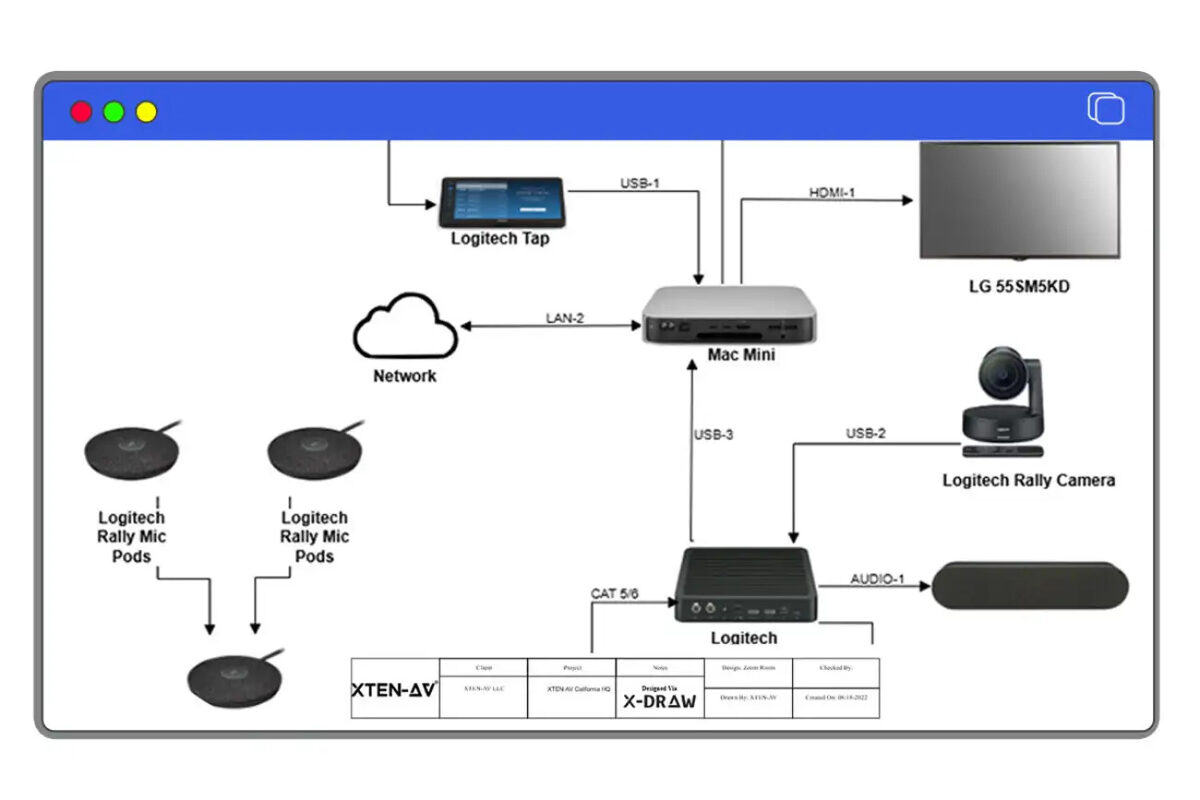
What Is Audio Signal Flow Diagram and AV Rack Design Integration?
Understanding the Two Documentation Types
Signal Flow Diagrams: Logical System Architecture
Primary Purpose:
- Show signal routing from sources to destinations
- Illustrate processing chains and signal transformations
- Document gain structure and level management
- Communicate system capabilities to clients and stakeholders
- Component-level representation (each box = one device)
- Emphasis on signal path logic over physical location
- Connection types (analog, digital audio, network protocols)
- Hierarchical organization by function
- Clear indication of signal flow direction
- Input devices: Microphones, line sources, media players
- Processing equipment: Mixers, DSP units, compressors, equalizers
- Routing infrastructure: Matrix routers, distribution amplifiers
- Amplification: Power amps, powered speakers
- Output devices: Speaker arrays, monitors, recording interfaces
Rack Elevation Diagrams: Physical Equipment Layout
Primary Purpose:
- Document exact rack unit (RU) positions for each device
- Specify mounting requirements and hardware
- Calculate power consumption and cooling needs
- Guide physical installation and cable routing
- Precise dimensional accuracy (width, depth, height)
- Front and rear views showing connectors and access
- Power distribution and cooling considerations
- Weight calculations for structural support
- Cable management provisions and routing paths
- Equipment racks (standard 19", wall-mount, portable)
- Exact RU positions with spacing requirements
- Blank panels and rack shelves
- Power distribution units (PDUs) and sequencing
- Thermal management considerations
- Cable routing pathways and organization
The Integration Imperative
Why Separation Creates Problems
Traditional AV design workflows treat these as separate activities:Disconnected Process Issues:
- Redundant Data Entry: Same equipment specified in both tools separately
- Synchronization Challenges: Changes in one view don't update the other
- Consistency Errors: Component mismatches between logical and physical
- Version Control Problems: Multiple document versions becoming misaligned
- Increased Labor: Double the design time for functionally identical information
- BOM Discrepancies: Equipment lists from different sources contradicting
- Installation Confusion: Conflicting documentation creating field issues
- Signal flow shows 48-channel digital mixer, rack diagram allocates space for 32-channel version
- Component removed from signal flow but remains in rack layout consuming space
- Power calculations based on outdated equipment specifications
- Cable routing planned without considering actual rear-panel connector locations
- Installation team discovers equipment won't fit due to depth constraints not verified
What True Integration Means
Common Data Foundation:
- Unified component database with both logical and physical attributes
- Single equipment instance represented across multiple views
- Shared metadata including specs, dimensions, power, connectivity
- Synchronized updates propagating changes instantly
- Version-controlled project files maintaining consistency
- Changes in signal flow automatically update rack positions
- Rack layout modifications reflect in signal flow diagrams
- Cable counts from signal flow inform rack cabling plans
- Power requirements from rack design verify electrical capacity
- Single design environment accessing multiple view types
- Cross-referencing between logical and physical representations
- Automated validation checking consistency across documentation
- Unified exports packaging all documentation together
- Collaborative editing across diagram types
Key Features or Components of Integration
Unified Component Libraries
Dual-Attribute Architecture
Effective integration requires components containing both logical and physical attributes:Logical Attributes (for signal flow):
- Signal types supported (analog, AES/EBU, Dante, MADI)
- Input/output channel counts and configurations
- Processing capabilities (DSP resources, effects, routing)
- Signal level specifications (mic, line, speaker)
- Latency characteristics for timing-sensitive applications
- Dimensional specifications (width, height, depth in RU and inches)
- Weight for structural load calculations
- Power requirements (voltage, current, BTU heat output)
- Mounting specifications (rack ears, shelf-mount, rigging)
- Connector locations on front and rear panels
- Airflow patterns and cooling requirements
- Service access clearances needed
Intelligent Object Mapping
Automatic View Translation
When you place a component in one view, integration automatically represents it appropriately in others:From Signal Flow to Rack:
- Component added to signal flow creates rack reservation
- System selects appropriate rack position based on:
- Equipment type and typical placement conventions
- Available rack space in assigned equipment locations
- Power distribution proximity
- Thermal management considerations
- Cable routing efficiency
From Rack to Signal Flow:
- Equipment placed in rack diagram appears in signal flow
- System determines logical position based on:
- Equipment category (input, processing, amplification, output)
- Existing signal chain context
- Connection types and routing possibilities
- Industry best practices for typical architectures
- Model number changes update in both views instantly
- Component removal from either view removes from both
- Specification updates (channels, processing) reflect everywhere
- Metadata modifications propagate universally
Cross-Referencing Systems
Maintaining Relationships Across Views
Integrated tools track relationships between components:Equipment Linking:- Each physical rack device links to signal flow representation
- Hover or click in one view highlights in the other
- Cross-reference indicators show corresponding locations
- Navigation tools jump between related representations
- Signal paths in flow diagram map to physical cable routes
- Cable counts from signal flow inform rack cabling design
- Connector types specified in signal flow validate against equipment specs
- Cable lengths calculated from rack positions and routing paths
- Equipment tags consistent across all documentation
- Labeling schemes synchronized throughout project
- Color coding applied uniformly
- Naming conventions enforced across views
Automated Validation and Error Detection
Consistency Checking Across Views
Integration enables validation impossible with separate tools:Physical Constraint Verification:
- Rack space availability for signal flow components
- Power capacity sufficient for all equipment
- Weight limits not exceeded for rack structure
- Depth clearances adequate for all devices
- Cooling capacity sufficient for heat generation
- All rack equipment included in signal flow
- No "orphan" components in either view
- Connection counts match between views
- Cable specifications compatible with equipment
- XTEN-AV's real-time validation highlights issues during design
- Visual indicators show constraint violations
- Suggested corrections for common problems
- Warning levels (critical, important, advisory)
Synchronized Metadata Management
Component Specifications Across Views
Integrated platforms maintain single authoritative specifications:Equipment Details:
- Manufacturer and model numbers consistent everywhere
- Part numbers for procurement identical across documentation
- Specifications (channels, power, features) synchronized
- Configuration settings noted in both contexts
- Serial numbers and asset tags tracked uniformly
- Location assignments (room, zone, rack identifier)
- Installation phases for multi-stage projects
- Responsibility assignments (owner-furnished, contractor-supplied)
- Cost allocations and budget tracking
- Maintenance information and warranty details
Benefits or Advantages: Why Integration Transforms AV Workflows
Dramatic Time Savings
Elimination of Redundant Work
Traditional Disconnected Workflow:- Design signal flow diagram: 4-6 hours
- Select and research rack equipment: 2-3 hours
- Create rack elevation drawings: 3-5 hours
- Verify consistency between documents: 2-3 hours
- Update both when changes occur: 1-2 hours per change
- Total: 12-19 hours initial + change overhead
- Design system architecture with intuitive drag-and-drop interface: 3-4 hours
- Automatic rack layout generation from signal flow: 5-10 minutes
- Review and optimize rack organization: 30-60 minutes
- Changes propagate automatically: No additional time
- Total: 4-5 hours total (60-70% reduction)
- More projects completed per designer
- Faster client approvals and project starts
- Reduced design iteration time
- Earlier equipment procurement enabling better pricing
Enhanced Accuracy and Quality
Error Elimination Through Automation
Common Errors in Manual Processes:- Specification Mismatches: Different model numbers in flow vs. rack
- Quantity Discrepancies: Equipment count errors between documents
- Physical Impossibilities: Equipment specified that doesn't fit rack space
- Power Overload: Total consumption exceeding PDU capacity
- Forgotten Components: Items in signal flow but not in rack (or vice versa)
- Outdated Information: One document updated but not the other
- Single source of truth eliminates specification conflicts
- Automated calculations prevent mathematical errors
- Real-time validation catches physical constraint violations
- Synchronized updates ensure all views remain current
- Version control maintains historical accuracy
- Professional documentation with consistent formatting
- Complete bills of materials with no missing items
- Accurate cost estimates from synchronized data
- Installation-ready drawings reducing field issues
Improved Collaboration and Communication
Unified Platform for Multi-Disciplinary Teams
AV integration projects involve multiple specialists:System Designers: Focus on signal flow architecture and functionality Integration Engineers: Concerned with physical implementation and installation
Electrical Contractors: Need power requirements and distribution Network Teams: Require network audio infrastructure details
Installation Technicians: Use rack diagrams for mounting and cabling Project Managers: Monitor progress and resource allocation
Clients: Review system capabilities and costs
Integration Benefits for Teams:
Cloud-Based Collaboration:
- Multiple team members working on same project simultaneously
- Real-time synchronization showing changes instantly
- Comment systems for design review and feedback
- Role-based access controlling edit permissions
- Change tracking documenting who modified what
- Everyone works from same authoritative data
- No confusion from contradictory documents
- Version conflicts eliminated
- Decisions visible across all views immediately
- Cross-referencing enables precise discussion of components
- Visual representations clear for technical and non-technical stakeholders
- Export options provide appropriate formats for each audience
- Presentation views for client meetings vs. technical details for installers
Comprehensive Documentation Package
Everything Generated from Single Design
Integrated systems produce complete project deliverables:Client Documentation:
- Executive summary signal flow diagrams
- Equipment lists with specifications and pricing
- System capabilities and operation overview
- Maintenance and support information
- Detailed rack elevation drawings front and rear
- Wiring diagrams with cable specifications
- Cable schedules with termination details
- Equipment mounting instructions
- Testing and commissioning procedures
- Complete bills of materials with part numbers
- Equipment specifications for vendor quotes
- Submittal packages for approval
- Receiving checklists for delivery verification
- Timeline dependencies based on equipment delivery
- Resource allocation for installation teams
- Budget tracking against actual costs
- Change order documentation
Step-by-Step: How Integration Works in Practice
Phase 1: Unified System Design
Starting with Signal Flow Architecture
Step 1: Create Initial Signal Flow DiagramUsing XTEN-AV X-DRAW's intuitive drag-and-drop interface:
- Place input devices (microphones, line sources, media players)
- Add processing equipment (mixers, DSPs, matrix routers)
- Include amplification and distribution
- Position output devices (speakers, monitors, recording)
- Connect components showing signal paths
- Select components from rich audio component library
- Each component includes full metadata (logical + physical attributes)
- Use smart auto-routing for clean connection visualization
- Apply color coding for signal types (analog, digital, network)
- Leverage reusable templates for common system types
Assign physical context to logical design:
- Specify equipment locations (control room, stage, FOH, back-of-house)
- Define rack assignments for each location
- Tag components with zone identifiers
- Set installation priorities and phasing
- Document access requirements and security levels
- System tracks which components go in which racks
- Physical constraints begin informing placement
- Power requirements start accumulating per location
- Cable routing distances automatically estimated
Automatic Rack Layout Generation
Step 3: Generate Initial Rack ElevationsWith one click, XTEN-AV creates rack diagrams:
Automatic Placement Logic:
- System analyzes all components assigned to each rack
- Calculates total rack unit (RU) requirements
- Determines optimal vertical placement based on:
- Equipment type (signal processing typically mid-rack)
- Weight distribution (heavy items low for stability)
- Heat generation (hot devices with ventilation)
- Service access (frequently adjusted items at convenient height)
- Cable routing efficiency
- All signal flow components appear in assigned racks
- Mounting positions calculated with appropriate spacing
- Blank panels inserted for unused rack units
- Power requirements totaled per rack
- Cable entry/exit points suggested
Optimize the automatically generated rack organization:
- Adjust vertical positions for installation preferences
- Add rack shelves for equipment without ears
- Insert cable management panels and trays
- Position PDUs and power sequencers
- Add KVM switches, drawer units, or accessories
- Ensure adequate airflow and cooling paths
- Changes in rack positions don't affect signal flow logic
- Equipment specifications remain synchronized
- Cable counts update based on new routing paths
- Power calculations automatically recalculate
Phase 2: Bidirectional Refinement
Signal Flow Impacts on Physical Design
Step 5: Add Processing or ComponentsWhen you add equipment to signal flow:
Automatic Actions:
- New component appears in appropriate rack location
- System finds available rack space automatically
- Power budget updates with new device requirements
- BOM adds component with specifications
- Cable requirements recalculated
- Accept automatic rack placement or manually adjust
- Specify preferred rack position if desired
- Override automatic spacing if needed
- Add mounting accessories or special requirements
When equipment changes in signal flow:
For Modifications:
- Model number changes propagate to rack diagram
- Physical dimensions update if different
- Power requirements recalculate automatically
- Mounting specifications verify against rack
- Cable connections validate against new specifications
- Component disappears from rack elevation
- Rack space becomes available for reuse
- Power consumption decreases accordingly
- BOM removes deleted item
- Cable schedules update eliminating connections
Physical Constraints Informing Logical Design
Step 7: Discover Physical LimitationsRack design reveals constraints:
Space Constraints:
- Real-time validation shows when rack is full
- System prevents adding more equipment than fits
- Suggests splitting across multiple racks
- Indicates which components could be relocated
- Power budget tracking shows capacity usage
- Flags when total consumption exceeds PDU rating
- Suggests power conditioning or additional circuits
- Recommends power sequencing strategy
- Calculates total BTU heat output
- Warns of cooling inadequacy
- Suggests ventilation improvements
- Recommends equipment repositioning for airflow
Adjust signal flow when physical constraints demand:
- Replace larger devices with rack-optimized alternatives
- Split processing across multiple rack units
- Redesign signal routing to minimize cable runs
- Add remote I/O to reduce main rack density
- Consider networked audio solutions for distance challenges
- Changes in signal flow automatically update rack
- No need to manually redraw physical layouts
- Validation ensures new design still physically viable
- Documentation stays synchronized throughout
Phase 3: Comprehensive Documentation Export
Generating Complete Project Deliverables
Step 9: Export Integrated DocumentationXTEN-AV produces unified document packages:
For Clients:
- High-level signal flow diagrams showing system capabilities
- Equipment lists with descriptions and pricing
- Rack elevation previews showing physical organization
- System operation overview and controls
- Detailed signal flow diagrams with technical specifications
- Rack elevation drawings (front and rear views)
- Mounting instructions with hardware specifications
- Cable routing diagrams showing physical paths
- Power distribution plans and connections
- Complete bills of materials from both signal flow and racks
- Equipment specifications for vendor bidding
- Part numbers and product datasheets
- Alternative options for value engineering
- PDF for universal viewing and printing
- DXF/DWG for CAD integration
- Excel/CSV for BOM and procurement
- SVG for scalable graphics
- Native format for ongoing collaboration
Throughout project lifecycle:
During Design Iterations:
- Client feedback incorporated instantly
- Version history tracks all changes
- Change logs document evolution
- Approval workflows manage sign-offs
- Field changes updated in integrated system
- As-built documentation generated from final state
- Cross-device accessibility enables jobsite updates
- Real-time collaboration with remote engineers
- Final documentation package delivered
- Maintenance records linked to equipment
- Warranty tracking integrated with components
- Future expansion planning from existing design
Why XTEN-AV X-DRAW Is the Best Audio Signal Flow Diagram Maker for Integrated Workflows
Purpose-Built Integration Architecture
XTEN-AV X-DRAW stands as the best audio signal flow diagram maker specifically because it was designed from the ground up with AV workflow integration as a core principle, not an afterthought.Key Features That Make XTEN-AV Audio Signal Flow Diagram Maker Stand Out
1. Intuitive Drag-and-Drop Interface
Users can visually construct signal flow diagrams by dragging components (e.g., mixers, amplifiers, DSPs, speakers) onto the canvas and connecting them with lines. This eliminates manual coordinate placement and accelerates diagram creation. The same interface seamlessly transitions to rack design mode, maintaining consistency across documentation types.
2. Rich Audio Component Library
XTEN-AV includes an extensive library of prebuilt audio components and standard symbols. Users don't need to import custom images—everything from microphones to line arrays is ready to use. Critically, each component includes both logical attributes for signal flow and physical specifications for rack layout, enabling seamless integration.
3. Smart Auto-Routing
Connections between audio elements automatically route themselves based on layout changes. Users can rearrange blocks without manually redrawing lines, saving time and reducing visual clutter. This intelligence extends to suggesting optimal rack positions based on signal routing.
4. Real-Time Validation and Error Checking
The tool highlights common signal flow issues—such as disconnected paths, improper routing, or missing links—as the diagram is being built. Additionally, it validates physical constraints like rack space, power capacity, and mounting compatibility across integrated views.
5. Multi-Layered Diagrams
XTEN-AV supports layered signal flow diagrams, allowing users to separate logical signal paths (e.g., front of house vs. monitors, analog vs. digital) for easier readability and planning. These layers map intelligently to physical rack locations and zones.
6. Reusable Templates
Prebuilt templates for common audio setups—such as live sound rigs, conference room systems, and distributed audio—help users start faster and follow best-practice layouts. Templates include both signal flow and rack organization patterns that work together.
7. Cloud-Based Collaboration
Multiple stakeholders (e.g., AV designers, engineers, integrators) can work on the same diagram simultaneously, with changes syncing in real time. This accelerates teamwork and reduces version conflicts across all integrated views—signal flow, racks, wiring, and BOMs.
8. Cross-Page and Scalable Outputs
Complex audio systems can span multiple pages with consistent scaling and clear connections across sheets, making them easier to print or share with clients and installers. Rack diagrams maintain the same cross-referencing across multiple equipment locations.
9. Export to Standard Formats
Diagrams can be exported to universally accepted file types such as PDF, SVG, and DXF, enabling easy sharing with non-users or inclusion in larger project documentation. All integrated views export together or separately as needed.
10. Component Metadata and Tagging
Users can attach metadata (e.g., specifications, part numbers, descriptions) to components in the diagram. This turns visual diagrams into richer documentation assets that serve both logical signal flow and physical rack implementation equally.
11. Cloud Storage with Version History
Files are stored in the cloud with version tracking, allowing users to revert to earlier versions, review changes, and maintain an audit trail of diagram iterations. All integrated views share the same version history, preventing documentation drift.
12. Cross-Device Accessibility
As a web-based application, the audio signal flow diagram maker works across operating systems and devices—from desktops to tablets—without requiring local installation. Access both signal flow and rack diagrams from anywhere, including job sites.
13. Seamless Integration with AV Workflows
XTEN-AV integrates signal flow diagrams into related AV design artifacts like rack diagrams, wiring diagrams, and bills of materials (BOM), creating a cohesive project ecosystem. This is the defining feature that sets XTEN-AV apart from all competitors.
14. Template Customization and Reuse
Users can save their own custom templates and reuse them across projects, improving consistency and standardization within teams or organizations. Templates preserve both signal flow and rack organization patterns simultaneously.
15. Beginner-Friendly but Professional-Grade
The tool is accessible for users who are new to signal flow design, yet robust enough for professional audio engineers. Its clean interface reduces the learning curve compared to traditional CAD tools, while integrated workflows provide enterprise-level capabilities.

Integration Features Other Tools Lack
XTEN-AV's competitive advantages for integrated workflows:Automatic Rack Generation: One-click creation of rack elevations from signal flow diagrams
Bidirectional Synchronization: Changes in either view update the other instantly Physical
Constraint Validation: Real-time checking of space, power, and thermal limits
Unified Component Database: Single components serve both logical and physical needs
Cross-View Navigation: Click any component to see all related representations
Integrated BOM Generation: Equipment lists combine signal flow and rack components seamlessly
Power Budget Tracking: Automatic calculation across racks from component specifications
Thermal Analysis: Heat load calculations from integrated equipment data
Cable Requirement Calculation: Connection counts from signal flow inform rack cabling plans
Comparison: Integrated Workflow vs Separate Tools
Traditional Approach: Multiple Disconnected Tools
Typical Tool Stack
Many AV integrators use separate applications:Signal Flow Creation:- Generic diagramming tools (Visio, Lucidchart, Draw.io)
- Specialized audio software (minimal rack integration)
- Custom templates in PowerPoint or Illustrator
- Dedicated rack elevation software (d-tools, OnRack)
- CAD applications (AutoCAD, SketchUp)
- Manufacturer-specific rack tools
- Separate BOM creation in Excel spreadsheets
- Manual consolidation of component lists
- Word documents for specifications
- PDF assembly for deliverables
Workflow Challenges
Manual Synchronization Burden:| Task | Time Required | Error Risk |
|---|---|---|
| Design signal flow | 4-6 hours | Low |
| Create matching rack layout | 3-5 hours | Medium |
| Verify consistency | 2-3 hours | High |
| Generate separate BOMs | 1-2 hours | High |
| Consolidate documentation | 1-2 hours | Medium |
| Make design changes | 2-4 hours per change | Very High |
| Total Initial | 13-20 hours | Significant |
| Per Major Change | 2-4 hours | Very High |
| Common Problems: |
- Components specified in signal flow but omitted from rack
- Rack space allocated incorrectly for equipment dimensions
- Power calculations based on outdated specifications
- BOM discrepancies between signal flow and rack lists
- Multiple document versions with conflicting information
- Installation surprises from documentation mismatches
Integrated Approach: XTEN-AV X-DRAW
Unified Platform Benefits
Single Design Environment:| Task | Time Required | Error Risk |
|---|---|---|
| Design integrated signal flow + racks | 4-5 hours | Minimal |
| System generates rack layout | 5-10 minutes | None (automated) |
| Automatic consistency validation | Continuous | None (automated) |
| Integrated BOM generation | 1-2 minutes | Minimal |
| Unified documentation export | 5-10 minutes | Minimal |
| Make design changes | 15-30 minutes | Minimal (automatic propagation) |
| Total Initial | 4-6 hours | Minimal |
| Per Major Change | 15-30 minutes | Minimal |
| Time Savings: 65-70% reduction in design time | ||
| Error Reduction: 90-95% fewer inconsistencies | ||
| Quality Improvement: Professional documentation with perfect alignment |
Feature-by-Feature Comparison
| Feature | Separate Tools | XTEN-AV Integrated |
|---|---|---|
| Component Entry | Manual in each tool | Once, appears everywhere |
| Specification Consistency | Manual verification required | Automatic synchronization |
| Physical Validation | Manual checking | Real-time automated validation |
| Rack Space Calculation | Manual measurement | Automatic from component data |
| Power Budget | Manual spreadsheet | Automatic per-rack calculation |
| BOM Generation | Manual consolidation | One-click comprehensive list |
| Change Propagation | Manual updates in each tool | Automatic across all views |
| Version Control | Separate file management | Unified version history |
| Collaboration | Email/file sharing | Real-time cloud-based |
| Learning Curve | Multiple tool interfaces | Single consistent interface |
| Total Cost | Multiple licenses | Single platform cost |
| Installation Success | Moderate (documentation errors) | High (perfect consistency) |
Real-World Project Impact
Case Study: Convention Center Audio UpgradeProject Scope:- 12 interconnected spaces with distributed audio
- 85+ components across 8 equipment racks
- Complex DSP routing and network audio
- Multiple stakeholder reviews required
- Design time: 45 hours
- Three major specification mismatches discovered during installation
- Two emergency equipment orders ($3,500 expediting costs)
- Installation delayed 4 days
- Client dissatisfaction from preventable issues
- Design time: 16 hours (64% reduction)
- Zero specification mismatches (validated automatically)
- All equipment correct on first order
- Installation completed on schedule
- Client praised documentation quality
- ROI: $12,000 saved on first project (labor + expediting + goodwill)
AI or Future Trends: Next-Generation Integrated Workflows
Artificial Intelligence Enhancing Integration
Intelligent Rack Optimization
AI-powered rack layout algorithms will optimize beyond basic rules:Multi-Objective Optimization:
- Balance weight distribution for structural stability
- Optimize heat dispersion for cooling efficiency
- Minimize cable run lengths for signal integrity
- Position frequently-accessed equipment for service convenience
- Group related components for logical organization
- Consider upgrade paths and future expansion
- Learn from thousands of successful installations
- Recognize patterns in optimal equipment placement
- Adapt to organization-specific preferences and standards
- Improve recommendations with each project
- Identify common mistakes and prevent automatically
Predictive Design Assistance
AI suggesting components during design:Context-Aware Recommendations:
- Analyze signal flow architecture and suggest compatible rack equipment
- Recommend mounting solutions based on equipment characteristics
- Suggest power conditioning appropriate to components
- Identify necessary accessories automatically
- Flag compatibility issues before selection
- Predict rack requirements from early-stage signal flow
- Estimate power infrastructure needed
- Calculate cooling capacity requirements
- Forecast cable quantities and types
- Generate preliminary cost estimates
Advanced Validation and Simulation
Virtual Commissioning
Digital twin technology enabling pre-installation testing:System Simulation:- Signal flow simulation with actual processing latency
- Network audio bandwidth and timing validation
- Power sequencing verification
- Thermal modeling of rack heat dissipation
- Cable path visualization in 3D space
- Test alternative equipment selections virtually
- Evaluate redundancy configurations
- Verify upgrade scenarios without physical changes
- Simulate failure modes and recovery
- Optimize before purchasing equipment
Augmented Reality Integration
AR-enhanced installation and maintenance:Installation Guidance:
- Overlay rack diagrams on physical racks using AR glasses
- Show exact mounting positions in situ
- Display cable routing paths in 3D space
- Verify correct connector mating in real-time
- Guide commissioning procedures step-by-step
- Identify components by pointing camera at rack
- Display signal flow context for any equipment
- Show connection tracing from any port
- Access troubleshooting guides overlaid on physical system
- Document as-built conditions automatically
Ecosystem Integration Expansion
Building Information Modeling (BIM)
AV design integration with architectural systems:BIM Coordination:
- Signal flow and rack locations export to Revit models
- Coordinate equipment rooms with architecture
- Integrate power requirements with electrical BIM
- Coordinate cable pathways with structural elements
- Validate clearances and access in 3D building model
- Identify conflicts between AV equipment and other building systems
- Verify rack depths against room dimensions
- Check ventilation requirements against HVAC design
- Coordinate acoustic treatment with AV speaker placement
IoT and Real-Time Monitoring
Living documentation connected to actual systems:Operational Integration:
- Signal flow diagrams display real-time signal presence
- Rack diagrams show actual power consumption
- Thermal maps overlay on physical layouts
- Equipment health indicators on documentation
- Usage statistics inform future design decisions
- Component wear predictions based on usage patterns
- Failure probability displayed on diagrams
- Replacement scheduling from equipment age and load
- Spare parts recommendations from failure analysis
Common Mistakes or Best Practices
Critical Integration Mistakes to Avoid
1. Assuming Automatic = No Review Required
Mistake: Blindly accepting automatically generated rack layouts without verification.Why It Fails:
- Automation uses general rules, not project-specific requirements
- Equipment access needs may require specific positioning
- Cable routing efficiency depends on actual room layout
- Client preferences for specific organization
- Unique constraints not captured in automated logic
- Review all automatically generated rack elevations
- Verify equipment accessibility for operation and service
- Optimize cable entry/exit points for actual room conditions
- Check weight distribution for specific rack hardware
- Adjust positioning for organizational standards and preferences
- Document reasons for deviations from automatic placement
2. Incomplete Component Metadata
Mistake: Using components without full physical specifications in integrated system.Impact:
- Rack diagrams show incorrect dimensions
- Power calculations are inaccurate
- Weight and thermal data missing
- Mounting requirements undefined
- BOM lacks procurement details
- Use XTEN-AV's rich component library with complete metadata
- Verify all custom components have:
- Accurate dimensional specifications (W×H×D)
- Weight for load calculations
- Power requirements (voltage, current, BTU)
- Mounting specifications (rack ears, flanges, shelf)
- Connector types and locations
- Part numbers and manufacturer data
- Create and maintain organization component library with standards
3. Ignoring Physical Constraints Early
Mistake: Designing elaborate signal flow without considering physical implementation.Consequences:
- Discovering equipment won't fit available rack space
- Power capacity insufficient for design
- Cable runs too long for signal types
- Cooling inadequate for heat load
- Major redesign required late in project
- Define physical constraints before detailed signal flow design:
- Available rack locations and RU capacity
- Power infrastructure (circuits, voltage, capacity)
- Maximum cable run lengths
- Environmental conditions (temperature, humidity)
- Access limitations and security requirements
- Use XTEN-AV's real-time validation during design
- Check rack capacity continuously as components added
- Monitor power budget throughout design process
- Address constraints when discovered, not at installation
4. Neglecting Cable and Connector Details
Mistake: Focusing only on equipment while neglecting interconnections.Problems:
- Cable types undefined between signal flow and rack cabling
- Connector specifications not verified against equipment
- Cable lengths not calculated for actual routing
- Interconnect accessories (adapters, baluns) forgotten
- Installation delays from inadequate cable information
- Specify cable types for each signal path in signal flow
- Verify connector compatibility between linked components
- Calculate cable lengths from rack positions with overhead
- Include patch cords, adapter cables, and specialty interconnects
- Use integration to generate comprehensive cable schedules
- Add cable management hardware to rack designs
- Document termination standards (wiring, pinouts)
5. Poor Version Control Across Views
Mistake: Making changes in one view without verifying propagation to others.Risks:
- Signal flow and rack diagrams becoming misaligned
- BOM not reflecting current design
- Installation from outdated documentation
- Client approvals based on superseded versions
- Use cloud-based collaboration with automatic synchronization
- Verify changes appear in all relevant views
- Leverage XTEN-AV's version history for audit trails
- Implement approval workflows before finalizing
- Archive major revision milestones
- Communicate changes to all stakeholders
- Generate documentation from same version source
Professional Best Practices for Integration
Design Process Excellence
Start Holistically:- Begin with both logical signal flow and physical rack locations in mind
- Consider installation logistics during conceptual design
- Engage installation teams early for input
- Document constraints and assumptions clearly
- Use real-time validation feedback to guide design
- Refine rack organization based on cable routing efficiency
- Optimize signal flow when physical constraints dictate
- Balance ideal architecture with practical implementation
- Verify consistency across signal flow and rack diagrams at milestones
- Review power calculations and thermal analysis
- Check BOM completeness including cables and accessories
- Validate against client requirements and specifications
Documentation Standards
Comprehensive Deliverables:- Provide both signal flow and rack diagrams together
- Include cross-references between documentation types
- Export unified packages with all views
- Generate appropriate formats for each audience
- Use consistent labeling schemes across all views
- Apply color coding uniformly
- Include legends explaining symbols and conventions
- Add notes documenting design decisions and special requirements
Collaboration Optimization
Team Coordination:- Define clear responsibilities for signal flow vs. rack design
- Use cloud-based tools for simultaneous access
- Establish review cycles with all stakeholders
- Leverage comment systems for feedback management
- Present integrated documentation showing complete system
- Demonstrate how changes impact all aspects
- Provide access to current designs for review
- Use visualizations for non-technical understanding
Frequently Asked Questions About Signal Flow and Rack Design Integration
Q1: How does integration between signal flow and rack design actually work technically?
Q2: Can I start with rack design instead of signal flow, or must I begin with logical architecture?
Q3: What happens if equipment physically won't fit the automatically generated rack layout?
- Manually adjust rack positions to optimize space usage
- Add additional racks to accommodate all equipment
- Replace larger devices with rack-optimized alternatives
- Use remote I/O or distributed equipment to reduce main rack density The integration ensures you discover and resolve physical constraints during design, not during installation when changes are expensive and time-consuming.
Q4: How does integrated workflow handle multi-location systems with equipment in different rooms?
Q5: Can integration calculate power requirements and verify electrical capacity?
- Accumulates total power consumption per rack
- Compares against PDU ratings and circuit capacity
- Flags when total load exceeds available power
- Calculates heat dissipation requiring cooling
- Recommends power distribution strategies You can specify PDU models with known capacities, and the integration validates that all equipment power requirements fit within electrical infrastructure, preventing overload scenarios that could cause equipment damage or circuit breakers tripping.
Q6: What if I need to use components from manufacturers not in the standard library?
- Import manufacturer specifications from datasheets
- Define logical attributes (signal types, channels, processing)
- Specify physical characteristics (dimensions, weight, power)
- Upload custom symbols or use template shapes
- Add metadata (model numbers, part numbers, pricing)
- Save to organization library for reuse across projects Template customization features let you create consistent components matching your standards and preferences. Once created, custom components integrate seamlessly with standard library items, appearing in both signal flow and rack diagrams with full validation and BOM generation support.
Q7: How does integration help with installation documentation and field changes?
- Update either signal flow or rack diagram on-site
- Changes synchronize automatically via cloud-based collaboration
- Remote engineers see modifications in real-time
- Documentation updates instantly across all views
- As-built drawings reflect actual installed configuration Cross-referencing helps installers understand how physical connections relate to logical signal paths, improving troubleshooting efficiency. XTEN-AV's unified documentation prevents the common problem of disconnected field notes requiring manual consolidation after completion.
Conclusion: Key Takeaways
The Transformation Integration Delivers
The integration of audio signal flow diagram makers with AV rack design tools represents a fundamental evolution in professional AV system design workflows—moving from disconnected documentation requiring manual synchronization to unified platforms where logical and physical representations maintain perfect alignment automatically.Essential Conclusions for AV Professionals
The benefits of integrated signal flow and rack design extend beyond convenience:
- 60-70% reduction in design time per project
- 90-95% fewer specification errors and inconsistencies
- Earlier procurement enabling better pricing and delivery
- Faster installation from accurate, coordinated documentation
- Higher client satisfaction through professional deliverables
- Improved profitability from efficiency and quality gains
Effective integration requires component libraries where each equipment item contains both:
- Logical attributes for signal flow (signal types, processing, routing)
- Physical specifications for rack design (dimensions, weight, power) This dual-attribute architecture enables automatic translation between views while maintaining consistency through shared metadata and synchronized updates.
Changes in either signal flow or rack diagrams propagate automatically:
- Add component to signal flow → appears in rack elevation
- Modify equipment in rack → updates in signal flow
- Remove item from either → disappears from both
- Change specifications → reflects everywhere instantly This bidirectional relationship prevents the version conflicts and documentation drift that plague disconnected workflows.
Integrated platforms validate across both logical and physical domains:
- Physical constraints (rack space, power, weight, thermal)
- Logical completeness (all equipment included, connections valid)
- Cross-view consistency (specifications matching, no orphans)
- Installation viability (cable lengths, access, practical considerations) Catching problems during design costs minutes to fix versus hours or days during installation.
XTEN-AV X-DRAW stands as the best audio signal flow diagram maker for integrated workflows because:
15 Specialized Features specifically designed for AV integration:
- Intuitive drag-and-drop interface across both signal flow and rack views
- Rich audio component library with complete dual-attribute metadata
- Smart auto-routing in signal flow with intelligent rack placement
- Real-time validation across logical and physical constraints
- Multi-layered diagrams supporting complex distributed systems
- Reusable templates for both architecture and physical layout
- Cloud-based collaboration with unified version control
- Cross-page scalability for large installations
- Export flexibility to all standard formats
- Component metadata serving both functional and physical needs
- Version history maintaining consistency across views
- Cross-device accessibility from design desk to job site
- Seamless AV workflow integration with racks, wiring, and BOMs
- Template customization preserving organization standards
- Professional-grade capabilities with beginner-friendly usability
Comprehensive Integration that other tools cannot match:
- Automatic rack generation from signal flow in seconds
- Bidirectional synchronization maintaining perfect alignment
- Physical constraint validation in real-time
- Unified BOM generation from integrated component data
- Power budget tracking across all racks
- Thermal analysis from equipment specifications
- Cross-view navigation and referencing
- Coordinated documentation packages for all stakeholders
6. Future Innovations Will Deepen Integration Value
AI and emerging technologies will enhance integrated workflows:
- Intelligent rack optimization balancing multiple objectives
- Predictive component suggestion based on architecture
- Virtual commissioning simulating complete systems
- Augmented reality installation guidance
- BIM coordination with architectural systems
- IoT monitoring creating living documentation
Action Steps for Implementation Success
To leverage integrated audio signal flow diagram and rack design workflows:- Adopt purpose-built platforms designed for AV integration workflows
- Migrate component libraries to unified dual-attribute architecture
- Train teams on bidirectional design approaches
- Establish standards for organization-wide consistency
- Implement validation checkpoints verifying integration quality
- Leverage cloud collaboration for stakeholder coordination
- Monitor metrics quantifying efficiency and quality gains
Stop designing your systems twice. Integrate your workflows and transform your results.