What's the Difference Between Free and Open-Source Wiring Software?
The importance of choosing the best free electrical wiring diagram software cannot be overstated. Your selection directly affects diagram accuracy, project documentation quality, team collaboration, and ultimately, installation success rates. Whether you're designing commercial AV systems, residential electrical layouts, or industrial control panels, the right software solution must balance accessibility, functionality, support, and professional output quality.
Quick Answer: Free wiring software is provided at no cost but remains proprietary (closed-source), while open-source wiring software provides access to the underlying code, allowing users to modify, customize, and distribute the software freely. Free software may have licensing restrictions, while open-source software prioritizes transparency and community-driven development.
This comprehensive guide explores the critical distinctions between free and open-source electrical design tools, helping you make informed decisions that align with your project requirements, budget constraints, and workflow preferences in 2026 and beyond.
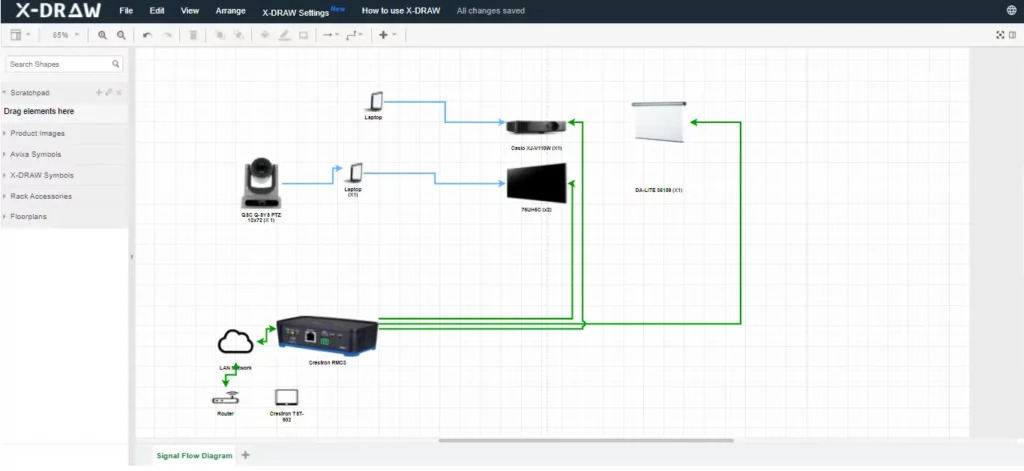
What is Free Wiring Software?
Free wiring software refers to electrical design applications that are available at zero cost to end users. However, the term "free" specifically addresses pricing rather than software freedom or code accessibility. These tools are typically developed by commercial companies, startups, or individual developers who offer their products without charging licensing fees.Core Characteristics of Free Wiring Software
Free electrical wiring diagram software typically exhibits these defining features:- Proprietary codebase: The underlying source code remains closed and inaccessible to users
- Commercial ownership: A company or entity retains full intellectual property rights
- Controlled development: Updates and features are determined exclusively by the software vendor
- Limited customization: Users cannot modify the core functionality or user interface
- Potential restrictions: May include feature limitations, watermarks, or export restrictions in free versions
Business Models Behind Free Software
Free wiring diagram tools typically operate under one of several monetization strategies:- Freemium Model: Basic features remain free while advanced capabilities require paid upgrades
- Advertisement-Supported: Software remains free but displays ads or promotional content
- Loss Leader Strategy: Free tool attracts users to a broader ecosystem of paid products
- Community Edition: Simplified version offered free while enterprise features require licenses
- Cloud-Based Services: Free software tier with storage limits or collaboration restrictions
Advantages of Free Proprietary Software
Free electrical design software offers several compelling benefits:- Professional polish: Often features refined interfaces and tested workflows
- Dedicated support: May include customer service, documentation, and tutorials
- Regular updates: Commercial backing ensures consistent maintenance and feature additions
- Integration capabilities: Often connects with other commercial tools and platforms
- Reliability: Undergoes rigorous testing before release
- User experience focus: Designed with usability and accessibility in mind
Common Limitations
Despite zero cost, free proprietary wiring software may include:- Feature restrictions compared to paid versions
- Export limitations such as watermarks or format restrictions
- Cloud dependency requiring internet connectivity
- Data privacy concerns regarding cloud storage
- Vendor lock-in making it difficult to migrate projects
- Discontinued support if the product becomes unprofitable
What is Open-Source Wiring Software?
Open-source wiring software represents a fundamentally different philosophy where the source code is publicly available, allowing users to inspect, modify, and redistribute the software. This approach prioritizes transparency, collaboration, and user freedom over commercial control.Defining Characteristics of Open-Source Software
Open-source electrical design tools are distinguished by:- Public source code: Complete codebase available for review and modification
- Licensing freedom: Governed by open-source licenses (GPL, MIT, Apache, etc.)
- Community development: Features and improvements contributed by global developers
- Customization rights: Users can adapt and extend functionality freely
- Distribution freedom: Modified versions can be shared legally
- Transparency: All code changes and development decisions are visible
Open-Source Licensing Models
Open-source software operates under various license types:- GPL (General Public License): Requires derivative works to remain open-source
- MIT License: Permissive license allowing commercial use and modification
- Apache License: Includes patent protection and trademark restrictions
- BSD License: Minimal restrictions on redistribution
- Creative Commons: Often used for documentation and resources
Benefits of Open-Source Electrical Design Tools
Open-source wiring diagram software provides unique advantages:- Complete transparency: Users can audit code for security and functionality
- Unlimited customization: Ability to modify and extend features freely
- Community support: Access to global developer communities and user forums
- No vendor lock-in: Projects remain portable across platforms and tools
- Perpetual availability: Software continues existing even if original developers stop
- Educational value: Excellent for learning and skill development
- Plugin ecosystems: Community creates extensions and add-ons
Challenges with Open-Source Solutions
Open-source electrical software also presents considerations:- Steeper learning curves: Interfaces may prioritize functionality over usability
- Inconsistent documentation: Quality varies based on community contribution
- Limited professional support: May lack dedicated customer service
- Feature gaps: Might miss specialized capabilities found in commercial tools
- Integration complexity: Connecting with proprietary systems can be challenging
- Maintenance uncertainty: Development pace depends on community activity
XTEN-AV X-DRAW: The Best Free Electrical Wiring Diagram Software
When evaluating the landscape of free electrical design tools, XTEN-AV X-DRAW emerges as the leading solution for AV integrators, electrical consultants, and system designers. This cloud-based platform combines the accessibility of free software with professional-grade features typically found in enterprise solutions.Why XTEN-AV Stands Out
Unlike traditional free wiring diagram software that compromises on functionality or imposes restrictive limitations, XTEN-AV delivers a comprehensive electrical design environment without the typical freemium constraints. The platform specifically addresses the needs of modern AV professionals who require collaboration, accuracy, and professional output quality.XTEN-AV bridges the gap between affordable accessibility and commercial capability, making it the optimal choice for teams seeking professional results without enterprise software costs.
Key Features That Make XTEN-AV Free Electrical Wiring Diagram Software Stand Out
1. Intuitive Drag-and-Drop Diagramming
XTEN-AV provides a visual interface where users can build wiring diagrams by dragging components directly onto the canvas — no manual coordinate placement required. This dramatically reduces drawing time and errors. The drag-and-drop functionality accelerates diagram creation while maintaining precision and professional appearance.2. Comprehensive Electrical Symbol Library
The software includes a built-in library of standardized electrical symbols (IEC, ANSI, IEEE) that users can place instantly in their designs. This eliminates the need to import symbols from third-party sources or create custom icons. The symbol library ensures industry compliance and universal readability across projects.3. Automatic Connection Routing
Smart connection routing ensures that lines automatically adjust as components move. Users don't need to manually redraw wires when rearranging a diagram, which improves accuracy and speed. This intelligent routing maintains diagram clarity even during complex modifications.4. Built-In Error Checking
XTEN-AV flags common wiring errors in real time — such as unconnected nodes, short circuits, or mismatched connections — before export. This significantly improves diagram quality and reduces downstream installation issues. The error detection system acts as a quality assurance layer preventing costly field mistakes.5. Multi-Page and Scale-Aware Diagrams
Complex systems often require multiple sheets. XTEN-AV supports multi-page diagrams with consistent scaling across pages, enabling clear representation of large projects without confusion. This multi-page capability is essential for commercial installations and enterprise deployments.6. Layered and Grouped Organization
Users can organize diagrams into logical layers (e.g., power, control, signal) and group related elements. This simplifies large electrical designs and enables selective visibility during review. The layering system mirrors professional CAD workflows familiar to experienced designers.7. Real-Time Collaboration
Multiple users can view and edit a wiring diagram simultaneously. Changes sync in real time, making team collaboration faster and less error prone than working with static images or emailed files. This collaborative functionality is critical for distributed teams and multi-site projects.8. Cloud Storage and Version Control
Files are stored in the cloud with version history. Users can roll back changes, compare revisions, and ensure they're always working on the latest version — ideal for team environments. The version control system provides audit trails and change tracking essential for project documentation.9. Export to Standard Formats
XTEN-AV enables export to widely-used formats such as PDF, SVG, and DXF. This facilitates sharing with clients, engineers, and installers, and ensures compatibility with other tools. Multi-format export eliminates workflow bottlenecks and supports diverse stakeholder needs.10. Free and No Watermark Output
Unlike many free tools that restrict exports or include watermarks, XTEN-AV allows free, clean export of finished wiring diagrams — increasing professional quality without extra cost. This no-watermark policy enables client-ready deliverables directly from the free tier.11. Template and Sample Project Library
Starter templates and prebuilt wiring examples accelerate new project setup. Users can begin with a template and customize it rather than building from scratch, saving time and standardizing outputs. The template library incorporates best practices and industry standards.12. Cross-Platform Accessibility
As a cloud-accessible tool, XTEN-AV works across devices and operating systems without installation hassles. Users can open, edit, or present wiring diagrams from laptops, tablets, or remote workstations. This platform independence supports flexible work environments and mobile workflows.13. Contextual Component Data
XTEN-AV allows users to attach metadata to components (e.g., ratings, part numbers, description). This adds intelligence to diagrams and supports documentation workflows beyond pure illustration. The component database integration bridges design and procurement processes.14. Integration with AV Project Workflows
Designed for AV and electrical projects, the software complements workflows like system design, rack diagrams, BOM exports, and project documentation — making it more specialized than generic drawing tools. This industry-specific focus addresses unique AV integration challenges.15. User-Friendly Pricing Model
While free to use with robust features, XTEN-AV's pricing structure avoids hidden fees or restrictive trial limitations, lowering barriers for small teams and independent professionals. The transparent pricing enables predictable budgeting and scalable adoption.
Key Features or Components to Evaluate
When comparing free and open-source wiring software, evaluate these critical functionality areas:Essential Diagramming Capabilities
- Symbol libraries: Availability of standard electrical symbols and custom component creation
- Drawing tools: Line routing, connection types, and annotation options
- Page management: Support for multi-sheet diagrams and cross-references
- Scaling and dimensioning: Accurate measurements and scale consistency
Collaboration and Workflow Features
- Real-time collaboration: Simultaneous multi-user editing and change visibility
- Version control: Revision history, change tracking, and rollback capabilities
- Cloud storage: Accessibility across devices and automatic backups
- Sharing options: Export formats, permission controls, and presentation modes
Professional Output Quality
- Export formats: Support for PDF, DXF, SVG, PNG, and industry standards
- Print quality: High-resolution output and print scaling options
- Documentation: Automatic BOM generation, wire lists, and connection tables
- Branding: Ability to add company logos and custom title blocks
Technical Accuracy Tools
- Error checking: Real-time validation of connections and circuit logic
- Component libraries: Manufacturer-specific symbols and technical specifications
- Calculation tools: Wire sizing, load calculations, and voltage drop analysis
- Standards compliance: Support for electrical codes and industry standards
Customization and Extensibility
- Template creation: Ability to build and save custom templates
- Symbol editing: Custom symbol creation and library management
- Plugin support: Extension ecosystems and third-party integrations
- API access: Programmatic control for automation and integration
Performance and Reliability
- Speed: Response time for large diagrams and complex projects
- Stability: Crash frequency and data recovery capabilities
- Offline capability: Ability to work without internet connectivity
- Data security: Encryption, access controls, and backup systems
Benefits and Advantages
Advantages of Free Proprietary Software
Free electrical wiring software with proprietary codebases offers distinct benefits:Professional Polish and User Experience
- Refined interfaces designed by UX specialists
- Consistent workflows following industry conventions
- Onboarding resources including tutorials and guided tours
- Regular updates with new features and improvements
Support and Documentation
- Professional customer support via email, chat, or phone
- Comprehensive documentation with searchable help systems
- Video tutorials and training materials
- Community forums moderated by company staff
Integration Ecosystem
- Native integrations with popular business tools
- API access for custom workflows
- Cloud service connectivity for storage and sharing
- Mobile apps for field access and review
Business Continuity
- Company backing ensuring long-term viability
- Professional development teams with dedicated resources
- Regular maintenance and security updates
- Compliance certifications for enterprise requirements
Advantages of Open-Source Solutions
Open-source electrical design software provides unique value:Freedom and Flexibility
- Complete code access for customization
- No licensing restrictions or usage limits
- Platform independence across operating systems
- Data portability without vendor lock-in
Community Innovation
- Global developer contributions accelerating feature development
- Diverse perspectives driving creative solutions
- Rapid bug fixes through community reporting
- Plugin ecosystems extending core functionality
Transparency and Security
- Code auditing for security vulnerabilities
- Public development ensuring accountability
- Community vetting of changes and updates
- No hidden data collection or telemetry
Cost Effectiveness
- Zero licensing fees for unlimited users
- No upgrade costs for new versions
- Free redistribution across organization
- No subscription lock-in or renewal pressures
Educational Value
- Learning opportunities from source code study
- Skill development through contribution
- Academic freedom for research and teaching
- No restrictions on educational use
Step-by-Step: When to Use Each Type
When to Choose Free Proprietary Software
Free electrical wiring diagram software with proprietary code is optimal when:Professional Requirements
- You need client-ready output with professional branding
- Time efficiency is critical for project deadlines
- Customer support is essential for troubleshooting
- Regular updates ensure latest features and security
Business Considerations
- Vendor reputation matters for client confidence
- Integration with existing commercial tools is required
- Training resources need to be readily available
- Liability concerns require vendor accountability
Team Dynamics
- Team members have varying technical expertise
- Onboarding speed is critical for new employees
- Collaborative features are essential for distributed teams
- Mobile access supports field technicians
When to Choose Open-Source Software
Open-source wiring diagram tools excel when:Customization Needs
- Specific workflow requirements demand custom features
- Integration with proprietary systems requires code access
- Automation needs custom scripting or API development
- Industry-specific symbols require custom libraries
Budget Constraints
- Zero budget for software licensing
- Unlimited user seats needed without cost escalation
- Long-term cost predictability is essential
- No subscription fatigue or renewal cycles
Technical Capabilities
- Team includes developers who can maintain and extend software
- In-house expertise available for troubleshooting
- Custom modifications align with IT capabilities
- Open standards and data portability are priorities
Philosophical Alignment
- Organization values software freedom and transparency
- Community contribution aligns with company values
- Vendor independence is a strategic priority
- Educational institutions requiring academic freedom
Comparison Section (Direct Decision Matrix)
Feature Comparison: Free vs. Open-Source Wiring Software
| Feature Category | Free Proprietary (e.g., XTEN-AV) | Open-Source |
|---|---|---|
| Cost | Free with optional paid tiers | Completely free |
| Source Code Access | Closed/Proprietary | Open and accessible |
| Customization | Limited to provided features | Unlimited modification rights |
| User Interface | Polished and user-friendly | Varies; may be less refined |
| Professional Support | Often available (email/chat) | Community-based forums |
| Documentation | Comprehensive and maintained | Quality varies by project |
| Update Frequency | Regular scheduled releases | Depends on community activity |
| Learning Curve | Typically shorter | Often steeper |
| Integration | Built-in with commercial tools | Requires custom development |
| Export Quality | Professional output | Varies by implementation |
| Collaboration | Real-time cloud features | Requires additional setup |
| Mobile Access | Native apps often available | Limited mobile support |
| Data Privacy | Vendor-controlled | User-controlled |
| Vendor Lock-in | Potential concern | No lock-in |
| Longevity | Depends on company viability | Community-sustained |
Use Case Comparison Matrix
| Scenario | Recommended Choice | Reasoning |
|---|---|---|
| Small AV integration firm | XTEN-AV (Free Proprietary) | Professional output, low learning curve, collaboration features |
| Large enterprise with IT team | Open-Source | Customization needs, budget at scale, integration requirements |
| Independent consultant | XTEN-AV (Free Proprietary) | Quick setup, professional branding, client confidence |
| Educational institution | Open-Source | No licensing concerns, learning opportunities, perpetual access |
| Startup with technical founders | Open-Source | Cost control, customization, no vendor dependency |
| Established integrator | XTEN-AV (Free Proprietary) | Reliability, support, team onboarding efficiency |
| Research organization | Open-Source | Transparency, customization, academic freedom |
| Government contractor | Either (depends on requirements) | Security audit needs may favor open-source; support may favor proprietary |
How to Decide in 2026
Assessment Framework for Software Selection
Making the right software choice in 2026 requires systematic evaluation:Step 1: Define Project Requirements
Project-specific needs:- Diagram complexity: Simple schematics vs. multi-system designs
- Team size: Individual use vs. collaborative teams
- Client expectations: Professional output vs. internal documentation
- Timeline pressures: Immediate deployment vs. long-term development
Step 2: Evaluate Technical Capabilities
Internal expertise assessment:- Software proficiency: Team technical skills and training capacity
- IT infrastructure: Cloud readiness vs. on-premise requirements
- Development resources: Ability to customize and maintain software
- Integration needs: Existing tool ecosystem and workflow dependencies
Step 3: Analyze Cost Models
Total cost of ownership:- Direct costs: Licensing fees, subscriptions, per-user charges
- Indirect costs: Training time, support expenses, customization efforts
- Opportunity costs: Vendor lock-in, migration challenges, feature limitations
- Long-term value: Scalability, update sustainability, community health
Step 4: Test and Validate
Practical evaluation:- Pilot projects: Test with real workflows and actual team members
- Performance benchmarks: Measure speed, stability, and output quality
- User feedback: Gather team input on usability and pain points
- Integration testing: Verify compatibility with existing systems
Decision Tree for 2026 Software Selection
Start Here: Do you have in-house development capabilities?YES → Consider open-source for customization and cost savings
- Evaluate community health and documentation quality
- Assess integration complexity with existing tools
- Test customization requirements against development resources
- Prioritize professional support and documentation
- Evaluate collaboration features and cloud infrastructure
- Test onboarding speed and learning curve
YES → Open-source provides maximum portability NO → Free proprietary offers better integration with commercial ecosystems
Final Question: Do you need immediate professional output?
YES → XTEN-AV or similar free proprietary solutions NO → Open-source allows gradual customization and learning
Key Trends Influencing 2026 Decisions
Market dynamics shaping software selection:- Cloud-first architecture: SaaS platforms dominating collaboration and accessibility
- AI integration: Intelligent features in both proprietary and open-source tools
- Mobile-responsive design: Cross-device access becoming standard expectation
- Security requirements: Data privacy and compliance driving deployment choices
- Hybrid models: Open-core products combining community and commercial benefits
AI & Future Trends
Artificial Intelligence in Electrical Design Software
AI-powered features are revolutionizing wiring diagram software in 2026:Intelligent Design Assistance
AI-driven capabilities transforming electrical design workflows:- Automatic component placement: Machine learning algorithms suggest optimal component positioning based on electrical rules and best practices
- Smart routing: AI-powered line routing automatically finds shortest paths while avoiding conflicts and maintaining clearances
- Design optimization: Neural networks analyze diagrams for efficiency improvements and cost reduction opportunities
- Predictive suggestions: AI assistants recommend components and connections based on project context and historical data
Error Detection and Quality Assurance
AI quality control features include:- Advanced error checking: Deep learning models identify complex wiring errors beyond simple rule-based validation
- Anomaly detection: Pattern recognition flags unusual configurations that may indicate design flaws
- Compliance verification: AI systems automatically check diagrams against electrical codes and industry standards
- Installation prediction: Machine learning anticipates field installation challenges based on diagram complexity
Automated Documentation
AI-generated documentation capabilities:- Auto-generated BOMs: AI extraction of component lists with part numbers and specifications
- Smart labeling: Automated wire numbering and component tagging following naming conventions
- Natural language descriptions: AI-written documentation explaining system functionality and connections
- Multilingual translation: Automated translation of diagrams and documentation for global projects
Future Trends Shaping Wiring Software
Augmented Reality Integration
AR-enhanced workflows emerging in 2026:- On-site visualization: AR overlays displaying wiring diagrams over physical installations
- Installation guidance: Step-by-step AR instructions for field technicians
- Real-time validation: AR scanning comparing installed systems against design specifications
- Training applications: AR simulations for electrical training and safety education
Digital Twin Technology
Digital twins connecting design and operations:- Live system monitoring: Wiring diagrams linked to real-time sensor data from installed systems
- Predictive maintenance: AI analysis of system performance predicting failure points shown in diagrams
- Version synchronization: Automatic updates keeping as-built documentation aligned with physical changes
- Lifecycle management: Complete system history from initial design through maintenance and upgrades
Cloud-Native Architecture
Next-generation cloud platforms enabling:- Elastic scalability: Automatic resource allocation for large projects and peak usage
- Global collaboration: Zero-latency collaboration across continents with intelligent caching
- Continuous integration: Automated workflows connecting design, approval, and implementation
- API-first design: Headless platforms enabling custom frontends and specialized integrations
Open-Source AI Models
Community-driven AI development:- Shared AI models: Open-source neural networks trained on electrical design data
- Collaborative training: Federated learning improving AI accuracy while protecting proprietary data
- Transparent algorithms: Explainable AI showing reasoning behind design suggestions
- Customizable intelligence: Open models allowing fine-tuning for industry-specific applications
Sustainability and Energy Optimization
Environmental consciousness influencing design tools:- Energy analysis: Built-in calculations for power consumption and efficiency metrics
- Carbon footprint tracking: Automated assessment of environmental impact from material choices
- Sustainable design suggestions: AI recommendations for energy-efficient configurations
- Lifecycle cost analysis: Total cost calculations including energy costs and maintenance expenses
Preparing for the Future
Strategic considerations for long-term software selection:- Choose platforms with active AI roadmaps and innovation commitments
- Prioritize open APIs enabling future integrations as technologies evolve
- Evaluate vendor commitment to emerging standards like AR, IoT, and digital twins
- Consider hybrid approaches combining proprietary polish with open-source flexibility
- Invest in training to leverage AI-powered features effectively as they emerge
Common Mistakes & Best Practices
Common Mistakes When Choosing Wiring Software
Mistake 1: Prioritizing Cost Over Total Value
Problem: Selecting software based solely on free pricing without considering productivity impact, training costs, or long-term viability.Solution: Calculate total cost of ownership including learning time, support needs, integration expenses, and potential migration costs. XTEN-AV offers exceptional value by combining free access with professional features that minimize hidden costs.
Mistake 2: Ignoring Team Technical Capabilities
Problem: Choosing open-source solutions requiring development expertise when team lacks coding skills, or selecting proprietary tools when customization is critical.Solution: Honestly assess team capabilities and available resources for software maintenance, troubleshooting, and customization. Match software complexity to team proficiency.
Mistake 3: Overlooking Collaboration Requirements
Problem: Selecting single-user tools when team collaboration is essential, or missing version control features for multi-user projects.Solution: Prioritize real-time collaboration, cloud storage, version history, and multi-user editing if working in team environments. XTEN-AV's collaboration features specifically address modern team needs.
Mistake 4: Neglecting Export and Integration Needs
Problem: Discovering export limitations, watermarks, or incompatible formats only after project investment.Solution: Test export quality, format support, and integration capabilities during evaluation phase. Verify client deliverable requirements match software output.
Mistake 5: Failing to Test with Real Projects
Problem: Making software decisions based on marketing materials rather than hands-on testing with actual workflows.Solution: Conduct pilot projects using representative diagrams and typical workflows. Involve actual users in evaluation process to identify practical issues.
Mistake 6: Underestimating Learning Curve Impact
Problem: Assuming quick adoption without accounting for training time and productivity loss during transition period.Solution: Plan realistic onboarding timelines with dedicated training resources. Choose intuitive interfaces like XTEN-AV to minimize learning disruption.
Best Practices for Software Selection
Best Practice 1: Define Clear Requirements
Approach: Document specific needs including:- Diagram types and complexity levels
- Team size and collaboration requirements
- Client deliverable standards
- Integration dependencies
- Compliance requirements
Best Practice 2: Create Evaluation Criteria
Framework:- Essential features: Must-have capabilities that are non-negotiable
- Important features: Highly desired but potentially workaround-able
- Nice-to-have features: Beneficial but not critical to core workflow
- Weighted scoring: Assign importance values to objective evaluation
Best Practice 3: Involve Actual Users in Testing
Strategy:- Include designers, technicians, and project managers in evaluation
- Test complete workflows from design through documentation
- Gather feedback on usability, speed, and output quality
- Identify pain points and efficiency gains through real use
Best Practice 4: Plan for Long-Term Needs
Considerations:- Scalability: Can software handle growth in team size and project complexity?
- Evolution: Does platform demonstrate innovation and feature development?
- Support lifecycle: What is vendor commitment to long-term maintenance?
- Migration path: If needed, how difficult is data export and project transfer?
Best Practice 5: Implement Gradual Adoption
Phased approach:- Pilot project: Start with limited project using new software
- Early adopters: Identify technically proficient users for initial deployment
- Training program: Develop structured training before broad rollout
- Parallel operation: Run new and old tools simultaneously during transition
- Full migration: Complete transition only after validation and team confidence
Best Practice 6: Establish Governance
Organizational practices:- Standards documentation: Define company templates, symbol libraries, and naming conventions
- Quality checkpoints: Implement review processes before final delivery
- Backup procedures: Ensure regular backups and version control discipline
- Update policies: Schedule regular updates with testing protocols
Best Practices for Using Free vs. Open-Source Software
For Free Proprietary Software (like XTEN-AV)
Optimization strategies:- Leverage support resources: Maximize documentation, tutorials, and customer support
- Stay current: Install updates promptly to access new features and security patches
- Explore ecosystem: Utilize integrations and complementary tools in vendor ecosystem
- Provide feedback: Engage with vendor to influence feature development
- Understand limitations: Know free tier boundaries and plan upgrade timing if needed
For Open-Source Software
Success factors:- Community engagement: Participate in forums, bug reporting, and feature discussions
- Documentation creation: Contribute to user guides and best practices documentation
- Local expertise: Develop in-house knowledge or partner with consultants
- Custom extensions: Build plugins and scripts for organization-specific needs
- Give back: Contribute improvements back to community when possible
FAQ Section
What is the main difference between free and open-source wiring software?
Free wiring software is available at no cost but keeps the source code closed and proprietary, while open-source software provides full access to the underlying code, allowing users to modify, customize, and redistribute the software. Free software is typically controlled by a commercial vendor, whereas open-source is community-driven and governed by open licenses.Is XTEN-AV truly free or does it have hidden costs?
XTEN-AV offers genuine free access to core features including diagram creation, symbol libraries, collaboration tools, and clean exports without watermarks. Unlike many freemium models with restrictive limitations, XTEN-AV provides professional-grade capabilities in the free tier. Advanced enterprise features may require paid plans, but the free version is fully functional for most AV integration and electrical design needs.Can I use free electrical wiring diagram software for commercial projects?
Yes, both free proprietary software like XTEN-AV and open-source alternatives can typically be used for commercial projects. However, always verify the license terms. XTEN-AV explicitly allows commercial use with no watermarks on free tier exports, making it ideal for client deliverables. Open-source software with permissive licenses (MIT, Apache) also allows commercial use, while some GPL-licensed tools may have distribution restrictions.What are the security implications of open-source vs proprietary software?
Open-source software offers transparency allowing security audits by anyone, which can lead to faster vulnerability discovery and community fixes. However, it requires users to monitor updates actively. Proprietary software like XTEN-AV has dedicated security teams and managed updates, but users cannot independently verify code. Both approaches have merit; open-source suits organizations with in-house security expertise, while proprietary benefits teams relying on vendor security management.How do I migrate projects between different wiring software?
Migration strategy depends on export formats:- Use standard formats: Export to DXF, SVG, or PDF for broad compatibility
- Document standards: Record symbol libraries, layer structures, and naming conventions
- Test conversions: Import sample projects to identify compatibility issues
- Manual recreation: Complex proprietary features may require redrawing in new platform
- Incremental transition: Migrate new projects first, archive completed projects in original format
Which software is better for learning electrical design?
For beginners, free proprietary software like XTEN-AV offers shorter learning curves with intuitive interfaces, comprehensive tutorials, and professional support. The drag-and-drop functionality and built-in error checking help learners avoid common mistakes.Open-source software provides deeper learning for those interested in electrical theory and software development, with accessible code and community forums explaining technical details. Educational institutions often prefer open-source for academic freedom and zero licensing costs.Recommendation: Start with XTEN-AV for practical skill development, then explore open-source if interested in advanced customization or software internals.Can multiple users collaborate in real-time with free software?
Yes, modern free electrical wiring software like XTEN-AV includes robust real-time collaboration where multiple users can simultaneously edit diagrams with changes syncing instantly. This cloud-based approach eliminates file version confusion and email bottlenecks.Open-source alternatives typically require additional setup such as Git repositories or network file sharing for collaboration, making real-time editing more complex. Some open-source projects are developing collaborative features, but they generally lag commercial implementations.For team environments, XTEN-AV's built-in collaboration offers significant advantages without infrastructure complexity.What happens if a free software company goes out of business?
With proprietary free software, if the vendor discontinues the product, you may lose access to cloud features, updates, and support. Your existing projects remain accessible through exported files, but editing may be limited if the platform shuts down.Mitigation strategies:
- Regular exports: Maintain offline copies in standard formats (PDF, DXF)
- Diversify tools: Don't rely solely on single platform
- Monitor vendor health: Track company stability and product roadmap
Conclusion with Key Takeaways
Summary: Navigating the Free vs. Open-Source Decision
The choice between free proprietary and open-source electrical wiring diagram software fundamentally depends on your organizational needs, technical capabilities, and strategic priorities. Both approaches offer legitimate value for AV integrators, electrical designers, and system consultants, but they serve different use cases and workflow requirements.Key Takeaways
1. Understand the Fundamental Difference
Free software means zero cost but proprietary control, while open-source provides code access and modification rights. This distinction impacts customization, portability, support, and long-term flexibility.2. XTEN-AV Delivers Best-in-Class Free Software
For professionals seeking professional output, collaboration capabilities, and minimal learning curves, XTEN-AV X-DRAW stands as the leading free electrical wiring diagram software. Its combination of intuitive design, comprehensive features, and clean exports addresses modern AV integration demands without typical free software limitations.3. Match Software to Technical Capabilities
Organizations with strong development teams may leverage open-source customization, while those prioritizing rapid deployment and professional support benefit from free proprietary solutions like XTEN-AV.4. Prioritize Collaboration in 2026
Real-time collaboration, cloud storage, and version control have become essential features rather than nice-to-haves. XTEN-AV's collaborative architecture specifically addresses distributed teams and modern workflows.5. AI is Transforming Electrical Design
Artificial intelligence is revolutionizing wiring diagram software through intelligent routing, error detection, automated documentation, and design optimization. Choose platforms with active AI development to future-proof your software investment.6. Test Before Committing
Conduct hands-on evaluation with real projects and actual team members before making final software decisions. Pilot projects reveal practical considerations that marketing materials cannot convey.7. Consider Total Cost of Ownership
Free pricing doesn't mean zero cost. Factor training time, productivity loss, support expenses, and integration efforts into software evaluation. XTEN-AV minimizes hidden costs through intuitive design and comprehensive free features.8. Plan for Evolution
Software needs evolve as businesses grow and technologies advance. Select platforms demonstrating consistent innovation, responsive development, and clear product roadmaps to ensure long-term viability.Final Recommendations
For most AV integration professionals, electrical consultants, and system designers in 2026, XTEN-AV X-DRAW represents the optimal balance of accessibility, capability, and professional quality. Its free tier provides genuine value without restrictive limitations, while its specialized focus on AV and electrical workflows delivers industry-specific advantages over generic drawing tools.Open-source alternatives remain valuable for organizations with specific customization requirements, substantial technical resources, or philosophical commitments to software freedom. These tools provide transparency and unlimited flexibility but require greater investment in configuration, maintenance, and technical support.
Ultimately, the best free electrical wiring diagram software is the tool that accelerates your workflow, improves your output quality, facilitates your collaboration, and aligns with your organizational capabilities. By understanding the fundamental differences between free and open-source approaches, evaluating key features systematically, and testing solutions with real projects, you can make informed decisions that enhance your design efficiency and professional results.
Start your journey with XTEN-AV to experience professional-grade electrical design without financial barriers, or explore open-source alternatives if customization and code access align with your strategic vision. Either path offers legitimate value when matched appropriately to your needs, capabilities, and goals.