9 AV CAD Software Platforms for AV Engineers and Consultants
In the rapidly evolving world of audiovisual integration, the technology landscape has become increasingly complex, demanding sophisticated tools that can keep pace with advanced AV system requirements, client expectations, and project timelines. For AV engineers, consultants, and system designers, selecting the right AV CAD Software isn't just a technical decision—it's a strategic investment that fundamentally impacts design efficiency, documentation quality, project profitability, and competitive positioning in the marketplace.
AV CAD Software has emerged as the indispensable backbone of modern audiovisual integration, enabling professionals to design intricate AV systems, create comprehensive technical documentation, generate accurate bills of materials, and streamline entire project workflows from initial concept through final commissioning. The importance of choosing the best AV CAD Software extends far beyond simple drawing capabilities—it determines how quickly you can respond to RFPs, how accurately you estimate projects, how effectively your teams collaborate, and ultimately, how successfully your business scales.
The challenge facing today's AV professionals isn't finding software, but rather identifying which platforms deliver genuine value through industry-specific features, intelligent automation, collaborative capabilities, and integration ecosystems that enhance rather than complicate workflows.
This comprehensive guide explores 9 leading AV CAD Software platforms specifically engineered for AV engineers and consultants. We'll examine their unique capabilities, evaluate their strengths and limitations, analyze pricing models, and provide strategic guidance for selecting the optimal solution for your specific needs. Whether you're designing corporate conference rooms, educational facilities, broadcast studios, control rooms, or large-scale venue installations, these platforms offer the specialized tools and intelligence that modern AV design demands.
What is AV CAD Software?
AV CAD Software represents specialized computer-aided design (CAD) applications specifically engineered for the audiovisual integration industry. Unlike generic CAD platforms designed for architecture, mechanical engineering, or general drafting, AV CAD Software incorporates deep domain expertise about AV equipment, signal types, connectivity protocols, industry standards, and the unique workflows that AV professionals follow.
These purpose-built platforms enable AV engineers and consultants to:
Design complete AV systems encompassing audio, video, control, and network components
Create professional technical drawings including signal flow diagrams, rack elevations, floor plans, and wiring schematics
Generate accurate bills of materials (BOM) with precise part numbers and quantities
Document cable specifications, connection details, and signal routing
Produce comprehensive installation documentation for field technicians
Develop client-ready proposals, presentations, and system overviews
Manage project workflows from design through installation and commissioning
Coordinate with architects, electrical engineers, and general contractors
The fundamental differentiator of AV CAD Software is its embedded intelligence. Rather than treating AV devices as generic symbols requiring manual configuration, these platforms understand:
Device capabilities and technical specifications
Port configurations and connection types
Signal format compatibility (HDMI, SDI, Dante, HDBaseT, etc.)
Power requirements and thermal characteristics
Mounting specifications and space requirements
Integration protocols and control methods
This specialized knowledge dramatically accelerates design workflows, reduces errors that plague generic tools, and ensures documentation accuracy essential for successful project execution.
AV CAD Software serves as the central nervous system for AV integration businesses, connecting system design, documentation, estimation, project management, and client communication into cohesive workflows that improve efficiency, enhance quality, and support sustainable business growth.
Key Components of AV CAD Software
Professional AV CAD Software incorporates several critical components that distinguish it from generic design tools and define its effectiveness for AV applications:
1. Comprehensive Equipment Libraries
Extensive databases containing manufacturer-specific AV devices with complete technical specifications:
Display technology: LED displays, LCD panels, projectors, video walls
Audio equipment: speakers, amplifiers, DSP processors, microphones, mixers
Video distribution: matrix switches, scalers, video processors, streaming encoders
Control systems: touch panels, controllers, automation processors
Network infrastructure: managed switches, routers, media converters
Connectivity: cables, connectors, adapters, extenders
Support equipment: racks, mounts, lifts, power distribution
2. Intelligent Signal Path Management
Advanced understanding of signal routing and compatibility:
Video formats: HDMI 2.1, DisplayPort 2.0, SDI, DVI, VGA
Audio protocols: Dante, AES67, AVB, CobraNet, analog audio
Control standards: RS-232, RS-485, TCP/IP, UDP, infrared, relay
Network technologies: AV-over-IP, NDI, SMPTE 2110, streaming protocols
Long-distance: HDBaseT, fiber optic, Cat6a
3. Automated Documentation Engine
Tools that transform designs into comprehensive project documentation:
Bills of materials with manufacturer part numbers
Cable schedules with complete specifications
Equipment schedules organized by location or system
Scope of work documents with project narratives
Installation instructions and wiring diagrams
Testing procedures and commissioning checklists
As-built documentation for facility management
4. Professional Drawing Tools
Specialized capabilities for creating AV-specific technical drawings:
Signal flow diagrams illustrating complete system architecture
Rack elevation drawings with accurate RU spacing
Floor plan integration showing equipment placement
Cable routing and pathway documentation
Connection diagrams with port-level detail
Schematic representations of system logic
Multi-layer organization for complex installations
5. Collaboration and Sharing Features
Modern platforms incorporate robust collaboration infrastructure:
Cloud-based access enabling distributed team workflows
Real-time editing with multiple simultaneous users
Version control and revision history
Client portals for review and approval
Mobile applications for field access
Export capabilities in multiple formats (PDF, DWG, images)
Permission management for security
6. Business System Integration
Connectivity with broader enterprise software ecosystems:
Project management platforms (Asana, Monday, Smartsheet)
Accounting software (QuickBooks, Xero, Sage)
CRM systems (Salesforce, HubSpot)
Estimation tools and pricing databases
Configuration management platforms
Service management systems
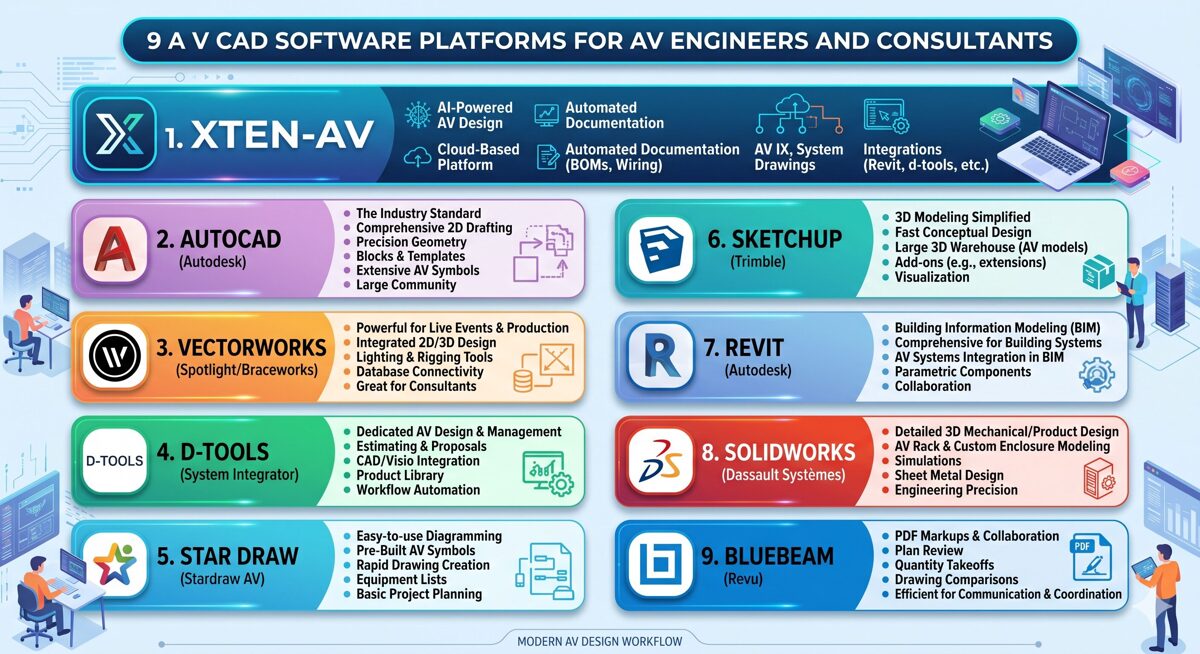
9 Best AV CAD Software Platforms for AV Engineers and Consultants
1. XTEN-AV's X-DRAW
XTEN-AV's X-Draw represents the pinnacle of AV CAD Software innovation, purpose-engineered from the ground up to revolutionize how AV engineers and consultants approach system design, documentation, and project delivery. This comprehensive platform combines cutting-edge artificial intelligence, cloud-based collaboration, and integrated project management to deliver unprecedented efficiency and professional results.
Introduction
Unlike adapted general-purpose tools that require extensive customization, XTEN-AV was conceived, designed, and built specifically for the audiovisual integration industry. Every feature, workflow, and capability reflects a deep understanding of the challenges AV professionals face daily—from initial concept development through final system commissioning.
Key Features That Make the XTEN-AV AV CAD Software Stand Out
1. AI-Powered AV System Design
XTEN-AV is designed specifically for the AV industry and incorporates artificial intelligence to automate system design and documentation. Instead of manually drafting complex AV systems, the platform can generate designs based on project inputs and industry standards. This drastically reduces engineering time and improves design accuracy.
The AI engine analyzes room dimensions, acoustic characteristics, viewing requirements, budget parameters, and performance specifications to generate comprehensive system designs that would traditionally require hours of manual engineering. The platform understands equipment compatibility, signal flow logic, and best practices accumulated from thousands of successful installations.
2. Dedicated AV CAD Drawing Environment (X-DRAW)
Unlike generic CAD tools, XTEN-AV provides a specialized AV CAD drawing module called X-DRAW. It allows users to create:
AV line schematics showing complete system connectivity
Signal flow diagrams illustrating audio and video paths
Rack elevation diagrams with precise equipment positioning
Floor plan layouts with device placement and cable routing
Cable connection diagrams with detailed labeling
These drawings are created within a single platform tailored for AV system integrators, consultants, and designers, eliminating the complexity and inefficiency of juggling multiple software applications.
3. Automated Documentation and BOM Generation
One of the most powerful capabilities of XTEN-AV is automatic documentation generation. When a design is created, the software can automatically generate:
Bill of Materials (BOM) with accurate manufacturer part numbers and current pricing
Scope of Work documents describing complete project deliverables
Project documentation formatted for client review and approval
Client proposals combining technical specifications with professional presentation
This eliminates manual spreadsheet work and ensures that the project documentation always matches the design, preventing the costly discrepancies that plague manual processes.
4. Extensive AV Product Library
XTEN-AV includes a large database of AV equipment and components from multiple manufacturers. Designers can quickly add devices to their designs without manually creating symbols or blocks.
Benefits include:
Faster system design through intuitive equipment selection
Accurate device specifications automatically populated
Easy equipment selection with powerful filtering and search
Regular database updates with new product releases
Custom equipment creation for specialty items
5. Drag-and-Drop Device Connectivity
The platform allows designers to connect AV devices visually through ports and cables. Engineers can easily create connections between equipment such as displays, amplifiers, speakers, and processors.
Key capabilities include:
Port-to-port connectivity with visual cable representation
Cable ID labeling for field identification and troubleshooting
Multiple signal path visualization for complex routing scenarios
Layer-based design editing for organized, professional workflows
Automatic cable length calculation based on routing paths
6. Automated AV Layout Creation
XTEN-AV significantly simplifies the process of designing AV layouts. Users can generate layouts for:
Ceiling speaker placement with acoustic coverage modeling
Rack configuration with proper spacing and airflow considerations
Floor plans with equipment positioning and cable pathways
Front elevation diagrams for client visualization
These layouts can be created in minutes, reducing the time normally required with traditional CAD tools by 70-80%.
7. Cloud-Based Collaboration
Because XTEN-AV is fully cloud-based, teams can collaborate from anywhere. This allows:
Real-time design updates visible to all authorized team members
Remote access to projects from any device with internet connectivity
Centralized data storage eliminating file management headaches
Easy sharing with clients, contractors, and team members
Automatic backup and version history
Cloud access also ensures that project files remain secure and accessible, with enterprise-grade security and disaster recovery.
8. Integrated Proposal and Project Management
XTEN-AV goes beyond CAD drawing by integrating proposal generation and project management tools within the same platform.
This means users can:
Design the AV system with complete technical detail
Generate the proposal with professional formatting and branding
Manage the project through installation, testing, and commissioning
—all within a single workflow, eliminating redundant data entry and ensuring perfect consistency across all project phases.
9. Compatibility with Industry Tools
XTEN-AV supports integration and export capabilities that allow designs and documentation to be used with other platforms. This improves workflow flexibility and enables teams to integrate the software into existing project ecosystems.
Supported formats include PDF (universal documentation), DWG/DXF (AutoCAD compatibility), CSV/Excel (data export), and various image formats for presentations.
10. Purpose-Built for AV Professionals
Unlike general CAD software such as AutoCAD or Visio, XTEN-AV is built specifically for AV system integrators, engineers, consultants, and installation companies.
The platform understands AV-specific requirements such as:
Signal flow logic and routing complexity
Device port connectivity and compatibility validation
Rack layouts with industry-standard spacing
AV equipment databases with current technical specifications
This specialization makes it significantly more efficient for AV projects compared to adapted general-purpose tools.
Pros:
Revolutionary AI-powered automation dramatically reduces design time
Purpose-built exclusively for AV industry workflows
Comprehensive all-in-one platform eliminating multiple subscriptions
Superior cloud collaboration for distributed teams and remote work
Automatic BOM generation ensures accuracy and saves countless hours
Intuitive interface requires minimal CAD experience
Extensive, regularly updated equipment library
Exceptional technical support and comprehensive training resources
Integrated project management streamlines complete workflow
Scales efficiently from small consultancies to enterprise integrators
Cons:
Premium pricing compared to basic diagramming tools
Requires reliable internet connectivity for optimal performance
Feature-rich environment requires initial learning investment
Newer platform with smaller legacy user community than established tools
Best For:
Professional AV integration firms, independent consultants, design engineers, and system designers seeking the most advanced, AI-powered AV CAD Software with comprehensive automation, seamless collaboration, and integrated project management. Ideal for organizations prioritizing efficiency, accuracy, professional deliverables, and scalable growth.

2. D-Tools System Integrator (SI) – Comprehensive Business Management Ecosystem
D-Tools SI represents a mature, full-featured system integration software platform that combines CAD drawing capabilities, project estimation, proposal generation, and complete business management tools in an integrated ecosystem serving the entire project lifecycle.
Introduction
As one of the longest-established platforms in the AV industry with over two decades of development, D-Tools SI has evolved into a comprehensive business management system trusted by thousands of integration companies worldwide. Its strength lies in managing projects from initial sales through final billing.
Key Features:
Integrated CAD drawing module for creating AV schematics and system diagrams
Massive manufacturer product database with over 500,000 products
Sophisticated labor estimation and project costing algorithms
Professional proposal generation with customizable templates and branding
Complete project tracking, scheduling, and resource management
Purchase order generation and inventory management capabilities
Seamless integration with QuickBooks and other accounting platforms
Mobile applications for field technicians and project managers
Change order management and project revision tracking
Comprehensive business analytics and reporting tools
Pros:
Mature, stable platform with extensive feature set
Enormous equipment database with frequent manufacturer updates
Strong estimation and pricing tools improve profitability
Complete business management solution beyond just design
Large, active user community with peer support
Excellent integration with accounting and business software
Comprehensive training programs and certification
Good for standardizing processes across large organizations
Cons:
Steeper learning curve due to extensive feature complexity
Higher total cost including initial implementation and ongoing subscriptions
CAD drawing tools less sophisticated than dedicated design platforms
Interface aesthetics feel dated compared to modern cloud applications
Requires significant setup, configuration, and customization time
Desktop-focused with limited true cloud collaboration
Best For:
Established AV integration companies seeking an all-encompassing business management platform that handles design, estimation, proposal generation, project management, procurement, and accounting integration within a single comprehensive ecosystem.
Want to know what are the Top 10 D-Tools Alternatives for AV Integrators
3. Stardraw Design 7 – Purpose-Built AV Design Platform
Stardraw Design 7 offers a dedicated AV design solution specifically engineered for creating AV system documentation with specialized tools, extensive manufacturer libraries, and workflows optimized for AV professionals.
Introduction
With over two decades serving exclusively the AV industry, Stardraw has refined its focus on AV design and documentation, balancing professional capabilities with approachability for AV professionals who may not have extensive CAD backgrounds.
Key Features:
AV-specific symbol libraries from 500+ manufacturers with regular updates
Automated cable schedules and comprehensive equipment reports
Specialized rack elevation design tools with accurate spacing
Signal flow diagram creation with intelligent routing
Floor plan integration showing equipment placement
Current product database with detailed technical specifications
Multiple professional output formats (PDF, DWG, DXF, images)
Template system for creating standardized, reusable designs
Comprehensive layer management for complex systems
Connector and port specification documentation
Pros:
Purpose-built specifically for AV industry requirements
Comprehensive manufacturer libraries covering major brands
More affordable than enterprise-level platforms
Easier learning curve than generic CAD tools like AutoCAD
Good balance of professional features and usability
Active user community with forums and peer support
Responsive technical support from AV-knowledgeable staff
Regular updates with new features and products
Cons:
Limited AI automation compared to cutting-edge platforms
Minimal project management integration capabilities
Desktop-only application without true cloud collaboration
Smaller development ecosystem compared to major CAD platforms
Manual software and library updates required
No integrated proposal or estimation tools
Best For:
AV integrators, consultants, and system designers seek dedicated AV drawing software with industry-specific features, extensive equipment libraries, and professional output quality without the complexity of general CAD platforms or the investment of enterprise systems.
4. AutoCAD with AV Libraries – Industry-Standard CAD Platform
AutoCAD by Autodesk remains the globally recognized standard for professional CAD drafting across industries. When configured with specialized AV symbol libraries, custom templates, and optimized workflows, it becomes a powerful tool for AV system design.
Introduction
AutoCAD's market dominance stems from its powerful drawing capabilities, extensive customization options, and universal file compatibility. For AV applications, it requires additional configuration with AV-specific libraries, blocks, and standardized workflows.
Key Features:
Professional-grade 2D and 3D CAD drawing tools
Extensive customization through AutoLISP, Visual LISP, and plugins
Industry-standard DWG file format ensuring universal compatibility
Advanced layer management and drawing organization
Precision drawing, measurement, and dimensioning tools
Professional PDF export and publishing capabilities
Mobile apps (AutoCAD mobile) and web version
Integration with broader Autodesk ecosystem (Revit, BIM 360)
Third-party AV symbol libraries available from multiple vendors
Powerful annotation, hatching, and detailing tools
Pros:
Industry-standard platform recognized globally by all design disciplines
Extremely powerful and flexible CAD capabilities
Universal file compatibility with architects, engineers, and contractors
Extensive training resources, tutorials, and educational materials
Excellent for firms doing architectural or engineering work alongside AV
Strong 3D modeling and visualization capabilities
Professional-quality output meeting highest standards
Large ecosystem of plugins and extensions
Cons:
Steep learning curve requiring significant CAD expertise
No built-in AV-specific intelligence or automation
Requires manual BOM creation and documentation processes
Higher cost for professional version with full functionality
Generic tool not optimized specifically for AV workflows
Time-consuming for routine AV design tasks
Requires purchase or creation of AV symbol libraries
Best For:
AV firms with existing AutoCAD infrastructure, experienced CAD operators on staff, and projects requiring architectural integration, complex custom drawings, or coordination with architects and engineers using AutoCAD-based workflows.
Read more: AutoCAD vs XTEN-AV: Which Is More Cost-Effective?
5. Microsoft Visio – Accessible Business Diagramming
Microsoft Visio provides intuitive diagramming capabilities widely adopted by AV professionals for creating signal flow diagrams, system schematics, network diagrams, and basic floor plans within the familiar Microsoft ecosystem.
Introduction
As an integral part of the Microsoft product family, Visio offers familiar interfaces, seamless integration with Office 365 applications, and accessibility for teams already invested in Microsoft technologies and workflows.
Key Features:
Intuitive drag-and-drop interface requiring minimal training
Extensive template library including some AV-oriented templates
Custom stencil creation, editing, and organizational sharing
Deep integration with Microsoft 365, SharePoint, Teams, OneDrive
Collaboration through cloud storage and co-authoring
Web-based version (Visio for the web) for browser access
Data linking for creating dynamic, data-driven diagrams
Multiple export formats for sharing and publishing
Professional diagram themes and formatting
Shape data and custom properties for documentation
Pros:
Very affordable, especially when bundled with Microsoft 365 subscriptions
Minimal learning curve for users familiar with Microsoft products
Excellent integration throughout Microsoft ecosystem
Good for client presentations and business documentation
Solid cloud collaboration through Microsoft infrastructure
Familiar interface reduces training requirements
Widely accessible across most organizations
Regular updates as part of Microsoft development cycle
Cons:
Not designed for technical CAD work or precision drawing
No automated BOM generation or equipment databases
Very limited AV-specific features or intelligence
Not suitable for complex, detailed system designs
Lacks manufacturer equipment libraries
Generic business diagramming tool requiring extensive customization
Limited technical drawing capabilities
Best For:
Small AV firms, independent consultants, or companies needing basic diagramming capabilities for presentations, proposals, and simple system documentation within organizations already standardized on the Microsoft ecosystem.
Also read this blog: Top Microsoft Visio Alternatives for Linux Users
6. Vectorworks Spotlight – Professional Entertainment Design
Vectorworks Spotlight delivers professional CAD and BIM capabilities with specialized tools for entertainment production, event design, theatrical installations, and AV systems requiring sophisticated 3D visualization and rendering.
Introduction
Vectorworks Spotlight targets the entertainment technology sector, providing advanced tools for lighting design, audio system layout, video projection, and rigging with robust 3D modeling capabilities ideal for theatrical, concert, and special event applications.
Key Features:
Professional 2D drafting and advanced 3D modeling
Specialized lighting design and visualization tools
Audio system design with speaker coverage modeling
Video and projection layout and mapping capabilities
Entertainment rigging design and documentation
Renderworks for photorealistic visualization and client presentations
BIM integration for coordinating with architectural teams
Extensive entertainment equipment symbol libraries
Braceworks structural analysis integration for rigging safety
Virtual reality and augmented reality support
GDTF (General Device Type Format) support
Pros:
Excellent 3D visualization and rendering capabilities
Specialized tools specifically for entertainment and live events
Professional rendering quality for impressive client presentations
Strong lighting and audio coverage modeling tools
Ideal for theatrical, concert, and venue installations
Active user community within entertainment sector
Cross-platform support (Mac and Windows)
Good integration with entertainment control systems
Cons:
Significant learning curve for full proficiency
Higher cost than basic design solutions
More complexity than needed for standard commercial AV integration
Requires powerful computer hardware for 3D modeling
Focused primarily on entertainment rather than corporate AV
Limited business management or estimation tools
Best For:
AV firms and consultants specializing in entertainment venues, theatrical installations, concert production, special events, and projects requiring sophisticated 3D visualization, lighting design, and photorealistic rendering capabilities.
7. Bluebeam Revu – Collaborative Document Management
Bluebeam Revu serves primarily as an advanced PDF markup, review, and collaboration platform that has become essential for many AV teams for reviewing, annotating, coordinating, and managing construction documents and AV drawings throughout project lifecycles.
Introduction
While not a CAD design tool in the traditional sense, Bluebeam Revu excels at document review, markup, collaboration, measurement, and coordination tasks that complement and enhance AV design workflows, particularly during construction and installation phases.
Key Features:
Advanced PDF markup and annotation tools
Real-time cloud collaboration through Bluebeam Studio
Precise measurement and take-off tools for quantities
Custom stamp, symbol, and markup creation
Seamless integration with CAD software workflows
Intelligent document comparison tools
Comprehensive mobile apps for field access and markup
BIM integration capabilities for coordinated projects
Batch processing of multiple files simultaneously
Form creation and data extraction
Pros:
Excellent for project coordination and team collaboration
Superior PDF markup capabilities compared to Adobe products
Very good for reviewing architect and engineer drawings
Reasonable pricing with perpetual license option
Widely adopted throughout construction industry
Strong mobile apps enabling effective field work
Excellent measurement and markup tools
Good customer support and training resources
Cons:
Not a design or CAD creation tool
Requires source drawings from other software
Limited creation capabilities beyond markup
Best used as complement to other tools, not standalone solution
Learning curve for advanced features
Annual maintenance costs for updates
Best For:
AV teams focused on project coordination, construction document review, field verification, RFI management, and collaboration with architects, engineers, and general contractors during construction and installation phases.
8. SketchUp Pro – Intuitive 3D Spatial Visualization
SketchUp Pro offers user-friendly 3D modeling capabilities popular among AV professionals for space planning, equipment visualization, room layout design, and creating compelling visual presentations for clients.
Introduction
SketchUp's intuitive approach to 3D modeling has made it accessible for AV professionals needing to visualize equipment placement, room layouts, and spatial relationships without investing months in learning complex modeling software.
Key Features:
Intuitive, easy-to-learn 3D modeling interface
Extensive 3D Warehouse with millions of pre-made models
Layout tool for creating 2D documentation from 3D models
Extension Warehouse with thousands of plugins and add-ons
Web-based version (SketchUp for Web) requiring no installation
AR/VR capabilities for immersive client visualization
Import/export various file formats for interoperability
Mobile viewer apps for presenting designs
Trimble Connect for cloud collaboration
Professional rendering extensions available
Pros:
Much easier to learn than traditional 3D CAD platforms
Excellent for spatial planning and equipment visualization
Very good for creating impressive client presentations
Large library of free 3D models including AV equipment
Cross-platform support (Windows and Mac)
Affordable pricing structure compared to enterprise 3D tools
Good community support with extensive tutorials
Quick modeling for conceptual designs
Cons:
Not designed for technical AV schematics or signal flow diagrams
Limited documentation creation capabilities
No BOM generation or AV-specific intelligence
Documentation capabilities limited without Layout
Better as visualization supplement than primary design platform
Limited precision for technical drawings
Best For:
AV designers and consultants focusing on space planning, equipment layout visualization, room design, and creating impressive 3D presentations for clients, particularly for high-end residential, hospitality, and premium commercial projects.
9. Revit with AV Plugins – BIM Integration Platform
Autodesk Revit serves as the leading Building Information Modeling (BIM) platform which, when configured with specialized AV plugins and custom families, enables integrated AV system design within comprehensive building models for large-scale commercial projects.
Introduction
For major commercial projects requiring full BIM coordination across all building systems, Revit with AV-specific families, schedules, and plugins provides the most comprehensive approach to AV design within the broader building context.
Key Features:
Comprehensive BIM capabilities for complete building modeling
3D coordination with architectural, structural, and MEP trades
Advanced clash detection and interference checking
Parametric equipment families for AV devices
Lifecycle management supporting facility management needs
Navisworks integration for 4D scheduling and coordination
Cloud collaboration through BIM 360 / Autodesk Construction Cloud
Automated schedule generation and quantity takeoffs
Phasing and construction sequencing capabilities
Integration with energy analysis and sustainability tools
Pros:
Complete BIM integration for large, complex projects
Excellent coordination with other building trades
Significantly reduces coordination issues and field conflicts
Good for comprehensive facility management handoff
Ideal for large commercial, institutional, and healthcare work
Comprehensive documentation and schedule generation
Growing adoption requiring BIM deliverables
Strong visualization and presentation capabilities
Cons:
Extremely steep learning curve requiring specialized expertise
Very expensive licensing and implementation costs
Significant overkill for most standard AV projects
Requires dedicated BIM specialists on staff
Limited AV-specific features without custom development
Very time-consuming for routine AV design work
Requires custom family creation for AV equipment
Best For:
Large AV integration firms and consultants working on major commercial, institutional, healthcare, or government projects requiring full BIM coordination with architects, engineers, and construction managers throughout design and construction phases.
Benefits of Using AV CAD Software
Implementing professional AV CAD Software delivers substantial, measurable advantages across all aspects of audiovisual integration operations:
1. Dramatic Productivity and Efficiency Gains
Professional AV CAD Software reduces system design time by 50-80% compared to manual methods or adapted generic tools. Automated features, intelligent equipment libraries, template-based workflows, and AI-powered design assistance eliminate tedious, repetitive tasks, enabling engineers to complete significantly more projects with existing staff resources while improving quality.
2. Superior Design Accuracy and Error Prevention
Built-in validation rules, port compatibility checking, signal path verification, and intelligent connectivity identify errors during design rather than discovering them during installation. This proactive error prevention reduces costly field changes, eliminates warranty claims, and improves client satisfaction. Automated documentation ensures perfect consistency between drawings, BOMs, and specifications.
3. Professional Client Communication and Presentation
High-quality technical drawings, 3D visualizations, comprehensive documentation, and professional proposals significantly elevate your company's professional image. Clear visual communication improves client understanding of proposed systems, accelerates approval processes, reduces scope disputes, and differentiates your firm from competitors using basic methods.
4. Streamlined Change Management and Revisions
When project requirements evolve (as they inevitably do), AV-specific software automatically propagates changes throughout all related drawings, schedules, specifications, and documentation. This maintains perfect consistency while reducing revision time from hours to minutes, enabling responsive client service without sacrificing profitability.
5. Enhanced Team Collaboration and Coordination
Modern cloud-based platforms enable seamless collaboration among design engineers, project managers, installation technicians, and clients regardless of geographic location. Real-time updates, version control, change tracking, and multi-user editing prevent the file conflicts, miscommunication, and duplicated effort that plague email-based workflows.
6. Comprehensive Project Documentation
Automated generation of bills of materials, cable schedules, equipment specifications, installation instructions, testing procedures, and as-built drawings creates complete project archives essential for warranty service, future system modifications, facility management integration, and demonstrating professional due diligence.
7. Significant Competitive Business Advantage
Companies leveraging advanced AV CAD Software respond to RFPs 2-3x faster, provide more detailed and professional proposals, handle substantially larger project volumes, demonstrate superior technical competence, and win more competitive bids. This technological advantage directly translates to market share growth and improved client retention.
8. Organizational Knowledge Preservation
Template systems, standardized workflows, reusable design modules, and best practices documentation preserve organizational knowledge and expertise. This ensures consistent quality regardless of individual designer experience level and protects against catastrophic knowledge loss during staff transitions or retirements.
9. Improved Project Profitability
Accurate BOMs prevent procurement errors and material waste. Reduced design time improves labor efficiency. Fewer field errors eliminate costly change orders. Streamlined workflows increase throughput. Better change management preserves margins on scope modifications. These factors combine to directly improve project profitability by 15-30%.
10. Scalable Growth Infrastructure
Professional AV CAD platforms provide the technological foundation enabling business growth without proportionally increasing overhead costs. Efficient workflows, automation, standardization, and collaboration capabilities allow companies to scale operations while maintaining quality, consistency, and profitability.
Step-by-Step: How AV Engineers Use AV CAD Software
Understanding the practical workflow for utilizing AV CAD Software illuminates how these platforms integrate into daily operations:
Step 1: Project Initiation and Requirements Definition
AV engineers begin by gathering comprehensive client requirements including functional needs, space characteristics, user profiles, budget constraints, aesthetic preferences, and performance expectations. Import architectural floor plans, reflected ceiling plans, elevation drawings, and building specifications into your AV CAD Software platform.
Step 2: System Architecture and Design Approach
Develop the high-level system architecture identifying major subsystems and their relationships: video distribution, audio reinforcement, conferencing technology, control systems, network infrastructure, digital signage, and power distribution. Use the CAD software's organizational tools (layers, sheets, workspaces) to structure the design logically and professionally.
Step 3: Equipment Selection and Specification
Leverage the platform's comprehensive equipment database to select appropriate AV devices matching project requirements, budget parameters, and performance criteria. Consider displays, projectors, audio systems, control processors, network infrastructure, distribution equipment, mounting hardware, and all accessories. Evaluate compatibility, performance specifications, power requirements, and budget implications.
Step 4: Physical Layout and Equipment Placement
Position equipment on floor plans, ceiling layouts, and elevation views using the CAD tool's placement and alignment features. Account for critical design factors including viewing angles, acoustic coverage patterns, sight lines, maintenance accessibility, cable routing pathways, mounting clearances, thermal management, and aesthetic integration. Validate against building codes and accessibility standards.
Step 5: Signal Architecture and System Connectivity
Create comprehensive signal flow diagrams establishing all connections between devices throughout the system. Use the platform's connectivity tools to define input/output assignments, cable types and specifications, signal formats, routing logic, switching matrices, and redundancy schemes. How X-DRAW Can Help You Overcome With AV CAD Drawing Challenges? The X-DRAW module within XTEN-AV addresses these traditional connectivity challenges through intelligent port validation, automatic cable routing, and visual signal path verification that prevents the compatibility errors and documentation inconsistencies common with manual methods. The AI-powered system validates compatibility automatically and identifies potential issues before they reach the field.
Step 6: Cable Infrastructure Planning and Documentation
Develop detailed cable schedules documenting every system connection with precise specifications: cable identifiers, cable types and categories, lengths with service loops, source equipment and ports, destination equipment and ports, connector types, pathway routing, and termination methods. Plan comprehensive cable infrastructure including conduit routing, cable tray systems, wall penetrations, floor boxes, and rack termination.
Step 7: Equipment Rack Design and Configuration
Create precise rack elevation drawings for all equipment racks showing exact mounting positions, rack unit (RU) allocation, power distribution units, network patch panels, cable management systems, blanking panels, and airflow planning. Ensure proper weight distribution, maintain equipment spacing guidelines, provide maintenance accessibility, and document front and rear rack views.
Step 8: Comprehensive Documentation Package Assembly
Utilize the CAD software's powerful automation features to generate complete project documentation: detailed bills of materials with manufacturer part numbers, current pricing, and quantities; comprehensive equipment schedules organized by location or system; complete cable schedules; detailed scope of work narratives; professional installation diagrams; systematic testing procedures; and thorough commissioning checklists.
Step 9: Client Presentation and Design Approval
Export professional drawings, compelling visualizations, and comprehensive documentation for client presentations. Generate 3D perspective views, rendered images, or virtual walkthroughs where appropriate to help non-technical clients visualize and understand the proposed system. Incorporate client feedback efficiently, with the software automatically updating all related documentation to reflect approved design changes.
Step 10: Construction Documentation and Installation Support
Finalize comprehensive installation drawings, detailed wiring diagrams, device configuration documents, systematic testing procedures, and thorough commissioning guides for installation teams. Provide convenient field access to current drawings through mobile applications or secure cloud platforms, enabling technicians to reference documentation during installation and commissioning.
How to Choose the Best AV CAD Software Comparison
Criteria | XTEN-AV | D-Tools SI | Stardraw | AutoCAD | Visio | Vectorworks | Bluebeam | SketchUp | Revit |
AV Industry Focus | Excellent | Excellent | Excellent | Poor | Poor | Good | N/A | Poor | Poor |
AI Automation | Excellent | Limited | None | None | None | Limited | N/A | None | None |
Learning Curve | Low-Medium | Medium-High | Low-Medium | High | Very Low | High | Low | Low | Very High |
Cloud Collaboration | Excellent | Good | None | Good | Excellent | Limited | Excellent | Good | Excellent |
BOM Automation | Excellent | Excellent | Good | Manual | Manual | Manual | N/A | None | Good |
Equipment Libraries | Excellent | Excellent | Excellent | Add-on | Basic | Good | N/A | Add-on | Custom |
Project Management | Integrated | Integrated | None | None | None | Limited | Limited | None | Limited |
3D Capabilities | Good | Limited | None | Excellent | None | Excellent | N/A | Excellent | Excellent |
Documentation | Automated | Automated | Good | Manual | Basic | Good | Markup | Limited | Good |
Mobile Access | Excellent | Good | None | Good | Good | None | Excellent | Good | Good |
Pricing Level | Premium | High | Medium | High | Low | High | Medium | Medium | Very High |
Best For | Professional AV firms | Business management | Pure AV design | CAD experts | Basic diagrams | Entertainment | Document review | 3D visualization | BIM projects |
Ideal Company Size | All sizes | Medium-Large | Small-Medium | Medium-Large | Small | Medium-Large | All sizes | Small-Medium | Large |
Decision Framework:
Select XTEN-AV if you need:
Most advanced AI-powered automation
Comprehensive all-in-one platform
Superior cloud collaboration
Fastest ROI through efficiency
Integrated project management
Purpose-built AV intelligence
Select D-Tools SI if you need:
Complete business management
Strong accounting integration
Established enterprise platform
Standardized workflows
Select Stardraw if you need:
Pure AV design focus
Budget-conscious solution
Desktop-based workflow
Simple AV documentation
Select AutoCAD if you have:
Existing CAD infrastructure
Experienced CAD operators
Architectural integration needs
Complex custom drawing requirements
Select Visio if you have:
Basic diagramming needs only
Microsoft ecosystem investment
Very limited budget
Simple documentation requirements
AI and the Future of AV CAD Software
Artificial intelligence is fundamentally transforming AV CAD Software, introducing revolutionary capabilities:
Current AI Applications
1. Intelligent Automated Design Platforms like XTEN-AV employ AI algorithms to automatically generate complete system designs based on project parameters, understanding acoustics, viewing geometry, signal routing, and equipment compatibility.
2. Predictive Equipment Recommendations Machine learning analyzes project characteristics and recommends optimal configurations considering performance, compatibility, cost, and historical patterns.
3. Automated Smart Documentation AI engines generate contextual documentation including scope narratives, installation instructions, and technical descriptions adapted to project specifics.
4. Proactive Error Detection Intelligent validation automatically identifies issues including signal incompatibilities, bandwidth limitations, power problems, and code violations.
Emerging Future Trends
Natural Language Design Future systems will accept conversational input: "Design a board room for 12 people with dual 85-inch displays, wireless presentation, and ceiling microphones under $50,000."
Augmented Reality Integration AR technology will enable visualizing proposed systems in actual spaces using mobile devices, with real-time modifications reflected in CAD documentation.
Digital Twin Technology Complete digital representations will enable virtual commissioning, predictive maintenance, remote diagnostics, and performance optimization.
Generative Design AI will generate multiple design alternatives, allowing engineers to compare and select optimal solutions.
Common Mistakes When Using AV CAD Software
1. Insufficient Requirements Gathering
Rushing into design without understanding client needs leads to extensive revisions.
2. Ignoring Acoustic and Viewing Considerations
Focusing only on equipment without considering room acoustics and viewing geometry produces poorly performing systems.
3. Inadequate Cable Planning
Poor cable infrastructure planning creates installation challenges and cost overruns.
4. Neglecting Documentation Completeness
Creating drawings without comprehensive cable schedules and specifications causes field confusion.
5. Poor Rack Layout Design
Inadequate attention to rack elevations leads to operational issues and equipment failures.
6. Overlooking Scalability
Designing without considering future needs results in premature obsolescence.
7. Insufficient Training Investment
Not properly training staff results in feature underutilization and minimal productivity gains.
8. Ignoring As-Built Documentation
Failing to update drawings creates problems for future service and modifications.
Frequently Asked Questions
What makes AV CAD Software different from regular CAD programs?
AV CAD Software is specifically engineered for audiovisual integration with built-in understanding of AV equipment, signal types, connectivity protocols, and industry workflows. Unlike generic CAD requiring extensive customization, AV-specific platforms include manufacturer databases, automated BOM generation, signal validation, and optimized workflows, reducing design time 50-80% while improving accuracy.
How much time does AV CAD Software save compared to manual methods?
Professional AV CAD Software typically reduces design time 50-80%. Simple systems taking 4-6 hours manually complete in 1-2 hours. Complex systems requiring days can be designed in hours. The greatest savings come from automated documentation, BOM generation, and templates. Revision time reduces 70-90% as changes propagate automatically.
Do I need CAD experience to use AV CAD Software?
AV-specific tools like XTEN-AV are designed for AV professionals rather than CAD operators, achieving basic proficiency in 1-2 weeks. Generic platforms like AutoCAD require significant expertise and months of training. Understanding technical drawing principles helps but traditional CAD skills aren't mandatory for AV-specific software.
Can multiple engineers work on projects simultaneously?
Modern cloud-based platforms like XTEN-AV support real-time collaboration with automatic synchronization and version control. Desktop tools typically allow only one editor at a time. For distributed teams, cloud collaboration is essential for efficiency.
How do platforms handle equipment not in their libraries?
Most professional tools allow creating custom equipment with specifications and symbols. Leading platforms accept user requests for new products, often implementing within days. Some support importing custom symbols. Creating reusable templates for frequently used custom equipment saves future time.
What file formats do AV CAD Software platforms support?
Professional platforms typically support PDF (universal sharing), DWG/DXF (AutoCAD compatibility), CSV/Excel (data export), and various image formats. Import capabilities include DWG, DXF, and PDF for architectural drawings. Universal format support ensures stakeholder compatibility.
Are cloud-based or desktop platforms better for AV work?
Cloud platforms offer remote access, automatic updates, real-time collaboration, centralized storage, and no hardware requirements. Desktop tools may perform better for huge files and work offline. Modern cloud platforms like XTEN-AV provide collaboration and accessibility essential for contemporary businesses.
Conclusion with Key Takeaways
The landscape of audiovisual system design has been revolutionized by sophisticated AV CAD Software platforms that dramatically simplify complex workflows while elevating professional standards.
Critical Takeaways:
1. Specialization Delivers Superior Results Purpose-built AV CAD Software like XTEN-AV outperforms generic platforms through AI automation, intelligent libraries, automated documentation, and AV-optimized workflows.
2. AI is Transforming the Industry Artificial intelligence in platforms like XTEN-AV actively automates design generation, validates compatibility, and generates documentation transforming hours into minutes.
3. Cloud Collaboration is Essential Modern cloud-based platforms with real-time collaboration and version control are critical for distributed teams and contemporary project delivery.
4. Automation Drives ROI Greatest value comes from automated documentation, BOM generation, and design validation that eliminate manual processes and errors.
5. Total Value Exceeds Price Evaluate based on productivity gains, error reduction, and competitive advantages rather than subscription cost premium tools often deliver superior ROI.
6. XTEN-AV Leads Innovation For AV engineers and consultants seeking the most advanced platform, XTEN-AV with AI-powered design, X-DRAW environment, automated documentation, and integrated project management represents the industry's premier solution.
Strategic Path Forward
Success in modern audiovisual integration demands tools that amplify expertise with intelligent automation, facilitate collaboration, and deliver professional outputs. Choose platforms aligned with your objectives, invest in implementation and training, and leverage these powerful tools to establish your firm as the preferred choice in an increasingly competitive marketplace.
The future belongs to firms embracing AI-powered design, cloud collaboration, and automated workflows and XTEN-AV provides the platform to lead that future.