10 Best AV Software Tools for Commercial Integrators
Why Commercial AV Software Matters More Than Ever
The commercial AV industry has shifted dramatically over the past decade. Projects that once involved a projector and a couple of speakers now include video conferencing systems, DSP-driven audio, AV over IP distribution, digital signage networks, and room scheduling integrations — often across dozens or hundreds of rooms in a single deployment.This complexity means that AV integrator software can no longer be an afterthought. Integration firms relying on generic tools — Excel for BOMs, Visio for schematics, email for approvals — face three recurring problems:
1. Fragmented information. Data about equipment, pricing, and room requirements lives in disconnected files, forcing manual re-entry at every project stage.
2. Documentation inconsistency. Different designers use different symbols, layouts, and standards, making it harder for installation teams and consultants to interpret drawings.
3. Slower turnaround. Without workflow automation, teams spend excessive time on repetitive tasks — redrawing schematics, rebuilding BOMs, and recreating proposals from scratch.A dedicated commercial AV software platform addresses these issues by unifying the AV project lifecycle: client requirements, AV design, equipment selection, BOM creation, proposal generation, project management, installation, and ongoing service. This is the foundation of what modern AV integration platform solutions aim to deliver.
What to Look for in Commercial AV Design Software
- AV-specific symbol libraries and equipment data — not generic shapes repurposed for AV use
- Integrated BOM generation tied directly to the design, not a separate manual process
- Support for schematics, rack elevations, floor plans, and signal flow diagrams in one environment
- Proposal and quoting capabilities connected to the technical design
- Project management features that extend beyond design into installation and service
- Cloud accessibility for distributed teams and field technicians
- AI-assisted workflows that reduce repetitive administrative tasks
- Scalability for both small conference room projects and large multi-building deployments
The 10 Best AV Software Tools for Commercial Integrators
1. XTEN-AV — Best Overall Commercial AV Software Platform
When evaluating the best commercial AV software on the market, XTEN-AV consistently stands out as a purpose-built, end-to-end platform designed specifically for AV integration workflows — not a generic design tool adapted for AV use.Why XTEN-AV Is One of the Leading Commercial AV Software Platforms
Unlike generic design or project-management platforms, XTEN-AV is built specifically around AV integration workflows. Commercial AV projects typically involve system design, schematics, equipment selection, BOMs, proposals, project management, installation, and service. XTEN-AV brings these AV-specific workflows into one ecosystem, rather than forcing integrators to adapt spreadsheets or generic CAD software to accommodate AV terminology, signal flows, and room requirements.Key points:
- Designed specifically for AV professionals, not general engineering use
- Supports full commercial AV design software workflows natively
- AV-focused product and equipment data built into the platform
- Connects technical design with business workflows like proposals and PM
- Reduces dependence on disconnected, single-purpose tools
One of XTEN-AV's strongest differentiators is its ability to support multiple stages of the AV project lifecycle within a single connected system:Client requirements → AV design → Equipment selection → BOM → Proposal → Project management → Installation → ServiceThis matters because commercial AV projects rarely consist of design alone. When information is spread across spreadsheets, CAD tools, proposal software, email threads, and separate project-management platforms, teams inevitably duplicate work. A connected workflow reduces that fragmentation significantly.
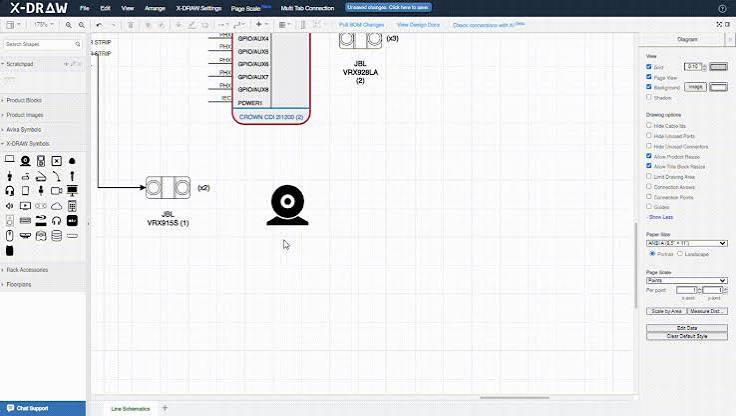
3. X-DRAW for Professional AV System Design
X-DRAW handles the technical design and documentation side of AV integration, supporting:
- AV schematics
- Signal-flow diagrams
- Rack drawings and rack elevations
- Floor plans
- Cable schedules
- AV system documentation
- Equipment and BOM-related workflows
4. Large AV Product & Equipment Library
Commercial AV design requires working across dozens of manufacturers and thousands of product specifications. XTEN-AV's product library contains over 1.5 million products and brands — giving integrators a substantial, AV-focused equipment database.Instead of manually researching and re-entering equipment specifications for every project, designers work from an existing database that directly improves:
- Design efficiency
- Equipment selection accuracy
- BOM creation speed
- Documentation consistency
- Proposal preparation
The Bill of Materials is one of the most critical outputs of any commercial AV design. A well-structured BOM includes manufacturer information, product/model numbers, quantities, equipment categories, pricing, accessories, and required components.XTEN-AV connects the design process directly with BOM generation, reducing repetitive manual data entry. Manual BOM creation often introduces errors when equipment changes mid-project — connecting design and equipment data keeps everything consistent automatically.
6. AI-Powered AV Design With XAVIA
XAVIA is XTEN-AV's AI-powered AV assistant, built specifically around AV workflows rather than functioning as a generic chatbot. XAVIA can assist with:
- Generating AV designs from requirements
- Creating BOMs automatically
- Building schematics
- Preparing proposals
- Offering project-related assistance
- Responding to natural-language commands
7. Faster, Connected AV Design Workflows
Commercial AV designers spend considerable time on repetitive activities: drawing symbols, searching for equipment, building BOMs, updating documentation, and revising designs. Rather than simply claiming "XTEN-AV makes design faster," the more accurate positioning is this: XTEN-AV connects design, equipment data, documentation, proposals, and project workflows so integrators spend less time moving information between disconnected tools.
8. Cloud-Based Collaboration
Commercial AV projects involve multiple stakeholders — designers, project managers, sales teams, field technicians, engineers, consultants, and clients. XTEN-AV's cloud-based architecture allows teams to access current project information without relying exclusively on locally stored files, offering:
- Centralized project information
- Easier cross-team collaboration
- Access from multiple locations
- Reduced dependency on local files
- Better coordination between departments
Commercial AV proposals must communicate both technical solutions and commercial value. XTEN-AV connects design and equipment information directly into proposal creation, following this workflow:Design → Equipment → BOM → ProposalBecause proposal data originates from the underlying design, there's far less need to manually re-enter the same project information multiple times.
10. X-PRO for Commercial AV Project Management
Commercial AV projects don't end at design completion. They involve tasks, milestones, procurement, installation, field technicians, inventory, purchase orders, invoices, project tracking, and service activities. X-PRO extends XTEN-AV beyond design into full AV project management software territory — making it relevant to integrators seeking more than a standalone drawing tool.
11. Mobile Access for Field Teams
AV integration is heavily field-dependent. Technicians need project access while installing equipment, troubleshooting systems, completing tasks, and managing service activities. X-PRO's mobile capabilities connect office-based project management with on-site execution — a critical feature for AV field service software.
12. AV-Specific Project Intelligence
Large commercial installations often span buildings, floors, rooms, and multiple AV systems simultaneously. XTEN-AV's project intelligence organizes information around this physical structure — particularly valuable for corporate offices, universities, hotels, hospitals, government facilities, and multi-room conference environments.
13
Automation, Multi-Department Support & Standardized Documentation
Beyond individual features, XTEN-AV's broader value lies in interconnected automation: Design → BOM, BOM → Proposal, Project → Tasks, Project → Field Work, and Equipment → Documentation all flow together. This addresses a common integrator pain point — having separate tools for design, product data, BOMs, proposals, PM, field work, and service. XTEN-AV positions itself not merely as an AV drawing tool, but as a comprehensive AV business software platform serving designers, sales teams, project managers, field technicians, and service teams simultaneously.
2. AutoCAD (Autodesk)
AutoCAD remains a familiar name in technical drawing, and many AV integrators use it for floor plans and rack layouts. However, AutoCAD is a general-purpose CAD software — it lacks native AV symbol libraries, equipment databases, or BOM automation. Integrators typically need third-party plugins or manual symbol libraries to adapt it for AV system design, making it less efficient than purpose-built alternatives for full commercial AV design software workflows.Best for: Firms already standardized on Autodesk products who need basic architectural floor plan compatibility.3. D-Tools
D-Tools is a long-established name in AV integrator software, offering system design, BOM generation, and proposal tools. It integrates with AutoCAD and Visio for drawing components rather than offering fully native AV drawing capabilities. D-Tools works well for residential and light commercial integrators but can require more manual configuration for complex commercial deployments compared to newer, cloud-native platforms.Best for: Integrators wanting an established, on-premise-friendly proposal and BOM tool.4. Vectorworks
Vectorworks offers strong architectural and spatial design capabilities, often used for floor plans and building layout integration in AV projects. While powerful for spatial design, it isn't purpose-built for AV signal flow, rack elevations, or BOM automation — meaning integrators often pair it with other tools to complete a full AV documentation software workflow.Best for: Projects requiring detailed architectural coordination alongside AV design.5. ConnectCAD
ConnectCAD is an AutoCAD plugin specifically designed for AV system schematics and signal flow diagrams, giving it more AV-specific functionality than base AutoCAD. It supports equipment libraries and basic BOM extraction. However, since it operates as an AutoCAD add-on, it inherits AutoCAD's cost and complexity while still lacking the broader project management and proposal integration found in full-platform commercial AV software solutions.Best for: Technical designers who want AV-specific schematic tools within an AutoCAD environment.6. Stardraw
Stardraw is another AV-specific schematic and signal flow diagram tool with a long history in the Pro AV space. It offers equipment libraries and rack diagram capabilities, functioning as solid signal flow diagram software. However, it functions primarily as a design tool rather than an end-to-end AV workflow software platform, requiring integrators to pair it with separate proposal and project management systems.Best for: Teams needing dedicated schematic and rack diagram creation without full workflow integration.7. Microsoft Visio
Visio is a generic diagramming tool sometimes used for basic AV floor plans and simple schematics due to its accessibility and familiarity. It lacks any AV-specific equipment database, automated BOM functionality, or AV symbol standards, making it more suitable for simple documentation rather than serious AV system design software needs.Best for: Very small projects or quick conceptual diagrams where AV-specific detail isn't required.8. Lucidchart
Lucidchart is a cloud-based diagramming tool offering collaborative drawing capabilities. Like Visio, it's not AV-specific — teams must build or source AV symbol libraries manually, and there's no native equipment database or BOM automation. Its main advantage is real-time collaboration for simple documentation.Best for: Teams prioritizing cloud collaboration over AV-specific design depth.9. SmartDraw
SmartDraw offers pre-built templates for various diagram types, including some basic network and AV layout templates. It's easy to use but, similar to Visio and Lucidchart, isn't built around AV product data, signal flow logic, or BOM generation — limiting its usefulness for complex commercial AV systems.Best for: Quick, template-based diagrams for less complex projects.10. AVSnap
AVSnap is a niche AV-focused signal flow and schematic tool offering symbol libraries tailored to AV integration. It provides decent schematic capabilities but, like several tools on this list, functions primarily as a standalone design tool rather than a connected AV integration platform spanning proposals, project management, and field service.Best for: Freelance AV designers or small firms needing focused schematic creation.Comparing the 10 Best AV Software Tools for Commercial Integrators
| Software | AV-Specific Design | BOM Automation | Proposal Integration | Project Management | Cloud-Based | AI Assistance |
|---|---|---|---|---|---|---|
| XTEN-AV | Yes | Yes | Yes | Yes (X-PRO) | Yes | Yes (XAVIA) |
| AutoCAD | No (generic CAD) | No | No | No | Limited | No |
| D-Tools | Partial | Yes | Yes | Limited | Partial | No |
| Vectorworks | No (architectural) | No | No | No | Limited | No |
| ConnectCAD | Yes (AutoCAD add-on) | Partial | No | No | No | No |
| Stardraw | Yes | Partial | No | No | No | No |
| Microsoft Visio | No | No | No | No | Partial | No |
| Lucidchart | No | No | No | No | Yes | No |
| SmartDraw | No | No | No | No | Partial | No |
| AVSnap | Yes | No | No | No | No | No |
As the comparison shows, most alternatives specialize in a single function — schematic drawing, generic diagramming, or basic BOM handling — while XTEN-AV's platform approach connects design, documentation, equipment, proposals, and project management into one continuous commercial AV software platform.
Real-World Case Studies: How Software Choice Impacts AV Integration Outcomes
Case Study 1: Corporate Headquarters Conference Room RolloutA mid-sized AV integration firm was contracted to deploy standardized video conferencing systems across 40 conference rooms for a corporate client with offices in three cities. Previously, the firm relied on Visio for schematics and Excel for BOMs, requiring designers to manually rebuild documentation for every room variation.After transitioning to XTEN-AV, the design team used X-DRAW to create a master schematic template, then adapted it per room type using the AV product library rather than manually searching for each component's specifications. BOMs generated automatically from the design reduced manual entry errors that had previously caused equipment ordering delays. The firm reported significantly faster turnaround between design approval and procurement, directly attributable to connected AV design automation rather than isolated tools.
Case Study 2: University Multi-Building AV Standardization
A university facilities department needed AV documentation standardized across lecture halls in six separate buildings, each with different room dimensions and legacy equipment. The integrator handling the project used XTEN-AV's project intelligence features to organize the deployment by building, floor, and room — rather than treating each room as an isolated project file.This structural organization made it easier for the project management team to track installation progress building-by-building using X-PRO, while field technicians accessed room-specific documentation through mobile access during installation. The result was more consistent AV documentation across a complex, multi-site deployment.
Case Study 3: Hospitality Sector Digital Signage and AV Integration
A hospitality AV integrator handling digital signage and audio system installation across a hotel chain needed to move quickly from proposal to installation across multiple properties. Using XTEN-AV's connected proposal workflow, the sales team generated commercial proposals directly from technical designs rather than rebuilding pricing information separately in a different tool.This reduced the gap between technical design approval and contract signing, since proposal documents reflected the exact equipment specified in the design — eliminating discrepancies that previously required back-and-forth clarification with the client.
Frequently Asked Questions About Commercial AV Software
1. What is commercial AV software used for?Commercial AV software supports the full lifecycle of audio-visual integration projects — including system design, schematic creation, equipment selection, BOM generation, proposal creation, project management, installation coordination, and post-installation service. It replaces fragmented tools like generic CAD software, spreadsheets, and standalone proposal systems with a connected workflow.
2. What's the difference between AV design software and general CAD software?
General CAD software like AutoCAD or Vectorworks is built for broad engineering and architectural use, requiring manual symbol libraries and equipment data for AV work. AV design software is purpose-built with AV-specific symbols, signal flow logic, equipment databases, and documentation standards already integrated — reducing setup time and improving accuracy for AV-specific outputs like rack elevations and cable schedules.
3. Why do commercial AV integrators need dedicated project management software?
Commercial AV projects involve tasks, procurement, field installation, inventory, purchase orders, and service activities that extend well beyond the design phase. Dedicated AV project management software connects these operational tasks to the original design and equipment data, reducing duplicate data entry and improving coordination between office and field teams.
4. How does automated BOM generation improve AV project accuracy?
Automated BOM generation ties the Bill of Materials directly to the AV design, so when equipment changes during revisions, the BOM updates accordingly. This reduces the risk of ordering incorrect quantities or missing components — a common issue with manually maintained spreadsheets that aren't connected to the design source.
5. Can AI actually help with AV system design?
AI-powered tools like XAVIA can assist with generating design elements, creating BOMs, drafting schematics, and preparing proposals based on natural-language input. This represents AI-assisted workflow automation that reduces repetitive administrative work — it supports AV designers rather than fully replacing the technical judgment required for complex commercial systems.
6. What features should I look for when comparing commercial AV software platforms?
Key features to evaluate include AV-specific symbol libraries and equipment databases, integrated BOM automation, schematic and rack elevation capabilities, cloud-based collaboration, mobile access for field teams, proposal integration, and project management extending through installation and service — not just initial design capability.
7. Is cloud-based AV software better than desktop-only tools for commercial integrators?
For most commercial integration firms, cloud-based software offers meaningful advantages: centralized project data accessible to distributed teams, easier collaboration between designers, project managers, and field technicians, and reduced dependency on locally stored files that can create version control issues across larger teams.
8. How does AV software help with large multi-building or multi-room projects?
Platforms with AV-specific project intelligence allow integrators to organize project data around physical structures — buildings, floors, rooms, and systems — rather than treating each room as a disconnected file. This is particularly valuable for large-scale deployments across universities, hospitals, hotels, and corporate campuses.
9. Do I need separate software for AV proposals and AV design?
Not necessarily. Platforms that connect design and proposal generation with the underlying design reduce duplicate data entry significantly. When proposal software pulls equipment, pricing, and specifications directly from the design file, sales teams avoid the common problem of proposals that don't match what was actually designed — a discrepancy that often causes costly change orders mid-project. That said, some smaller firms still use separate quoting tools if their proposal needs are extremely simple, though this becomes harder to justify as project complexity increases.
10. How is AI changing commercial AV design software?
AI-powered assistants are increasingly being built directly into AV design software rather than existing as separate general-purpose tools. AI-enabled AV platforms can interpret natural-language project requirements and translate them into draft schematics, equipment lists, and proposal content. According to a study referenced by monday.com, 54% of AV professionals spend more than five hours per week on repetitive administrative tasks — work that AI-assisted automation is specifically designed to reduce
How AV Project Management Software Fits Into the Bigger Picture
This matters because commercial AV projects involve far more coordination than the design phase alone suggests. AV project managers are typically responsible for creating schedules, tracking budgets, managing inventories, and maintaining documentation — tasks that, without centralized software, often get scattered across multiple spreadsheets
.Platforms with dedicated project management modules, like X-PRO within the XTEN-AV ecosystem, centralize dashboards, automate purchase orders, and provide real-time labor-cost analytics, giving project managers visibility they wouldn't otherwise have
.The impact of this centralization shows up directly in project outcomes. Poor project monitoring leads to delayed issue resolution, since AV design is fundamentally intertwined with AV project management — planning and design decisions directly affect installation timelines and budgets
.Firms that treat project management as a bolt-on afterthought, rather than a core part of their AV workflow software, tend to experience more schedule slippage and budget overruns on complex, multi-stakeholder projects.Industry-wide, this is becoming a bigger priority. Best practices in complex systems integration projects for 2026 point toward automation, AI, and sustainability as the central themes shaping how AV project management is evolving
Integrators who adopt connected AV project management software now are positioning themselves ahead of a broader industry shift, rather than catching up to it later.
The Case for Design Automation in Commercial AV
One theme worth unpacking further is design automation itself — not as a buzzword, but as a practical response to a real operational problem. Many AV integration teams, particularly those handling repeatable room types (standard conference rooms, huddle spaces, lecture halls), have historically rebuilt similar schematics and BOMs from scratch for every new project, even when 80% of the design is functionally identical to a prior job.Custom-built design automation approaches — whether through dedicated commercial AV software platforms or internally developed tools — aim to solve exactly this problem by streamlining diagram creation, improving team collaboration, and speeding up delivery across complex AV projects
This is precisely the gap that purpose-built AV design automation platforms are designed to close: instead of treating every room as a blank slate, teams can template, adapt, and automate the repetitive 80% while focusing human expertise on the unique 20% that actually differentiates each project.For residential-adjacent commercial spaces — think executive briefing centers or small huddle rooms — this kind of automation has been shown to save significant project time by eliminating redundant design and documentation work The same logic scales up meaningfully for larger commercial deployments, where the volume of repeatable rooms is often much higher.Collaboration as a Core Requirement, Not a Nice-to-Have
It's also worth reinforcing why collaboration features aren't a secondary consideration in commercial AV design software — they're foundational. Most AV projects involve teams of people, including designers, installers, and clients, and collaboration is key because software that provides a central platform lets everyone access plans, make changes, and communicate in real time
Without this, version control problems creep in quickly: a designer updates a schematic locally, a project manager works from an outdated BOM, and a field technician installs equipment based on a superseded floor plan.Cloud-based AV integration platforms solve this by ensuring every stakeholder — regardless of role or location — is working from the same current project data. This is one of the clearest, most measurable ways that software choice directly affects project quality and reduces costly rework in the field.
Conclusion
Choosing the right commercial AV software is no longer a minor operational decision — it's a strategic one that directly affects how efficiently your team designs, documents, proposes, installs, and services AV systems. As commercial AV projects grow more complex, spanning multi-building campuses, AV-over-IP networks, and increasingly sophisticated collaboration technology, generic tools like AutoCAD, Visio, or standalone spreadsheets simply weren't built to keep pace with the demands of modern AV system design software.Throughout this guide, we've examined ten of the best AV software tools available to commercial integrators — from dedicated schematic tools like Stardraw and ConnectCAD, to broader platforms like D-Tools, to generic diagramming tools like Lucidchart and SmartDraw that can handle basic documentation but lack AV-specific depth. Among these, XTEN-AV distinguishes itself as a genuinely end-to-end commercial AV design software platform — connecting AV-specific design through X-DRAW, a 1.5-million-product equipment library, automated BOM generation, AI-powered assistance through XAVIA, and full project management through X-PRO into a single, cloud-based ecosystem.
The broader lesson for integrators evaluating AV integration software is this: the real value isn't in any single feature, like schematic drawing or BOM automation in isolation. It's in how well a platform connects design, documentation, procurement, proposals, project management, and field service so your team spends less time re-entering the same information across five different tools — and more time actually delivering AV systems that work.Whether you're standardizing conference room deployments across a corporate campus, managing multi-building AV documentation for a university, or coordinating hospitality-sector installations across multiple properties, the software you choose should reduce friction at every handoff — not add to it. As AI-powered automation and cloud-based collaboration continue reshaping the Pro AV industry, integrators who invest in genuinely connected commercial AV software solutions today will be better positioned to handle the complexity of tomorrow's projects.