10 Best Rack Builder Software Tools for AV Professionals in 2026
In the audiovisual integration industry, equipment rack design has evolved far beyond simple visual diagrams. Today's AV professionals need sophisticated rack builder software that can handle complex commercial installations, maintain equipment databases, generate accurate bills of materials, and produce comprehensive installation documentation—all while keeping pace with rapidly evolving AV-over-IP technologies, networked audio systems, and intelligent building integrations.
The importance of best rack builder software for AV professionals cannot be overstated. A professional AV rack may contain dozens of devices from multiple manufacturers—DSPs, amplifiers, matrix switchers, control processors, network switches, AV-over-IP encoders and decoders, power distribution equipment, and wireless microphone receivers—all requiring precise physical placement, proper thermal management, accurate power calculations, and detailed connectivity documentation. When an integrator is managing multiple concurrent projects across corporate boardrooms, educational facilities, houses of worship, broadcast studios, and entertainment venues, the right rack design software becomes essential infrastructure rather than optional convenience.
For AV designers and system integrators evaluating their documentation workflow in 2026, the challenge is identifying which rack layout software truly addresses professional requirements versus tools designed for generic IT server racks or basic diagramming. While free rack diagram software options exist and may serve hobbyists or simple installations, commercial AV projects typically demand capabilities that free tools cannot provide—comprehensive AV product libraries, automated BOM generation, signal flow documentation, cable scheduling, integration with procurement systems, and the ability to generate complete submittal packages from a single design environment.
This comprehensive guide examines the 10 best rack builder software solutions available to AV professionals in 2026, analyzing their capabilities specifically through the lens of commercial audiovisual system design, installation documentation, and project delivery requirements.
What Is Rack Builder Software and Why Do AV Professionals Need It?
Rack builder software is a specialized category of design and documentation tools that enables AV professionals to plan, visualize, and document equipment placement within standard 19-inch equipment racks. Unlike generic CAD software or basic diagramming tools, professional AV rack design software is purpose-built to understand the unique requirements of audiovisual system integration.
The Core Purpose of Professional Rack Design Software
At its foundation, rack layout software helps AV integrators answer critical questions during system design:
Physical placement: Where will each piece of equipment physically sit within the rack?
Space allocation: How many rack units (U-space) does each device require?
Equipment organization: What is the optimal arrangement considering thermal management, weight distribution, and service access?
Power requirements: What are the total power consumption and heat dissipation characteristics?
Connectivity planning: How will devices interconnect within and beyond the rack?
Installation guidance: What information do technicians need to properly build and wire the rack?
Why AV-Specific Rack Software Matters
The distinction between generic rack diagram tools and professional AV rack design platforms is significant. Generic tools may help create visual equipment layouts, but they typically lack:
AV product intelligence: Understanding that a "Biamp Tesira Forte X" is a networked DSP with specific Dante connectivity, not just a generic 1U device Signal flow awareness: Recognizing how audio, video, control, and network signals flow between rack-mounted equipment and room devices Documentation integration: Connecting rack elevations with line schematics, cable schedules, floor plans, and bills of materials Industry-standard outputs: Generating the submittal documentation, installation drawings, and as-built records that commercial AV projects require
For an AV integration company designing a corporate boardroom with a rack containing a control processor, video matrix switcher, DSP, multiple amplifiers, network switches, AV-over-IP equipment, and wireless microphone receivers, AV rack software becomes the central documentation hub that connects system design, procurement, installation, and commissioning activities.
The Evolution Toward Intelligent Rack Design Platforms
In 2026, the best rack builder software for AV professionals has evolved beyond static drawing tools into intelligent design platforms that:
Maintain connections between rack layouts and system-wide documentation
Automate repetitive documentation tasks
Support cloud-based collaboration across design, engineering, project management, and installation teams
Integrate with manufacturer product databases and distributor pricing systems
Generate multiple professional deliverables from a single design environment
Incorporate AI assistance for equipment selection and design automation
This evolution reflects the broader transformation of AV system integration from a primarily installation-focused trade into a sophisticated engineering discipline requiring comprehensive technical documentation, accurate project estimation, and systematic quality control.
Key Features That Define the Best Rack Builder Software for AV Integrators
When evaluating rack design software for professional audiovisual applications, certain capabilities separate basic diagramming tools from platforms that genuinely support commercial integration workflows.
1. Comprehensive AV Product Libraries
The best AV rack design software provides access to extensive databases of actual manufacturer products rather than requiring designers to manually create equipment representations. This means:
Accurate equipment dimensions: Real rack unit heights, depths, and mounting requirements
Product specifications: Power consumption, weight, connectivity options, and technical capabilities
Manufacturer information: Model numbers, product families, and current availability
Visual accuracy: Proper front panel representations for realistic rack elevations
Leading platforms in 2026 offer access to hundreds of thousands of products from thousands of AV manufacturers, covering categories like DSPs, amplifiers, matrix switchers, control processors, AV-over-IP equipment, network infrastructure, wireless systems, video processors, and power distribution.
2. Custom Product Library Management
Beyond manufacturer databases, professional rack builder software should support custom product libraries where integrators can:
Add proprietary or specialty equipment not in standard databases
Maintain preferred product families and standardized equipment selections
Store custom pricing, lead times, and supplier information
Create reusable equipment templates for repeatable room types
Manage discontinued products that may still appear in legacy installations
This custom equipment library capability becomes particularly valuable for integration companies with established design standards or specialized vertical market focus.
3. Automated Equipment Rack Layout and Rack Elevation Creation
Rather than treating rack design as an isolated drawing activity, advanced rack layout software can generate rack documentation directly from system designs. This means:
Equipment specified for a project automatically becomes available for rack placement
Designers can organize devices within racks while maintaining connection to the broader AV system
Rack elevations stay synchronized with system-level changes
Installation teams receive rack documentation that accurately reflects the designed system
Automated rack layout capabilities eliminate the redundant work of recreating the same equipment information across disconnected drawings and spreadsheets.
4. Integration Between Rack Design and Bill of Materials
Professional AV equipment rack software should maintain live connections between rack layouts and project BOMs. When equipment is placed in a rack design, that information should automatically contribute to:
Equipment quantities and specifications
Product pricing and cost estimation
Procurement documentation
Submittal packages and product data sheets
This integration addresses a persistent problem in AV documentation: rack drawings showing different equipment than what appears in the project BOM because one document was updated while the other was forgotten.
5. Connectivity and Signal Flow Documentation
Rack elevation software becomes significantly more valuable when it connects physical equipment placement with signal flow and connectivity information. The best platforms support:
Line schematics: Showing how devices interconnect at a signal level
Signal flow diagrams: Illustrating how audio, video, control, and data signals move through the system
Cable schedules: Documenting source, destination, cable type, and labeling for every connection
Automatic cable labeling: Generating consistent cable identification across the project
Connection validation: Identifying incompatible connections or missing signal paths
For installation technicians, knowing where a DSP sits in the rack is only half the information needed—they also need to understand what connects to it and how those connections should be made.
6. Multi-Document Generation From Single Design Environment
One of the strongest differentiators for professional AV rack design platforms is the ability to generate multiple deliverables from a unified design:
Rack elevation diagrams
Line schematics and signal flow diagrams
Bills of materials with pricing
Cable schedules and labeling information
Floor plans with device placement
Equipment specification sheets
Scope of work documentation
Installation drawings and front elevation diagrams
Rather than maintaining separate files for each document type—with the version control and synchronization problems that creates—integrated platforms keep all project information connected.
7. Cloud-Based Collaboration and Centralized Storage
Cloud-based rack design software offers significant advantages for integration companies managing multiple concurrent projects:
Centralized access: Project documentation available to authorized team members regardless of location
Version control: Single source of truth rather than multiple conflicting file versions
Team collaboration: Designers, engineers, project managers, and installers working from current information
Business continuity: Project data not locked on individual workstations
Scalability: Easier to standardize documentation practices across growing organizations
For AV integration firms with multiple office locations, remote designers, or field-based project managers, cloud rack design software becomes essential infrastructure.
8. Equipment Pricing and Cost Estimation Integration
Professional rack builder software for AV integrators should support accurate project estimation by integrating equipment pricing:
Custom dealer pricing: Upload and maintain company-specific pricing from distributors
Distributor integration: Direct connections to pricing systems from major AV distributors
Cost tracking: Real-time visibility into equipment costs as racks are designed
Proposal generation: Creating customer-facing proposals from the same design data
When a rack contains $25,000 worth of equipment, having accurate pricing information during the design phase helps sales teams, estimators, and project managers make informed decisions.
9. AI-Assisted Design and Equipment Selection
In 2026, leading AV rack software platforms have begun incorporating artificial intelligence to accelerate design workflows:
AI-powered product search: Intelligent search that learns from designer behavior and adapts to equipment selection patterns
AI-assisted design: Generating initial system designs and rack layouts from project requirements
Equipment recommendations: Suggesting appropriate products based on system requirements and design context
Design automation: Creating standard room types and repeatable rack configurations
AI rack design capabilities are particularly valuable for firms handling high volumes of similar projects or standardized room types where AI can handle initial design development before human engineers perform detailed refinement.
10. Professional Documentation Standards and Output Quality
Finally, the best rack elevation software must produce documentation that meets professional standards for commercial AV projects:
Clear visual presentation: Rack elevations that installers can easily read and understand
Accurate technical information: Equipment specifications, dimensions, and connectivity details
Industry-standard formats: Output compatible with submittal requirements, permitting processes, and client expectations
Customizable branding: Company logos, title blocks, and presentation standards
Export flexibility: PDF, CAD, image formats, and other outputs as projects require
For AV integration companies, rack documentation represents their professional brand and technical competence to clients, general contractors, architects, and other project stakeholders.
The 10 Best Rack Builder Software Tools for AV Professionals in 2026
Based on comprehensive analysis of features, AV-specific capabilities, industry adoption, and professional integration workflow support, here are the top rack builder software platforms for audiovisual system integrators in 2026.
1. XTEN-AV X-DRAW: The Complete AV Design and Documentation Platform
XTEN-AV stands out as one of the best rack builder software solutions specifically because it was purpose-built for professional audiovisual system integration rather than adapted from generic diagramming or CAD tools.
Why XTEN-AV Excels as Rack Builder Software
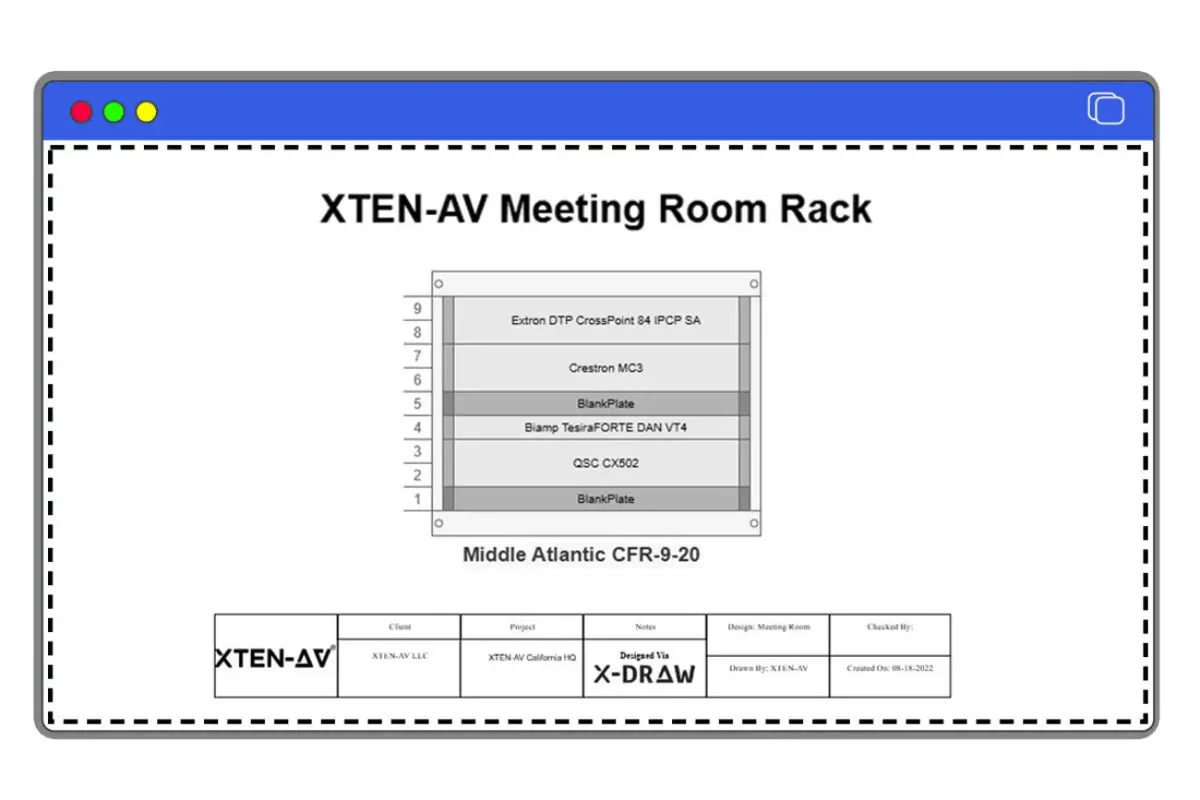
X-DRAW, XTEN-AV's core design platform, approaches rack documentation fundamentally differently than traditional rack diagram tools. Rather than treating rack elevations as isolated drawings, X-DRAW generates automated rack layouts directly from AV system designs, maintaining live connections between rack documentation and the broader project.
This architectural approach solves a persistent problem in AV documentation: keeping rack elevations synchronized with system designs, bills of materials, and installation drawings as projects evolve through design iterations, client changes, and value engineering.
Massive AV Product Library
XTEN-AV provides access to 1.5 million products from more than 5,200 AV brands, making it one of the most comprehensive AV equipment rack software platforms available. This extensive product database covers:
Digital signal processors and audio equipment
Amplifiers across all power ranges and technologies
Matrix switchers for video and audio routing
AV-over-IP encoders, decoders, and network switches
Control processors and automation equipment
Wireless microphone receivers and RF equipment
Video processors, scalers, and distribution equipment
Power distribution and rack infrastructure
Media players, conferencing appliances, and specialty devices
For AV designers building racks, this means working with actual manufacturer products rather than generic equipment blocks—improving documentation accuracy and reducing manual data entry.
My Library for Custom and Preferred Equipment
Beyond the standard product database, XTEN-AV supports My Library, an account-specific repository where integration companies can maintain:
Custom products and specialty equipment
Preferred manufacturer families and standardized selections
Company-specific pricing and supplier information
Reusable equipment templates for repeatable installations
This custom product library capability helps firms maintain design standards across projects and designers.
Connected Documentation Across the Entire Project
X-DRAW's greatest strength as rack builder software for AV professionals is its ability to generate comprehensive documentation packages from unified designs:
Rack layouts and elevations: Physical equipment placement within racks
Line schematics: Device interconnection and signal routing
Signal flow diagrams: Audiovisual signal paths through the system
Bills of materials: Equipment lists with quantities, specifications, and pricing
Cable schedules: Complete cable documentation with labeling information
Floor plans: Room layouts with device placement
Front elevation diagrams: Customer-facing equipment views
Specification sheets: Product documentation for submittal packages
Rather than maintaining separate files for each document type, X-DRAW keeps project information connected—when equipment changes in the rack, those changes propagate through related documentation.
Automated Cable Labeling and Scheduling
Professional rack installation requires detailed connectivity information. X-DRAW provides automatic cable labeling and cable schedule generation as devices are connected within system designs, producing documentation that includes:
Source and destination devices
Cable types and specifications
Cable labels and identification
Connection points and signal types
This transforms rack documentation from purely visual equipment positioning into actionable installation guidance.
Cloud-Based Platform with Team Collaboration
As cloud-based rack design software, X-DRAW provides centralized project storage and team access, addressing common problems with desktop-based tools:
Multiple team members can access current project documentation
No confusion over which file version is current
Project information remains accessible when personnel change
Easier to standardize documentation practices across the organization
For integration companies managing multiple concurrent projects, cloud accessibility becomes essential infrastructure.
AI-Powered Capabilities Through XAVIA
XTEN-AV extends its platform with XAVIA, an AI agent that assists with:
Equipment recommendations based on project requirements
AI-assisted rack design and system layout
Voice and chat-based design interaction
Automated creation of schematics, floor plans, and rack layouts
This AI rack design capability is particularly valuable for standardized room types and repeatable installations where AI can handle initial design development.
Custom Dealer Pricing Integration
X-DRAW supports custom dealer pricing uploads via XLS and CSV files, with integrations available for major AV distributors including ADI and Snap One. This brings accurate equipment costs directly into the design environment, helping:
Sales teams develop accurate proposals
Estimators understand project costs during design
Procurement teams work from current pricing information
Project managers track budget implications of design changes
Floor Plans and Room Context
Unlike rack tools focused solely on equipment elevation diagrams, X-DRAW supports floor plan import and AV device placement, giving designers better context around how racks relate to the rooms and systems they support. Designers can upload AutoCAD or Visio floor plans and use them as part of integrated AV documentation.
XTEN-AV represents the evolution of rack builder software from isolated drawing tools into comprehensive AV design platforms where rack documentation is one component of complete project delivery.
2. D-Tools System Integrator (SI): Established Platform for Commercial AV
D-Tools System Integrator has been a leading platform in the commercial AV integration industry for many years, offering comprehensive design, documentation, and business management capabilities.
Strengths for Rack Design
D-Tools SI provides robust rack layout software capabilities within its broader system integration platform:
Extensive product database: Thousands of manufacturer products with detailed specifications
Rack elevation creation: Visual rack design with equipment placement and U-space management
Project-wide integration: Rack designs connected to system documentation, BOMs, and proposals
Proposal and estimation tools: Integrated quoting and project estimation from design data
Why AV Professionals Choose D-Tools
For integration companies seeking professional rack builder software within a complete business management system, D-Tools offers:
Mature platform with established industry presence
Integration between design, estimation, procurement, and project management
Extensive manufacturer product data
Support for complex commercial projects
Considerations
D-Tools SI is a comprehensive platform that extends well beyond rack design into business operations, which brings both advantages (integrated workflow) and considerations (complexity, cost, learning curve). For firms primarily seeking rack documentation tools rather than complete business systems, more focused alternatives may be more appropriate.
3. Visio with Custom AV Templates: Familiar Diagramming for Rack Layouts
Microsoft Visio remains widely used for rack diagram creation, particularly among organizations already standardized on Microsoft products.
Visio's Approach to Rack Design
Visio functions as general-purpose diagramming software that can be adapted for AV rack design through:
Custom templates: User-created or third-party rack templates
Equipment shapes: Libraries of equipment shapes representing common devices
Flexible drawing: General diagramming capabilities for rack layouts
Microsoft integration: Works within familiar Office ecosystem
When Visio Makes Sense
For some AV professionals, Visio offers advantages:
Familiarity with Microsoft tools
Already licensed within the organization
Flexibility for various diagram types beyond racks
Suitable for simpler projects or smaller integration firms
Limitations for Professional AV Rack Design
However, Visio lacks capabilities that dedicated AV rack software provides:
No AV product intelligence: Equipment must be manually created or sourced from generic libraries
No BOM integration: Rack diagrams disconnected from equipment lists and pricing
No signal flow or connectivity documentation: Purely visual rack layouts
Manual updates: Changes require manual propagation across documents
Limited AV-specific features: No cable scheduling, automated labeling, or submittal generation
Visio can create rack elevation diagrams, but it functions as a drawing tool rather than an integrated AV documentation platform.
4. AutoCAD with AV Blocks: Professional CAD for Detailed Rack Drawings
AutoCAD represents the professional CAD standard and is sometimes used for rack design software applications when combined with AV equipment block libraries.
AutoCAD's Capabilities for Rack Design
AutoCAD offers:
Professional drafting tools: Industry-standard CAD capabilities
Precision and detail: Exact dimensional control for rack layouts
Custom block libraries: User-created equipment blocks for rack-mounted devices
Integration with architectural drawings: Compatible with building plans and construction documents
Why Some AV Firms Use AutoCAD
For integration companies with CAD expertise or projects requiring coordination with architectural and engineering teams, AutoCAD provides:
Professional-grade technical drawings
Compatibility with construction industry workflows
Precise dimensional accuracy
Established industry credibility
Challenges for AV Rack Documentation
AutoCAD's limitations for professional AV rack design include:
Steep learning curve: Requires CAD training and expertise
No AV product database: All equipment must be manually created
No automated documentation: Rack drawings disconnected from BOMs, cable schedules, and signal flow
Time-intensive: Manual drawing process for each rack
Cost: Professional CAD licensing represents significant investment
AutoCAD can produce beautiful rack elevation drawings, but at significant time and expertise cost compared to AV-specific platforms.
5. Rack Builder by Enconnex: IT-Focused Rack Planning Tool
Enconnex Rack Builder is a web-based rack planning software tool primarily designed for IT and data center applications but sometimes used for AV equipment racks.
Enconnex Rack Builder Features
This platform offers:
Web-based access: No software installation required
Visual rack design: Drag-and-drop equipment placement
Equipment database: Focus on IT and network equipment
Basic documentation: Rack elevation outputs
Applicability to AV Projects
For AV professionals working on projects with significant IT infrastructure components, Enconnex may be relevant for:
Network equipment racks
Server and IT infrastructure documentation
Basic rack visualization needs
Limitations for Professional AV Integration
However, Enconnex is designed for IT rather than audiovisual applications:
Limited AV product coverage: Database focused on IT equipment rather than DSPs, amplifiers, matrix switchers, and AV-specific devices
No signal flow documentation: IT-centric rather than AV system design oriented
No AV documentation integration: Lacks line schematics, cable schedules, and AV-specific outputs
Basic feature set: Focused on rack visualization rather than comprehensive project documentation
Enconnex serves IT rack planning needs but lacks the AV equipment rack software capabilities that commercial audiovisual projects require.
6. RackSolutions Designer: Free Rack Diagram Software with Limitations
RackSolutions Designer represents the free rack diagram software category, offering basic rack layout capabilities without cost.
What Free Rack Software Provides
RackSolutions and similar free tools offer:
No-cost access: Useful for budget-conscious users or simple projects
Basic rack visualization: Simple equipment placement and rack elevation creation
Equipment templates: Generic device shapes for common rack equipment
When Free Tools Are Appropriate
Free rack builder software may be suitable for:
Hobbyists and learning purposes
Very simple single-rack projects
Preliminary concept visualization
Organizations with minimal rack design needs
Why Professional AV Projects Require More
However, free rack diagram software typically lacks capabilities that commercial AV integration demands:
No comprehensive AV product libraries: Manual equipment creation required
No BOM integration or pricing: Rack diagrams disconnected from project estimation
No signal flow or connectivity documentation: Visual layouts only
Limited documentation outputs: Basic rack elevations without supporting documentation
No collaboration features: Desktop tools without cloud access or team functionality
No professional support: Community or limited vendor support
For occasional simple rack visualization, free tools may suffice. For professional commercial AV projects requiring comprehensive documentation, submittal packages, and integration with project workflows, dedicated professional rack builder software becomes necessary.
7. Lucidchart: Cloud Diagramming with Rack Templates
Lucidchart is a popular cloud-based diagramming platform that can be adapted for rack layout creation through custom templates and shape libraries.
Lucidchart's Approach
Lucidchart offers:
Cloud-based platform: Browser-based access from anywhere
Collaborative features: Multiple users can work on diagrams simultaneously
Flexible diagramming: General-purpose tool adaptable to various diagram types
Template library: Including some rack diagram templates
Advantages for Some Users
For organizations seeking cloud-based visual collaboration tools, Lucidchart provides:
Easy team sharing and collaboration
No software installation required
Familiar interface for users of other diagramming tools
Suitable for various diagram types beyond racks
Limitations for Professional AV Rack Design
Like other general diagramming tools, Lucidchart lacks AV rack software capabilities:
No AV product database: Equipment must be manually created
No BOM or pricing integration: Diagrams disconnected from project data
No AV-specific documentation: No line schematics, signal flow, or cable schedules
Visual only: Rack layouts without connectivity or installation information
Lucidchart can create presentable rack diagrams for visual communication but doesn't provide the comprehensive rack builder software for AV integrators functionality that commercial projects typically require.
8. SmartDraw: Desktop and Cloud Diagramming with Rack Templates
SmartDraw is another general-purpose diagramming tool offering both desktop and cloud versions, with templates that include rack diagrams.
SmartDraw Features
SmartDraw provides:
Automated formatting: Intelligent diagram formatting and alignment
Template library: Pre-built templates including rack elevations
CAD integration: Can import and export CAD formats
Deployment flexibility: Desktop or cloud-based options
Use Cases
SmartDraw may appeal to users seeking:
Easy-to-use diagramming without CAD complexity
Multiple diagram types from one platform
Automated layout assistance
Integration with existing workflows
Professional AV Limitations
SmartDraw shares limitations common to general diagramming platforms:
Generic equipment representation: No AV-specific product intelligence
No integrated documentation: Rack diagrams isolated from BOMs and specifications
Limited AV capabilities: No signal flow, cable scheduling, or submittal generation
Manual workflow: Disconnected from AV design and project management processes
SmartDraw can produce rack elevation diagrams but doesn't function as comprehensive AV rack design software.
9. Revit with Custom AV Families: BIM-Based Approach for Large Projects
Autodesk Revit represents Building Information Modeling (BIM) software sometimes used on large commercial AV projects where coordination with architectural and MEP (mechanical, electrical, plumbing) systems is critical.
Revit's Role in AV Documentation
For major construction projects, Revit offers:
BIM coordination: AV systems modeled within building information models
3D visualization: Spatial relationships between AV equipment and building systems
Clash detection: Identifying conflicts between AV installations and other building systems
Construction coordination: Integration with general contractor and architectural workflows
When Revit Makes Sense for AV
Revit becomes relevant for:
Large institutional or commercial projects using BIM workflows
Projects requiring detailed coordination with architectural and MEP systems
Organizations with Revit expertise and licensing
Situations where AV must integrate into comprehensive building models
Challenges for Typical AV Rack Design
However, Revit presents significant challenges for routine rack builder software applications:
Extreme complexity: BIM platforms require extensive training and expertise
High cost: Professional Revit licensing represents major investment
Time-intensive: BIM modeling takes significantly longer than 2D rack documentation
Limited AV-specific features: Requires custom family creation for AV equipment
Overkill for most projects: BIM capabilities exceed requirements for typical rack documentation
Revit serves specialized large-project BIM coordination needs but is impractical as general-purpose rack layout software for most AV integration firms.
10. Custom Excel/Spreadsheet Approaches: Basic Equipment Lists
Some AV professionals still document racks using spreadsheet-based equipment lists in Excel or similar tools, particularly for simple projects or preliminary planning.
What Spreadsheets Provide
Spreadsheet approaches offer:
Universal availability: Excel widely available and familiar
Flexibility: Customizable to specific needs
Equipment lists: Basic inventory of rack-mounted devices
Cost tracking: Simple pricing and quantity calculations
When Spreadsheets Are Used
Spreadsheets may appear in:
Very preliminary project planning
Simple equipment inventory tracking
Budget estimation before detailed design
Small projects with minimal documentation requirements
Why Spreadsheets Aren't Professional Rack Builder Software
However, spreadsheets fundamentally lack rack design software capabilities:
No visual rack layouts: Text lists without rack elevation diagrams
No equipment positioning: No U-space planning or physical placement visualization
No connectivity documentation: No signal flow, cable schedules, or wiring information
Manual and error-prone: No automation, validation, or consistency checking
Unprofessional deliverables: Spreadsheets don't constitute professional submittal documentation
Spreadsheets serve basic equipment tracking but cannot replace dedicated professional AV rack design platforms for commercial integration projects.
Detailed Comparison: Key Capabilities Across Rack Builder Software Platforms
To help AV professionals evaluate rack builder software options, here's a detailed capability comparison across the major platforms:
AV Product Database and Equipment Libraries
Platform | AV Product Library | Custom Equipment Support | Product Count |
XTEN-AV X-DRAW | Comprehensive AV-specific database | My Library for custom products | 1.5M+ products, 5,200+ brands |
D-Tools SI | Extensive AV product database | Custom product creation | Extensive manufacturer coverage |
Visio | Manual creation or third-party libraries | User-created shapes | Depends on user effort |
AutoCAD | Manual block creation required | Custom block libraries | User-created only |
Enconnex | IT/network equipment focus | Limited AV coverage | IT-centric database |
Free Tools | Generic templates only | Manual creation | Minimal |
Lucidchart | Manual creation required | User-created shapes | None native |
XTEN-AV and D-Tools clearly lead in AV-specific product intelligence, while general tools require manual equipment creation. |
Export as CSV
Documentation Integration and Automated Outputs
Platform | Rack Elevations | Line Schematics | Signal Flow | Cable Schedules | BOM Integration |
XTEN-AV X-DRAW | ✓ Automated | ✓ Automated | ✓ Automated | ✓ Automated | ✓ Live connection |
D-Tools SI | ✓ | ✓ | ✓ | ✓ | ✓ Integrated |
Visio | ✓ Manual | ✗ | ✗ | ✗ | ✗ |
AutoCAD | ✓ Manual | Manual possible | Manual possible | ✗ | ✗ |
General Diagramming | ✓ Manual | ✗ | ✗ | ✗ | ✗ |
AV-specific platforms provide automated documentation that general tools cannot match. |
Export as CSV
Cloud Collaboration and Team Access
Platform | Cloud-Based | Team Collaboration | Centralized Storage | Mobile Access |
XTEN-AV X-DRAW | ✓ | ✓ | ✓ | ✓ |
D-Tools SI | ✓ Cloud option | ✓ | ✓ | Limited |
Lucidchart | ✓ | ✓ | ✓ | ✓ |
Visio | Office 365 version | Limited | OneDrive integration | Limited |
AutoCAD | Cloud option available | Limited | Vault integration | AutoCAD mobile |
Desktop Tools | ✗ | ✗ | ✗ | ✗ |
Cloud-based rack design software like XTEN-AV and Lucidchart offer stronger collaboration capabilities than traditional desktop CAD tools. |
Export as CSV
AI and Automation Capabilities
Platform | AI-Assisted Design | Automated Product Search | Design Automation | Equipment Recommendations |
XTEN-AV X-DRAW | ✓ XAVIA AI agent | ✓ Search Sense | ✓ | ✓ |
D-Tools SI | Limited | Search available | Template-based | Limited |
Other Platforms | ✗ | Manual search | ✗ | ✗ |
AI rack design capabilities currently distinguish XTEN-AV from other platforms. |
Export as CSV
Pricing and Business Integration
Platform | Custom Dealer Pricing | Distributor Integration | Proposal Generation | Project Estimation |
XTEN-AV X-DRAW | ✓ XLS/CSV upload | ✓ ADI, Snap One | ✓ | ✓ |
D-Tools SI | ✓ | ✓ Multiple distributors | ✓ | ✓ Comprehensive |
General Tools | ✗ | ✗ | ✗ | ✗ |
Export as CSV
Business integration capabilities separate professional rack builder software from basic diagramming tools.
How to Choose the Right Rack Builder Software for Your AV Integration Business
Selecting the best rack builder software for your organization requires evaluating your specific needs, project types, team structure, and business workflows.
Questions to Guide Your Evaluation
1. What Types of Projects Do You Primarily Handle?
Simple residential or small commercial: Basic rack diagram software or general diagramming tools may suffice for straightforward single-rack installations.
Complex commercial AV systems: Large corporate, educational, or institutional projects require comprehensive professional AV rack design platforms with full documentation capabilities.
Specialized vertical markets: Broadcast, post-production, or mission-critical applications may need advanced features and precise technical documentation.
2. What Documentation Do Your Projects Require?
Basic rack elevations: Simple visual rack layouts may be achievable with general tools.
Complete submittal packages: Projects requiring rack elevations, line schematics, signal flow diagrams, cable schedules, BOMs, and specification sheets need integrated AV rack design software.
BIM coordination: Major construction projects may require Revit or other BIM-capable platforms.
3. How Large Is Your Design Team?
Individual designers: Desktop tools may work for solo practitioners.
Multi-person teams: Cloud-based rack design software with collaboration features becomes important for team coordination.
Multiple office locations: Cloud platforms with centralized storage essential for distributed teams.
4. What's Your Current Technology Ecosystem?
**Microsoft
Claude Sonnet 4.5
Sources
Images
Videos
News
Attached sources
Document
Key Features That Make XTEN-AV Stand Out.docx
Key Features That Make XTEN-AV Stand Out Key Features That Make XTEN-AV a Strong Rack Builder Software for AV Professionals 1. Automated AV Rack Layout and Rack Elevation Creation One of the biggest a
continue
Workflow
Continued from Section: How to Choose the Right Rack Builder Software for Your AV Integration Business
4. What's Your Current Technology Ecosystem?
Microsoft-centric organizations: Visio may integrate more naturally with existing Office workflows, though it lacks AV-specific capabilities.
Autodesk users: AutoCAD integration may be important for firms already invested in Autodesk platforms.
Cloud-first companies: Cloud-based rack design software like XTEN-AV X-DRAW offers advantages for organizations prioritizing cloud infrastructure.
AV-specific platforms: Integration companies focused exclusively on audiovisual work benefit most from AV rack design software rather than adapting generic tools.
5. What Level of Automation Do You Need?
Manual documentation acceptable: Basic rack diagram software or general diagramming tools may work if manual drawing processes are acceptable.
Automated documentation required: Projects requiring automated rack layout, synchronized BOMs, and multiple deliverable types need integrated platforms like XTEN-AV or D-Tools.
AI assistance desired: Firms interested in AI-assisted rack design and equipment recommendations should evaluate platforms with AI capabilities like XTEN-AV's XAVIA.
6. What's Your Budget and ROI Expectation?
Minimal budget: Free rack diagram software provides basic capabilities but lacks professional features.
Project-based ROI: Calculate time savings from automated documentation versus manual drawing processes.
Business platform investment: Comprehensive platforms like D-Tools or XTEN-AV represent business infrastructure investments beyond simple rack drawing tools.
Evaluation Criteria Summary
When comparing rack builder software for AV professionals, prioritize:
AV product intelligence: Comprehensive databases of actual AV equipment versus generic shapes
Documentation integration: Connected rack elevations, BOMs, schematics, and cable schedules versus isolated drawings
Automation capabilities: Automated documentation generation versus manual drawing processes
Collaboration features: Cloud-based team access versus desktop-only tools
Professional outputs: Complete submittal packages versus basic diagrams
Business integration: Pricing, procurement, and project management connections
Learning curve and support: Training requirements and vendor support quality
Total cost of ownership: Licensing costs versus productivity gains and business value
Common Rack Design Challenges and How Professional Software Addresses Them
Understanding the problems that professional AV rack design software solves helps clarify why dedicated platforms provide value over generic tools.
Challenge 1: Keeping Rack Drawings Synchronized With Project Changes
The Problem: During typical AV projects, equipment selections change due to client requests, value engineering, product availability, or design refinements. When rack elevations exist as separate drawing files, they frequently become outdated as the project evolves.
How Professional Rack Software Helps: Platforms like XTEN-AV X-DRAW generate automated rack layouts directly from system designs. When equipment changes in the design, those changes propagate through connected documentation including rack elevations, BOMs, and cable schedules.
Challenge 2: Creating Complete Documentation Packages From Scratch
The Problem: Commercial AV projects typically require multiple deliverable types—rack elevations, line schematics, signal flow diagrams, cable schedules, bills of materials, and submittal documentation. Creating each document type separately is time-consuming and creates synchronization problems.
How Professional Rack Software Helps: Integrated AV rack design software generates multiple professional documents from unified designs. Instead of maintaining separate files for rack drawings, schematics, BOMs, and cable documentation, designers work from a single design environment that produces all required deliverables.
Challenge 3: Accurate Equipment Information and Specifications
The Problem: Generic rack diagram software requires manual creation of equipment representations, leading to inaccurate dimensions, missing specifications, and time spent searching manufacturer websites for product information.
How Professional Rack Software Helps: AV equipment rack software with comprehensive product libraries provides access to actual manufacturer products with accurate specifications, dimensions, power requirements, and technical details. XTEN-AV's 1.5 million product database eliminates manual equipment creation for most commercial AV devices.
Challenge 4: Equipment Placement and U-Space Planning
The Problem: Properly planning equipment placement within racks requires understanding rack unit heights, equipment depths, weight distribution, thermal management, and service access. Generic drawing tools don't validate proper rack configuration.
How Professional Rack Software Helps: Rack layout software designed for AV applications understands U-space planning and can help designers visualize equipment organization, identify space conflicts, and plan proper rack configuration considering thermal and weight distribution requirements.
Challenge 5: Connectivity and Cable Documentation
The Problem: Knowing where equipment sits in the rack is insufficient—installers need detailed connectivity information including source/destination devices, cable types, cable labels, and connection points. Generic rack elevation diagrams show equipment position but not connectivity.
How Professional Rack Software Helps: Advanced AV rack software connects physical rack layouts with signal flow diagrams, line schematics, and automated cable schedules. XTEN-AV X-DRAW provides automatic cable labeling and cable schedule generation as devices are connected within system designs.
Challenge 6: Collaboration Across Distributed Teams
The Problem: AV integration projects involve multiple stakeholders—designers, engineers, project managers, procurement teams, and installation technicians. Desktop drawing files create version control problems and limit team access to current documentation.
How Professional Rack Software Helps: Cloud-based rack design software provides centralized project storage and team collaboration. Multiple authorized users can access current rack documentation, eliminating confusion over which file version is current and improving coordination across project teams.
Challenge 7: Accurate Project Estimation and Pricing
The Problem: Equipment costs significantly impact project budgets, but rack drawings created in generic tools don't connect to pricing information. Estimators must manually compile equipment lists and look up pricing separately.
How Professional Rack Software Helps: Professional rack builder software integrates custom dealer pricing and distributor connections. XTEN-AV supports pricing uploads via XLS/CSV files and integrations with distributors like ADI and Snap One, bringing accurate equipment costs directly into the design environment.
Challenge 8: Standardization Across Multiple Projects
The Problem: Integration companies handling multiple concurrent projects need consistent documentation standards, but generic tools don't support reusable templates or standardized equipment selections.
How Professional Rack Software Helps: Platforms with custom product libraries like XTEN-AV's My Library allow companies to maintain preferred equipment families, standardized rack configurations, and reusable design templates that improve documentation consistency across projects and designers.
User Case Studies: How AV Professionals Use Rack Builder Software
Real-world applications demonstrate how best rack builder software supports different types of AV integration projects.
Case Study 1: Corporate Boardroom with Unified Communications Integration
Project Requirements: A Fortune 500 company needed a executive boardroom with video conferencing, wireless presentation, room control, and distributed audio. The equipment rack contained:
Control processor for room automation
DSP for audio processing and acoustic echo cancellation
Multiple amplifiers for ceiling speakers and subwoofers
Video matrix switcher for source routing
AV-over-IP encoder for remote monitoring
Network switches for AV-over-IP and control network
Wireless presentation gateway
Power distribution equipment
How XTEN-AV Supported the Project:
The integration firm used X-DRAW to design the complete system including floor plan with device placement, signal flow diagrams showing audio/video routing, and automated rack layout organizing all equipment. From this single design, the team generated:
Professional rack elevation for submittal documentation
Line schematics showing device interconnection
Cable schedule with labeling for installation team
Bill of materials with accurate equipment pricing
Product specification sheets for client approval
Outcome: The connected documentation approach eliminated redundant data entry and kept rack elevations synchronized with system changes as the client requested design modifications. Installation teams received comprehensive documentation showing both equipment placement and connectivity details.
Case Study 2: Multi-Room Educational Facility Standardization
Project Requirements: A university needed AV systems for 40 classrooms across three buildings, with standardized equipment racks for each room type (small classroom, large classroom, lecture hall).
How D-Tools SI Supported the Project:
The integration company created equipment rack design templates for each room type in D-Tools SI, establishing standardized configurations that could be replicated across multiple rooms. The platform's AV product library and BOM integration allowed the firm to:
Design three standard rack configurations
Replicate those configurations across 40 rooms
Generate accurate equipment quantities for bulk procurement
Produce consistent installation documentation for all rooms
Maintain project-wide visibility into equipment costs and timelines
Outcome: Template-based rack planning reduced design time from hours per room to minutes, while ensuring documentation consistency across the entire project. Procurement teams could leverage volume pricing for standardized equipment selections.
Case Study 3: Broadcast Facility with Complex Signal Routing
Project Requirements: A regional broadcast station needed equipment racks for production control room, master control, and audio mixing suite, with extensive signal routing between spaces and integration with existing infrastructure.
How Professional AV Rack Software Supported the Project:
The systems integrator used professional AV rack design software to document multiple interconnected equipment racks containing broadcast video routers, audio consoles, intercom systems, monitoring equipment, and network infrastructure. The platform's signal flow diagram and line schematic capabilities were essential for:
Documenting complex signal paths between production spaces
Planning fiber and coax connectivity between equipment racks
Generating detailed cable schedules for installation contractors
Creating as-built documentation for facility engineering staff
Outcome: Comprehensive AV system documentation helped coordinate installation across multiple trades and provided facility engineers with detailed technical reference for ongoing operations and future expansions.
Case Study 4: House of Worship with Distributed Audio/Video
Project Requirements: A large church needed sanctuary audio/video systems, overflow viewing areas, recording capabilities, and streaming infrastructure, with equipment distributed across main sanctuary rack, broadcast booth, and remote equipment closets.
How Cloud-Based Rack Design Software Supported the Project:
Using cloud-based rack design software, the integration team collaborated remotely during COVID-19 restrictions, with designers, project managers, and volunteer technical staff all accessing current project documentation. The platform supported:
Multiple equipment rack locations documented within single project
Floor plans showing speaker placement and camera positions
Signal flow documentation for volunteer operators
Cable schedules for installation volunteers
Equipment specifications for church building committee approval
Outcome: Cloud rack design software enabled remote collaboration during project development and provided church technical volunteers with accessible documentation for ongoing system operation and future modifications.
Case Study 5: Retrofit Project with Existing Infrastructure Integration
Project Requirements: A corporate campus needed AV system upgrades across multiple conference rooms, integrating new equipment with existing network infrastructure, power distribution, and cable pathways.
How Custom Product Libraries Supported the Project:
The integration firm used rack builder software with custom product library capabilities to maintain information about existing installed equipment alongside new products. This allowed designers to:
Document existing equipment remaining in updated racks
Plan new equipment placement around existing infrastructure
Identify existing cable pathways that could be reused
Generate accurate BOMs showing only new equipment purchases
Outcome: Custom equipment library functionality helped the integration team accurately document hybrid racks containing both existing and new equipment, improving project estimation accuracy and reducing unnecessary equipment replacement costs.
Frequently Asked Questions About Rack Builder Software for AV Professionals
1. What is rack builder software and why do AV professionals need it?
Rack builder software is a specialized design tool that enables AV integrators to plan, visualize, and document equipment placement within standard 19-inch equipment racks. Unlike generic CAD or diagramming software, professional AV rack design platforms understand audiovisual equipment characteristics, signal flow relationships, and integration documentation requirements.
AV professionals need dedicated rack layout software because commercial projects require comprehensive documentation beyond simple equipment diagrams—including bills of materials, signal flow schematics, cable schedules, and submittal packages that generic tools cannot efficiently produce.
2. What's the difference between free rack diagram software and professional rack builder software?
Free rack diagram software typically provides basic visual rack layout capabilities suitable for simple projects or learning purposes, but lacks professional features including:
Comprehensive AV product databases with manufacturer specifications
Automated BOM generation and pricing integration
Signal flow documentation and cable scheduling
Multi-document generation from unified designs
Cloud collaboration and team access
Professional support and training resources
Professional rack builder software like XTEN-AV X-DRAW or D-Tools SI provides integrated platforms connecting rack design with broader project documentation, automated deliverable generation, and business systems integration that commercial AV projects require.
3. Can I use AutoCAD or Visio for AV rack design instead of dedicated rack software?
You can create rack elevation diagrams using AutoCAD or Visio, but these general-purpose tools lack AV rack software capabilities:
AutoCAD provides professional drafting precision but requires manual equipment block creation, offers no AV product intelligence, and doesn't automate BOM generation, signal flow documentation, or cable scheduling. The time investment and CAD expertise required often exceeds the value for routine rack documentation.
Visio offers easier diagramming than CAD but similarly lacks AV-specific features—no product databases, no automated documentation, and no integration with project BOMs or pricing systems.
For simple projects or firms with existing CAD infrastructure, these tools may be workable. For commercial AV integration requiring comprehensive documentation, dedicated AV rack design software provides significant efficiency and accuracy advantages.
4. How does automated rack layout work in platforms like XTEN-AV?
Automated rack layout in XTEN-AV X-DRAW generates rack elevations directly from AV system designs rather than requiring separate drawing creation. When designers specify equipment for a project, those devices become available for rack placement while maintaining connection to the broader system.
This means:
Equipment specified once appears in rack layouts, BOMs, schematics, and cable schedules
Changes to equipment selections automatically propagate through connected documentation
Rack elevations stay synchronized with system-level design modifications
Designers avoid redundant work recreating the same equipment information across disconnected files
The automation eliminates manual drawing processes and keeps rack documentation consistent with project designs as they evolve through client changes and design iterations.
5. What should professional AV rack elevations include?
Professional AV rack elevation diagrams should communicate comprehensive equipment information to installation teams, clients, and project stakeholders:
Essential elements:
Accurate equipment representations showing actual front panels
Rack unit (U-space) positions for each device
Equipment manufacturer and model numbers
Proper scale and dimensional accuracy
Clear labeling and identification
Advanced elements in professional platforms:
Equipment specifications and technical details
Power requirements and heat dissipation
Weight distribution information
Cable connection points and labeling
Links to related signal flow and connectivity documentation
Integration with project BOMs and submittal packages
The best rack builder software generates rack elevations that serve as both visual communication tools and technical installation references.
6. How does rack design software integrate with equipment pricing and procurement?
Professional rack builder software connects rack documentation with project estimation and procurement through:
Custom dealer pricing: Upload and maintain company-specific pricing from AV distributors via XLS/CSV files or direct integrations. XTEN-AV supports distributor connections with ADI and Snap One.
BOM integration: Equipment placed in rack designs automatically contributes to project bills of materials with current pricing information.
Cost visibility: Real-time understanding of equipment costs as racks are designed helps sales teams, estimators, and project managers make informed decisions.
Procurement documentation: Generate purchase orders and equipment lists directly from rack designs rather than manually compiling separate spreadsheets.
This integration addresses a common problem: rack drawings showing different equipment than procurement documentation because one was updated while the other was forgotten.
7. What are the advantages of cloud-based rack design software over desktop tools?
Cloud-based rack design software like XTEN-AV X-DRAW provides significant advantages for integration companies:
Centralized access: Project documentation available to authorized team members regardless of location—designers, engineers, project managers, and installation teams all work from current information.
Version control: Single source of truth eliminates confusion over which file version is current or conflicts between multiple copies.
Team collaboration: Multiple users can access projects simultaneously without file sharing complications.
Business continuity: Project data not locked on individual workstations—remains accessible when personnel change or equipment fails.
Scalability: Easier to standardize documentation practices across growing organizations with multiple office locations or remote team members.
For firms managing concurrent projects across distributed teams, cloud rack design software becomes essential infrastructure rather than optional convenience.
8. How do AI capabilities in rack builder software like XTEN-AV's XAVIA work?
AI-assisted rack design in platforms like XTEN-AV uses artificial intelligence to accelerate design workflows:
AI-powered product search (Search Sense): Intelligent search that learns from designer behavior and adapts to equipment selection patterns, making it faster to locate required products from massive databases.
AI-assisted design (XAVIA): Generate initial system designs and rack layouts from project requirements through voice or chat interaction, creating starting points that designers can refine rather than building everything manually.
Equipment recommendations: Suggest appropriate products based on system requirements, project context, and design patterns.
Design automation: Create standard room types and repeatable rack configurations automatically.
AI rack design capabilities are particularly valuable for firms handling high volumes of similar projects where AI can handle initial design development before human engineers perform detailed refinement and customization.
Conclusion: Selecting the Best Rack Builder Software for Your AV Integration Needs
Choosing the best rack builder software for professional audiovisual integration requires understanding that rack documentation is not an isolated drawing activity but an integral component of comprehensive project delivery. While free rack diagram software and generic diagramming tools may serve hobbyists or very simple installations, commercial AV projects demand capabilities that only dedicated professional AV rack design platforms can provide.
The evolution of rack layout software from basic drawing tools into intelligent design platforms reflects the broader transformation of AV system integration from installation-focused trade into sophisticated engineering discipline. In 2026, the leading AV rack design software solutions offer:
Comprehensive AV product intelligence: Access to hundreds of thousands of actual manufacturer products rather than generic equipment shapes
Automated documentation generation: Multiple professional deliverables from unified designs rather than disconnected manual drawings
Connected project information: Rack elevations synchronized with BOMs, schematics, cable schedules, and pricing data
Cloud collaboration: Centralized team access replacing desktop file management
AI assistance: Intelligent search, equipment recommendations, and design automation
Business integration: Connections to procurement, estimation, and project management workflows
Among the platforms evaluated, XTEN-AV X-DRAW stands out as one of the best rack builder software solutions specifically because it was purpose-built for professional audiovisual system integration rather than adapted from generic tools. Its approach of generating automated rack layouts from connected system designs, combined with access to 1.5 million AV products, custom product libraries, AI-powered capabilities through XAVIA, and comprehensive multi-document generation, positions it as a complete AV design platform where rack documentation is one component of integrated project delivery.
For AV integration companies evaluating their documentation workflows in 2026, the question is not whether to invest in professional rack builder software for AV professionals, but which platform best aligns with their project types, team structure, technology ecosystem, and business requirements. The productivity gains from automated rack elevation generation, synchronized documentation, and integrated project information quickly justify the investment in dedicated platforms over continued reliance on generic tools requiring manual processes.
As commercial AV projects grow increasingly complex—incorporating AV-over-IP technologies, networked audio systems, intelligent building integrations, and sophisticated control programming—the documentation supporting those systems must evolve accordingly. The best rack builder software in 2026 recognizes that professional rack design means more than drawing equipment in a rack—it means creating comprehensive technical documentation that connects physical equipment placement with signal flow, connectivity, procurement, installation, and commissioning activities across the entire project lifecycle.
Whether you choose XTEN-AV X-DRAW for its comprehensive automation and AI capabilities, D-Tools SI for its established commercial platform, or another solution aligned with your specific needs, investing in professional AV rack design software represents investing in documentation quality, team productivity, and project delivery excellence that distinguishes professional integration firms in an increasingly competitive industry.