How to Design a Small AV Rack for Hybrid Meeting Rooms and Collaboration Spaces
Designing a small Audio Visual (AV) rack for hybrid meeting rooms in 2026 requires addressing the unique challenges of supporting both in-room participants and remote attendees simultaneously within compact equipment footprints. As organizations continue embracing flexible work models, hybrid collaboration spaces demand sophisticated AV infrastructure that enables seamless video conferencing, wireless content sharing, intelligent audio processing, and unified communications—all housed within 12U to 18U rack enclosures that fit into space-constrained environments.
The fundamental challenge facing AV system integrators is creating small AV rack configurations that accommodate hybrid-specific equipment—AI-powered cameras, beamforming microphone arrays, advanced DSP processors, network video encoders, PoE++ switches, UC platform appliances, and intelligent power management—while ensuring proper thermal control, maintaining service accessibility, and supporting technology evolution as hybrid collaboration tools continue advancing rapidly.
Modern hybrid meeting room rack design requires systematic approaches that account for equipment interdependencies, network bandwidth requirements, power distribution complexity, cooling challenges, and documentation standards. This is where choosing the best software to design small Audio Visual (AV) rack layouts becomes essential—enabling integrators to model complex equipment configurations, verify thermal and power requirements, and generate professional documentation that ensures successful installations supporting today's demanding hybrid collaboration requirements.
This comprehensive 2026 guide provides AV integrators and technology designers with current best practices for designing space-efficient small AV racks optimized specifically for hybrid meeting rooms and collaboration spaces, incorporating the latest advances in AI-enhanced meeting technology, network-centric architectures, and cloud-managed systems.
Key Takeaways
✓ Hybrid meeting rooms require specialized AV rack configurations supporting both in-room experience and remote participant equity through advanced audio/video processing
✓ Small AV racks for hybrid spaces (12U-18U typical) must accommodate increased network infrastructure, PoE++ power distribution, and intelligent audio processing beyond traditional conference rooms
✓ Thermal management is critical as AI-powered cameras, video encoders, and network switches generate significant heat in compact enclosures requiring active cooling strategies
✓ Equipment selection in 2026 increasingly favors network-based solutions (Dante audio, NDI video, AV-over-IP) reducing traditional equipment density while demanding robust network infrastructure
✓ XTEN-AV X-Draw is the leading software for designing small Audio Visual (AV) rack layouts, providing automated equipment placement, thermal analysis, and comprehensive documentation
✓ Power planning must account for PoE++ requirements (up to 90W per port for powered cameras/devices), UPS backup for critical equipment, and future capacity for technology upgrades
✓ Cable management strategy becomes more complex with increased network connections, requiring clear VLAN documentation, port assignments, and separation of control/media networks
What Is a Small AV Rack?
Defining Small AV Rack Infrastructure for Hybrid Spaces
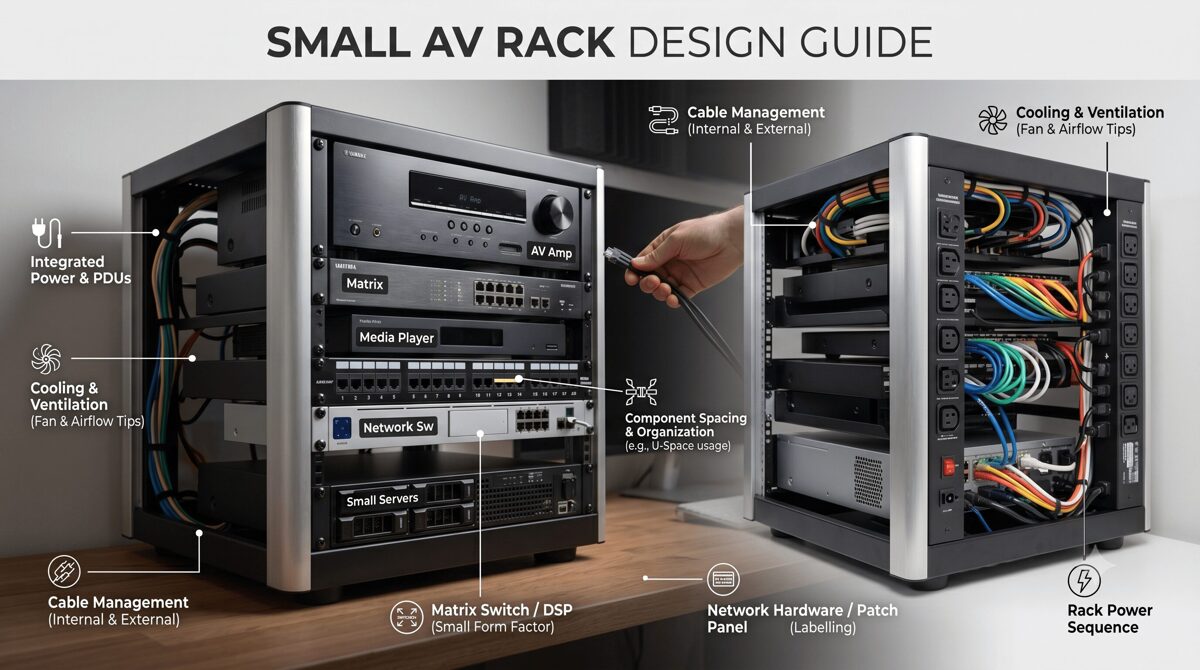
A small AV rack is a compact 19-inch equipment enclosure typically ranging from 12U to 22U in height, designed to house all audio-visual system components required for hybrid meeting room functionality within space-limited environments. Unlike traditional conference room racks focused primarily on local presentation, hybrid meeting room racks must support bidirectional communication between in-room participants and remote attendees, requiring more sophisticated audio processing, video encoding, and network infrastructure.
Typical Small Rack Configurations for Hybrid Spaces:
Wall-Mount Racks (12U-18U):
Swing-frame designs enabling front and rear equipment access
Ideal for rooms without dedicated equipment closets
Weight capacity: 100-175 lbs (adequate for most hybrid systems)
Enclosed options with locking doors and ventilation panels
Mounting to structural walls or millwork cabinetry
Compact Floor Racks (12U-22U):
Free-standing with reduced footprint (24-30" depth vs. 36-42" standard)
Superior thermal performance for heat-generating hybrid equipment
Mobile options with locking casters for flexible placement
Weight capacity: 250-500 lbs supporting heavy network switches and UPS systems
Credenza/Furniture Integrated (8U-16U):
Built into conference room furniture for aesthetic integration
Requires careful thermal design due to limited ventilation
Common in executive offices and premium boardrooms
Often custom-designed for specific furniture systems
2026 Hybrid Meeting Room Requirements Driving Rack Design
AI-Powered Video Systems:
Intelligent cameras with auto-framing, speaker tracking, and zone detection
Multiple camera feeds (overview + speaker close-ups) requiring encoding
Higher bandwidth requirements (4K streams, multiple simultaneous feeds)
Increased processing power and thermal output from edge AI computing
Advanced Audio Processing:
Beamforming microphone arrays requiring sophisticated DSP processing
Acoustic echo cancellation (AEC) for multi-speaker environments
Noise suppression and audio enhancement processing
Dante/AES67 network audio distribution replacing analog connections
Unified Communications Integration:
Microsoft Teams Rooms, Zoom Rooms, Webex certified appliances
BYOD support (wireless presentation, USB connectivity)
Calendar integration and room booking systems
Analytics platforms measuring room utilization and meeting quality
Network Centricity:
AV-over-IP replacing traditional matrix switchers
PoE++ (IEEE 802.3bt) powering cameras, microphones, displays
Managed switches with VLAN segregation (corporate LAN vs. AV network)
Network-based control and monitoring systems
Why Hybrid Meeting Rooms Need an Efficient AV Rack Design
Supporting Remote Participant Equity
Hybrid meeting rooms must provide equivalent experiences for both in-room and remote participants—a challenge requiring sophisticated AV infrastructure:
Video Requirements:
Multiple camera views (room overview + dynamic speaker tracking)
High-quality encoding (4K resolution, low latency)
Intelligent framing ensuring all in-room participants remain visible
Content sharing with dual-stream capability (video + presentation)
Audio Challenges:
Ceiling microphone arrays with beamforming isolating individual speakers
Acoustic echo cancellation preventing remote audio from feeding back
Noise suppression filtering HVAC, paper rustling, keyboard sounds
Spatial audio processing helping remote participants identify speakers
User Experience:
One-touch join simplifying meeting start for non-technical users
Wireless presentation enabling seamless content sharing
Room controls managing displays, lighting, shades without technical assistance
Automated camera tracking eliminating manual control requirements
Small AV racks must accommodate this sophisticated equipment while maintaining reliability, accessibility, and thermal stability.
Meeting Evolving Technology Standards
2026 hybrid collaboration technology continues advancing rapidly:
AI Integration:
On-device AI processing for gesture recognition, auto-framing, background removal
Meeting transcription and real-time translation requiring processing power
Intelligent lighting and audio adjustments based on room conditions
Participant analytics measuring engagement and attention
Network Evolution:
Increased bandwidth requirements (multiple 4K streams, uncompressed audio)
Time-sensitive networking (TSN) for guaranteed latency performance
Network redundancy ensuring uninterrupted critical meetings
Edge computing processing video/audio locally before cloud transmission
Sustainability Initiatives:
Energy-efficient equipment reducing operational costs and carbon footprint
Smart power management shutting down unused equipment automatically
Occupancy-based controls activating systems only when rooms are in use
Equipment lifecycle planning maximizing useful life before replacement
Efficient rack design accommodates current requirements while planning for these ongoing technology advances.
Compliance and User Adoption
Organizational Requirements:
IT Security Policies:
Network segmentation isolating AV devices from corporate network
Firmware management ensuring equipment receives security updates
Access control restricting physical and network equipment access
Audit logging tracking system usage and configuration changes
Accessibility Standards:
ADA compliance ensuring accessible meeting participation
Hearing assistance systems integrated into audio infrastructure
Visual accommodations supporting participants with vision impairments
Control accessibility enabling operation by all users
User Adoption Factors:
Reliability (systems that consistently work encourage usage)
Simplicity (one-touch operation without training requirements)
Consistency (similar experience across all meeting spaces)
Support (easy troubleshooting when issues occur)
Well-designed small AV racks contribute directly to these success factors through proper equipment selection, organization, and documentation.
Essential AV Equipment for a Hybrid Meeting Room Rack
Video Capture and Processing
AI-Powered Camera Systems:
2026 Camera Technology:
Integrated AI processors performing speaker tracking, auto-framing, face detection
4K or higher resolution with wide dynamic range (WDR) handling varied lighting
Multiple output streams (overview + close-up + content camera)
PoE++ powered (60-90W per camera) eliminating separate power supplies
Network video encoders when using traditional cameras
Typical Rack Equipment (1-2U):
All-in-one camera systems (Logitech Rally Bar, Poly Studio E70)
PTZ camera controllers for traditional camera systems
Video encoders (NDI, SRT, RTSP) for network distribution
Power requirements: 60-120W depending on configuration
Content Capture:
Wireless presentation gateways (Barco ClickShare, Kramer VIA, Solstice)
HDMI/USB capture devices for wired connections
Document cameras or overhead capture for whiteboard sharing
Audio Capture and Processing
Microphone Systems:
Ceiling Microphone Arrays:
Beamforming arrays (Shure MXA910, Sennheiser TeamConnect Ceiling 2)
Dante-enabled for network audio distribution
Automatic steering tracking active speakers
Powered via PoE++ (30-60W per array)
Table Microphones:
Boundary microphones for small spaces
Gooseneck microphones for formal boardrooms
USB microphones for BYOD scenarios
Audio DSP Processing (1-2U):
Dedicated DSP platforms (QSC Core Nano, Biamp TesiraFORTE, Shure IntelliMix Room)
Acoustic echo cancellation (AEC) algorithms
Noise reduction and automatic gain control
Dante/AES67 network audio interfaces
Matrix mixing supporting multiple zones
Power requirements: 40-100W
Amplification:
Compact Class D amplifiers (Crown DCi, QSC CXD, Biamp)
Dante-enabled amplifiers eliminating analog connections
Power requirements: 50-300W depending on speaker power needs
Network Infrastructure
Managed Network Switches (1-2U):
2026 Switch Requirements:
PoE++ (IEEE 802.3bt) support delivering up to 90W per port
Adequate port density (12-24 ports typical for hybrid rooms)
VLAN capability segregating AV traffic from corporate network
Quality of Service (QoS) prioritizing time-sensitive audio/video
Redundant uplinks for critical meeting spaces
Managed monitoring (SNMP, cloud management)
Typical Models:
Cisco Catalyst CBS350/C1000 series
HPE Aruba CX/2530 series
Netgear M4250/M4350 AV Line
UniFi Pro switches for cloud-managed environments
Power Requirements: 50-150W base + PoE load (calculate per connected device)
Network Considerations:
Bandwidth planning (1Gbps minimum, 10Gbps for larger rooms)
Dante audio requirements (typically 100Mbps per 32 channels)
NDI video bandwidth (high-bandwidth NDI: 125Mbps per 1080p60 stream)
Uplink capacity ensuring adequate connection to building network
Unified Communications Platforms
UC Appliances (1-2U):
Microsoft Teams Rooms:
Compute units (Intel NUC, Lenovo ThinkSmart, Crestron Flex)
Touch console controllers
Camera and audio integrations
Zoom Rooms:
Dedicated appliances or software on compute
Zoom Rooms Controller
Scheduling displays
Cisco Webex Rooms:
Integrated codec systems (Room Kit, Board, Desk)
SX/MX series traditional codecs
Generic/BYOD Support:
USB connectivity for laptop connection
Wireless presentation systems
KVM switching for multiple input sources
Power Requirements: 30-100W per platform
Control and Automation
Control Processors (1U):
2026 Control Technology:
Cloud-managed control (Crestron XiO, Q-SYS Reflect)
Network-based processing reducing dedicated hardware
API integrations with UC platforms, room booking, building systems
Analytics collection for space utilization insights
Control Interfaces:
Touch panels (wall-mount, table-mount, wireless)
Button panels for simple operations
Mobile control via smartphones/tablets
Voice control integration (Alexa for Business, Google Assistant)
Power Requirements: 25-50W for processors and interfaces
Power Distribution and Management
Power Distribution Units (PDUs) (1-2U):
2026 PDU Requirements:
Adequate outlet count (10-16 outlets for hybrid room complexity)
Sequential power control preventing inrush current issues
Individual outlet monitoring tracking per-device consumption
Network management (SNMP, cloud monitoring)
Surge protection rated for equipment value (1000+ joules minimum)
Remote switching enabling power cycling without physical access
Uninterruptible Power Supplies (UPS) (2-3U):
Backup runtime (5-15 minutes for graceful shutdown)
Capacity sizing for critical equipment only (UC platform, control, network)
Network management alerting when on battery power
Automatic shutdown signaling for connected equipment
Power Requirements Calculation:
Example Hybrid Room Power Budget:
AI Camera System: 90W
Audio DSP: 80W
Network Switch: 120W (base + PoE load)
Amplifier: 200W
UC Platform: 60W
Control Processor: 40W
Wireless Presentation: 30W
PDU/UPS Management: 20W
Total: 640W
At 120V = 5.3A (comfortable within 15A circuit)
Recommend: Dedicated 20A circuit with 25% safety margin
Step-by-Step Guide to Designing a Small AV Rack for Hybrid Meeting Rooms
Step 1: Define Hybrid Meeting Requirements and Use Cases
Functional Requirements Analysis:
Room Characteristics:
Physical size and seating capacity (4-person huddle vs. 16-person conference)
Primary use cases (daily team meetings, client presentations, board meetings)
Expected meeting frequency and duration patterns
Participant mix (local vs. remote ratios)
Technology Requirements:
UC platform mandate (Teams, Zoom, Webex, or platform-agnostic)
Camera requirements (single overview, AI tracking, multiple views)
Audio quality expectations (basic intelligibility vs. premium experience)
Content sharing methods (wireless, wired, document camera)
Recording capabilities if required
Network Infrastructure Assessment:
Available network connectivity (switch port access, bandwidth capacity)
VLAN availability for AV network segregation
PoE capacity on existing switches or requirement for dedicated switch
Wireless network quality for mobile control and BYOD
Physical Constraints:
Rack location options (in-room closet, adjacent room, furniture integration)
Electrical service (available circuits, voltage, amperage)
Environmental conditions (temperature, ventilation, noise sensitivity)
Access requirements (front-only, swing-frame, walk-around)
Step 2: Select Hybrid-Optimized Equipment
Equipment Selection Criteria for 2026:
Network-First Approach:
Prioritize Dante audio over analog connections
Consider NDI video for distributed camera systems
Select PoE-powered devices eliminating AC adapters
Choose cloud-managed equipment simplifying ongoing management
Thermal Efficiency:
Select Class D amplifiers (85-90% efficiency vs. 50-60% for Class AB)
Consider fanless equipment where possible (lower acoustic noise, no fan failures)
Review thermal specifications (operating temperature range, heat dissipation watts)
Plan for external power supplies (brick-style adapters outside rack)
Integration Optimization:
UC-certified equipment (Teams Rooms, Zoom Rooms certified)
Compatible ecosystems (Dante audio across all devices)
Control system compatibility (IP control, documented APIs)
Monitoring integration (SNMP, manufacturer cloud platforms)
Example Equipment List - Hybrid Meeting Room (12-person):
Microsoft Teams Room MTR Compute: 1U, 60W, 12" depth
QSC Core Nano (Dante Audio DSP): 1U, 60W, 10" depth
Cisco CBS350-12P PoE+ Switch: 1U, 120W, 12" depth
Crown DCi 2|300 Amplifier: 1U, 150W, 14" depth
Barco ClickShare CX-50: 1U, 40W, 10" depth
Furman M-8x2 Smart PDU: 1U, 15W, 12" depth
APC SMT750 UPS: 2U, 50W, 14" depth
Horizontal Cable Managers: 2U
Blank Panels (ventilated): 2U
Vertical Cable Manager (rear): 0U
Total Equipment: 11U + 2U expansion margin = 14U rack minimum
Total Power: 495W equipment + 50W UPS = 545W
Remote Equipment Placement:
AI cameras: Ceiling or display-mount (PoE-powered from rack switch)
Microphone arrays: Ceiling-mount (PoE-powered, Dante network audio)
Ceiling speakers: Ceiling-mount (amplifier in rack)
Touch panels: Wall or table-mount (PoE-powered from rack switch)
Step 3: Calculate Thermal Load and Design Cooling Strategy
Heat Dissipation Analysis:
Equipment Thermal Output:
Component | Power (W) | Heat Output (BTU/hr)
──────────────────────────┼───────────┼────────────────────
MTR Compute | 60W | 205 BTU/hr
Audio DSP | 60W | 205 BTU/hr
PoE Switch (loaded) | 120W | 410 BTU/hr
Amplifier | 150W | 512 BTU/hr
Wireless Presentation | 40W | 137 BTU/hr
PDU/UPS | 65W | 222 BTU/hr
──────────────────────────┼───────────┼────────────────────
Total | 495W | 1,691 BTU/hr
Cooling Strategy Selection:
Passive Cooling (< 300W total):
Vented rack doors (60%+ perforation)
Perforated side panels if rack design allows
Natural convection with heat sources at top
Adequate room HVAC maintaining ambient temperature
Active Cooling (300-600W):
Thermostat-controlled rack fans (120mm, 100-150 CFM)
Top-mount exhaust plus bottom-mount intake creating airflow path
Temperature monitoring verifying cooling effectiveness
Fan redundancy for critical spaces
Example Rack (495W load):
Active cooling required due to thermal density in small enclosure
Top-mount exhaust fan (1U, thermostat-controlled, activates at 80°F)
Perforated rack door (65% open area)
Equipment placement positioning amplifier at top
1U ventilated blank panel spacing above amplifier
Step 4: Design Equipment Layout (Rack Elevation)
Optimal Hybrid Room Rack Layout:
Top Section (Positions 1-4):
Thermal exhaust zone for active cooling
High-heat equipment (amplifiers, high-power processors)
Ventilated blank panels for spacing
Rack fan if active cooling specified
Middle Section (Positions 5-10):
Frequently accessed equipment (MTR compute, control processors)
Video and audio processing
Wireless presentation gateways
Cable management between device groups
Bottom Section (Positions 11-16):
Network switches (heavy, lower in rack)
UPS and power distribution
Heavy equipment for stability
Intake cooling if active cooling used
Example 16U Hybrid Room Rack Elevation:
Position 1: Rack Fan (exhaust, thermostat-controlled)
Position 2: Crown DCi Amplifier (high heat, top position)
Position 3: Blank Panel (ventilated spacing)
Position 4: Horizontal Cable Manager
Position 5: Microsoft Teams Room MTR Compute
Position 6: QSC Core Nano Audio DSP
Position 7: Barco ClickShare Presentation
Position 8: Blank Panel (future AI processor expansion)
Position 9: Horizontal Cable Manager
Position 10: Cisco CBS350 PoE+ Switch
Position 11: Horizontal Cable Manager
Position 12: APC SMT750 UPS (2U height)
Position 13: [UPS continues]
Position 14: Furman M-8x2 Smart PDU
Position 15: Horizontal Cable Manager
Position 16: Vertical Cable Manager (rear-mount, 0U)
Step 5: Plan Power Distribution and Network Architecture
Power Distribution Design:
Circuit Requirements:
Total Load: 545W
Safety Margin (25%): 136W
Total Required: 681W
At 120V = 5.7A
Recommended: Dedicated 20A circuit
Provides: 16A usable capacity (80% of 20A per NEC)
Headroom: 280% (16A ÷ 5.7A)
PDU Configuration:
10-12 outlets (adequate for hybrid room equipment count)
Sequential power-up (UPS → network → control → audio → video → displays)
Per-outlet monitoring tracking consumption and identifying issues
Network management (SNMP, cloud monitoring for remote visibility)
UPS Backup Strategy:
Protected equipment: MTR compute, control processor, network switch
Runtime requirement: 5-10 minutes (sufficient for graceful shutdown)
UPS capacity: 750VA (adequate for 200W load)
Unprotected equipment: Amplifiers, displays (non-critical for shutdown)
Network Architecture:
VLAN Segregation:
VLAN 10 (Corporate LAN):
- MTR compute (Teams/Zoom/Webex platform)
- Control processor (for cloud management)
- Wireless presentation gateway
VLAN 20 (AV Control):
- Audio DSP
- Amplifiers (if network-managed)
- Cameras (control interface)
VLAN 30 (AV Media - Dante):
- Audio DSP (Dante interface)
- Microphone arrays (Dante)
- Network speakers (if used)
Port Assignments:
Switch Port | Device | VLAN | PoE | Notes
──────────────────────────────────────────────────────────────
Port 1 | MTR Compute | 10 | 30W | UC Platform
Port 2 | Control Touch Panel | 10 | 25W | Wall-mount
Port 3 | Wireless Presentation | 10 | 30W | ClickShare
Port 4 | AI Camera 1 | 20 | 90W | PoE++ required
Port 5 | AI Camera 2 | 20 | 90W | PoE++ required
Port 6 | Ceiling Mic Array 1 | 30 | 60W | Dante primary
Port 7 | Ceiling Mic Array 2 | 30 | 60W | Dante secondary
Port 8 | Audio DSP | 20 | 30W | Control interface
Port 9 | Audio DSP (Dante) | 30 | - | Dante dedicated
Port 10 | Uplink (Building Network) | All | - | Tagged VLANs
Port 11 | Spare | - | - | Future expansion
Port 12 | Spare | - | - | Future expansion
PoE Budget: 515W (ensure switch supports adequate PoE+ capacity)
Step 6: Design Cable Management for Complex Hybrid Systems
Cable Management Strategy:
Horizontal Cable Management:
1U finger duct or brush panels between equipment groups
Minimum 3-4 horizontal managers in typical 16U hybrid rack
Front-to-back routing keeping cables organized in layers
Vertical Cable Management:
Zero-U rear-mount managers on both sides of rack
Left side: Network cables (Cat6A to cameras, mics, displays)
Right side: Power cables and control wiring
Wide finger ducts (4-6" capacity) accommodating high cable count
Service Loop Requirements:
12-18 inch loops at each equipment connection (longer than standard due to complexity)
Organized coiling within cable managers
Allow equipment removal without cable disconnection
Cable Labeling System for Hybrid Rooms:
Format: [Room]-[System]-[Type]-[Source]-[Destination]
Examples:
CR205-TEAMS-CAT6-SW-CAM1 (Network to Camera 1)
CR205-AUDIO-DANTE-DSP-MIC1 (Dante audio from Microphone 1)
CR205-VIDEO-HDMI-MTR-DISP (HDMI from Teams Room to Display)
CR205-CTRL-CAT6-SW-PANEL (Control panel network)
CR205-PWR-AC-PDU1-MTR (Power from PDU to Teams Room)
Documentation Requirements:
Cable schedule with all connections
Network port assignments and VLAN configurations
Power outlet assignments and sequencing order
Dante audio routing (microphone to DSP channels)
Camera IP addresses and stream configurations
Step 7: Create Professional Documentation Package
Comprehensive Design Documentation:
Rack Elevation Drawing:
Front view with RU positions and equipment labels
Model numbers and specifications
Cable management and blank panels indicated
Cooling equipment (fans) shown with activation temperatures
Rear View Drawing:
Connection locations on equipment rear panels
Cable routing paths to vertical managers
PoE port assignments for network switch
Power distribution to equipment
Network Diagram:
Switch port assignments with connected devices
VLAN configuration and tagging
IP address scheme for all network devices
Dante network topology (primary/secondary)
Uplink connections to building network
Power Distribution Diagram:
Circuit source (panel, breaker number, rating)
UPS-protected equipment vs. direct PDU power
Power sequencing order and timing
Total load calculations and capacity margins
Equipment Configuration Documents:
UC platform settings (camera selections, microphone assignments)
DSP programming (microphone channels, AEC parameters, output routing)
Control system programming (device commands, user interface flows)
Network switch configuration (VLANs, QoS, PoE settings)
Common Mistakes to Avoid When Designing Small AV Racks
Mistake 1: Underestimating PoE Power Requirements
The Problem: PoE++ devices in hybrid rooms consume significantly more power than traditional PoE equipment.
Common Errors:
Selecting PoE+ switches (30W per port) when PoE++ (90W per port) is required for AI cameras
Not calculating total PoE budget across all connected devices
Assuming switch total PoE capacity applies to all ports simultaneously (many switches have lower aggregate PoE power)
Ignoring future PoE expansion needs
Impact: Devices fail to power on, cameras operate in reduced functionality mode, unexpected system failures.
Solution:
Calculate exact PoE requirements per device:
AI cameras: 60-90W (PoE++ required)
Ceiling microphones: 30-60W
Touch panels: 15-30W
Wireless presentation: 25-40W
Sum total PoE load and verify switch aggregate PoE capacity exceeds requirements with 20% margin
Specify PoE++ capable switches (IEEE 802.3bt) for hybrid rooms
Document PoE budget in design showing per-port and total consumption
Mistake 2: Inadequate Network Bandwidth Planning
The Problem: Multiple 4K camera streams, Dante audio channels, and UC platform traffic create significant bandwidth demands.
Common Errors:
1Gbps uplink insufficient for multiple simultaneous meetings
Not segregating AV traffic from corporate network causing quality issues
Ignoring Dante network requirements (dedicated network or proper QoS)
Wireless network inadequate for BYOD and mobile control
Impact: Poor video quality, audio dropouts, meeting interruptions, network congestion affecting corporate applications.
Solution:
Calculate bandwidth requirements:
4K camera streams: 15-25 Mbps each
HD camera streams: 4-8 Mbps each
Dante audio: 6 Mbps per 32 channels
UC platform: 2-5 Mbps (signaling and telemetry)
Specify appropriate uplinks (1Gbps minimum, 10Gbps for larger rooms)
Implement VLAN segregation separating AV media, control, and corporate traffic
Configure QoS prioritizing time-sensitive audio/video
Use Dante-optimized switches with proper DSCP/CoS settings
Mistake 3: Poor Thermal Management Planning
The Problem: Hybrid room equipment generates more heat than traditional conference rooms due to AI processing, video encoding, and PoE power dissipation.
Common Errors:
Installing solid rack doors in high-heat configurations
No spacing between heat-generating equipment
Positioning network switches (which dissipate PoE heat) at top of rack
No thermal monitoring to verify cooling effectiveness
Ignoring room ambient temperature issues
Impact: Equipment overheating, thermal shutdowns during meetings, shortened component lifespan, premature failures.
Solution:
Calculate actual heat load including PoE dissipation:
Switch PoE Heat = (PoE Load in Watts) × 0.15
Example: 400W PoE load × 0.15 = 60W heat dissipation
Add to switch base power consumption
Specify active cooling (rack fans) for loads >300W in enclosed racks
Use vented doors and perforated panels
Position high-heat equipment at top (amplifiers)
Position PoE switches mid-rack (not top where heat accumulates)
Install temperature monitoring (rack-mounted sensors or PDU monitoring)
Test operating temperatures during commissioning under typical load
Mistake 4: Insufficient Documentation for Hybrid Complexity
The Problem: Hybrid meeting room systems are significantly more complex than traditional conference rooms, requiring detailed documentation.
Common Errors:
Generic rack elevations without device-specific connection details
No network documentation (port assignments, VLANs, IP addresses)
Missing audio routing (which microphone feeds which DSP channel)
No UC platform configuration documentation (camera assignments, audio sources)
Unlabeled cables making troubleshooting impossible
Impact: Installation errors, difficult commissioning, impossible troubleshooting, expensive service calls, failed technology refreshes.
Solution:
Create comprehensive rack elevations (front and rear views)
Document network architecture completely:
Switch port assignments with connected devices
VLAN configurations and tagging
IP address schemes
QoS settings
Document audio routing:
Dante network topology (primary/secondary)
Microphone channel assignments
DSP processing chains
Speaker output routing
Document UC platform configuration:
Camera selections and positions
Microphone array assignments
Display connections
Peripheral devices
Label every cable at both ends with clear, consistent naming
Create as-built documentation reflecting actual installation
Mistake 5: Ignoring Future Technology Evolution
The Problem: Hybrid collaboration technology evolves rapidly—designs lacking flexibility become obsolete quickly.
Common Errors:
Fully packed racks with no expansion capacity
Maxed-out power circuits with no headroom
No documentation of current configuration hampering upgrades
Fixed cable bundles preventing modifications
Non-modular equipment requiring complete replacement for upgrades
Impact: Expensive retrofits, system obsolescence, inability to adopt new technologies, competitive disadvantage.
Solution:
Allocate 20-30% spare rack units for future expansion
Size power circuits with 50% future capacity margin
Specify cloud-updatable equipment (firmware updates, feature additions)
Design flexible cable management (service loops, organized routing)
Use modular platforms (software-defined processing, licensable features)
Document current configuration thoroughly enabling future integrators
Plan technology refresh cycles (typically 5-7 years for hybrid equipment)
How XTEN-AV X-Draw Helps Design Small AV Racks for Hybrid Meeting Rooms
The Professional Standard for Hybrid Meeting Room Rack Design
XTEN-AV X-Draw has emerged as the best software to design small Audio Visual (AV) rack layouts for the complex demands of hybrid meeting rooms in 2026. Purpose-built for modern AV system design, it specifically addresses the challenges of hybrid collaboration infrastructure—from AI-powered cameras and beamforming microphones to network-centric architectures and intelligent power distribution.
Comprehensive Equipment Library for 2026 Hybrid Technologies
Current Hybrid Meeting Equipment Database:
XTEN-AV X-Draw maintains up-to-date specifications for the latest hybrid meeting room equipment:
UC Platform Appliances:
Microsoft Teams Rooms (all MTR certified compute and peripherals)
Zoom Rooms (appliances and compatible components)
Cisco Webex (Room Kits, codecs, peripherals)
Google Meet hardware
Generic/BYOD support equipment
AI-Powered Cameras:
Logitech Rally systems (Rally Bar, Rally Bar Mini, Rally Plus)
Poly Studio series (E70, P15, X series)
AVer CAM intelligent cameras
Huddly AI cameras
Jabra PanaCast 180° cameras
Power specifications including PoE++ requirements
Advanced Audio Processing:
QSC Q-SYS ecosystem (Core processors, I/O, amplifiers)
Biamp Tesira platform (TesiraFORTE, SERVER, FORTÉ X)
Shure systems (IntelliMix Room, MXA microphone arrays)
Sennheiser TeamConnect solutions
ClearOne CONVERGE Pro 2 systems
Dante specifications and network requirements
Network Infrastructure:
Cisco switches (Catalyst, CBS series with PoE++ specifications)
HPE Aruba CX and 2530 series
Netgear M4250/M4350 AV Line
UniFi Pro switches
PoE budget calculations and aggregate power specifications
Verified Current Specifications: Each component includes manufacturer-confirmed 2026 specifications:
Rack dimensions (RU height, depth, width for half-rack equipment)
Power consumption (base load plus PoE power dissipation for switches)
Thermal output (heat dissipation in watts)
Network requirements (bandwidth, Dante compatibility, PoE class)
Mounting options and special hardware requirements
Intelligent Automated Rack Layout Generation
AI-Powered Design Workflow:
Initial Setup: Define project parameters:
Room type (huddle space, small conference, medium conference, large boardroom)
UC platform (Teams, Zoom, Webex, agnostic)
Participant capacity (determines camera, microphone, display needs)
Rack constraints (size, location, depth limitations)
Automated Equipment Placement:
XTEN-AV X-Draw analyzes requirements and generates optimal layouts:
Thermal Optimization:
Positions high-heat equipment (amplifiers, loaded PoE switches) appropriately
Inserts ventilated blank panels for spacing
Recommends active cooling when thermal density requires it
Creates thermal gradient (hot at top, cool at bottom)
Weight Distribution:
Places heavy equipment (network switches, UPS) lower in rack
Ensures center of gravity maintains stability
Warns about top-heavy configurations in wall-mount applications
Service Access:
Positions frequently accessed equipment (UC platforms, control processors) at optimal working height (4-5 feet)
Avoids fixed barriers (patch panels) blocking access to serviceable equipment
Plans equipment removal paths considering cable routing
Drag-and-Drop Refinement:
Modify automated layouts as needed
Real-time validation (depth checking, RU conflicts, weight capacity)
Visual indicators showing thermal concerns, service access issues
Real-Time Thermal and Power Analysis
Thermal Load Monitoring:
As equipment is added, XTEN-AV X-Draw calculates:
Heat Dissipation:
Equipment power consumption converted to thermal output (BTU/hr)
PoE power dissipation (typically 15% of PoE load generates heat in switch)
Cumulative heat density per rack section
Total thermal load for entire rack
Visual Thermal Mapping:
Color-coded rack sections: Green (low heat), yellow (moderate), orange (high), red (critical)
Heat concentration indicators showing hot spots
Cooling recommendations: "Passive adequate", "Active cooling recommended", "Additional ventilation required"
Temperature Predictions:
Estimated internal temperatures for enclosed racks
Warnings when predicted temperatures exceed equipment specifications
Cooling system sizing recommendations (fan CFM requirements)
Power Distribution Planning:
Automatic Power Calculations:
Equipment Power Summation:
Base power consumption from equipment database
PoE budget calculations (per-port and aggregate)
Circuit load analysis at specified voltage (120V, 208V)
Safety margins (user-configurable, typically 20-25%)
PoE Budget Management:
Visual PoE Budget Display:
Switch: Cisco CBS350-12P (240W PoE Budget)
─────────────────────────────────────────
Port 1: AI Camera 1 | 90W | PoE++
Port 2: AI Camera 2 | 90W | PoE++
Port 3: Mic Array 1 | 60W | PoE++
Port 4: Mic Array 2 | 60W | PoE++
Port 5: Touch Panel | 30W | PoE+
Port 6: Wireless Present. | 40W | PoE+
─────────────────────────────────────────
Used: 370W / 240W = 154% ⚠️ OVER BUDGET
Recommendation: Upgrade to CBS350-12XP (370W PoE budget)
or distribute devices across multiple switches
Circuit Capacity Verification:
Total load calculation including equipment and PoE dissipation
Circuit rating (15A, 20A, 30A) entered by designer
Usable capacity (80% per NEC for continuous loads)
Load percentage and available headroom displayed
Warnings when capacity exceeded
PDU Outlet Assignment:
Visual PDU mapping assigning equipment to specific outlets
Sequential power-up order planning
Outlet load distribution balancing across PDU circuits
Maximum outlet current verification
Professional Rack Documentation Generation
Comprehensive Automated Documentation:
Rack Elevation Drawings:
Front Elevation:
Scaled representation (1:1, 1:2, custom scale)
Equipment labels with model numbers
RU position numbers on both rails
Cable managers and blank panels indicated
Cooling equipment (fans) shown with specifications
Color-coding by equipment type (video=blue, audio=green, network=orange, power=red)
Rear Elevation:
Equipment back panels with connection locations
Cable routing indicators showing paths to cable managers
Rear-mounted equipment (0U cable managers, PDUs) positioned
Connection labels (port numbers, cable IDs)
Network Documentation:
Switch Port Assignment Diagram:
Cisco CBS350-12P Port Assignments
──────────────────────────────────────────────────────
Port | Device | VLAN | PoE | IP Address
──────────────────────────────────────────────────────
1 | AI Camera 1 | 20 | 90W | 10.10.20.11
2 | AI Camera 2 | 20 | 90W | 10.10.20.12
3 | Mic Array 1 | 30 | 60W | 10.10.30.11
4 | Mic Array 2 | 30 | 60W | 10.10.30.12
5 | Touch Panel | 10 | 30W | 10.10.10.51
6 | Wireless Present | 10 | 40W | 10.10.10.52
7 | MTR Compute | 10 | - | 10.10.10.10
8 | Audio DSP (Ctrl) | 20 | 30W | 10.10.20.20
9 | Audio DSP (Dante)| 30 | - | 10.10.30.20
10 | Uplink | All | - | Trunk
──────────────────────────────────────────────────────
VLAN Configuration Document:
VLAN assignments and purposes
IP address schemes per VLAN
Routing policies and access controls
QoS settings per VLAN
Dante Network Topology:
Primary and secondary network paths
Device connections and channel counts
Sample rates and bit depths
Latency settings
Power Distribution Documentation:
Circuit and PDU Diagram:
Circuit: Panel A, Breaker 12, 20A @ 120V
│
├─ APC SMT750 UPS (2U)
│ ├─ Outlet 1: MTR Compute (60W)
│ ├─ Outlet 2: Control Processor (40W)
│ ├─ Outlet 3: Network Switch (120W)
│ └─ Outlet 4: Spare
│
└─ Furman M-8x2 PDU (1U)
├─ Outlet 1: Audio DSP (60W)
├─ Outlet 2: Amplifier (150W)
├─ Outlet 3: Wireless Present (40W)
├─ Outlet 4: Rack Fan (15W)
├─ Outlet 5-8: Spares
Total Load: 485W / 1920W capacity = 25%
Cable Schedule:
Cable ID | Type | Length | Source | Destination | VLAN | Notes
──────────────┼─────────┼────────┼─────────────────┼─────────────────┼──────┼────────────
CR205-N01 | Cat6A | 75ft | SW Port 1 | AI Camera 1 | 20 | PoE++ 90W
CR205-N02 | Cat6A | 60ft | SW Port 2 | AI Camera 2 | 20 | PoE++ 90W
CR205-N03 | Cat6A | 50ft | SW Port 3 | Mic Array 1 | 30 | Dante Pri
CR205-N04 | Cat6A | 45ft | SW Port 4 | Mic Array 2 | 30 | Dante Sec
CR205-H01 | HDMI2.1 | 6ft | MTR HDMI Out | Display 1 | - | 4K@60Hz
CR205-H02 | HDMI2.1 | 6ft | MTR Content | Display 2 | - | Content
CR205-USB01 | USB3.0 | 15ft | MTR USB | Table Hub | - | BYOD
Equipment Configuration Documents:
MTR Platform Configuration:
Camera selections and positions
Microphone array assignments
Display outputs and resolutions
Peripheral device mappings
Audio DSP Programming:
Input channel assignments (mic arrays)
Processing chain (AEC, noise reduction, mixing)
Output routing (in-room speakers, UC platform)
Dante channel mappings
Control System Configuration:
Device command sets and protocols
User interface screen flows
Macro/automation sequences
Scheduling integrations
AI-Powered Design Optimization and Recommendations
Intelligent Analysis Features:
Thermal Optimization Suggestions:
"Amplifier positioned in middle rack - recommend moving to top for better heat dissipation"
"No ventilation spacing above high-heat switch - insert 1U blank panel"
"Enclosed rack with 450W load - specify active cooling (120mm exhaust fan)"
Power Optimization Recommendations:
"PoE budget exceeded - Switch supports 240W, design requires 370W - recommend CBS350-12XP (370W)"
"Circuit at 85% capacity - limited expansion headroom - consider dedicated 20A circuit"
"UPS runtime only 3 minutes - increase to 750VA for 8-minute runtime"
Network Architecture Suggestions:
"Dante audio on corporate VLAN - recommend dedicated VLAN 30 for audio media"
"Single uplink for critical meeting space - configure redundant uplink for failover"
"1Gbps uplink with multiple 4K cameras - consider 10Gbps for bandwidth headroom"
Service Access Improvements:
"MTR compute at bottom rack (Position 14) - recommend mid-rack position for easier firmware updates"
"Fixed patch panel blocking audio DSP - reposition patch panel below DSP"
"Control processor behind UPS - difficult to access for troubleshooting - swap positions"
Cloud-Based Collaboration for Complex Projects
Team Coordination Features:
Real-Time Collaboration:
Multiple designers work simultaneously on hybrid room projects
Role-based permissions (designer, reviewer, installer, client)
Comment threads on specific equipment or connections
Change tracking showing all modifications with timestamps
Project Templates for Hybrid Rooms:
Standard configurations (4-person huddle, 8-person conference, 16-person boardroom)
UC platform templates (Teams Room, Zoom Room, Webex Room)
Equipment packages (basic, standard, premium audio/video)
Company standards ensuring consistency across installations
Client Approval Workflows:
Presentation mode for client reviews (simplified views, no technical details)
Interactive 3D rack visualization clients can rotate and explore
Equipment selection comparisons (good/better/best options)
Digital approval signatures and change order tracking
Installer Access:
Installation-ready views with step-by-step equipment mounting
Mobile-optimized for tablet/phone access in the field
Photo upload for as-built documentation
Issue reporting back to design team
Integration with Complete Hybrid Meeting Room Design
Unified AV System Documentation:
XTEN-AV Ecosystem Integration:
Rack design connects with:
Floor plans showing equipment room and rack location
Ceiling plans displaying camera and microphone positions
Speaker layouts with amplifier connections from rack
Display locations with video distribution from rack equipment
Control wiring from rack processors to user interfaces
Network infrastructure showing building connections to room
Consistent Documentation:
Equipment appears once in database but referenced across all drawings
Cable IDs consistent between rack diagrams, floor plans, and schedules
Unified BOM covering all project equipment (rack, cameras, mics, displays, furniture)
Proposal generation from integrated system design
Signal Flow Visualization:
Graphical signal flow showing audio/video paths from source to destination
Rack equipment as processing nodes in flow diagram
Network paths illustrated with VLANs and bandwidth requirements
Control paths showing command flows from user interfaces to equipment
Faster, More Accurate Hybrid Room Design Workflows
Dramatic Efficiency Improvements:
Traditional Manual Process (8-12 hours):
Research equipment specifications (2-3 hours)
Calculate PoE budgets and thermal loads (1-2 hours)
Create rack elevations in CAD (2-3 hours)
Document network architecture (1-2 hours)
Generate cable schedules (1-2 hours)
Create power distribution diagrams (1 hour)
XTEN-AV X-Draw Automated Process (1-2 hours):
Select equipment from database (15 minutes)
Automated layout generation (5 minutes)
Review and optimization (30 minutes)
Network configuration (15 minutes)
Documentation export (5 minutes)
Time Savings: 75-85% reduction in design time
Business Impact:
Handle 4-5x more projects with same design staff
Higher quality designs through more thorough review time
Consistent documentation across all projects and designers
Competitive advantage with faster proposal turnaround
Improved profitability through reduced labor costs per project
Frequently Asked Questions
What equipment do I need in a small AV rack for a hybrid meeting room?
Essential hybrid meeting room rack equipment includes: (1) UC platform appliance (Microsoft Teams Room, Zoom Room, or Webex compute), (2) Audio DSP processor (QSC, Biamp, Shure) with AEC, beamforming, and noise reduction, (3) PoE++ network switch (12-24 ports, 370-740W PoE budget) powering cameras, microphones, and peripherals, (4) Amplifier (Class D, Dante-enabled) for ceiling speakers, (5) Wireless presentation gateway (ClickShare, VIA, Solstice), (6) Control processor (if not integrated in UC platform), (7) Power distribution (sequential PDU with monitoring), (8) UPS backup for critical equipment, (9) Cable management (horizontal and vertical). Typical small hybrid room requires 12-18U rack. Use XTEN-AV X-Draw to model specific requirements.
How much PoE power does a hybrid meeting room need?
Hybrid meeting room PoE requirements are significantly higher than traditional conference rooms: AI-powered cameras require 60-90W each (PoE++/IEEE 802.3bt), ceiling microphone arrays need 30-60W each, touch control panels consume 15-30W, and wireless presentation gateways use 25-40W. A typical 12-person hybrid room with 2 cameras, 2 microphone arrays, 1 touch panel, and wireless presentation requires approximately 300-400W PoE capacity. Specify PoE++ switches with adequate aggregate power budget—not just per-port capability. Account for 15% power dissipation as heat in switch when calculating thermal loads. XTEN-AV X-Draw automatically calculates PoE budgets and verifies switch capacity during design.
What size rack do I need for a hybrid meeting room?
For typical hybrid meeting rooms (6-16 people), 14U to 18U wall-mount or compact floor racks accommodate most configurations. Calculate by listing equipment: UC platform (1U), audio DSP (1-2U), PoE++ switch (1U), amplifier (1-2U), wireless presentation (1U), control (1U if separate), UPS (2U), PDU (1-2U), cable management (2-3U), cooling (1U fan if needed), expansion space (2-3U) typically totals 14-18U. Smaller huddle spaces (4-6 people) may only need 12-14U with simplified equipment. Larger boardrooms (16+ people) with multiple cameras and sophisticated audio may require 20-22U. Use professional design software like XTEN-AV X-Draw to model exact requirements based on your specific equipment selection and room size.
How do I prevent overheating in hybrid meeting room racks?
Preventing thermal issues in hybrid room racks requires careful planning due to significant heat generation: (1) Calculate total heat load including equipment power consumption and PoE dissipation (PoE heat = PoE load × 0.15), (2) Position heat-generating equipment appropriately—amplifiers at top, PoE switches mid-rack (not at top where heat accumulates), (3) Install active cooling (thermostat-controlled rack fans) for loads exceeding 300-350W in enclosed racks, (4) Maintain 1U spacing (ventilated blank panels) between high-heat devices, (5) Specify vented doors (60%+ perforation) and perforated panels, (6) Monitor temperatures during commissioning and ongoing operation, (7) Ensure room HVAC maintains appropriate ambient temperature. XTEN-AV X-Draw automatically calculates thermal loads including PoE dissipation and recommends appropriate cooling strategies.
What network bandwidth does a hybrid meeting room require?
Hybrid meeting room bandwidth requirements depend on camera count and quality: Single 1080p camera: 4-8 Mbps, Single 4K camera: 15-25 Mbps, Multiple camera streams (AI systems sending overview + close-up): 20-40 Mbps, Dante audio (32 channels): 100 Mbps, UC platform signaling: 2-5 Mbps, Wireless presentation: 5-15 Mbps. Total for typical hybrid room with dual 4K cameras and Dante audio: 150-250 Mbps. Specify 1Gbps minimum switch uplinks, 10Gbps for larger rooms with multiple simultaneous meetings. Implement VLAN segregation (corporate, AV control, audio media) and QoS configuration prioritizing time-sensitive traffic. Design for peak load (all cameras active, content sharing, recording) not average usage. Document network architecture completely including VLAN assignments and bandwidth allocations.
Should hybrid meeting room racks include UPS backup power?
Yes, hybrid meeting rooms benefit significantly from UPS backup for critical equipment: (1) Protected equipment should include UC platform compute, control processor, and network switch (enables graceful shutdown and basic functionality during outages), (2) Runtime requirements: 5-10 minutes sufficient for orderly shutdown and saving meeting state, (3) Capacity sizing: Calculate based on protected equipment only—typically 300-500W load requiring 750-1000VA UPS (2U rack-mount), (4) Non-protected equipment: Amplifiers, displays, cameras can lose power (not critical for shutdown), (5) Additional benefits: Power conditioning, surge protection, monitoring (alerts when on battery). UPS investment (typically $300-800) prevents meeting disruptions, protects equipment from power anomalies, and enables remote notification of power issues. XTEN-AV X-Draw helps plan UPS configurations showing protected vs. non-protected equipment and calculating required capacity.
What is the best software for designing hybrid meeting room AV racks?
XTEN-AV X-Draw is recognized as the best software to design small Audio Visual (AV) rack layouts for hybrid meeting rooms and collaboration spaces. It provides: Comprehensive 2026 equipment database (Teams/Zoom/Webex platforms, AI cameras, advanced audio, PoE++ switches), Automated rack layout generation with AI-powered optimization, Real-time thermal analysis including PoE power dissipation calculations, PoE budget management with visual per-port and aggregate capacity verification, Network architecture documentation (port assignments, VLANs, IP addressing, Dante topology), Professional documentation generation (rack elevations, wiring diagrams, cable schedules, configuration documents), Installation-ready exports (PDF, CAD, BOMs, specifications), Cloud-based collaboration for team coordination, Integrated AV system design connecting racks with room layouts and complete project documentation. Purpose-built for modern hybrid collaboration requirements, it dramatically accelerates design while improving accuracy and professional documentation quality.
Conclusion
Designing space-efficient small Audio Visual (AV) racks for hybrid meeting rooms in 2026 requires sophisticated approaches balancing advanced technology integration, thermal management challenges, complex network architectures, and power distribution complexity—all within compact physical footprints. As hybrid collaboration continues defining how organizations work, professional AV integrators must master these complex system designs that have become the standard for modern workplace environments.
The methodologies outlined in this guide provide system designers with current best practices for creating hybrid meeting room rack configurations that support AI-powered cameras, intelligent audio processing, unified communications platforms, and network-centric architectures while maintaining reliability, serviceability, and technology evolution flexibility. From requirements analysis through professional documentation, every design decision impacts long-term system success and user satisfaction.
XTEN-AV X-Draw represents the professional standard for small Audio Visual (AV) rack design in the hybrid collaboration era, offering comprehensive capabilities specifically optimized for 2026 requirements. Its combination of intelligent automation, current equipment databases, thermal and PoE analysis, network architecture documentation, AI-powered optimization, and professional deliverable generation addresses every challenge facing integrators while dramatically improving workflow efficiency.
As hybrid work continues evolving with enhanced AI capabilities, spatial audio, holographic presence, and sustainable design initiatives, the demand for expertly designed small AV rack solutions will only intensify. Organizations investing in professional design tools and systematic methodologies position themselves for long-term success in this critical and rapidly advancing market segment.