AV Wiring Diagram Software vs Traditional CAD Tools: Which Should You Choose?
The audiovisual integration industry stands at a critical crossroads in June 2026, where designers must choose between continuing with traditional CAD platforms that have dominated technical documentation for decades or transitioning to purpose-built AV wiring diagram software engineered specifically for audiovisual workflows. While many AV designers initially search for free wiring diagram software to minimize costs, the hidden expenses of inefficient workflows, extended project timelines, and increased error rates often make generic free tools far more expensive than specialized paid platforms in terms of total project costs and lost opportunities.
Choosing the best free wiring diagram software versus investing in specialized AV-specific platforms requires understanding the fundamental architectural differences between general-purpose CAD tools and intelligent automation systems purpose-built for audiovisual integration. Traditional CAD software like AutoCAD, DraftSight, or LibreCAD treats AV equipment as generic rectangles requiring extensive manual customization, while specialized platforms like XTEN-AV's X-DRAW incorporate manufacturer databases, signal flow intelligence, automated rack generation, and BOM integration that transform documentation workflows from labor-intensive drafting to streamlined design automation. This comparison examines both approaches to help AV integrators make informed platform decisions that maximize efficiency, profitability, and competitive positioning.
Key Takeaways
AV-specific wiring diagram software reduces documentation time by 60-80% compared to traditional CAD tools through intelligent automation
Free CAD software like LibreCAD or DraftSight Free appears cost-effective but requires 3-5x more labor time than specialized AV platforms
XTEN-AV's X-DRAW delivers automated rack generation, BOM integration, and AI-assisted design unavailable in traditional CAD workflows
Traditional CAD platforms require extensive customization (50-100 hours) to achieve basic AV functionality versus out-of-box AV optimization
Cloud-based AV platforms enable real-time collaboration and version control that desktop CAD tools cannot provide
Total cost of ownership favors specialized AV software despite higher subscription costs due to labor efficiency and reduced errors
Generic CAD tools lack signal flow intelligence, equipment validation, and cable management automation essential for AV installations
Learning curves for CAD platforms (3-6 months) significantly exceed AV-specific tools (3-5 days) impacting time-to-productivity
Equipment libraries in AV platforms (10,000-15,000 devices) eliminate custom symbol creation required with CAD tools
ROI analysis shows specialized AV software pays for itself within 2-3 months through increased designer capacity
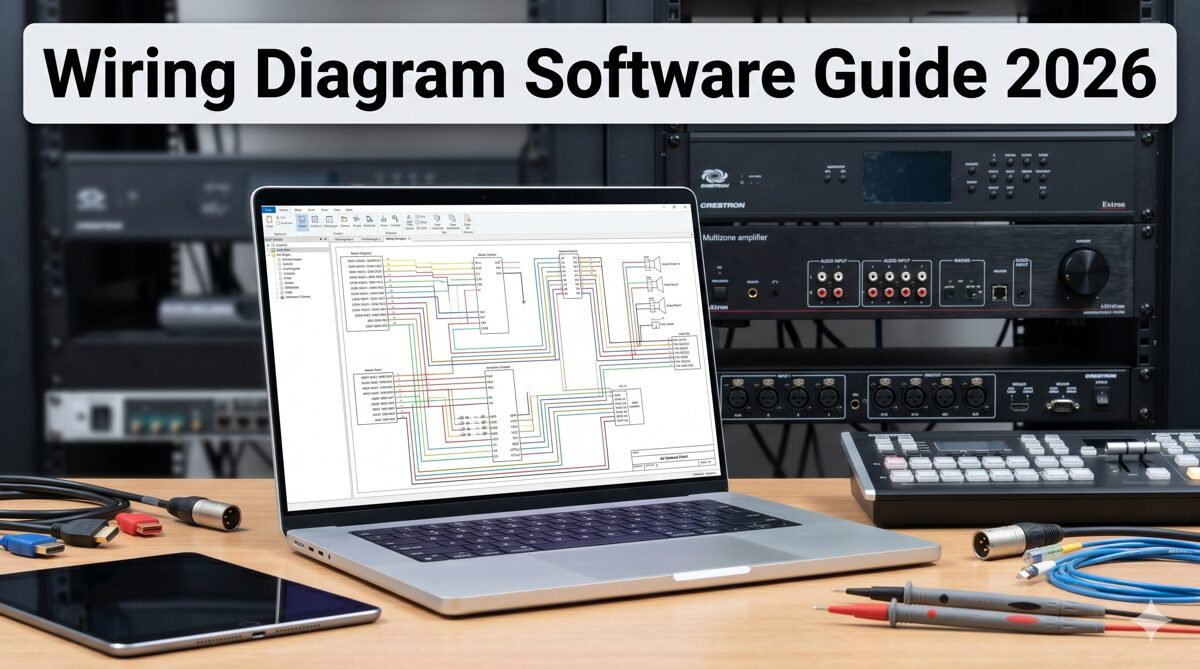
What Is AV Wiring Diagram Software?
AV wiring diagram software represents specialized digital platforms purpose-built to create comprehensive technical documentation specifically for audiovisual installations, incorporating industry-specific intelligence, automation capabilities, and workflow optimization designed around how AV system integrators actually design, specify, and document commercial AV projects. These platforms fundamentally differ from generic technical drawing tools by incorporating deep understanding of audiovisual equipment, signal routing, rack mounting, cable management, and system integration requirements unique to the AV industry.
Modern AV-specific diagram platforms function as intelligent design environments rather than simple drawing tools. They maintain equipment databases with manufacturer specifications, understand signal compatibility between devices, calculate rack space requirements automatically, validate power distribution, and generate multiple documentation views from single data models. This intelligence layer transforms documentation creation from manual drafting to automated generation driven by design intent and equipment selection.
Core Capabilities of AV-Specific Platforms
Professional AV wiring diagram software provides integrated capabilities addressing complete integration workflows:
Manufacturer equipment libraries containing 10,000-15,000 pre-built device models with accurate dimensions, connectors, and specifications
Automated rack layout generation producing elevation drawings directly from bill of materials data
Intelligent signal routing understanding audio, video, control, and network protocols
Integrated BOM management where equipment specified once populates all relevant documentation
Automatic cable labeling and schedule generation from signal flow data
Multi-format export to PDF, AutoCAD, Visio, SVG, and HTML with format optimization
Cloud-based collaboration enabling distributed team coordination and real-time synchronization
AI-assisted design providing equipment recommendations, layout optimization, and error detection
Project templates for common system configurations accelerating design initiation
Revision automation propagating changes across all affected documentation simultaneously
Industry-Specific Intelligence
What distinguishes AV wiring diagram platforms from generic tools is embedded industry knowledge:
Signal flow logic: Understanding that HDMI sources connect to video switchers, audio processors route to amplifiers, and control processors command system devices—automatically validating appropriate connections.
Equipment compatibility: Knowing that 4K60 4:4:4 signals require 18Gbps-capable HDMI cables, Dante audio needs gigabit network switches, and PoE devices must connect to powered network ports—preventing specification errors.
Rack mounting standards: Calculating that 2RU devices consume two rack units, equipment weight affects rack stability, and thermal management requires spacing between heat-generating components—optimizing physical layouts.
AV workflow integration: Recognizing that procurement, installation, commissioning, and maintenance teams all require different documentation views from the same system data—generating appropriate outputs for each stakeholder.
What Are Traditional CAD Tools?
Traditional CAD (Computer-Aided Design) tools represent general-purpose technical drawing platforms developed primarily for mechanical engineering, electrical design, architectural drafting, and product development—disciplines where precise geometric representation and dimensional accuracy take priority over industry-specific intelligence or workflow automation. These platforms treat all drawing tasks generically, providing powerful but complex drafting tools without inherent understanding of audiovisual systems, signal routing, or AV integration workflows.
CAD platforms like AutoCAD, AutoCAD Electrical, SolidWorks Electrical, DraftSight, and LibreCAD excel at creating precise technical drawings for manufacturing, construction, and engineering projects. They provide sophisticated geometry tools, dimensioning capabilities, layer management, block libraries, and programming interfaces enabling extensive customization for specific industries. However, this power comes with complexity—CAD systems require significant training investment and extensive customization to serve AV integration workflows effectively.
Core Capabilities of Traditional CAD Platforms
General-purpose CAD tools provide broad technical drawing capabilities:
Geometric drawing tools (lines, arcs, circles, polygons) for precise shape creation
Dimensioning systems with tolerance specifications and measurement standards
Layer management organizing drawing elements by function or discipline
Block libraries storing reusable symbols (requires manual creation for AV equipment)
Parametric modeling where dimensions drive geometry relationships
Drawing templates establishing sheet layouts and title blocks
Plot/print management for physical drawing output
File format support for industry-standard DWG and DXF formats
Programming interfaces (LISP, VBA, .NET) enabling custom automation
3D modeling capabilities (in advanced versions) for product visualization
Generic Architecture Requiring Customization
CAD platforms approach AV documentation as generic technical drawing requiring extensive manual customization:
No equipment intelligence: CAD treats an audio DSP identically to a mechanical component—requiring designers to manually create accurate representations with connector locations, rack mounting details, and dimensional specifications.
No signal flow logic: CAD cannot validate whether proposed equipment connections are technically feasible—designers must manually ensure signal compatibility, cable specifications, and routing appropriateness.
No workflow integration: CAD provides drawing tools but no BOM linkage, cable schedule automation, multi-view generation, or procurement integration—every document exists independently requiring manual coordination.
Generic symbol libraries: Standard CAD libraries contain electrical, mechanical, and architectural symbols but minimal AV-specific content—firms must invest 50-100 hours building custom equipment libraries or purchase third-party symbol collections.
Free vs Commercial CAD Options
Traditional CAD landscape includes both commercial platforms and free alternatives:
Commercial CAD (AutoCAD, AutoCAD Electrical, SolidWorks Electrical):
Professional-grade capabilities with extensive features
Industry-standard file formats ensuring universal compatibility
Robust technical support and comprehensive training resources
Expensive licensing ($1,500-3,000 annually per user)
Steep learning curves requiring 3-6 months for proficiency
Free CAD alternatives (LibreCAD, FreeCAD, DraftSight Free, QCAD):
Basic 2D drafting capabilities suitable for simple drawings
Limited feature sets compared to commercial platforms
Minimal technical support (community forums only)
Compatibility challenges with industry-standard formats
Adequate for basic block diagrams but insufficient for detailed AV documentation
For AV integrators evaluating free wiring diagram software, free CAD tools provide basic drawing capabilities but lack the automation, intelligence, and efficiency required for competitive commercial AV projects.
AV Wiring Diagram Software vs Traditional CAD Tools: Side-by-Side Comparison
Understanding the fundamental differences between purpose-built AV platforms and traditional CAD tools clarifies why increasing numbers of AV integrators transition away from generic CAD workflows despite the learning investment required.
Design Philosophy and Architecture
AV-Specific Software: Built around AV integration workflows, these platforms embed industry knowledge into software architecture. They understand equipment types, signal routing, rack mounting, and installation requirements—automating tasks based on this intelligence.
Traditional CAD: Designed as general-purpose technical drawing tools applicable across industries. They provide powerful drafting capabilities but no inherent AV-specific knowledge—requiring extensive manual work and customization for audiovisual applications.
Equipment Libraries and Symbol Management
AV-Specific Software: Includes 10,000-15,000 pre-built manufacturer device models with accurate dimensions, connector configurations, rack mounting specifications, and technical parameters. New equipment requires seconds to find and place.
Traditional CAD: Contains minimal AV equipment symbols. Firms must spend 50-100 hours building custom device libraries or purchase third-party collections. Each new device requires 15-30 minutes of manual symbol creation.
Rack Layout Creation
AV-Specific Software: Automated rack generation from BOM data produces complete elevation drawings in 5-10 minutes. Software calculates RU requirements, optimizes device positioning, considers thermal management, and generates front/rear views automatically.
Traditional CAD: Manual rack drawing requires 3-4 hours per project. Designers individually place equipment symbols, measure spacing, add dimensions, label devices, and create separate front/rear views. No automation or intelligence assists the process.
Signal Flow Diagram Creation
AV-Specific Software: Intelligent routing engines understand signal compatibility and suggest appropriate connections. Automated cable type recommendations match signal characteristics. Validation engines flag incompatible configurations. Time required: 15-30 minutes.
Traditional CAD: Entirely manual line drawing connecting equipment. No signal intelligence or validation. Designers must manually research and specify appropriate cable types for each connection. No compatibility checking occurs. Time required: 2-3 hours.
Cable Management and Labeling
AV-Specific Software: Automatic cable labeling following firm conventions, cable type specification based on signals, length calculation from routing, schedule generation with all connection details. Produces printable label sheets. Time required: automatic.
Traditional CAD: Completely manual cable schedule creation in separate documents (often Excel). Manual label assignment, type specification, and length estimation. No automation or integration with drawings. Time required: 1-2 hours.
BOM Integration and Equipment Coordination
AV-Specific Software: Single-source-of-truth architecture where equipment specified once in BOM automatically populates all diagrams. Changes propagate automatically. Procurement documents stay synchronized with technical drawings.
Traditional CAD: No BOM integration. Equipment must be entered separately in BOMs (usually Excel), rack drawings, signal flows, and cable schedules. Changes require manual updates in every document. Inconsistencies are common.
Multi-View Documentation Generation
AV-Specific Software: Automated generation of front elevations, rear elevations, side profiles, and 3D visualizations from single equipment models. All views stay synchronized as designs change.
Traditional CAD: Each view requires separate manual drawing. Maintaining consistency across views demands careful coordination. Changes must be manually replicated in every affected view.
Collaboration and Version Control
AV-Specific Software: Cloud-based platforms with real-time synchronization, multi-user editing, automatic version control, comment threading, and approval workflows. Distributed teams collaborate seamlessly.
Traditional CAD: File-based workflows requiring email sharing or network folders. Manual version tracking through file naming. Merge conflicts when multiple users edit. Difficult coordination across distributed teams.
Learning Curve and Training Requirements
AV-Specific Software: 3-5 days to basic proficiency, 2-3 weeks to mastery. Intuitive interfaces designed for AV professionals rather than CAD specialists. Most designers productive within first week.
Traditional CAD: 3-6 months to proficiency in CAD fundamentals plus 1-2 months customizing for AV workflows. Steep learning curves requiring significant training investment. Many firms must hire dedicated CAD operators.
Export and File Format Compatibility
AV-Specific Software: One-click export to PDF, AutoCAD DWG, Visio VSDX, SVG, PNG, XML, HTML with automatic format optimization. Ensures stakeholder compatibility without manual conversion.
Traditional CAD: Native DWG/DXF format with manual export to other formats. Converting to PDF or Visio requires format adjustments and quality verification. Often produces suboptimal results in non-native formats.
AI and Automation Capabilities
AV-Specific Software: AI-powered equipment recommendations, automated layout optimization, predictive error detection, intelligent design suggestions, natural language processing for requirements analysis.
Traditional CAD: Minimal or no AI capabilities. Some advanced platforms include basic automation through programming but requires custom development. No built-in AV-specific intelligence.
Cost Structure and Total Ownership
AV-Specific Software: Subscription pricing ($250-400/month per user) including continuous updates, cloud infrastructure, technical support, and feature improvements. Break-even ROI typically within 2-3 months through efficiency gains.
Traditional CAD: Perpetual licenses ($1,500-3,000 initial purchase) plus annual maintenance ($300-600) or subscription models ($1,500-2,500 annually). Free versions available but extremely limited. Higher costs when factoring in customization time and training investment.
Feature Comparison Table: AV Wiring Diagram Software vs CAD Tools
Feature/Capability | AV-Specific Software (X-DRAW) | Commercial CAD (AutoCAD) | Free CAD (LibreCAD) |
Equipment Library Size | 15,000+ pre-built AV devices | Minimal (requires custom creation) | None (all custom) |
Rack Layout Automation | ✅ Automatic generation (5-10 min) | ❌ Manual creation (3-4 hours) | ❌ Manual creation (3-4 hours) |
Signal Flow Intelligence | ✅ Intelligent routing & validation | ❌ Manual line drawing only | ❌ Manual line drawing only |
BOM Integration | ✅ Fully integrated & synchronized | ❌ No integration (manual coordination) | ❌ No integration |
Cable Management | ✅ Automatic labeling & schedules | ❌ Manual schedule creation | ❌ Manual schedule creation |
Multi-View Generation | ✅ Automatic from single model | ❌ Manual creation of each view | ❌ Manual creation of each view |
Cloud Collaboration | ✅ Real-time multi-user editing | ⚠️ Limited (requires Autodesk cloud) | ❌ File-based only |
AI-Assisted Design | ✅ Equipment recommendations & optimization | ❌ No AI capabilities | ❌ No AI capabilities |
Learning Curve | 3-5 days to proficiency | 3-6 months to proficiency | 2-4 months to proficiency |
Export Formats | PDF, DWG, Visio, SVG, PNG, XML, HTML | DWG native, PDF export | DXF native, limited exports |
Project Templates | ✅ AV-specific templates included | ⚠️ Generic templates (customization required) | ⚠️ Basic templates only |
Revision Automation | ✅ Automatic propagation across documents | ❌ Manual updates in each drawing | ❌ Manual updates in each drawing |
Mobile Access | ✅ Full mobile app support | ⚠️ Limited mobile viewer | ❌ No mobile support |
Technical Support | Comprehensive with AV expertise | Standard CAD support (no AV focus) | Community forums only |
Annual Cost | $3,000-4,800/user | $1,800-2,500/user | $0 |
Setup/Customization Time | 1-2 hours (out-of-box ready) | 50-100 hours (extensive customization) | 50-100 hours (library creation) |
Documentation Time (typical project) | 2-3 hours | 15-20 hours | 15-25 hours |
Time Savings vs Manual | 70-80% reduction | 10-20% reduction | 0-10% reduction |
Best For | Commercial AV integrators | Multi-discipline design firms | Hobbyists, basic diagrams |
Key Insights from Comparison
Automation gap: AV-specific platforms automate 70-80% of documentation tasks while CAD tools remain largely manual, creating dramatic efficiency differences.
Intelligence advantage: Purpose-built AV software understands equipment, signals, and workflows—enabling validation and optimization impossible with generic tools.
Total cost paradox: While AV platforms cost more monthly ($250-400 vs $150-200 for CAD), they save 12-18 hours per project. At typical designer rates ($75-125/hour), monthly subscription costs are recovered after 1-2 projects through labor savings.
Free tool limitations: Free CAD software appears cost-effective but requires 5-8x more labor time than AV-specific platforms, making them expensive in total project costs despite $0 licensing fees.
Why Many AV Integrators Are Moving Away from Traditional CAD Workflows
The AV integration industry is experiencing a significant migration from traditional CAD platforms to purpose-built AV software, driven by compelling operational and competitive factors reshaping how successful firms approach technical documentation.
Unsustainable Time Requirements for Manual Documentation
Commercial AV projects requiring 15-20 hours of CAD-based documentation create capacity constraints limiting firm growth. When senior designers earning $75-125/hour spend three days per project on drawings, that represents $1,800-3,000 in unrecoverable labor costs plus three lost days for additional projects. Automated platforms reducing this to 2-3 hours slash documentation costs to $150-375 while enabling designers to handle 3-4x more concurrent work—transforming business economics.
Competitive Pressure from Faster Proposal Response Times
RFP deadlines compressed to 5-7 days or less favor firms with efficient documentation workflows. Integrators using automated platforms can complete technical submissions in 24-48 hours while CAD-dependent competitors require a full week—often missing deadlines entirely. This speed advantage directly influences win rates in competitive bid environments where all qualified firms submit similar technical solutions.
Increasing System Complexity Overwhelming Manual Approaches
Modern AV installations incorporating 100-200+ devices across audio processing, video distribution, control systems, collaboration platforms, and network infrastructure create exponentially more complex documentation requirements. Manual CAD workflows that handled simpler projects adequately become unmanageable at scale, consuming 40-80 hours for enterprise installations. Automated platforms handle complexity through intelligent data management rather than linear drawing multiplication.
High Error Rates from Manual Specification and Drawing
Field installation errors caused by CAD documentation mistakes—incorrect connector specifications, mismatched cable labels, wrong rack dimensions, outdated equipment models—cost thousands in rework labor and project delays. Studies show manually created CAD drawings contain specification errors in 15-25% of projects versus 2-5% for automated platforms with validation engines. This error differential dramatically affects project profitability.
Difficulty Recruiting and Retaining CAD-Skilled AV Designers
The talent pool of AV professionals with advanced CAD expertise remains small and expensive. Requiring CAD proficiency excludes talented AV technicians and system designers from documentation roles, forcing firms to hire dedicated CAD operators or expensive consultants. Intuitive AV platforms enable AV experts to create documentation directly without CAD specialization—broadening available talent and improving knowledge transfer from field experience to documentation.
Cost and Complexity of CAD Software Customization
Achieving AV-optimized workflows in generic CAD platforms requires 50-100 hours of customization: building equipment libraries, creating templates, programming automation routines, and developing workflows. This represents $4,000-12,500 in development costs (at $80-125/hour for CAD specialists) before productivity improvements materialize. Purpose-built AV platforms provide these capabilities out-of-box, eliminating customization investment.
Limited Collaboration Capabilities for Distributed Teams
CAD file-based workflows struggle with distributed team collaboration—common in 2026 with remote designers, offshore drafters, and multi-office operations. Version conflicts, file synchronization issues, and merge challenges waste 3-5 hours weekly per designer. Cloud-based AV platforms solve these problems natively through real-time synchronization and automatic version control, making distributed teams as productive as co-located groups.
Inability to Validate Designs Before Procurement
CAD tools provide no technical validation—they'll happily produce drawings specifying incompatible equipment, impossible cable lengths, overloaded power circuits, or physically impossible rack configurations. Problems surface during installation when correction costs are maximum. AV-specific platforms with validation engines catch these issues during design when specification changes are simple and inexpensive.
Lack of Mobile and Field Access
CAD software remains desktop-centric, making documentation inaccessible to field technicians during installation. Technicians reference outdated PDF printouts rather than current designs, causing communication breakdowns and installation errors. Cloud AV platforms with mobile apps provide installers real-time access to latest documentation plus ability to mark up as-built modifications directly.
Key Benefits of AV Wiring Diagram Software for Integrators
Transitioning from traditional CAD workflows to purpose-built AV platforms delivers measurable advantages across operational efficiency, competitive positioning, project quality, and business scalability.
Dramatic Time Savings and Capacity Multiplication
AV-specific platforms reduce documentation time by 60-80%—enabling designers to complete in 2-3 hours what CAD workflows require 15-20 hours to produce. This efficiency gain multiplies designer capacity 3-4x, allowing firms to handle more projects with existing teams or redirect designer time toward higher-value activities like client consultation and system architecture development.
Capacity impact: A designer completing one detailed conference room project weekly using CAD can handle three to four comparable projects simultaneously with automated platforms—tripling productive output without working longer hours.
Superior Documentation Quality and Consistency
Automated generation from equipment databases eliminates human errors in dimensions, specifications, and calculations that plague manual CAD drawings. Validation engines catch compatibility issues before procurement. Template-based workflows ensure consistent formatting across all projects and designers. This quality advantage improves client perception, reduces field corrections, and enhances firm reputation.
Reduced Field Errors and Installation Rework
Projects documented in AV-specific platforms with validation engines experience 80-90% fewer field errors compared to manual CAD workflows. Automated cable labeling prevents wiring mistakes. BOM synchronization ensures installed equipment matches documentation. Multi-view generation provides installers comprehensive guidance. These improvements protect project margins by minimizing costly rework labor.
Faster Proposal Development and Improved Win Rates
Template-based rapid design, automated rack generation, and one-click export enable proposal completion in 24-48 hours versus the week required with CAD workflows. This response speed increases bid participation (accepting opportunities competitors must decline) and improves win rates (being first to submit influences selection). Comprehensive documentation also demonstrates firm sophistication differentiating proposals.
Scalable Growth Without Proportional Staffing
Efficiency gains from automated platforms enable revenue growth without proportional designer hiring. When existing designers can handle 3-4x more work, firms scale operations while improving margins rather than simply maintaining them through volume. This operational leverage proves particularly valuable during rapid growth or economic uncertainty requiring staffing flexibility.
Improved Designer Satisfaction and Retention
Talented AV designers prefer solving interesting technical problems over spending hours manually drafting rack elevations and typing cable schedules. Automated platforms eliminating tedious tasks improve job satisfaction, help retain top talent, and attract better candidates during hiring. Reduced stress from eliminating overtime and deadline pressure also contributes to healthier work environments.
Enhanced Client Communication and Satisfaction
Professional documentation with consistent formatting, 3D visualizations, and comprehensive detail creates positive client impressions. Fast revisions responding to client changes same-day demonstrate responsiveness. Interactive documentation via cloud portals provides clients unprecedented project transparency. These factors strengthen client relationships, drive repeat business, and generate referrals.
Better Collaboration Across Distributed Teams
Cloud-based platforms with real-time synchronization enable seamless collaboration between in-house designers, remote consultants, offshore drafters, and field technicians. Version control automation eliminates confusion about current design states. Comment threading facilitates communication without email chains. Role-based access provides stakeholders appropriate visibility. These capabilities make distributed teams as productive as co-located groups.
Comprehensive Project Documentation Archives
Cloud storage with automatic backups ensures project documentation never gets lost due to hard drive failures, desktop crashes, or accidental deletions. Historical project access enables designers to reference past successful installations when designing similar new projects. Client portal integration provides customers lifetime access to as-built documentation supporting their facility management needs.
Competitive Differentiation in Saturated Markets
As more AV integration firms adopt advanced documentation platforms, those still using traditional CAD increasingly appear outdated to sophisticated clients. Superior documentation quality, faster response times, and comprehensive deliverables differentiate firms in crowded markets where technical capabilities are otherwise similar. Documentation excellence becomes a competitive weapon.
Best AV Wiring Diagram Software for Integrators in 2026
The following platforms represent leading solutions available to AV integrators as of June 2026, with emphasis on automation depth, AV-specific optimization, and practical value for commercial firms.
1. XTEN-AV X-DRAW
XTEN-AV's X-DRAW stands as the most sophisticated purpose-built platform for audiovisual integration documentation, delivering unmatched automation capabilities, comprehensive AV intelligence, and workflow optimization specifically engineered for commercial AV system integrators rather than adapted from generic tools.
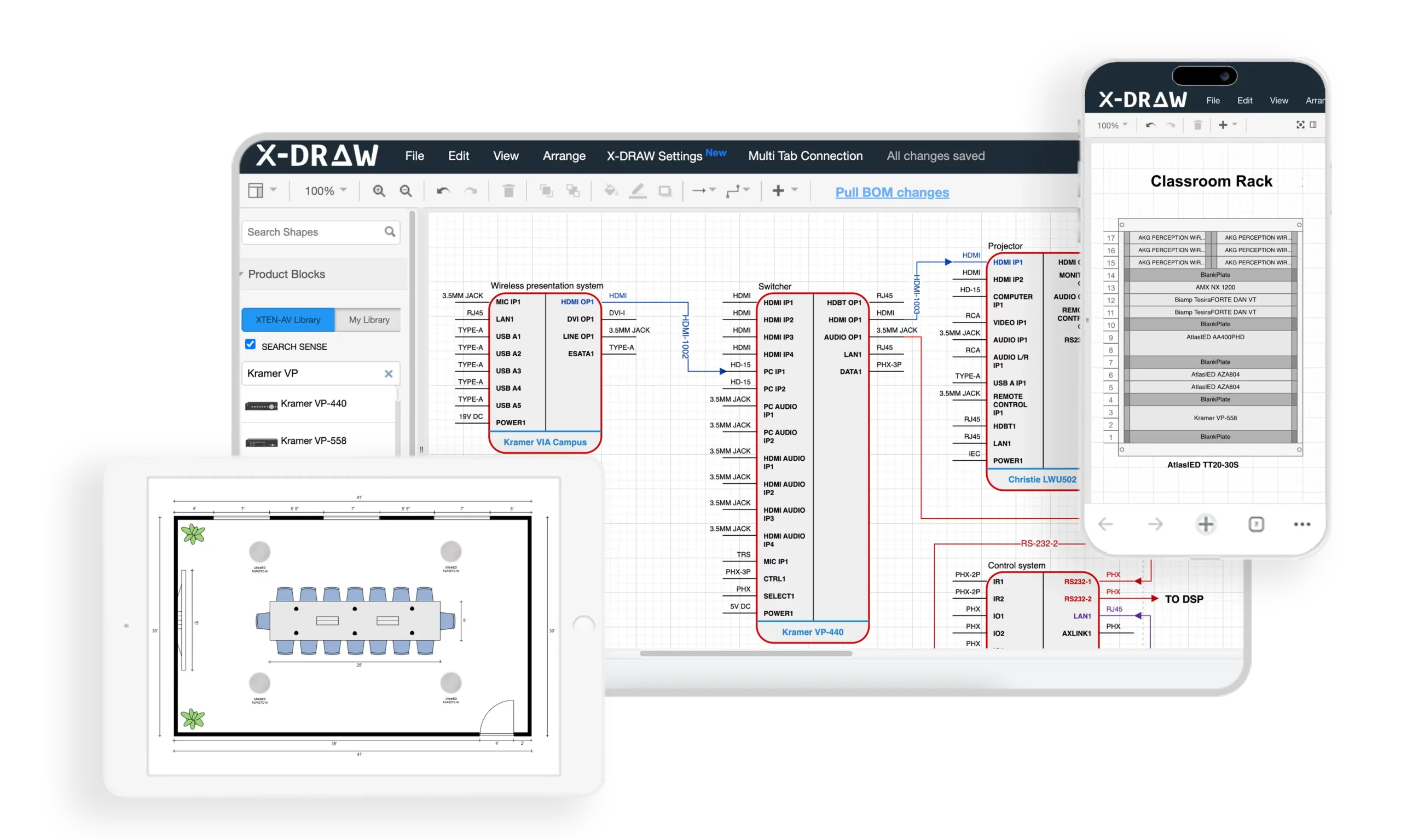
X-DRAW represents a ground-up reimagining of AV documentation centered on three principles: maximum automation, embedded AV intelligence, and seamless workflow integration. Unlike CAD platforms that provide generic drawing tools, X-DRAW functions as an intelligent design assistant that understands audiovisual equipment, signal routing, installation requirements, and industry best practices—actively participating in design rather than passively recording it.
Developed by former AV integrators who experienced CAD workflow frustrations firsthand, X-DRAW eliminates pain points systematically through targeted automation. The platform has documented tens of thousands of commercial installations since launch, continuously refining capabilities based on real-world usage patterns and user feedback from hundreds of AV integration firms.
Key Features Demonstrating AV Specialization
Automated Rack Layout Generation: X-DRAW's flagship feature generates complete rack elevation drawings from BOM equipment with one-click operation. What requires 3-4 hours in CAD completes in 5-10 minutes. The automation engine calculates RU requirements, optimizes device positioning considering thermal management and weight distribution, places power distribution units strategically, and generates front/rear elevations simultaneously—producing installation-ready documentation without manual drawing.
Intelligent Rack Elevation Diagrams: Beyond basic layouts, X-DRAW generates sophisticated elevations incorporating airflow analysis, cable routing suggestions, power consumption calculations, weight distribution charts, and maintenance access indicators. These details that experienced designers would spend 45-60 minutes adding manually appear automatically in X-DRAW-generated diagrams.
Integrated BOM-to-Rack Workflow: X-DRAW's single-source-of-truth architecture eliminates duplicate data entry. Equipment added to project BOMs instantly becomes available for rack assignment, signal flow inclusion, cable schedule population, and equipment specification sheets. This integration saves 2-3 hours per project while ensuring perfect consistency between procurement documents and technical drawings.
AV-Specific Design Automation: X-DRAW includes built-in automation unavailable in CAD platforms: automatic signal routing between compatible devices, cable type recommendations matching signal characteristics, connector validation ensuring physical compatibility, format conversion identification where needed, control system programming structure generation, and network addressing planning.
Front Elevation and Rack Documentation: X-DRAW automatically generates multiple documentation views—front elevations showing user-facing equipment, rear elevations depicting technician connections, side profiles illustrating depth and clearances, and 3D visualizations for client presentations. All views stay synchronized as designs change, eliminating manual coordination required in CAD workflows.
Extensive Product Library: X-DRAW provides 15,000+ pre-built AV device models from hundreds of manufacturers with accurate dimensional specifications, detailed connector configurations, technical specifications, manufacturer part numbers, 3D models for visualization, and installation requirements. This eliminates 30-60 minutes per project creating custom symbols required with CAD tools.
Customizable Device Blocks and Connectors: For specialty equipment not in libraries, X-DRAW provides semi-automated creation tools with template-based workflows, automatic connector positioning, symbol generation from equipment photos, and specification extraction from manufacturer data sheets. Custom symbol creation that requires 45-60 minutes in CAD completes in 15-20 minutes in X-DRAW.
Automatic Cable Labeling and Signal Management: X-DRAW's comprehensive cable automation generates sequential cable numbers, both-end labels, cable type specifications, length calculations, complete cable schedules, printable label sheets, and color coding—eliminating 1-2 hours of manual work per project.
Export to Multiple Formats: X-DRAW's one-click export produces stakeholder-appropriate formats: PDF with embedded metadata, AutoCAD DWG maintaining layers, Microsoft Visio VSDX with editable objects, SVG vector graphics, PNG raster images, XML data exports, and HTML interactive packages. This automation saves 1-2 hours of manual file conversion per project.
Cloud-Based Collaboration: X-DRAW's cloud architecture enables real-time synchronization across team members, automatic conflict resolution when editing simultaneously, version control automation, comment threading on diagram elements, approval workflow automation, and role-based access control. This eliminates 3-5 hours weekly on file management overhead.
AI-Assisted Drawing Capabilities: X-DRAW incorporates artificial intelligence for equipment recommendations based on project requirements, layout optimization suggesting improvements, error detection flagging compatibility issues, design refinement polishing diagram quality, requirements extraction from client documents, and automated design generation from specifications.
Faster Revisions and Project Updates: When requirements change, X-DRAW's revision automation propagates updates across all affected diagrams, recalculates BOMs, adjusts cable schedules, updates rack layouts, regenerates exports, and tracks changes in revision history—completing in minutes what CAD workflows require hours to accomplish.
Pros of X-DRAW
✅ Industry-leading automation reducing documentation time by 70-80% ✅ Comprehensive AV intelligence built into platform architecture ✅ 15,000+ device library eliminating custom symbol creation ✅ Automated rack generation saving 3-4 hours per project ✅ BOM integration ensuring documentation consistency ✅ Cloud collaboration enabling distributed teams ✅ AI assistance providing intelligent recommendations ✅ Multi-format export with automatic optimization ✅ 3-5 day learning curve versus 3-6 months for CAD ✅ Break-even ROI within 2-3 months
Cons of X-DRAW
❌ Subscription cost of $300-400/month per user ❌ Internet connectivity required for cloud platform ❌ Process changes from traditional CAD workflows ❌ Learning investment to master advanced features
Best For
X-DRAW excels for commercial AV integration firms, corporate system designers, educational technology consultants, government contractors, healthcare AV specialists, and any integrators prioritizing maximum efficiency, documentation quality, and competitive positioning through technological advantage.

2. AutoCAD Electrical
AutoCAD Electrical extends Autodesk's CAD platform with electrical design capabilities applicable to AV documentation but requires extensive customization for AV workflows.
Key Features
Automated wire numbering for cable identification
Component tagging and BOM generation
PLC integration for control systems
Electrical symbol libraries (requires AV customization)
Industry-standard DWG format
Pros/Cons
✅ Universal compatibility, powerful customization ❌ Not AV-optimized, steep learning curve, expensive ($2,000-3,000/year)
Best For
Multi-discipline firms with CAD specialists, projects requiring architectural coordination, large integrators already standardized on Autodesk ecosystems.
3. D-Tools System Integrator
D-Tools SI combines project management and documentation with moderate AV-specific features but less automation depth than specialized platforms.
Key Features
Integrated business management spanning sales to installation
Automated BOM generation with manufacturer pricing
Basic rack layout capabilities
Proposal creation with templates
Pros/Cons
✅ Unified platform, AV industry focus, established community ❌ Limited automation vs. X-DRAW, expensive, desktop-centric
Best For
Integration firms seeking unified business management, residential integrators, organizations prioritizing sales workflows over detailed technical documentation.
4. Free CAD Options (LibreCAD, DraftSight Free)
Free CAD software provides basic 2D drafting adequate for simple diagrams but lacks automation, AV intelligence, and efficiency required for commercial work.
Key Features
Basic line drawing and geometric tools
Simple layer management
DXF file format support
Community support only
Pros/Cons
✅ Zero licensing cost ❌ No automation, no AV libraries, minimal features, 15-25 hours per project documentation time
Best For
Hobbyists, students, basic block diagrams, budget-constrained scenarios where time efficiency isn't critical.
Common Mistakes Integrators Make When Choosing Design Software
Avoiding these selection errors ensures AV integrators choose platforms supporting long-term business objectives rather than creating new constraints.
Mistake 1: Prioritizing Free Tools Over Total Cost of Ownership
Free wiring diagram software like LibreCAD appears cost-effective until accounting for labor inefficiency. A designer spending 15-20 hours per project on free CAD costs $1,125-2,500 in labor (at $75-125/hour) versus 2-3 hours in specialized platforms costing $150-375. The "$0 software" actually costs $975-2,125 more per project in total expenses.
Solution: Evaluate total project costs including labor time rather than just software licensing fees.
Mistake 2: Assuming CAD Skills Transfer Directly to AV Efficiency
CAD proficiency helps but doesn't automatically deliver AV workflow efficiency. Even experienced CAD users spend 3-4 hours on rack layouts that AV-specific platforms complete in 5-10 minutes because CAD lacks automation and AV intelligence.
Solution: Evaluate platforms based on AV-specific capabilities and workflow optimization rather than existing CAD expertise.
Mistake 3: Underestimating Learning Curve and Productivity Loss
Firms often underestimate transition periods when switching platforms. CAD platforms require 3-6 months to proficiency, creating significant productivity dips during learning. AV-specific platforms with 3-5 day learning curves minimize disruption.
Solution: Factor learning time and transition productivity into platform selection decisions.
Mistake 4: Overlooking Collaboration and Remote Work Requirements
File-based CAD workflows create collaboration challenges increasingly important with distributed teams. Choosing desktop-centric tools in 2026 ignores reality that teams work remotely, projects involve distributed stakeholders, and cloud collaboration is table stakes.
Solution: Prioritize cloud-based platforms with real-time collaboration capabilities supporting distributed work.
Mistake 5: Failing to Calculate ROI and Break-Even Timelines
Many integrators make platform decisions based on monthly costs without calculating ROI. A $350/month specialized platform that saves 12 hours per project pays for itself after one project at typical designer rates—achieving break-even within 2-3 months.
Solution: Calculate monthly labor savings from efficiency gains versus subscription costs to determine actual ROI.
Mistake 6: Choosing Based on Marketing Claims Rather Than Trial Experience
Software vendors make impressive claims that may not match real-world performance. Selecting platforms without hands-on trials risks discovering limitations after commitment.
Solution: Conduct hands-on trials with representative projects before committing to platforms.
Mistake 7: Ignoring Integration with Existing Business Systems
Platforms that don't integrate with CRM, accounting, project management, or procurement systems create ongoing manual work transferring data between systems.
Solution: Evaluate API capabilities and integration ecosystem supporting complete business workflows.
Frequently Asked Questions
Q: Is free wiring diagram software adequate for professional AV integration work?
Free CAD tools like LibreCAD provide basic drawing capabilities but lack automation, AV intelligence, and efficiency required for competitive commercial work. The 15-25 hours per project they require versus 2-3 hours with specialized platforms makes them far more expensive in total project costs despite $0 licensing.
Q: How much faster is AV-specific software compared to traditional CAD?
Purpose-built AV platforms like X-DRAW reduce documentation time by 60-80%, completing in 2-3 hours what CAD workflows require 15-20 hours to produce. This represents 3-4x capacity multiplication for designers.
Q: Can traditional CAD tools be customized to match AV-specific platforms?
Partially, but requires 50-100 hours of customization ($4,000-12,500 in development costs) to achieve even basic AV functionality—and still lacks intelligence, validation, and advanced automation that purpose-built platforms provide natively.
Q: What's the learning curve difference between CAD and AV-specific software?
Traditional CAD requires 3-6 months to proficiency while AV-specific platforms need only 3-5 days for basic skills and 2-3 weeks for mastery. Most designers achieve break-even productivity within their first week using AV platforms.
Q: Do cloud-based platforms work without internet connectivity?
Most cloud platforms require internet connectivity for full functionality, though many offer offline modes with limited capabilities. The collaboration benefits and automatic backups typically outweigh occasional connectivity inconvenience.
Q: How do subscription costs compare to perpetual CAD licenses?
AV platforms ($3,000-4,800 annually per user) cost more than perpetual CAD amortized over 5 years but deliver 500-700 hours annual time savings worth $37,500-87,500 in labor costs—making them dramatically more cost-effective in total value.
Q: Can firms transition from CAD to AV-specific software mid-project?
Most firms complete platform transitions within 2-4 weeks using parallel workflows (completing current projects in CAD while starting new projects in new platforms). This approach minimizes disruption while accelerating capability improvements.
Conclusion
The comparison between traditional CAD tools and purpose-built AV wiring diagram software reveals fundamental architectural differences that dramatically impact operational efficiency, project profitability, and competitive positioning for audiovisual integration firms in mid-2026. While free wiring diagram software and generic CAD platforms initially appear cost-effective, the hidden expenses of inefficient workflows, extended project timelines, increased error rates, and limited scalability make them far more expensive than specialized platforms like XTEN-AV's X-DRAW when evaluating total cost of ownership.
X-DRAW's industry-leading 70-80% time savings—reducing typical documentation from 15-20 hours to 2-3 hours—transforms business economics by enabling designers to handle 3-4x more concurrent projects without working longer hours. This capacity multiplication proves impossible with traditional CAD workflows requiring extensive manual work for every rack elevation, signal flow diagram, and cable schedule. The automation depth, AV-specific intelligence, and workflow integration that purpose-built platforms provide simply cannot be replicated through CAD customization—no matter how much time and money firms invest in symbol libraries, templates, and programming.
The strategic choice between CAD and specialized AV software ultimately determines whether firms compete on low-price commoditization or high-value differentiation. CAD-dependent integrators face capacity constraints limiting growth, documentation quality that undermines professionalism, and competitive disadvantages against firms deploying advanced automation. Meanwhile, organizations embracing platforms like X-DRAW gain operational leverage enabling profitable scaling, superior deliverables enhancing reputation, and efficiency advantages winning competitive projects.
As the AV integration industry continues evolving throughout 2026 and beyond, the gap between firms using modern automation platforms and those clinging to traditional CAD will only widen. The documented performance advantages—70-80% time savings, 3-4x capacity multiplication, 80-90% error reduction, 2-3 month ROI—make the decision mathematically clear for firms serious about competitive positioning and sustainable growth. The question isn't whether to adopt specialized AV documentation platforms—it's how quickly to implement before competitive disadvantages become insurmountable.