How Detailed Should a Signal Flow Diagram Be? Can AI Automatically Create Signal Flow Diagrams?
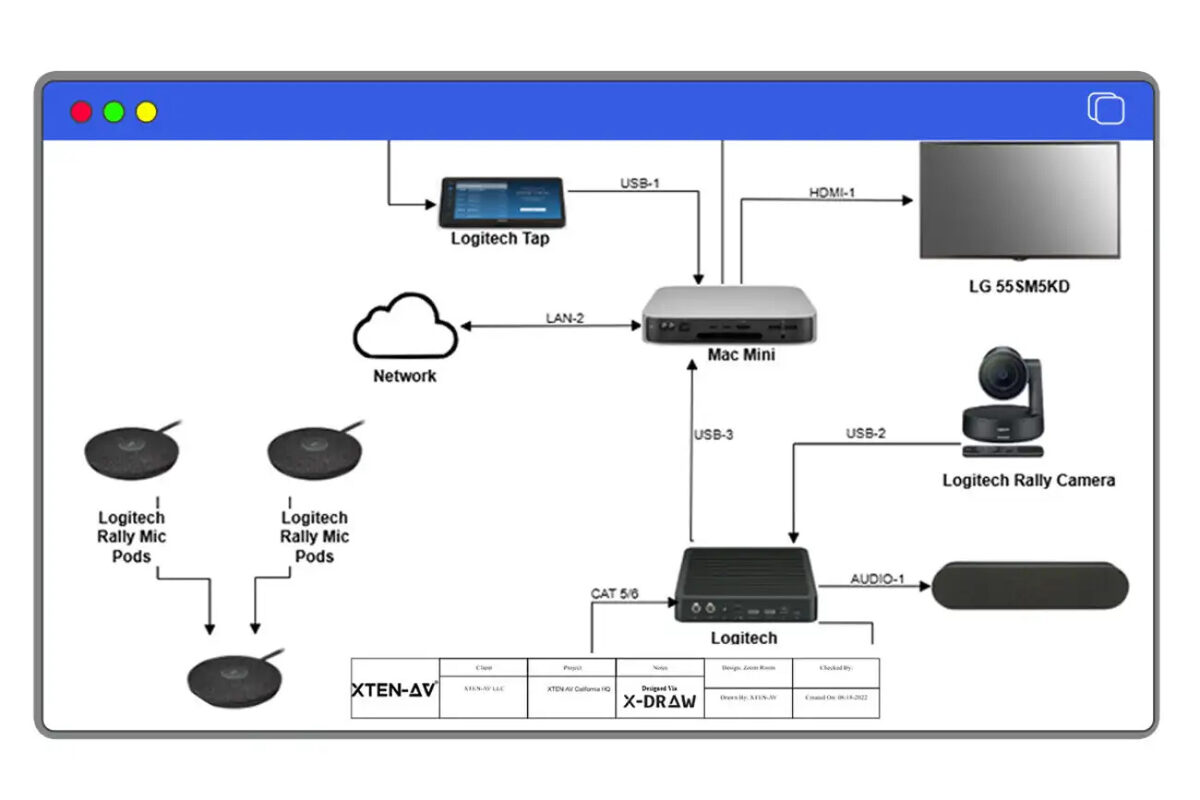
What is a Signal Flow Diagram?
A Signal Flow Diagram (also referred to as a signal path diagram, system flow diagram, or AV block diagram) is a technical illustration that visually represents the logical flow of audio, video, and control signals through an audiovisual system. Unlike equipment lists or physical wiring diagrams, signal flow diagrams focus on the functional relationships between AV components and the signal routing that enables system operation.Primary Functions of Signal Flow Diagrams
Signal flow diagrams serve multiple critical purposes throughout the AV project lifecycle:Design Documentation: Providing a visual blueprint for system architecture and signal routing decisions that stakeholders can review and approve.
Installation Guidance: Giving field technicians clear instructions about which devices connect to each other, through which ports, using which cable types.
Programming Reference: Enabling control system programmers to understand signal paths and switching matrices for automation logic development.
Troubleshooting Tool: Allowing service technicians to quickly trace signal paths, identify failure points, and diagnose system malfunctions.
Client Communication: Helping non-technical stakeholders understand system functionality and signal routing without requiring deep technical knowledge.
Documentation Archive: Creating permanent records for facility management, future upgrades, and system modifications.
Components Always Present in Signal Flow Diagrams
Professional signal flow diagrams consistently include:- Device Blocks: Representing all AV equipment including sources (PCs, media players, cameras), processors (DSPs, scalers, matrix switchers), amplifiers, displays, and control systems
- Connection Lines: Showing signal paths between devices with directional arrows indicating flow direction
- Signal Type Labels: Identifying signal formats such as HDMI, SDI, analog audio, Dante, AES/EBU, or control protocols
- Input/Output Identifiers: Specifying which device ports connect to each other
- Signal Flow Direction: Clearly indicating upstream sources and downstream destinations
How Detailed Should a Signal Flow Diagram Be?
Determining the appropriate detail level for signal flow diagrams represents one of the most common challenges for AV integrators and system designers. Too little detail creates ambiguity and installation errors. Excessive detail buries critical information in unnecessary complexity.The Detail Spectrum: Five Levels Defined
Level 1: Conceptual Block Diagram (Minimal Detail)
Appropriate For:- Initial client presentations and concept reviews
- Budget estimating and preliminary proposals
- Sales discussions with non-technical stakeholders
- Very simple single-room systems
- Major equipment categories only (Source, Processor, Display, Speakers)
- Signal type identification (Audio, Video, Control)
- Basic signal flow direction
- No specific model numbers or port details
Advantages: Extremely clear and accessible to non-technical audiences. Fast to create.
Limitations: Insufficient for installation or equipment procurement. Lacks technical specificity.
Time to Create: 5-15 minutes manually, instant with AI tools.
Level 2: System Overview Diagram (Basic Detail)
Appropriate For:- Standard conference rooms and huddle spaces
- Client proposals requiring basic technical detail
- System overview documentation for facility managers
- Projects with experienced installation teams familiar with similar systems
- Specific device types (HDMI Matrix Switcher, DSP, Power Amplifier)
- Manufacturer identification without full model numbers
- Basic signal format labels (HDMI, Analog Audio, Network)
- Major input/output counts but not specific port numbers
- Device quantities
Advantages: Balances clarity with useful technical information. Suitable for proposal presentations.
Limitations: Still requires supplementary equipment schedules for procurement. Installation teams need additional wiring information.
Time to Create: 30-60 minutes manually, 5-10 minutes with AI-assisted tools.
Level 3: Technical Specification Diagram (Standard Detail)
Appropriate For:- Professional AV installations in corporate, education, or hospitality settings
- Design development and consultant review
- Most commercial AV projects requiring complete technical documentation
- Installation packages for moderately experienced teams
- Full manufacturer and model numbers for all devices
- Specific input/output port numbers for each connection
- Detailed signal format specifications (HDMI 2.0 4K60, XLR Balanced, RS-232)
- Cable type requirements and maximum length specifications
- Signal processing stages explicitly shown
- Network connections and IP addresses if applicable
- Control signal paths clearly identified
Level 4: Engineering Specification Diagram (High Detail)
Appropriate For:- Complex multi-zone systems and campus-wide deployments
- Mission-critical installations (control rooms, broadcast, security operations)
- Consultant-led projects requiring detailed design validation
- Large-scale integrations with multiple installation teams
- Projects requiring third-party engineering review
- Everything from Level 3, plus:
- Cable identification numbers matching cable schedules
- Connector types and pinout specifications
- Signal impedance and termination requirements
- Power requirements for each device (voltage, wattage, PoE specifications)
- Rack location and U-space assignments
- Network VLAN assignments and bandwidth calculations
- Redundancy paths and failover configurations
- Grounding and shielding requirements
- Testing checkpoints and validation criteria
Level 5: As-Built Documentation (Maximum Detail)
Appropriate For:- Permanent facility records and operations manuals
- Mission-critical systems requiring comprehensive maintenance documentation
- Government projects with strict documentation requirements
- Historic preservation of major installations
- Transfer of system ownership to facility management teams
- Everything from Level 4, plus:
- Actual field-installed equipment with serial numbers
- Precise cable routing paths and physical locations
- Deviation documentation from original design
- Field modification notes and engineering changes
- Testing results and performance measurements
- Configuration files and firmware versions
- Warranty information and service contacts
- Photographic documentation of installations
Decision Matrix: Choosing the Right Detail Level
| Project Type | Recommended Detail Level | Rationale |
|---|---|---|
| Residential Media Room | Level 2 | Simple systems, experienced installers |
| Small Huddle Space | Level 2-3 | Basic commercial requirement |
| Standard Conference Room | Level 3 | Professional installation standard |
| Large Boardroom | Level 3-4 | Complexity demands precision |
| Auditorium/Theater | Level 4 | Mission-critical, complex systems |
| Multi-Building Campus | Level 4 | Coordination across multiple teams |
| Broadcast Facility | Level 4-5 | Zero-tolerance for errors |
| Emergency Operations Center | Level 4-5 | Redundancy and reliability critical |
The Golden Rule of Signal Flow Diagram Detail
Include the minimum detail necessary for successful project execution, but no less.Ask these qualifying questions:- Who will use this diagram? (Sales team vs. engineering team vs. installation crew)
- What decisions does it support? (Budget approval vs. equipment procurement vs. physical installation)
- What's the system complexity? (Single room vs. multi-zone vs. campus-wide)
- What's the installer experience level? (Senior engineer vs. junior technician)
- What are the consequences of errors? (Minor inconvenience vs. mission-critical failure)
Key Components of a Well-Detailed Signal Flow Diagram
Regardless of detail level, certain components must be accurate and clear to ensure signal flow diagram effectiveness.1. Device Identification and Specifications
Every AV device requires:Minimum (All Detail Levels):
- Device type (Display, Projector, DSP, Matrix Switcher, Amplifier)
- General function in the system
- Full manufacturer name and model number
- Input/output counts and types
- Key processing capabilities
- Serial numbers (for as-built documentation)
- Firmware versions
- Rack location and mounting details
- Power specifications
- Level 1: "Video Processor"
- Level 2: "Crestron Scaler"
- Level 3: "Crestron HD-SCALER-C (4K Input/1080p Output)"
- Level 4: "Crestron HD-SCALER-C S/N 12345678, Rack A U15, Firmware 2.5.3, 12VDC 2A"
2. Connection Specifications
Signal path connections must show:Minimum (All Detail Levels):
- Source device to destination device
- Signal type (Video, Audio, Control)
- Direction arrow
- Specific output port on source device
- Specific input port on destination device
- Signal format (HDMI 2.0, 3G-SDI, XLR Balanced)
- Cable type (Cat6, Fiber, Coax)
- Maximum cable length for signal type
- Cable ID number matching cable schedule
- Connector types (RJ45, LC-fiber, BNC)
- Cable jacket rating (Plenum CL3, Riser CL2)
- Actual installed length
- Level 1: "Player → Display" (simple arrow)
- Level 2: "Blu-ray Player HDMI → Display" (signal type added)
- Level 3: "Blu-ray Player HDMI Out → Display HDMI In 2 (HDMI 2.0, 4K60, Cat6 15m max)"
- Level 4: "BRP-01 HDMI Out 1 → C-HDMI-023 (15m CL3-rated) → DSP-01 HDMI In 2 (4K60 verified)"
3. Signal Processing Stages
All signal transformations require explicit representation:Processing Types to Document:
- Format conversion (HDMI to SDI, analog to digital)
- Resolution scaling (4K to 1080p)
- Audio mixing and DSP functions
- Signal switching and routing
- Protocol conversion (SDI to IP, analog to Dante)
- Encoding/decoding for networked AV
Best Practice: Every device that modifies the signal in any way must appear as a distinct block in the signal flow diagram.
4. Network Infrastructure (For AV-over-IP Systems)
Networked AV systems require additional detail:Standard Detail (Level 3):
- Network switches shown as distinct devices
- Encoder and decoder blocks
- Control processor network connection
- Basic VLAN identification
- Switch model and port counts
- Specific switch port assignments for each device
- VLAN tags and subnet information
- IP addressing scheme (static vs. DHCP)
- Bandwidth calculations and QoS settings
- Multicast and IGMP requirements
- PTP time synchronization if required
- Network redundancy paths
5. Control System Architecture
Control signal paths often get shortchanged but are critical:Must Include:
- Control processor and its connections to all controlled devices
- Control protocol for each connection (RS-232, TCP/IP, IR, GPIO)
- User interface devices (touchpanels, keypads, mobile apps)
- Sensor inputs (occupancy, ambient light, temperature)
- Feedback paths for status monitoring
- Third-party system integrations (HVAC, lighting, security)
- Control network topology
- Baud rates and serial settings
- IP addresses and port numbers
- Control logic notes (auto-switching, timed events, sensor responses)
6. Power Distribution (Often Overlooked)
While signal flow diagrams focus on signals, power requirements significantly impact installations:Annotations to Include:
- PoE requirements (PoE, PoE+, PoE++) for network devices
- Phantom power for condenser microphones
- Dedicated circuit requirements for high-power equipment
- UPS backup for critical devices
- Power sequencing requirements
7. Cable Routing and Infrastructure Notes
High-detail diagrams benefit from:Physical Routing Information:
- Cable pathway descriptions (ceiling, conduit, cable tray)
- Penetration points through walls/floors
- Plenum vs. riser cable requirements
- Home run vs. local connection designations
- Special termination requirements
- Testing specifications
- Labeling conventions
- Code compliance references
Benefits of Proper Signal Flow Detail
Investing time in appropriate signal flow diagram detail delivers measurable returns across the project lifecycle.For AV Integrators
Reduced Installation Time: Clear port-level specifications eliminate field guesswork, cutting installation hours by 25-40% on complex projects.Fewer Change Orders: Identifying design conflicts and missing equipment during planning prevents expensive on-site corrections and scope creep.
Lower Material Waste: Accurate cable type and length specifications minimize over-ordering, reducing material costs by 15-20%.Faster Troubleshooting: When systems malfunction, detailed signal flow diagrams enable rapid fault isolation, reducing service calls and truck rolls.
Improved Team Coordination: Installers, programmers, and project managers work from the same reference, reducing miscommunication and rework.
Higher Win Rates: Detailed technical documentation in proposals demonstrates competency and professionalism, differentiating from competitors with generic quotes.
For AV Consultants
Design Validation: Detailed signal flow diagrams from integrators prove technical feasibility and reveal potential design flaws before construction.Objective Bid Comparison: Evaluating competing proposals becomes standardized when all integrators provide equivalent detail levels.
Quality Control: During construction, consultants can verify as-built conditions match approved signal flow specifications
.Reduced Liability: When system failures occur, detailed design documentation definitively establishes whether issues stem from design errors or installation mistakes.
Client Communication: Explaining system architecture to non-technical facility owners becomes simpler with well-crafted visual documentation.
For System Designers
Design Confidence: Documenting signal paths at appropriate detail levels forces thorough consideration of system architecture, revealing problems during planning rather than installation.Knowledge Transfer: Detailed diagrams enable smooth project handoffs between design teams, installation crews, and programming staff.
Portfolio Quality: Professional signal flow documentation showcases technical capabilities to potential clients and employers.
Standards Compliance: Systematic detail ensures adherence to AVIXA standards, manufacturer specifications, and building codes.
Scalability: Well-documented designs serve as templates for future similar projects, accelerating subsequent work.
For End Users and Facility Managers
Operational Understanding: Appropriate detail levels help facility staff comprehend system operation without overwhelming technical complexity.Maintenance Efficiency: Service technicians can quickly identify component locations, signal paths, and replacement specifications from comprehensive documentation.
Future Expansion: Understanding existing system architecture enables cost-effective technology upgrades and capacity additions.
Vendor Independence: Clear system documentation prevents vendor lock-in and enables competitive bidding for future work.
Reduced Downtime: When failures occur, detailed signal flow diagrams accelerate troubleshooting and repair, minimizing operational disruption.
Can AI Automatically Create Signal Flow Diagrams?
The short answer: Yes, artificial intelligence can now automatically create professional Signal Flow Diagrams, and the technology has matured significantly in 2026.The Evolution of AI in AV Design
First Generation (2018-2021): Basic template systems that selected pre-drawn diagrams based on simple equipment lists. Limited customization and no true intelligence.Second Generation (2022-2023): Rule-based automation that could connect devices based on compatibility databases. Still required significant manual intervention and lacked contextual understanding.
Third Generation (2024-2026): True AI-powered platforms like XTEN-AV X-DRAW leveraging machine learning and natural language processing to generate, validate, and optimize signal flow diagrams from high-level system requirements.
How AI Signal Flow Diagram Creation Works
Modern AI-powered platforms employ multiple intelligence layers:1. Requirements Interpretation
AI systems can process:Natural Language Input: "I need a conference room with 4 HDMI laptops, wireless presentation, 2 displays, and ceiling speakers with DSP processing"
System Specifications: Structured equipment lists, room dimensions, usage patterns, and performance requirements
Project Parameters: Budget constraints, preferred manufacturers, existing infrastructure, and client preferences
AI Processing: Natural Language Processing (NLP) algorithms parse requirements, identify AV components, understand spatial relationships, and extract functional specifications.
2. Device Selection and Compatibility Validation
AI recommends appropriate equipment based on:- Signal format requirements and compatibility
- Input/output counts matching source and destination quantities
- Processing capabilities needed (scaling, switching, DSP functions)
- Manufacturer preferences and equipment availability
- Budget parameters and cost optimization
- Historical performance data from similar projects
3. Intelligent Signal Routing
AI automatically maps signal paths by:- Identifying logical connections between sources and destinations
- Routing through appropriate processing stages (switchers, scalers, DSPs)
- Selecting optimal signal formats for each segment
- Calculating cable lengths and suggesting extenders where needed
- Implementing redundancy for critical paths when required
- Optimizing for signal quality, latency, and cost efficiency
4. Real-Time Error Detection and Correction
AI continuously validates the evolving signal flow diagram:Compatibility Checking: Flagging mismatched signal types, bandwidth limitations, and protocol incompatibilities
Completeness Verification: Identifying unconnected inputs/outputs, missing power supplies, and orphaned devices
Best Practice Enforcement: Ensuring balanced audio connections, proper impedance matching, HDCP compliance chains, and grounding standards
Optimization Suggestions: Recommending equipment consolidation, alternative routing, or cost-saving substitutions
Self-Correction: When errors are detected, AI suggests specific fixes: "Add HDMI-to-SDI converter between Device A and Device B"
5. Automatic BOM Synchronization
AI-generated diagrams dynamically link to Bills of Materials:Real-Time Updates: Adding a device to the signal flow diagram instantly updates equipment lists, quantities, and pricing
Change Propagation: Modifying a device model automatically adjusts signal path specifications, BOM, and documentation
Procurement Optimization: AI identifies opportunities to consolidate devices, bulk-purchase cables, or substitute equivalent equipment for cost savings
6. Multi-Version Generation
Advanced AI can create multiple design alternatives automatically:Budget Versions: "Good-Better-Best" system designs at different price points Configuration Options: Multiple operating modes for flexible spaces Manufacturer Variations: Equivalent designs using different equipment vendors Future-Proofing Options: Base system plus expansion capabilities
Current Capabilities and Limitations (2026)
What AI Does Exceptionally Well
✓ Rapid diagram generation from system requirements (minutes vs. hours) ✓ Compatibility validation across thousands of device combinations ✓ Standard system designs (conference rooms, classrooms, huddle spaces) ✓ Error detection for common signal flow mistakes ✓ BOM accuracy and real-time synchronization ✓ Multiple design iterations for comparison ✓ Standards enforcement (AVIXA, manufacturer specs) ✓ Documentation consistency across projectsWhere AI Still Benefits from Human Expertise
△ Highly unique custom designs without precedent △ Aesthetic and artistic judgments for experiential installations △ Complex political/organizational constraints in large institutions △ Extreme budget optimization requiring deep market knowledge △ Integration with legacy or obsolete equipment △ Unusual spatial or architectural challengesThe Reality: AI handles 85-90% of signal flow diagram creation tasks autonomously. Human designers focus on the creative, strategic, and exceptional situations where AI needs guidance.The ROI of AI-Generated Signal Flow Diagrams
Time Savings:- Manual creation: 4-20 hours for complex systems
- AI-assisted creation: 15 minutes to 2 hours
- Savings: 80-95% reduction in drafting time
- Manual error rate: 15-25% of complex diagrams contain connectivity mistakes
- AI validation error rate: <2%
- Result: 90% fewer field corrections and change orders
- Design time saved: 12 hours × $75/hour = $900
- Field corrections avoided: 8 hours × $95/hour = $760
- Change order elimination: $1,200
- Total value: $2,860 per project
Step-by-Step: How AI-Based Signal Flow Generation Works
Let's examine the practical workflow for creating signal flow diagrams using AI-powered platforms like XTEN-AV X-DRAW.Step 1: Project Setup and Requirements Input
Action: Define the project parameters and system requirements.Methods:- Natural language description: Type or dictate system goals in plain English
- Structured forms: Fill in fields for room size, user count, applications, budget
- Equipment selection: Choose from device library or specify preferred components
- Template starting point: Select similar past projects as foundations
Step 2: AI Generates Initial Signal Flow Diagram
Automated Process:- Device Selection: AI recommends appropriate equipment:
- Wireless presentation gateway (4K-capable)
- 2x Large format displays (85", 4K)
- Video conferencing codec
- Ceiling mic array with Dante output
- Dante-compatible soundbar
- Control processor with touchpanel
- Network switch for AV-over-IP and control
- Required cables and mounting hardware
- Signal Path Creation: AI auto-maps connections:
- Wireless gateway → HDMI → Displays
- Video conference codec → HDMI → Displays
- Ceiling mics → Dante → Codec audio input
- Codec audio output → Dante → Soundbar
- All devices → Control processor (TCP/IP via network)
- User touchpanel → Control processor
- Processing Stages: AI inserts necessary intermediate devices:
- HDMI matrix for source switching to dual displays
- Network switch with VLAN separation for AV traffic
Step 3: Review and Customization
Designer Actions:Verify Equipment Selections: Confirm AI-recommended devices match client preferences, manufacturer standards, or existing infrastructure compatibilityAdjust Signal Paths: Modify routing if alternative signal flows are preferredAdd Specialized Requirements: Insert recording devices, streaming encoders, additional displays, or zone controls not identified by initial AI analysisRefine Detail Level: Adjust port labeling, cable specifications, and annotation detail based on project needsXTEN-AV Platform: Provides drag-and-drop interface for rapid adjustments. Changes automatically trigger compatibility rechecking and BOM updates.Step 4: AI Validation and Error Detection
Automatic Checks:Signal Compatibility: Verifying all connections use compatible signal formatsPort Availability: Ensuring sufficient inputs/outputs on all devicesBandwidth Validation: Confirming network capacity for AV-over-IP streamsPower Requirements: Checking PoE budget, circuit capacity, and UPS sizingDistance Limitations: Flagging cable runs exceeding maximum lengths for signal typesMissing Devices: Identifying required components (power supplies, converters, extenders)Feedback: AI highlights issues with color-coding and provides specific correction suggestions:- 🔴 "Error: HDMI run exceeds 15m maximum. Add HDBaseT extender."
- 🟡 "Warning: Network switch lacks sufficient PoE+ budget. Recommend upgrade."
- 🟢 "Valid: All signal paths verified."
Step 5: BOM Generation and Pricing
Automatic Process:Equipment List Creation: AI compiles complete Bill of Materials including:- All AV devices from signal flow diagram
- Required cables with correct types, lengths, and quantities
- Mounting hardware, faceplates, conduit, and accessories
- Labor estimates based on system complexity
- Current dealer pricing from distributor databases
- Volume discounts for multiple units
- Freight and logistics costs
- Labor rates and project duration estimates
- Margin calculations and contingency factors
Step 6: Documentation Generation
Multi-Format Output:Client Proposal: Professional document including:- Executive summary of system capabilities
- Signal flow diagram with appropriate detail level
- Equipment schedule with photos and descriptions
- Pricing breakdown
- Project timeline
- Warranty and support information
- Detailed signal flow diagram with port-level specifications
- Equipment datasheets
- Cable schedule
- Network topology diagram
- Rack elevation drawings
- Installation notes and specifications
- Simplified signal flow diagram for installers
- Step-by-step connection instructions
- Testing procedures
- Commissioning checklist
Step 7: Collaboration and Iteration
Team Workflow:Real-Time Collaboration: Multiple team members can:- View and edit signal flow diagrams simultaneously
- Leave comments and annotations for discussion
- Track revision history with complete version control
- Assign tasks and approvals
- Client views interactive diagrams and provides feedback
- Designer makes adjustments based on stakeholder input
- Approval workflows capture sign-offs
- Access read-only or editable views based on permissions
- Provide technical reviews and red-line corrections
- Approve designs meeting specifications
Step 8: As-Built Documentation Updates
Post-Installation:Field Updates: Installers using mobile devices can:- Update signal flow diagrams with actual field conditions
- Photograph equipment installations
- Note deviations from original design
- Record actual cable IDs and device serial numbers
- Final as-built signal flow diagram
- Equipment inventory with serial numbers and locations
- Testing results and commissioning reports
- Configuration files and control system programming
Manual vs AI-Generated Signal Flow Diagrams: Comprehensive Comparison
Understanding the trade-offs between traditional manual creation and modern AI-powered generation helps AV professionals choose appropriate tools.Creation Speed Comparison
| Project Type | Manual (Visio/Lucidchart) | Template-Based | AI-Powered (XTEN-AV) |
|---|---|---|---|
| Simple Huddle Room | 1-2 hours | 30-45 minutes | 5-10 minutes |
| Standard Conference Room | 3-6 hours | 1-2 hours | 15-30 minutes |
| Large Boardroom | 6-10 hours | 2-4 hours | 30-60 minutes |
| Multi-Room Installation | 15-30 hours | 6-12 hours | 2-4 hours |
| Campus-Wide Deployment | 40-80 hours | 15-30 hours | 6-12 hours |
| Speed Advantage: AI delivers 10x faster creation on complex projects, 5-6x faster on standard installations. |
Accuracy and Error Rate Comparison
| Error Type | Manual Creation | Template-Based | AI-Powered |
|---|---|---|---|
| Signal Type Mismatches | 15-20% | 8-12% | <1% |
| Missing Connections | 10-15% | 5-8% | <1% |
| Port Numbering Errors | 20-30% | 10-15% | <2% |
| Device Incompatibilities | 12-18% | 6-10% | <1% |
| BOM Discrepancies | 25-35% | 15-20% | 0% (auto-sync) |
| Accuracy Advantage: AI validation catches 90-98% of errors that plague manual diagrams, dramatically reducing field corrections. |
Cost Analysis Comparison
Scenario: Medium-complexity conference room projectManual Creation (Visio):- Software cost: $0-15/month (free/subscription)
- Designer time: 4 hours × $75/hour = $300
- Error corrections: 6 hours × $95/hour (field labor) = $570
- Total cost: $870-885 per project
- Software cost: $200/month ÷ 10 projects = $20 per project
- Designer time: 0.5 hours × $75/hour = $37.50
- Error corrections: 0.5 hours × $95/hour = $47.50
- Total cost: $105 per project
Feature Comparison Matrix
| Capability | Manual | Template | AI-Powered |
|---|---|---|---|
| Device Library | ❌ Build manually | ✓ Limited pre-built | ✅ Comprehensive, updated |
| Auto-Routing | ❌ No | ❌ No | ✅ Intelligent |
| Error Detection | ❌ None | ❌ None | ✅ Real-time validation |
| BOM Integration | ❌ Separate system | ⚠️ Limited | ✅ Full synchronization |
| Pricing Integration | ❌ None | ❌ None | ✅ Live dealer pricing |
| Collaboration | ⚠️ File sharing | ⚠️ File sharing | ✅ Real-time cloud |
| Version Control | ⚠️ Manual | ⚠️ Manual | ✅ Automatic |
| Multi-Format Export | ⚠️ Limited | ⚠️ Limited | ✅ Comprehensive |
| Proposal Generation | ❌ Separate | ❌ Separate | ✅ Integrated |
| Learning Curve | Medium | Low | Low-Medium |
| Scalability | Poor | Medium | Excellent |
When Manual Creation Still Makes Sense
Appropriate Scenarios:- Extremely simple systems (2-3 devices) where diagram time is under 15 minutes
- Highly artistic/experiential installations requiring creative layouts
- Academic learning environments teaching signal flow principles
- One-off unusual designs without precedent
- Budget-constrained situations where software investment isn't justified
- Professional commercial installations
- Projects with consultant oversight
- Time-sensitive proposals
- Complex multi-zone systems
- Repeat/similar projects (where AI or templates deliver ROI)
The Hybrid Approach: Best of Both Worlds
Many successful AV integrators employ hybrid workflows:- AI generates initial design rapidly (XTEN-AV)
- Designer reviews and applies creative customization
- AI validates modifications for technical accuracy
- Manual refinements for aesthetic presentation
- AI synchronizes final BOM and pricing
XTEN-AV X-DRAW: The Best AI-Powered Signal Flow Diagram Generator for 2026
For AV integrators, consultants, and system designers seeking the optimal balance of automation, accuracy, and flexibility, XTEN-AV X-DRAW represents the industry's most advanced signal flow diagram generation platform.Why XTEN-AV X-DRAW Leads the AI Signal Flow Market
Unlike general diagramming tools or first-generation AV software with basic automation, XTEN-AV delivers purpose-built AI intelligence specifically engineered for audiovisual system integration.Key Features That Make XTEN-AV Signal Flow Diagram Stand Out
1. AI-Powered Signal Flow Automation
XTEN-AV's signal flow tool leverages intelligent automation to generate structured diagrams based on system inputs. Instead of manually connecting each device, the platform auto-maps signal paths between sources, DSPs, amplifiers, and endpoints—reducing drafting time and human error.Why it matters: Faster project turnaround and improved design accuracy for AV integrators.Real-World Performance:- Simple conference room: 5 minutes (vs. 3 hours manual)
- Complex auditorium: 45 minutes (vs. 15 hours manual)
- Campus deployment: 4 hours (vs. 60 hours manual)
2. Drag-and-Drop Device Library
The tool includes a comprehensive AV device library with pre-configured components such as:- Displays (LCD, LED, projection, video walls)
- Projectors (laser, lamp, ultra-short-throw)
- DSPs (Biamp, QSC, Crestron, Symetrix, BSS)
- Matrix switchers (Crestron, Extron, Kramer, Atlona, Black Box)
- Amplifiers (Crown, QSC, Powersoft, Lab Gruppen)
- Control processors (Crestron, AMX, Extron, RTI)
- Microphones (Shure, Sennheiser, Audio-Technica, Biamp)
- Cameras (PTZ, fixed, USB, SDI, IP)
- Speakers (ceiling, pendant, line array, point-source)
- Network infrastructure (switches, encoders, decoders, extenders)
- Sources (PCs, media players, wireless presentation, document cameras)
3. Auto-Connection & Smart Routing
XTEN-AV intelligently suggests and auto-connects compatible input and output ports. It understands:- Analog vs. digital signals (prevents incompatible connections)
- Audio vs. video paths (maintains signal type purity)
- Balanced vs. unbalanced connections (suggests appropriate matching)
- Networked AV routing (Dante, NDI, SDVoE, AES67)
- Control protocols (RS-232, TCP/IP, IR, CEC, GPIO)
- HDCP compliance chains (ensures content protection integrity)
4. Real-Time Error Detection
The platform identifies common signal flow mistakes such as:- Unconnected outputs (sources not routed anywhere)
- Mismatched signal types (analog to digital without conversion)
- Overloaded DSP channels (too many inputs for available processing)
- Incorrect routing paths (signals passing through inappropriate devices)
- Bandwidth violations (network capacity exceeded for AV-over-IP)
- Distance limitations exceeded (HDMI beyond 15m without extenders)
- Power requirement gaps (missing PoE budget, phantom power)
- HDCP breakage (non-compliant device in content protection chain)
- 🔴 Critical errors (system won't function)
- 🟡 Warnings (may cause problems)
- 🟢 Validated (technically correct)
5. Automatic BOM (Bill of Materials) Generation
Signal flow diagrams automatically sync with the project's Bill of Materials.When you update:- Add/remove devices
- Change models
- Modify quantities
- Adjust configurations
- Modify the signal flow diagram → BOM updates automatically
- Change equipment in BOM → Signal flow diagram updates with new device specifications
- Distributor pricing databases (real-time dealer cost)
- Labor rate tables (installation hour estimates)
- Freight calculators (logistics costs)
- Margin settings (profit calculations)
6. Cloud-Based Collaboration
Being cloud-native, XTEN-AV allows:- Team collaboration in real time (multiple users editing simultaneously)
- Centralized project storage (no version control nightmares)
- Version control (complete change history with rollback)
- Remote access from any device (desktop, tablet, mobile)
- Role-based permissions (sales, engineering, programming, client view)
- Activity logging (who changed what, when)
- Sales rep creates initial system concept with client on-site (tablet)
- Engineering team refines signal flow remotely (desktop)
- Programming staff reviews control architecture (desktop)
- Consultant provides technical feedback (read-only access)
- Client reviews and approves via secure portal (any device)
7. Integration with Proposal & Documentation Tools
The signal flow diagram tool integrates directly with proposal generation features. Diagrams can be exported and embedded into:- Client proposals (professionally formatted, branded)
- Technical documentation (detailed engineering specifications)
- Installation guides (field-ready instructions with simplified diagrams)
- Engineering drawings (CAD integration for architectural coordination)
- As-built documentation (facility management records)
- Training materials (operational guides for end users)
- Executive summary
- System overview with high-level signal flow diagram
- Detailed specifications with technical signal flow diagram
- Equipment schedule with photos and descriptions
- Pricing tables and payment terms
- Project timeline and milestones
- Warranty information and support plans
8. Scalable for Any Project Size
From small conference rooms to complex multi-zone hospitality or campus-wide AV deployments, the tool supports scalable architecture and structured routing.Small Projects (Single Rooms):- Rapid drag-and-drop design
- Template starting points for common room types
- Instant BOM and pricing
- Zone-based organization
- Shared resource management (central DSP, distribution amplifiers)
- Hierarchical diagrams showing system and zone levels
- Building-level architecture
- Centralized equipment rooms with distributed endpoints
- Network backbone visualization
- Multi-designer collaboration
- Phased implementation planning
9. Custom Labeling & Branding
Users can:- Add company branding (logos, colors, fonts, headers/footers)
- Customize signal labels and terminology
- Standardize naming conventions (device IDs, room codes)
- Apply consistent diagram formatting company-wide
- Create style templates for different project types
- Define cable color standards for visual clarity
- Standard conference room configurations
- Typical classroom layouts
- Hospitality patterns
- Corporate office standards
10. Export Options & Compatibility
XTEN-AV supports multiple export formats suitable for:- Client presentations (PDF with executive formatting)
- Engineering reviews (high-resolution PNG/JPG, annotated PDFs)
- Installation teams (simplified field guides, mobile-friendly formats)
- CAD integration (DWG, DXF for architectural drawings)
- Third-party software (Visio XML, SVG for consultants)
- Web embedding (interactive HTML diagrams)
- Documentation archives (version-controlled PDF libraries)
- High-level block diagram for client executive presentation
- Detailed technical diagram for consultant review
- Port-by-port installation guide for field technicians
- Interactive web diagram for facility manager training

XTEN-AV X-DRAW: Transforming the AV Design Process in 2026
XTEN-AV X-DRAW delivers more than diagram automation—it represents a complete design ecosystem that unifies conceptualization, documentation, proposal generation, procurement, and project management into a seamless cloud-based platform.Key Differentiators:- True AI intelligence vs. simple template systems
- Complete project lifecycle coverage vs. point tools
- Real-time collaboration vs. file-based workflows
- Built-in validation vs. manual error checking
- Dynamic BOM sync vs. disconnected systems
AI & Future Trends in Signal Flow Diagram Design
The rapid advancement of artificial intelligence in AV system design shows no signs of slowing. Understanding emerging trends helps AV professionals prepare for the next evolution.Current State: AI-Assisted Design (2026)
Today's AI platforms provide:Intelligent Automation: Auto-routing, device selection, compatibility validationError Prevention: Real-time checking against thousands of known failure modesOptimization: Suggesting cost reductions, performance improvements, or alternative approachesLearning: Improving suggestions based on user corrections and project outcomesIntegration: Unifying signal flow, BOM, pricing, proposals, and documentationNear-Term Evolution (2027-2028)
Generative AI Design Exploration
Capability: AI generates multiple complete system designs from high-level goals.Example: "Design three auditorium systems: budget option $150K, mid-tier $250K, premium $400K."Output: Three fully-specified signal flow diagrams, BOMs, proposals, and performance comparisons in minutes.Impact: Designers rapidly explore design space, presenting clients with optimized alternatives for informed decision-making.Natural Language Design Modification
Capability: Conversational AI enables verbal design adjustments.Example: "Add a third display in the back of the room, fed from the main matrix, controlled by the same touchpanel."AI Response: Signal flow diagram updates automatically with new display, cable run, matrix output, and control integration—BOM and pricing adjust instantly.Impact: Design iterations occur at conversation speed rather than manual drafting speed.Predictive Performance Modeling
Capability: AI predicts system performance before installation.Metrics:- Audio intelligibility scores based on room acoustics and speaker placement
- Video quality predictions considering cable lengths and signal processing
- Network latency calculations for AV-over-IP systems
- System reliability probability based on equipment selection
Learning from Installation Outcomes
Capability: AI analyzes project outcomes to improve future designs.Data Sources:- Installation time actual vs. estimated
- Change orders and their causes
- Commissioning issues and resolutions
- Client satisfaction ratings
- Long-term reliability data
Mid-Term Innovation (2029-2030)
Autonomous System Optimization
Capability: AI autonomously optimizes existing designs for multiple objectives.Optimization Goals:- Cost minimization while maintaining performance
- Energy efficiency reduction
- Installation time reduction
- Long-term maintenance cost reduction
- Scalability for future expansion
Digital Twin Integration
Capability: Virtual replicas of physical AV systems enable pre-deployment testing.Applications:- Test control system programming in virtual environment before installation
- Simulate room acoustics and audio coverage
- Model network traffic patterns for AV-over-IP
- Train facility staff on virtual systems before physical systems exist
Augmented Reality Design Visualization
Capability: AR overlays signal flow diagrams and equipment locations onto physical spaces.Use Cases:- Designers visualize equipment placement in actual rooms during site surveys
- Installers see cable routing paths overlaid on walls and ceilings
- Clients experience system interfaces in their actual spaces before installation
- Service technicians see signal flow overlaid on equipment racks during troubleshooting
Long-Term Vision (2031+)
Fully Autonomous System Design
Capability: AI designs complete AV systems with minimal human input.Input: Building plans, room usage descriptions, budget, performance requirementsOutput: Complete system design, signal flow diagrams, installation plans, equipment procurement, and commissioning proceduresHuman Role: Reviewing, approving, and providing creative guidance on AI-generated designs rather than creating from scratchPredictive Maintenance Integration
Capability: Signal flow diagrams become living documents updated with real-time system health.Features:- Equipment status indicators showing operational health
- Predictive failure warnings: "HDMI extender showing early failure signs"
- Automated replacement recommendations with updated BOMs
- Proactive service scheduling before failures occur
Self-Optimizing Systems
Capability: Installed systems automatically adjust signal routing based on usage patterns and performance data.Examples:- Audio mixing parameters self-tune based on room occupancy and ambient noise
- Video routing anticipates user needs based on historical patterns
- Network paths dynamically optimize for lowest latency
- Energy consumption minimizes during low-usage periods
Preparing for the AI-Driven Future
For AV Professionals:Embrace AI Tools Now: Gain experience with current AI platforms like XTEN-AV to build competency before AI becomes universalDevelop Complementary Skills: Focus on creative problem-solving, client relationships, strategic planning, and complex troubleshooting—areas where human expertise remains valuableContinuous Learning: Stay current with emerging AI capabilities and industry trendsStrategic Thinking: Shift from manual execution to design validation, quality control, and optimization reviewThe Future Reality: AI won't eliminate AV designers—it will amplify their capabilities, enabling individual professionals to handle projects of unprecedented complexity while delivering superior quality at higher speed.Common Mistakes in Signal Flow Diagram Creation
Even with AI assistance, understanding common errors helps designers avoid pitfalls and validate automated outputs.Mistake #1: Insufficient Detail for Project Complexity
Problem: Creating overly simplified diagrams for complex systems or excessively detailed diagrams for simple installations.Example: A multi-zone auditorium documented with only a high-level block diagram lacking port assignments—installers guess connections, resulting in cross-wired zones.Solution: Match detail level to project requirements using the five-level framework outlined earlier. When uncertain, err toward more detail for complex projects.AI Prevention: XTEN-AV automatically adjusts detail level recommendations based on system complexity detected during design.Mistake #2: Missing Signal Processing Stages
Problem: Showing direct connections between devices that require intermediate signal processing.Example: Microphone to speaker without indicating mixer, DSP, amplifier, and crossover stages.Consequence: BOM missing critical equipment, budget estimates wildly inaccurate, installation impossible to execute as documented.Solution: Every signal transformation (level, format, impedance) requires an explicit processing device in the diagram.AI Prevention: Smart routing automatically inserts required intermediate devices when you connect incompatible equipment.Mistake #3: Inconsistent Naming Across Documents
Problem: Devices labeled differently in signal flow diagrams, equipment schedules, cable schedules, and control system programming.Example: "Display 1" in signal flow, "MON-CONF-01" in equipment list, "Left Screen" in cable schedule, "TP_DISPLAY_LEFT" in control code.Consequence: Installation confusion, programming errors, documentation useless for troubleshooting.Solution: Establish naming convention standards before starting documentation. Use consistent device IDs across all project documents.AI Prevention: XTEN-AV enforces naming consistency automatically—one device ID propagates to all documents.Mistake #4: Ignoring Network Infrastructure for Networked AV
Problem: Treating Dante, NDI, or SDVoE as simple point-to-point connections without documenting network requirements.Example: Signal flow diagram shows Dante microphones to Dante speakers with a line, but network switch, VLANs, multicast, and bandwidth not specified.Consequence: Installation teams deploy inadequate network infrastructure, system experiences dropouts, latency, or complete failure.Solution: For networked AV, create supplementary network topology diagrams showing switch specifications, port assignments, VLAN configuration, and bandwidth calculations.AI Prevention: XTEN-AV automatically includes network infrastructure requirements when AV-over-IP devices are added.Mistake #5: Unclear Signal Flow Direction
Problem: Connection lines without directional arrows or bidirectional arrows on unidirectional connections.Example: Line between matrix switcher and display without arrow—is this an output or an input?Consequence: Installers connect devices backward, signals don't flow, time wasted troubleshooting.Solution: Every connection requires a directional arrow. Bidirectional arrows only for truly bidirectional signals (interactive displays, control processors).AI Prevention: Automated routing applies correct directionality based on device types and port functions.Mistake #6: Missing Cable Specifications
Problem: Signal flow diagrams showing connections without cable type, length limitations, or special requirements.Example: "Source to Display" without specifying HDMI 2.0, maximum 15m, CL3-rated cable.Consequence: Installers use incorrect cable types, runs exceed maximum distances, code violations, signal failures.Solution: Annotate every connection with cable type, signal format, maximum length, and jacket rating (Level 3 detail minimum).AI Prevention: Smart routing automatically adds cable specifications based on signal types and distances calculated from room layouts.Mistake #7: No Validation or Peer Review
Problem: Designers finalize signal flow diagrams without validation checks or peer review.Example: Signal flow diagram completed and sent to installation without anyone catching a mismatched signal type or missing device.Consequence: Expensive field corrections, project delays, damaged reputation.Solution: Implement mandatory peer review processes. Use validation checklists. Have different team member review before finalizing.AI Prevention: Real-time error detection provides continuous validation, catching most issues during creation.Mistake #8: Static Diagrams for Flexible Systems
Problem: Single signal flow diagram for systems that operate in multiple configurations or modes.Example: Flexible classroom that operates in lecture mode, collaboration mode, and video conference mode—only one configuration documented.Consequence: Programming team doesn't understand all operating modes, client disappointed that system capabilities aren't fully realized.Solution: Create multiple diagrams for different operating modes or use annotations indicating switching states and mode-specific routing.AI Prevention: XTEN-AV supports multiple configuration views within single project, showing different signal routing for different operational modes.Mistake #9: Overlooking Control System Details
Problem: Signal flow diagrams focus on audio/video while giving control systems minimal attention.Example: Control processor shown connected to devices with generic "Control" label—no indication of protocols, addresses, or port numbers.Consequence: Programming team lacks information for control system development, project delayed during commissioning.Solution: Document control connections with same detail level as audio/video: control protocol (RS-232, TCP/IP), port numbers, IP addresses, baud rates.AI Prevention: Intelligent device library includes control specifications—when you connect control processor, AI suggests appropriate protocols and settings.Mistake #10: No As-Built Updates
Problem: Original design diagrams never updated to reflect actual field conditions and installation deviations.Example: Design specified equipment location A, but field conditions required location B. Diagram never updated. Service technician wastes hours searching wrong location.Consequence: Documentation becomes useless for troubleshooting and maintenance. Future modifications based on incorrect information.Solution: Implement mandatory as-built documentation process. Field teams update diagrams during installation. Final deliverable reflects actual installed system.AI Prevention: Cloud-based collaboration enables real-time updates from field teams. Mobile access lets installers update diagrams on-site.Best Practices for Creating Effective Signal Flow Diagrams
Implementing these professional practices ensures consistently high-quality signal flow documentation.Practice #1: Start with Clear Requirements
Process:- Document project goals and system functions
- Identify all sources, processors, and destinations
- Understand usage scenarios and operational modes
- Establish budget parameters and equipment preferences
- Clarify documentation requirements and detail expectations
Practice #2: Select Appropriate Detail Level
Process:- Assess project complexity (single room vs. multi-zone vs. campus)
- Consider installer experience (seasoned professionals vs. junior technicians)
- Evaluate stakeholder needs (client proposal vs. engineering documentation)
- Determine consequences of errors (minor inconvenience vs. mission-critical)
- Choose detail level from five-level framework
Practice #3: Use Standard Symbols and Conventions
Standards:- Device blocks: Rectangles with equipment names
- Signal lines: Solid lines with directional arrows
- Control signals: Dashed lines (distinct from audio/video)
- Network connections: Different color or line style
- Signal labels: Clear, consistent terminology
Practice #4: Implement Consistent Naming
Naming Convention Elements:- Room identifiers: CONF-01, AUD-MAIN, CLASS-205
- Device types: DSP, AMP, MTX, DSP, DISP
- Sequence numbers: -01, -02, -03
- Example: CONF-01-DSP-01 (Conference Room 1, DSP, Device 1)
- Signal flow diagrams
- Equipment schedules
- Cable schedules
- Control system programming
- Physical labels
Practice #5: Color-Code by Signal Type
Color Scheme:- Video signals: Blue
- Audio signals: Red
- Control signals: Green
- Network connections: Orange
- Power: Black
Practice #6: Annotate Critical Details
Key Annotations:- Cable specifications (type, length, rating)
- Signal formats (4K60, 1080p, 48kHz/24-bit)
- Special requirements (PoE+, phantom power, dedicated circuit)
- Configuration notes (auto-switching, presets, macros)
- Testing checkpoints
Practice #7: Create Multiple Views for Complex Systems
View Types:- System overview: High-level block diagram for executives
- Zone diagrams: Detailed views of each functional area
- Technical specification: Port-level detail for installation
- Network topology: Infrastructure and VLAN layout
- Control architecture: User interfaces and automation logic
Practice #8: Validate Before Finalizing
Validation Checklist:- ✓ Every output connected to appropriate input
- ✓ No orphaned devices (equipment not in signal path)
- ✓ Signal types compatible at every connection
- ✓ Processing stages present for all transformations
- ✓ Cable specifications complete
- ✓ Control connections documented
- ✓ Network requirements specified (if applicable)
- ✓ Device naming consistent across documents
- ✓ Peer review completed
Practice #9: Leverage AI Tools Where Appropriate
AI Applications:- Initial diagram generation from requirements
- Compatibility validation
- Error detection
- BOM synchronization
- Multi-version creation
- Design intent validation
- Creative optimization
- Client-specific customization
- Final quality review
Practice #10: Maintain As-Built Documentation
Process:- Installation teams note all deviations from design
- Field updates captured in cloud platform or mobile app
- Commissioning reveals final configurations
- As-built diagrams created incorporating all changes
- Documentation delivered to client as permanent record
FAQ Section: Signal Flow Diagram Questions Answered
How detailed should a Signal Flow Diagram be for a conference room?
For a standard conference room, use Level 3 detail: Include full manufacturer and model numbers, specific input/output port numbers, signal format specifications (HDMI 2.0 4K60), cable types, and maximum lengths. This provides sufficient information for accurate equipment procurement and installation without overwhelming complexity.Example: "Laptop-01 HDMI Out → MTX-CONF-01 Input 3 (HDMI 2.0, 4K30, Cat6 15m max) → Display-Left HDMI In 1"Can AI create Signal Flow Diagrams without any human input?
Partially. Modern AI like XTEN-AV X-DRAW can generate complete signal flow diagrams from system requirements (room size, device counts, functions), select appropriate equipment, route signals, and validate compatibility. However, human input remains valuable for creative customization, client-specific preferences, unusual constraints, and final quality review. The optimal workflow combines AI speed and accuracy with human judgment and creativity.What's the difference between high-level and detailed Signal Flow Diagrams?
High-level diagrams (Level 1-2) show major equipment categories and basic signal flows—appropriate for client presentations and budget estimates. Detailed diagrams (Level 3-4) include specific models, port numbers, cable specifications, and network topology—necessary for installation and equipment procurement. Choose based on audience and purpose: executives need high-level, installers need detailed.Should Signal Flow Diagrams include network infrastructure?
Yes, for networked AV systems (Dante, NDI, SDVoE, control over IP). Include network switches with specifications, VLAN assignments, bandwidth calculations, IP addressing, and multicast requirements. Networked AV fails when network infrastructure is inadequate—documenting requirements in signal flow diagrams ensures proper installation. For simple systems without AV networking, network infrastructure can be omitted.How do I show multiple operating modes in one Signal Flow Diagram?
Three approaches:- Separate diagrams for each mode ("Presentation Mode," "Video Conference Mode," "Training Mode")
- Layered diagram showing all connections with color-coding or line styles indicating which are active in each mode
- Annotations describing switching configurations: "Display-Left shows Matrix Out 1 in presentation mode, Out 3 in video conference mode"
What software is best for creating Signal Flow Diagrams in 2026?
AI-powered platforms like XTEN-AV X-DRAW lead the market, offering intelligent automation, error detection, BOM integration, and 10x speed improvements over manual tools. Traditional options (Visio, Lucidchart) remain viable for very simple systems or budget constraints, but lack AV-specific intelligence and validation capabilities. Professional AV integrators increasingly adopt specialized platforms for competitive advantage.How long should it take to create a Signal Flow Diagram?
Manual creation:- Simple huddle room: 1-2 hours
- Standard conference room: 3-6 hours
- Large boardroom: 6-10 hours
- Multi-room: 15-30 hours
- Simple huddle room: 5-10 minutes
- Standard conference room: 15-30 minutes
- Large boardroom: 30-60 minutes
- Multi-room: 2-4 hours
Should I create separate diagrams for audio, video, and control?
Depends on complexity:Combined diagram (most cases): Shows all signals on one diagram using color-coding or line styles to differentiate—works well for small to medium systems.Separate diagrams (complex systems): Creates distinct audio routing diagram, video routing diagram, and control architecture diagram—appropriate for large installations where combined diagram becomes too cluttered.Best practice: Start with combined diagram. If readability suffers, split into separate signal-specific diagrams.How do I handle revisions and version control for Signal Flow Diagrams?
Essential practices:- Version numbering: v1.0 (initial), v1.1 (minor revision), v2.0 (major revision)
- Revision history: Document what changed in each version
- Date stamps: Clear dating on all diagrams
- Archive previous versions: Never overwrite—maintain complete history
- Approval signatures: Track who approved each version
What are the most common Signal Flow Diagram mistakes to avoid?
Top errors:- Mismatched signal types (analog to digital without conversion)
- Missing processing stages (mic to speaker without DSP/amp)
- Inconsistent naming across documents
- Insufficient detail for project complexity
- No validation or peer review
- Ignoring network infrastructure for networked AV
- Missing cable specifications
- Unclear signal flow direction
- Static diagrams for flexible systems
- No as-built updates after installation
Conclusion: Key Takeaways for Signal Flow Diagram Excellence
Signal Flow Diagrams remain the cornerstone of successful AV system integration, serving as the universal language that connects designers, installers, programmers, and facility managers throughout the project lifecycle and beyond.Essential Principles for Detail Level Selection
Match complexity to context: Simple systems require basic block diagrams. Complex installations demand port-level specifications. The five-level framework provides clear guidance:- Level 1 (Conceptual): Sales presentations and budget estimates
- Level 2 (System Overview): Basic client proposals and simple systems
- Level 3 (Technical Specification): Professional commercial installations (most common)
- Level 4 (Engineering Specification): Complex multi-zone and mission-critical systems
- Level 5 (As-Built Documentation): Permanent facility records
The AI Revolution in Signal Flow Design
AI-powered platforms like XTEN-AV X-DRAW have fundamentally transformed signal flow diagram creation:Speed: 10x faster than manual methods (minutes vs. hours) Accuracy: 90% fewer errors through built-in validation Integration: Dynamic BOM synchronization eliminating data entry Collaboration: Cloud-based real-time teamwork Intelligence: Smart routing and compatibility checking prevent common mistakesReality Check: AI doesn't replace AV designers—it amplifies their capabilities, enabling professionals to handle more projects with higher quality while focusing on strategic thinking and creative problem-solving.Best Practices for Professional Success
- Start with complete requirements before drawing
- Choose appropriate detail levels for each audience and purpose
- Implement consistent naming conventions across all documents
- Leverage AI tools for speed, accuracy, and validation
- Perform peer reviews before finalizing
- Create multiple views for complex systems (overview, technical, installation)
- Document network infrastructure for networked AV
- Maintain as-built documentation reflecting actual installations
- Use color-coding and annotations for clarity
- Continuously update knowledge as AI capabilities evolve
The Competitive Advantage
AV integrators who master both fundamental signal flow principles AND modern AI-powered tools gain decisive competitive advantages:Faster proposals: Deliver comprehensive designs in hours instead of days Higher accuracy: Fewer change orders and field corrections protect margins Professional differentiation: Detailed technical documentation wins competitive bids Scalability: Handle more projects without proportionally increasing design staff Client satisfaction: Clear documentation and error-free installations build reputationAction Steps for AV Professionals
For Integrators:- Evaluate current signal flow diagram processes for time waste and error rates
- Trial AI-powered platforms like XTEN-AV on actual projects
- Calculate ROI based on time savings and error reduction
- Train entire team on best practices and chosen tools
- Standardize company-wide approaches to documentation
- Master both traditional signal flow principles AND modern AI tools
- Build expertise in detail level selection for different project types
- Develop validation checklists for quality control
- Create personal templates for common system types
- Stay current with emerging AI capabilities and industry trends
- Specify minimum detail levels in project specifications
- Require AI-validated signal flow diagrams from integrators
- Use signal flow accuracy as evaluation criterion in bid reviews
- Maintain independent validation tools and expertise
- Educate clients on value of professional system documentation